

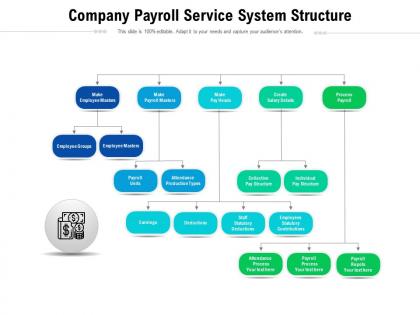
Company payroll service system structure




Try Before you Buy Download Free Sample Product
 Impress Your
 Audience
 100%
100% Editable
 Save Hours
 of Time


Our Company Payroll Service System Structure are topically designed to provide an attractive backdrop to any subject. Use them to look like a presentation pro.
People who downloaded this PowerPoint presentation also viewed the following :
Company payroll service system structure with all 2 slides:
Use our Company Payroll Service System Structure to effectively help you save your valuable time. They are readymade to fit into any presentation structure.
FAQs for Company payroll
Okay so first things first - map out how you're doing payroll now, then figure out what you actually need vs what sounds cool. The big ones are employee data (personal stuff, pay rates, tax info), time tracking that syncs up, and automated calculations. Tax compliance is honestly a nightmare if you pick the wrong system - get one that handles federal, state, and local automatically. You'll also want security features, audit trails, and direct deposit obviously. Oh and make sure it does pay stubs and can handle weekly vs biweekly pay schedules. Trust me, the tax thing will save you so many headaches later.
Honestly, compliance rules will completely reshape how you build your payroll system. Your tax calculation engine has to juggle federal, state, AND local requirements - it's a nightmare. Plus you need bulletproof data retention and audit trails that'll make regulators happy. The kicker? Rules change all the time, so build flexibility in from day one. Don't forget security controls and proper reporting features either. Trust me on this - treat compliance as foundational, not something you bolt on later. I've seen too many people have to rebuild from scratch because they thought they could hack it together first.
Dude, payroll tech has completely changed everything. Cloud platforms now connect with your HR stuff, time tracking, even bank APIs for direct deposits - it's pretty crazy. We used to do SO much of this by hand. Real-time processing means employees can grab their pay stubs instantly, and managers approve timesheets from their phone while grocery shopping or whatever. The mobile access thing is huge honestly. Just make sure whatever systems you pick actually work together smoothly. Trust me, you don't want to deal with platforms that won't talk to each other - been there, total nightmare.
So basically you want your HR and payroll systems talking to each other automatically. Map out what data needs to sync first - employee info, time tracking, benefits, all that stuff. Then get your IT people to set up API connections so when someone gets hired or promoted in HR, it flows straight to payroll without anyone manually entering it twice. Honestly, this alone will save you from so many headaches with data errors. Don't forget to connect it to your accounting software too - makes reporting way cleaner. I learned this the hard way at my last job when we were doing everything manually like it was 1995.
Honestly, cloud payroll is so much better than the old clunky systems. No more manual updates or worrying about security patches - it all happens automatically. Being able to check payroll stuff from my phone when I'm out is clutch. The money you save on not buying servers and hiring IT people adds up fast. Tax changes used to stress me out, but now everything updates itself. Most of these systems play nice with whatever HR software you're already using. ADP's solid if you want something established, though Gusto's interface is way cleaner. Your current system sounds like a pain.
Manual payroll is such a pain - you're stuck doing math every pay period with spreadsheets or paper forms. Automated systems just handle all that boring stuff automatically. They connect to your time tracking, calculate everything for you, and even file taxes. Your employees get portals where they can grab their own pay stubs too, which is nice. Honestly cuts down on so many errors compared to doing it by hand. If you're spending more than a couple hours each payroll cycle, you should probably look into it. The time savings alone make it worth checking out.
Dude, the data migration part is where most people get totally screwed. Integration with your current HR stuff is way more complicated than anyone thinks going in. Teams always rush testing too - trust me, mess up people's paychecks and you'll have a revolt on your hands. Finance and compliance need to be looped in from day one, otherwise you're looking at tax reporting nightmares down the road. Definitely map out everything you're doing now first. Run both systems side by side for at least two pay cycles before you flip the switch.
Okay so first thing - encrypt everything. In transit, at rest, all of it. Then set up role-based access so only the right people can see specific employee data. Trust me, you don't want salary info getting around the office. Check what regulations you need to follow too, like GDPR or whatever privacy laws apply locally. Oh, and run security audits regularly - can't stress this enough. Honestly though? Start by looking at who has access to your payroll data right now. That's where most companies mess up. Tighten those permissions and you'll fix your biggest security hole.
Look at processing time per payroll run first - that's your bread and butter for showing if this thing actually saves time. Error rates matter too since nobody wants to create more cleanup work later. Cost per employee is where the magic happens though, executives eat that stuff up for ROI conversations. Don't sleep on employee self-service adoption rates and compliance audit results - people forget about those but they'll bite you if ignored. Monthly tracking works well, you'll catch patterns before they become real headaches. Oh, and honestly? The cost metric usually wins over leadership faster than anything else.
Start with a flexible payroll system that can handle different pay structures right out of the gate. Your platform needs to run multiple calculation types at once - some people on salary, others hourly with overtime, maybe a few commission tiers for sales folks. Honestly, commission structures can get pretty complex depending on your industry. Make sure it plays nice with your time tracking software too. The system should spit out accurate pay stubs regardless of how someone gets paid. Don't box yourself in early because changing payroll systems later is a total headache.
Honestly, the software part isn't too bad once you mess around with it for a week or two. Tax stuff and labor laws though? That's where it gets real. Most people need like 2-3 weeks to feel comfortable with the basics. Compliance requirements are honestly a pain - you've got deductions, different employee types, all that jazz. I'd start with whatever training your software company offers, then maybe throw in some HR courses. Oh, and definitely have someone experienced babysit the newbies for their first few cycles. Trust me, payroll mistakes are expensive mistakes.
Honestly, you want a payroll system that won't completely fall apart when new regulations hit. Find one with automatic tax updates - trust me, manually updating that stuff is a nightmare. Configurable compliance rules are clutch too. The modular design thing matters because laws keep changing (especially lately, ugh). APIs that connect to legal compliance services will save your butt when surprise regulations drop. Don't forget audit trails and flexible reporting. Some vendors are way better at rolling with regulatory punches than others, so ask how they handled recent changes in your field before you commit.
Start documenting everything from day one and backup your data religiously - I almost lost a whole month of timesheets once and nearly had a panic attack. Create a simple checklist for each pay period, trust me on this. Double-check all your data entry because math errors are embarrassing when people don't get paid right. Have someone else review calculations before running payroll if possible. Reconcile against timesheets regularly and keep detailed records for three years minimum. Oh, and store everything securely obviously. The checklist thing sounds boring but it'll literally save your sanity later.
So basically payroll systems store all your benefits and deductions as separate line items that get calculated each pay period. Pre-tax stuff like health insurance and 401k gets processed first, then they calculate taxes on what's left. After that comes post-tax deductions - garnishments, parking fees, whatever. Most systems let you set things up as either fixed amounts or percentages. Honestly, percentages are way easier to deal with over time since you don't have to keep adjusting them. The big thing is making sure your system knows which deductions are pre-tax vs post-tax - that totally changes the math. Oh, and don't forget to review everything yearly when benefit costs inevitably go up.
Honestly, automate everything you can - time tracking, tax calculations, the works. Direct deposit is a must because who has time for paper checks anymore? Get your payroll software talking to your HR systems so you're not doing double work. Here's what actually saves me time though: make department managers approve timesheets before they come to you. Game changer. Set hard deadlines for timesheet submissions and don't budge - people will test you on this. Standardize your pay periods and create templates for the usual stuff like overtime. Trust me, chasing down discrepancies after the fact will eat your whole day.
-
Appreciate the research and its presentable format.
-
Presentation Design is very nice, good work with the content as well.