

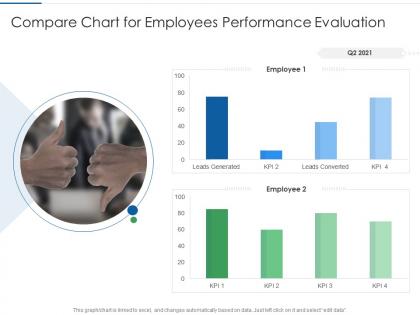
Compare chart for employees performance evaluation




Try Before you Buy Download Free Sample Product
 Impress Your
 Audience
 100%
100% Editable
 Save Hours
 of Time


Our Compare Chart For Employees Performance Evaluation are topically designed to provide an attractive backdrop to any subject. Use them to look like a presentation pro.
People who downloaded this PowerPoint presentation also viewed the following :
Compare chart for employees performance evaluation with all 2 slides:
Use our Compare Chart For Employees Performance Evaluation to effectively help you save your valuable time. They are readymade to fit into any presentation structure.
FAQs for Compare chart for
Key metrics should include goal achievement, quality of work, productivity levels, collaboration skills, communication effectiveness, problem-solving abilities, and professional development progress. These performance indicators enable managers to assess both quantitative results and qualitative contributions, with many organizations finding that comprehensive evaluation charts streamline feedback processes, enhance employee development, and ultimately deliver improved team performance and strategic alignment.
Organizations tailor performance evaluation charts by aligning metrics with strategic objectives, incorporating role-specific competencies, and customizing rating scales to reflect company values and culture. Through configurable templates and weighted scoring systems, companies across sectors like technology and healthcare create targeted assessments that measure what matters most, ultimately driving focused performance improvement and strategic goal achievement.
Self-assessments enhance employee performance evaluation charts by promoting self-reflection, increasing engagement in the review process, and providing valuable employee perspectives on achievements and challenges. When integrated with manager evaluations, self-assessments create more comprehensive performance discussions, help identify skill development opportunities, and foster greater ownership of professional growth, ultimately delivering more balanced evaluations and stronger employee buy-in.
Visual elements enhance performance evaluation charts by incorporating color coding for different performance levels, clear icons or symbols for various competencies, progress bars or gauges for quantifiable metrics, and consistent formatting throughout. These design features enable managers and employees to quickly identify strengths, areas for improvement, and overall performance trends, ultimately streamlining review processes and facilitating more productive performance discussions.
Excel, Tableau, Power BI, Google Sheets, and specialized HR platforms like BambooHR offer robust capabilities for creating dynamic employee performance evaluation charts. These tools streamline performance tracking through automated data visualization, real-time updates, and customizable dashboards, with many organizations finding that integrated analytics ultimately enhance decision-making and employee development processes.
Performance evaluations should be conducted quarterly or bi-annually to ensure accurate chart representation, with monthly check-ins providing ongoing data points for comprehensive tracking. This frequency enables organizations to capture performance trends, seasonal variations, and development progress effectively, while many companies find that quarterly cycles balance administrative efficiency with timely feedback, ultimately delivering more accurate performance insights and strategic workforce planning.
Peer feedback can be incorporated through structured 360-degree assessments, anonymous peer rating systems, collaborative project evaluations, and team-based performance metrics within the evaluation chart. These approaches enhance evaluation accuracy by capturing diverse perspectives on teamwork, communication, and collaboration skills, with many organizations finding that peer insights significantly improve performance discussions and ultimately deliver more comprehensive employee development outcomes.
Managers can effectively communicate performance evaluation results by presenting the chart visually during one-on-one meetings, highlighting specific metrics and achievements, explaining rating criteria clearly, and connecting performance data to career development opportunities. This approach enables transparent discussions about strengths and improvement areas, while many organizations finding that visual performance charts facilitate more productive conversations, ultimately enhancing employee engagement and goal alignment.
Common pitfalls include overly complex metrics, subjective criteria without clear standards, infrequent feedback cycles, ignoring employee development goals, and failing to align evaluations with organizational objectives. Many organizations find that streamlining assessment categories, incorporating regular touchpoints throughout the year, and balancing quantitative measures with qualitative insights ultimately delivers more accurate evaluations and enhanced employee engagement.
Performance evaluation charts identify training needs by highlighting skill gaps, performance deficiencies, competency shortfalls, and areas requiring development across teams and departments. Through systematic analysis of evaluation data, organizations can pinpoint specific training requirements, design targeted development programs, and allocate resources strategically, ultimately enhancing workforce capabilities and operational efficiency.
Employee performance benchmarks include productivity metrics, quality scores, customer satisfaction ratings, goal achievement rates, and peer comparison data. These standards enable organizations to assess performance objectively through industry-specific KPIs, revenue per employee ratios, and efficiency measurements, with many companies finding that standardized benchmarks streamline evaluations while delivering competitive insights and strategic workforce optimization.
Organizations ensure fairness and objectivity by implementing standardized evaluation criteria, using multiple data sources like peer feedback and self-assessments, and training managers on bias reduction techniques. Through structured rating scales and regular calibration sessions, companies across industries like healthcare and financial services deliver consistent evaluations, ultimately enhancing employee trust and organizational transparency.
**INPUT**: What strategies can be employed to link individual performance metrics to overall organizational goals in the chart? **OUTPUT**: Effective strategies include cascading organizational objectives into individual KPIs, establishing weighted scoring systems that reflect strategic priorities, implementing cross-functional collaboration metrics, and creating visual alignment indicators. These approaches enable managers to demonstrate clear connections between daily tasks and company outcomes, with many organizations finding that employees become more engaged and productive when they understand how their performance directly contributes to broader business success. [Word count: 60]
Employee performance evaluation charts can be modified for remote or hybrid setups by incorporating virtual collaboration metrics, digital communication effectiveness, goal achievement tracking, and remote-specific competencies like self-management and tech proficiency. These adaptations enable organizations to assess productivity, engagement, and outcomes rather than physical presence, with many companies finding that focus shifts to deliverable quality and strategic contribution, ultimately delivering more meaningful performance insights.
Technology streamlines performance evaluation through automated data collection, real-time feedback systems, analytics dashboards, and integrated goal tracking platforms. These digital solutions enhance accuracy by eliminating manual errors, accelerating review cycles, and providing comprehensive performance insights, with many organizations finding that automated systems deliver faster evaluations and more objective assessments.
-
I discovered this website through a google search, the services matched my needs perfectly and the pricing was very reasonable. I was thrilled with the product and the customer service. I will definitely use their slides again for my presentations and recommend them to other colleagues.
-
Very unique, user-friendly presentation interface.
-
Excellent Designs.
-
Awesome use of colors and designs in product templates.