Competitor Analysis Accenture Company Profile CP SS

Rating:
80%
Competitor Analysis Accenture Company Profile CP SS
Slide 1 of 9
Favourites Favourites

Try Before you Buy Download Free Sample Product

Audience Impress Your
Audience
Editable 100%
Editable
Time Save Hours
of Time
The Biggest Sale is ending soon in
0
0
:
0
0
:
0
0
Rating:
80%
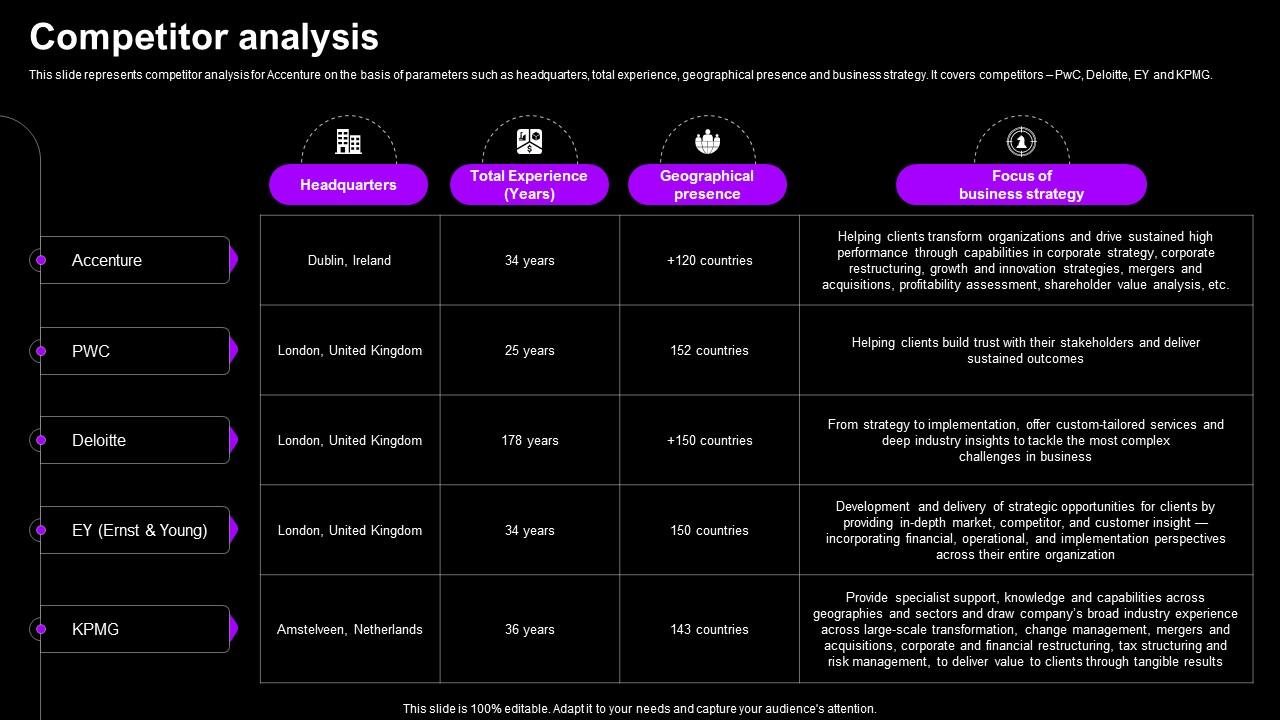
This slide represents competitor analysis for Accenture on the basis of parameters such as headquarters, total experience, geographical presence and business strategy. It covers competitors PwC, Deloitte, EY and KPMG. Present the topic in a bit more detail with this Competitor Analysis Accenture Company Profile CP SS. Use it as a tool for discussion and navigation on Headquarters, Total Experience, Geographical Presence. This template is free to edit as deemed fit for your organization. Therefore download it now.

FAQs for Competitor Analysis Accenture Company

Check out their pricing models and template selection first. Design quality matters too - honestly, some of these companies have terrible outdated stuff. See what file formats they offer (PowerPoint-only shops are kinda behind the times). Monthly library updates are huge. Customer reviews will show you gaps you could fill. Are they targeting specific industries or casting a wide net? Subscription vs one-time purchases is worth noting. I'd grab 3-5 main competitors and throw everything into a simple spreadsheet. Track it monthly so you can spot trends.

Just Google "presentation design services" and see who pops up first - those are your main competitors. Upwork and 99designs are crawling with freelancers doing this stuff too. LinkedIn's honestly your best bet though. Search for presentation designers in your area and you'll find tons. Ask your current clients who else they considered before hiring you - that's pure gold right there. Social media's helpful too, check who's posting about design work. Make a list of like 5-10 competitors and dig into their pricing and what services they offer. You'll spot the gaps pretty quick once you see what everyone else is doing.

Okay so SEMrush or Ahrefs are your best bet for seeing what keywords competitors rank for. SimilarWeb shows their traffic sources which is super helpful. I still do manual digging on their sites and socials though - sounds boring but you find stuff the tools miss. BuzzSumo's solid for checking which content actually performs well. Oh and Screaming Frog lets you peek at how they structure their template categories. Don't try using everything at once or you'll get overwhelmed. Pick one tool first, then add more as you figure things out.

Look, different price points target totally different buyers. Those $1-5 templates? Students and tiny startups who just need something cheap. Premium stuff ($20-50+) goes after professionals wanting fancy designs and better features. Most competitors fight it out in the middle though - that's where it gets messy. Some do subscriptions for recurring cash, others stick with one-time buys for casual users. Oh, and watch how they bundle things - throwing in icons and fonts to make higher prices seem worth it. Just map out who's charging what so you can figure out where your templates actually fit.

Honestly, customer reviews are pure gold for this stuff. I'm always diving into the one-star reviews because people get brutally honest when they're pissed off. You'll start seeing the same complaints over and over - terrible user interface, crappy mobile app, whatever. That's literally your roadmap right there. What's cool is you also get to see which features people actually care about vs what the company *thinks* they want. Pricing gripes come up a lot too. Sometimes I get distracted reading these for way longer than I should, but it's addictive once you start spotting patterns. Just keep asking yourself how you'd fix each problem they're complaining about.

Your templates need to solve problems competitors are ignoring. Most template makers just care about looking pretty - which honestly isn't enough anymore. Find what's actually frustrating users about existing options. Maybe it's clunky editing or templates that look awful with company fonts. Test their products yourself and hunt for those annoying pain points. Could be mobile responsiveness issues, crappy collaboration tools, or they're not thinking about specific use cases like pitch decks vs training materials. Industry-specific layouts are huge too. Once you find where competitors are weak, that's your opening.

Honestly, most companies just copy what works rather than risk being first - can't blame them though. When you're analyzing competitors, check if they're the ones setting trends, jumping on them fast, or scrambling to catch up later. I'd track their product launches against major industry shifts to see the pattern. Are they always first out the gate? Second but quick? Or perpetually behind? Once you know their style, you can spot opportunities where nobody's leading yet. Those gaps are where you might actually get ahead instead of following everyone else around.

Honestly, competitive SEO research is like peeking at someone's homework but totally legal. Plug their domains into SEMrush or Ahrefs and you'll see exactly which keywords are driving traffic - could be obvious stuff like "PowerPoint templates" or weirdly specific terms like "minimalist pitch deck designs." Their top-performing pages show you what's actually working. The keyword gaps are wild sometimes. You can spot content they're completely missing and basically reverse-engineer their whole organic strategy. It's probably the fastest way to figure out what you should be going after.

Honestly, social media is like having a secret window into your competitors' whole game plan. Stalk their Instagram and Pinterest (especially for visual stuff like templates) to see what's getting tons of engagement. You'll catch their pricing strategies, trending styles, even customer complaints in the comments - which is kinda sneaky but whatever, business is business. I always set up notifications for when they post so I don't miss new launches. Check how often they're posting and what hashtags they use. The gaps in their content? That's where you swoop in.

Look at what your competitors are posting consistently - that tells you what people actually want to read about. I'd start with 3-5 main competitors and check their last few months of content. See which topics keep coming up? Those are safe bets. But here's the good part: find gaps where there's obvious interest but nobody's really nailing it yet. Check their most commented posts too - people going crazy in the comments usually means you've hit something they care about. Honestly, their engagement rates will tell you more than any fancy analytics tool. Just map out the patterns and you'll spot opportunities pretty quick.

Dude, you absolutely have to keep tabs on competitors in this space. Things change so fast with design trends - one day everyone wants minimalist, next it's all bold colors. Check their sites monthly and set up Google Alerts for their brand names. When they drop new features or styles that hit with users, you'll hear about it before your own customers start wondering where yours are. Nobody wants to get blindsided in meetings, you know? Also watch their pricing moves and how they're positioning stuff. Takes maybe an hour a month but saves you from looking clueless later.

Honestly, most of them have the basics down - decent response times, chat support that actually works. Their bots aren't terrible anymore either. But here's where it gets weird: they're awful at remembering what happened last time you called. Like, zero continuity between interactions. Plus their agents sound like robots reading scripts, can't think outside the box when you have something unusual going on. The real opportunity though? Nobody follows up after fixing your problem. They just disappear and hope it sticks. That's where you can totally beat them.

Check out your competitors' reviews first - that's where the gold is. People constantly complain about templates being too text-heavy or looking dated. Create what they're missing. Better color palettes work wonders (seriously, why does everyone default to corporate blue?). Short sentences hit different. Look for industries they're totally ignoring too. I'd audit their top templates and note what sucks or feels outdated. Sometimes it's mobile responsiveness that's trash. Your designs can solve their problems directly. Companies have blown up just by offering modern layouts when competitors stick to 2015 vibes.

So their competitors are totally focused on that 25-45 crowd - you know, urban professionals with money to burn. Makes sense with their premium pricing I guess. But they're basically ignoring the 18-30 market we've been going after. That's actually perfect for us because there's way less competition for younger users who care about price and want everything mobile-first. You should definitely play up this gap when you're positioning the product. I'd push hard on our affordability and mobile approach - that's what really sets us apart from their whole "established professional" thing they've got going.

Check out what your competitors are doing - it's like having a sneak peek at design trends before they blow up. I usually screenshot stuff monthly because honestly, it's way better than scrambling to catch up later. You'll start seeing patterns everywhere... like when everyone suddenly goes super minimal or ditches boring text slides for visuals. Don't just stalk direct competitors either. Look at industry leaders and those companies that always have their design game on point. Track color schemes, fonts, layouts - basically anything that catches your eye. It's kinda nerdy but works.

Ratings and Reviews

80% of 100
Review Form
Write a review
Most Relevant Reviews
  1. 80%

    by Connor Lopez

    Eye-catching PPT designs, outstanding team, and best customer service. I’m a super satisfied customer here!
  2. 80%

    by William Martinez

    The ease of modifying templates is just superb! Also, the vast collection offers plenty of options to choose from.

2 Item(s)

per page: