

Computer Aided Facility Management Tool Facility Management And Maintenance




Try Before you Buy Download Free Sample Product
 Impress Your
 Audience
 100%
100% Editable
 Save Hours
 of Time


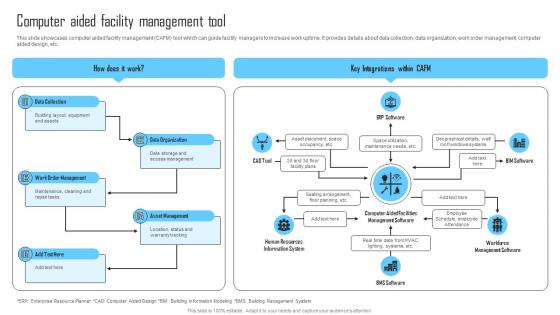
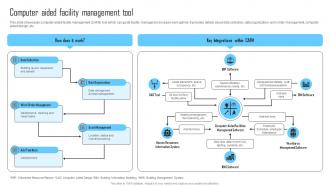
This slide showcases computer aided facility management CAFM tool which can guide facility managers to increase work uptime. It provides details about data collection, data organization, work order management, computer aided design, etc.
People who downloaded this PowerPoint presentation also viewed the following :
Computer Aided Facility Management Tool Facility Management And Maintenance with all 6 slides:
Use our Computer Aided Facility Management Tool Facility Management And Maintenance to effectively help you save your valuable time. They are readymade to fit into any presentation structure.





FAQs for Computer Aided Facility Management Tool Facility
So CAFM basically puts all your facility stuff in one place - space tracking, maintenance schedules, asset info, everything. Real-time visibility means no more scrambling around for basic data. The analytics part is actually pretty cool because you can spot usage patterns and optimize from there. Maintenance costs go way down since you're being proactive instead of constantly putting out fires. Plus planning space gets easier when teams expand or whatever. Honestly though, I'd just pick your biggest current pain point and see if CAFM fixes that specific thing first before worrying about all the other features.
Dude, CAFM basically gives you actual data instead of guessing about everything. You'll see real usage patterns and maintenance costs right there on the dashboard - way better than those ancient spreadsheets we all hate. The coolest part? You can spot trends you'd never catch otherwise, like rooms sitting empty or where maintenance is draining your budget. I'd honestly start small though - pick one thing that's been driving you crazy and use the data to fix that first. You can even test different scenarios before spending any money. Game changer for sure.
Definitely need asset tracking, work order management, and space planning - those three are non-negotiable. Mobile access is huge too since who wants to run back to their computer every time something breaks? Integration with HR and accounting will save you headaches later. Automated maintenance scheduling is a game changer, plus decent reporting so you can actually see what's happening. Oh and real-time notifications are pretty clutch. Honestly though, don't get sucked into all the bells and whistles. Figure out what's actually driving you crazy right now, then demo stuff that fixes those problems specifically.
So first thing - check what protocols your BMS already uses, like BACnet or Modbus. Most decent CAFM systems can connect through APIs or you might need middleware to translate between them. Really depends on how compatible they are out of the box. The whole point is getting real-time data flowing - HVAC status, energy usage, occupancy sensors, that kind of stuff. Some systems work great together immediately. Others? You're looking at custom config work, which honestly can get pricey. I'd definitely verify compatibility with CAFM vendors before committing to anything. Save yourself the headache later.
CAFM's actually perfect for this stuff - gives you live data on energy, water, waste across your whole building. Which areas are totally wasting power? You'll spot them fast. The dashboards show HVAC performance, lighting schedules, all that equipment maintenance that hits your carbon footprint hard. Honestly, the automated reporting for sustainability certs is probably worth it alone. Set up monitoring for your biggest energy users first. I bet you'll find some obvious fixes in like a week, maybe less.
CAFM shows you what's actually happening with your spaces versus what you think is happening - and honestly, most places are shocked by the results. Track occupancy through sensors and booking data to spot underused areas and peak times. The planning tools are pretty solid for modeling layouts and calculating efficiency before you blow money on changes. Hot desking setups become way easier to figure out too. I'd start with a basic utilization report on your current spaces first. You'll probably find some weird patterns that could save you serious cash, or at least help justify downsizing if that's on the table.
Data migration is always a nightmare - just accept that now. Your team will probably resist it too since everyone's attached to their old spreadsheets. Integration with whatever systems you already have gets messy fast. The costs hit hard upfront, which sucks but it's reality. Training becomes crucial because these systems are pretty complex, and honestly if people don't know how to use it properly, they just won't. I'd definitely test it out in just one building first. Work through all the problems there before you try rolling it out everywhere else - saves you major headaches later.
Dude, mobile access is such a lifesaver - you're not stuck at your desk anymore dealing with facility stuff. I can approve work orders from literally anywhere, even when I'm out getting lunch. Your field team updates job statuses in real time, so no more endless phone calls trying to figure out what's actually happening. Plus you get alerts immediately if something critical breaks. Honestly, the response time difference is huge. Oh, and equipment monitoring while you're walking around? Super handy. Start with just mobile work orders - trust me, you'll save hours every week on communication alone.
So CAFM analytics tracks all your equipment data - performance patterns, maintenance records, failure trends - then predicts when things will probably break. The algorithms catch subtle changes you'd totally miss. You can set automated alerts based on usage, schedule repairs during downtime, and keep the right parts in stock. Honestly, it's a game changer because you stop playing whack-a-mole with broken equipment. Instead of scrambling when stuff dies, you're planning ahead and dodging those middle-of-the-night crisis calls.
User interfaces can totally make or break CAFM adoption - I've watched amazing systems crash and burn just because they're a pain to navigate. Clean, intuitive design means facility managers will actually log in daily instead of dodging the system like the plague. Nobody wants to wrestle with clunky menus when there's an urgent maintenance issue. Most vendors have gotten way better at UI design lately though, which is refreshing. Here's what I'd do: let your actual end users test-drive the interface during demos. Their reactions will tell you everything about whether people will embrace it or hate it.
Real-time data turns CAFM from a fancy spreadsheet into something that actually saves your butt. You'll catch problems early - like that HVAC unit that's about to die on the hottest day of summer. Sensors and IoT feeds give you instant alerts instead of finding out about issues from angry tenants (been there). Track energy usage live, see which spaces people actually use, optimize everything on the fly. Honestly, once you're not constantly firefighting, you realize how reactive most facilities teams are. Figure out what's driving you crazy first, then see what real-time data could fix.
Dude, CAFM is perfect for this stuff. It'll track all your equipment inspections and maintenance schedules automatically - fire extinguishers, HVAC filters, emergency lighting, whatever. No more missing deadlines or scrambling during audits (been there, it sucks). The alerts keep you ahead of everything, and auditors actually prefer digital records anyway. Here's the thing though - when you start mapping out what you currently do, you'll probably discover compliance gaps you had no clue about. Happens to everyone. But honestly? Better to find them now than during an inspection. The system catches safety issues early, which saves you money and headaches down the road.
Skip the PowerPoint presentations - get everyone actually clicking around in the system first. Group people by what they actually do since maintenance guys need totally different stuff than space planners. I'd start small with a pilot group (trust me, less headaches). Roll out features slowly over a few weeks instead of overwhelming everyone at once. Document the workflows they'll use most and keep those somewhere easy to find. Oh, and pick a few tech-savvy people as your go-to troubleshooters after training wraps up. They'll save you tons of "how do I..." emails later.
So basically CAFM gives everyone access to the same info in real-time. No more endless email chains between facilities, IT, and HR about who's doing what. Everyone sees the same dashboard. You can set up automatic alerts so people get notified when they need to act on something, and track everything from request to completion. Honestly, those "I thought you were handling that" situations just disappear. Oh, and start with your departments that already work well together - they'll sell it to everyone else for you. Trust me on this one.
Dude, the whole CAFM space is getting crazy with AI and IoT right now. Predictive maintenance actually works these days - not like the garbage we had before. Smart sensors are popping up everywhere tracking air quality, how many people are in rooms, all that stuff. The AI can catch patterns we'd totally miss doing it by hand. Oh and cloud platforms make everything way more flexible, which is nice since you're not stuck with some clunky on-premise setup. Digital twins are becoming a thing too for better planning. Honestly? Just start with a few IoT sensors in your critical spots and see what happens.
-
It is my first time working with them and that too on a friend's recommendation. I would say, I am not expecting such a worldly service at this low price.
-
Thank you for showering me with discounts every time I was reluctant to make the purchase.