

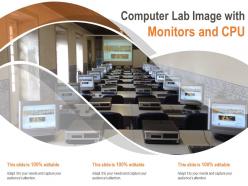
Computer lab image with monitors and cpu





Try Before you Buy Download Free Sample Product
 Impress Your
 Audience
 100%
100% Editable
 Save Hours
 of Time


Commence the action with a distinct advantage due to our Computer Lab Image With Monitors And CPU. You will acquire the initiative.
People who downloaded this PowerPoint presentation also viewed the following :
Computer lab image with monitors and cpu with all 2 slides:
Initiate the campaign with our Computer Lab Image With Monitors And CPU. Commence with your best foot forward.
FAQs for Computer lab image with
Essential computer lab components include high-performance computers, reliable networking infrastructure, interactive displays, ergonomic furniture, and robust security systems. These elements work together by ensuring seamless connectivity, enhancing student engagement, and providing comfortable learning environments, with many educational institutions finding that strategic lab design ultimately delivers improved learning outcomes and operational efficiency.
Layout design significantly influences collaboration by incorporating flexible seating arrangements, moveable furniture, shared workstations, and open spaces that encourage interaction. Strategic positioning enables students to easily transition between individual and group work, share screens and resources, and engage in peer-to-peer learning, ultimately enhancing educational outcomes and teamwork skills.
Ergonomic furniture plays a crucial role in computer labs by reducing physical strain, improving posture, and enhancing user comfort during extended computing sessions. Adjustable chairs, properly positioned desks, and monitor stands help prevent repetitive stress injuries, back pain, and eye strain, while boosting productivity and focus, with many educational institutions and corporate training centers finding that ergonomic investments significantly reduce health-related absences.
Network infrastructure for computer labs requires high-bandwidth switches, structured cabling with Cat6 or fiber connections, redundant internet lines, and robust wireless access points for comprehensive coverage. Strategic network segmentation isolates lab traffic from administrative systems, while quality-of-service protocols prioritize educational applications, ultimately delivering faster resource access and seamless collaborative learning experiences.
Best practices for power management in computer labs include implementing automated shutdown schedules, using energy-efficient hardware, configuring power-saving modes, installing smart power strips, and monitoring usage patterns. These approaches streamline operations by reducing electricity costs, extending equipment lifespan, and minimizing environmental impact, with many educational institutions finding that strategic power management delivers significant operational savings while enhancing system reliability.
Computer labs can be made inclusive through adjustable-height workstations, screen readers, voice recognition software, varied input devices, and flexible seating arrangements. These accessibility features enable students with physical disabilities, visual impairments, and different learning styles to participate fully, while educational institutions find that inclusive design ultimately enhances learning outcomes for all students.
Essential lab software includes Microsoft Office Suite, Adobe Creative Cloud, programming environments like Python and Visual Studio Code, statistical packages such as SPSS or R, and specialized applications like AutoCAD for engineering students. These comprehensive toolsets enable institutions to serve multiple academic disciplines simultaneously, from business analytics and graphic design to software development, with many universities finding that strategic software combinations ultimately enhance learning outcomes while reducing per-student licensing costs.
Security measures for computer lab data protection include network firewalls, user authentication systems, endpoint encryption, access control protocols, and regular security audits. These technologies work by restricting unauthorized access, monitoring user activities, and securing data transmission, with many educational institutions and corporate training centers finding that layered security approaches significantly reduce data breaches while maintaining operational efficiency.
Computer selection for educational labs should prioritize durability, processing power adequate for educational software, sufficient RAM and storage, reliable network connectivity, and compatibility with curriculum requirements. Educational institutions increasingly find that balancing cost-effectiveness with performance specifications, while considering factors like warranty support and energy efficiency, ultimately delivers better learning experiences and lower long-term operational costs.
Technology integration in computer labs enhances teaching through interactive whiteboards, learning management systems, collaborative software, virtual reality applications, and cloud-based platforms. These technologies streamline lesson delivery, enable real-time collaboration, and provide personalized learning experiences, with many educational institutions finding that students demonstrate improved engagement and faster skill acquisition, ultimately delivering enhanced academic outcomes and better preparation for digital workplace demands.
Cloud-based tools in computer labs offer centralized management, automatic updates, device-agnostic access, scalable storage, and enhanced collaboration capabilities. These technologies streamline administrative overhead, reduce IT maintenance costs, and enable seamless access across different devices, with many educational institutions finding that students can work from anywhere while administrators maintain consistent software environments.
Technology upgrades should be planned through systematic assessment of current hardware performance, software compatibility requirements, user needs analysis, and lifecycle evaluation cycles. Educational institutions typically implement phased replacement schedules spanning 3-5 years, with many finding that strategic budgeting for incremental upgrades delivers better cost management and minimizes operational disruptions.
Environmental considerations for computer lab setup include proper ventilation systems, temperature control, humidity management, energy-efficient equipment selection, and sustainable power solutions. These factors enhance equipment longevity, reduce operational costs, and create optimal learning environments, with many educational institutions finding that strategic environmental planning ultimately delivers lower maintenance expenses and improved student performance.
Computer labs facilitate remote learning by providing high-speed internet connectivity, cloud-based software access, virtual desktop infrastructure, and digital collaboration tools. Through these technologies, students can seamlessly access specialized applications, participate in online classes, and collaborate on projects from any location, while educational institutions deliver consistent learning experiences and maintain operational continuity in an increasingly flexible academic environment.
Effective computer lab maintenance strategies include scheduled cleaning protocols, proactive hardware monitoring, systematic software updates, preventive replacement scheduling, and comprehensive usage tracking. These approaches enhance equipment longevity by minimizing dust accumulation, detecting issues early, and optimizing performance, with many educational institutions and corporate training centers finding that structured maintenance programs reduce replacement costs while ensuring consistent, reliable computing environments for users.
No Reviews