

Construction Project Guidelines Playbook Ongoing Construction Project Progress Tracking




Try Before you Buy Download Free Sample Product
 Impress Your
 Audience
 100%
100% Editable
 Save Hours
 of Time


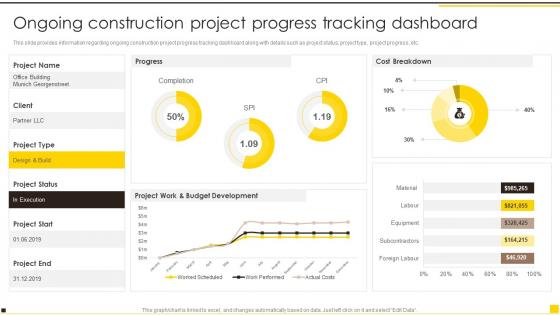
This slide provides information regarding ongoing construction project progress tracking dashboard along with details such as project status, project type, project progress, etc.
People who downloaded this PowerPoint presentation also viewed the following :
Construction Project Guidelines Playbook Ongoing Construction Project Progress Tracking with all 7 slides:
Use our Construction Project Guidelines Playbook Ongoing Construction Project Progress Tracking to effectively help you save your valuable time. They are readymade to fit into any presentation structure.





FAQs for Construction Project Guidelines Playbook Ongoing Construction
Track your big four: hitting milestones on schedule, budget variance, safety incidents, and quality stuff like rework rates. Cost per square foot will save your ass - learned that when material overruns blindsided me last project. Resource utilization matters too, plus how often you're dealing with change orders since those mess everything up. Oh, and actually USE your dashboard weekly. I've seen too many beautiful spreadsheets that nobody ever opens. Make it simple enough that you'll actually check it instead of letting it collect dust.
Honestly, tech makes tracking way more accurate since it cuts out all the manual mistakes we usually make. Project management software gives you live updates on budgets and timelines - way better than those spreadsheets that are always wrong by the time you open them. IoT sensors and drones are pretty cool for this stuff too. They'll show you exactly how much material you've got left and actual equipment usage. Your field teams can update everything instantly through mobile apps instead of waiting until Friday to tell you what happened. I'd start with decent PM software first, then add the fancy sensors later.
Honestly, I'd go with something like Procore or Buildertrend first - they handle scheduling, docs, and team chat all in one spot. Mobile apps are huge for this stuff since your crew can upload progress pics and report issues right from the field. GPS tracking's pretty solid for keeping tabs on equipment too. Oh, and BIM software like Autodesk gives you that visual progress thing which is actually really helpful. The main thing though? Don't pick a bunch of tools that can't talk to each other - been there, it's a nightmare. Start simple with one good platform, then add other stuff later if you need it.
Okay so first thing - set up some kind of regular check-in rhythm. Weekly emails with the key numbers work, though let's be real, half these people won't even open them. That's why I'd also do monthly calls where you actually walk through everything visually. Get everyone on the same project tool (Monday, Asana, whatever) so they can peek at progress whenever. When something big happens or gets delayed, don't wait - post it right away in your shared channels. Here's what really works though: every week, think about what's probably keeping each stakeholder up at night, then address those concerns before they even ask.
Dude, you HAVE to stay on top of your budget - I can't stress this enough. Weekly check-ins, not monthly. Seriously, I've watched so many projects crash and burn because people weren't paying attention to the money side of things. It's wild how fast costs can spiral. Track every dollar so you can spot problems before they get ugly. Plus your stakeholders will actually trust you when you can show them real numbers instead of just guessing. Oh, and it helps you figure out where to move resources around when things inevitably get weird.
Ugh, scope creep is the worst! Start documenting everything from day one - who wants what changed and why. Before saying yes to anything, figure out how it'll mess with your timeline and budget. I got burned so bad on one project because I didn't do this. Weekly meetings with your team help catch stuff early before it becomes a nightmare. Never let work start until everyone signs off on the change. Oh, and update your schedules right away or you'll lose track fast. Trust me, a solid change process saves your sanity.
Oh man, data silos are the worst - everyone's using different systems and nothing talks to each other. You'll also deal with inconsistent reporting and zero real-time visibility into what's actually happening. Weather delays? Scope changes? Yeah, those will mess up your timeline every single time. Get a centralized platform that plays nice with your current tools. Mobile apps help with field updates, and honestly automated reports save so much headache. Build in buffer time because something always goes sideways. Also set up clear communication rules upfront - trust me on this one.
Look, just make risk tracking part of your normal routine - like checking budget and timeline stuff. Log your risks somewhere and update their probability when things shift. Honestly, I've watched way too many projects crash from completely obvious problems nobody bothered tracking. Every week during your team meetings, spend 10 minutes going through what could blow up. Pick your 5 biggest threats first and check on them during standups. Sounds boring but it'll save your ass when something actually goes sideways - which it will.
Dude, you've gotta pad EVERYTHING with buffer time from the start. Things always run late - it's like a law of nature or something. I learned the weather thing the hard way last year, so definitely give yourself extra days for outdoor stuff. Track your real progress weekly, not what you hoped would happen. Daily check-ins with your main crews will save your ass when problems pop up. Don't sit on delays hoping you'll catch up later - tell everyone immediately when timelines shift. Oh, and start documenting actual vs planned durations now. That data's gonna be your best friend for future jobs.
Honestly, you've gotta check your budget way more often than you think. Weekly beats monthly every time - you'll catch the small stuff before it becomes a disaster. I've watched so many teams get blindsided because they only looked at numbers during big milestones, then freaked when they were already bleeding money. Course corrections are way easier when you spot labor issues or material costs going wonky early on. Don't overthink the system either - a basic spreadsheet works fine. Just loop in your main people weekly so everyone's on the same page and accountable.
Look, Gantt charts actually save your butt on construction projects. They map out your whole timeline visually so you can see which tasks depend on others. When the electricians are stuck waiting for drywall, you'll spot it right away instead of scrambling later. I was skeptical at first too, but man - client meetings got so much easier when I could show exactly where we were versus the plan. You can adjust deadlines on the fly and call out subs who are dragging. Excel works fine to start, or try something like Smartsheet. Honestly can't imagine running jobs without them now.
Track your work units per hour, schedule adherence, and quality scores - that's your foundation. Daily reports comparing actual vs planned progress work best (square footage done, linear feet installed, whatever applies). Honestly, rework percentages might be the most telling metric since it shows when crews are rushing and cutting corners. Compare everything against your historical data or industry standards. Just make sure you're measuring consistently across all teams so patterns actually emerge. Catching problems early beats dealing with major headaches later - trust me on that one.
So basically, tracking lets you see what's actually happening safety-wise instead of just hoping for the best. You'll start noticing patterns - like why warehouse corner A always has issues while B doesn't. It's way easier to fix problems before someone gets hurt than deal with the aftermath (trust me on this one). Daily check-ins help you catch stuff early and give you solid documentation when auditors show up. The real win? You can tweak training based on actual data instead of guessing. Set up quick daily walkthroughs and use what you find to drive your weekly meetings.
Yeah, totally different beasts. For on-site you're dealing with actual visual stuff - walking around checking progress, making sure nobody's being unsafe, handling weather delays and broken equipment. Off-site is more about tracking prefab schedules and when suppliers will actually show up (spoiler: usually not when they say). The real headache is syncing everything so your deliveries don't arrive when you're nowhere near ready for them. I'd probably use separate dashboards for each but have them roll up into one master schedule. Way less confusing that way.
Okay so here's what's worked for me - keep the same agenda every week covering budget, timeline, safety stuff, and what's coming up next. Cap it at 45 minutes because people zone out after that (learned this the hard way lol). Each trade lead gets maybe 2-3 minutes to update on their progress vs what was planned, plus call out anything blocking them. I swear by using some kind of visual board or simple dashboard to track how complete major tasks are. Makes it painfully obvious when things are falling behind. Wrap up by nailing down next week's priorities and making sure everyone knows who's responsible for what.
-
Great work on designing the presentation. I just loved it!
-
Great templates that you can use in your next keynote or conference. They are perfect for quick and visually-engaging delivery.