

Content Management System Deployment Powerpoint Presentation Slides





Try Before you Buy Download Free Sample Product
 Impress Your
 Audience
 100%
100% Editable
 Save Hours
 of Time


An e commerce management system is a software that enables commerce shop owners to develop, edit and publish online website content without writing code. It allows users to transform the look and feel of a digital store, such as making changes in product page layout, adding promotional banners, or adding new website sections for better promotion of products. Grab our insightfully designed template on Content management system deployment. It covers the key issues experienced by the e commerce marketing manager due to the lack of an effective e commerce management system. The PPT also includes details related to the overview of the e-commerce management system and its various types. Additionally, it highlights details related to types of e commerce management systems such as Content management, order management, and warehouse management system. Moreover, the deck provides information related to e commerce payment gateways and security systems. Further, our Ecommerce management platforms module compares various e commerce management systems on multiple parameters to help the enterprise select the best platform. It also represents the impact of an e-commerce management system on an organization pre- and post-implementation. At last, the presentation depicts the cost incurred by the enterprise in implementing an e-commerce management system and shows forecasted revenues and profits of the enterprise for five years. Get access to this powerful template now
People who downloaded this PowerPoint presentation also viewed the following :
Content of this Powerpoint Presentation
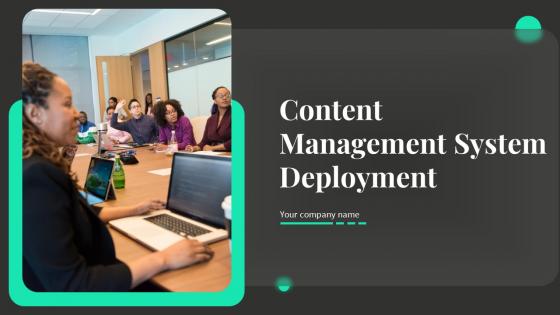
Slide 1: This slide introduces Content Management System Deployment. Commece by stating Your company name.
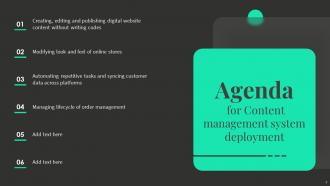
Slide 2: This slide depicts the Agenda of the presentation.
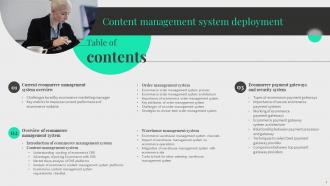
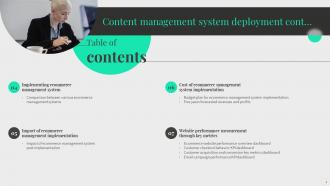
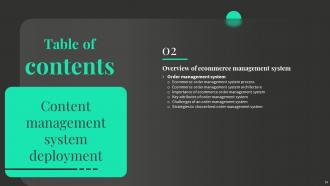
Slide 3: This slide includes the Table of contents
Slide 4: This slide is the continuation of the Table of contents.
Slide 5: This slide shows the Title for the Topics to be covered in the next template.
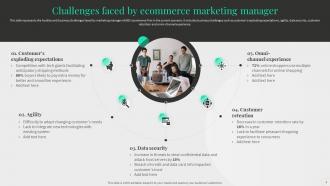
Slide 6: This slide addresses the Challenges faced by ecommerce marketing manager.
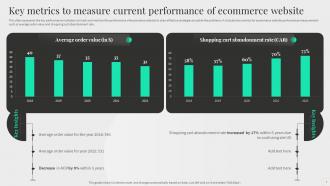
Slide 7: This slide represents the Key metrics to measure current performance of ecommerce website.
Slide 8: This slide incorporates the Heading for the Contents to be discussed further.
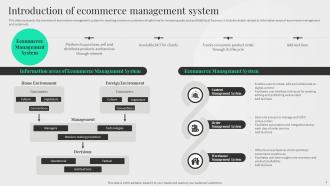
Slide 9: This slide provides an Introduction of ecommerce management system.
Slide 10: This slide contains the Title for the Contents to be covered next.
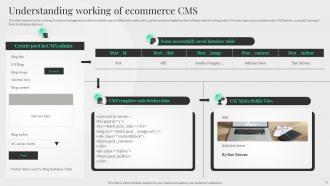
Slide 11: This slide represents the working of ecommerce CMS.
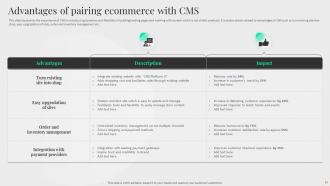
Slide 12: This slide displays the Advantages of pairing ecommerce with CMS.
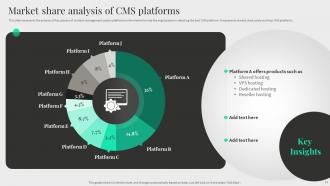
Slide 13: This slide illustrates the Market share analysis of CMS platforms.
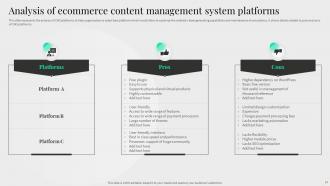
Slide 14: This slide presents the Analysis of ecommerce content management system platforms.
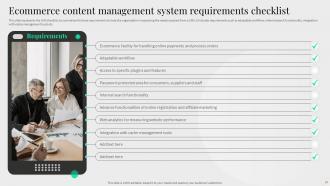
Slide 15: This slide showcases the Ecommerce content management system requirements checklist.
Slide 16: This slide includes the Title for the Topics to be discussed further.
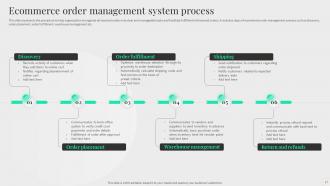
Slide 17: This slide highlights the Ecommerce order management system process.
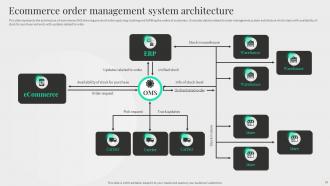
Slide 18: This slide reveals the Ecommerce order management system architecture.
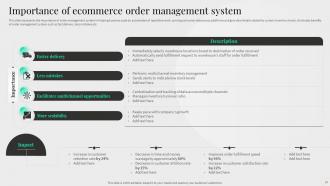
Slide 19: This slide highlights the Importance of ecommerce order management system.
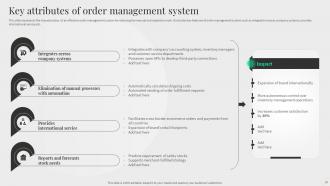
Slide 20: This slide showcases the Key attributes of order management system.
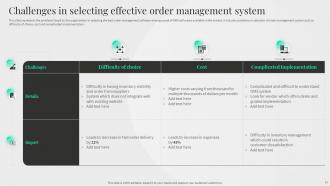
Slide 21: This slide depicts the Challenges in selecting effective order management system.
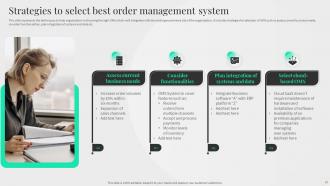
Slide 22: This slide represents the Strategies to select best order management system.
Slide 23: This slide contains the Heading for the Contents to be discussed further.
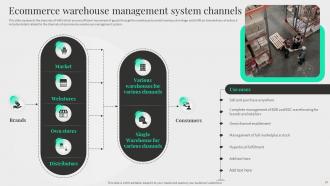
Slide 24: This slide lists the Ecommerce warehouse management system channels.
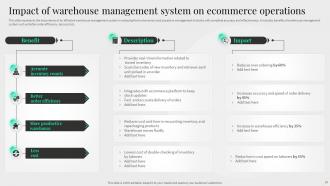
Slide 25: This slide highlights the Impact of warehouse management system on ecommerce operations.
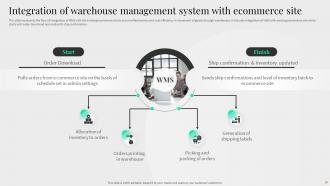
Slide 26: This slide reveals the Integration of warehouse management system with ecommerce site.
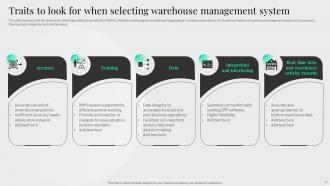
Slide 27: This slide depicts the Traits to look for when selecting warehouse management system.
Slide 28: This slide incorporates the Title for the Topics to be covered in the next template.
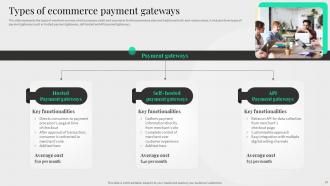
Slide 29: This slide states the Types of ecommerce payment gateways.
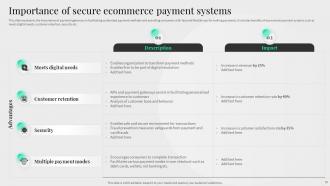
Slide 30: This slide shows the Importance of secure ecommerce payment systems.
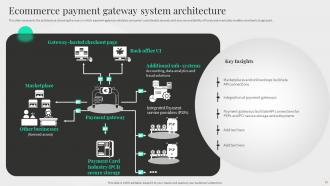
Slide 31: This slide elucidates the Ecommerce payment gateway system architecture.
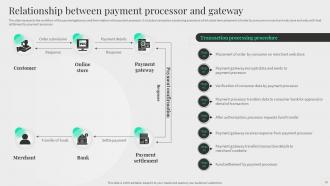
Slide 32: This slide exhibits the Relationship between payment processor and gateway.
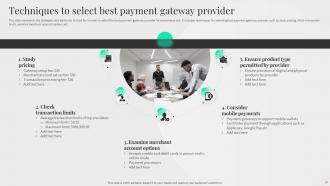
Slide 33: This slide represents Techniques to select best payment gateway provider.
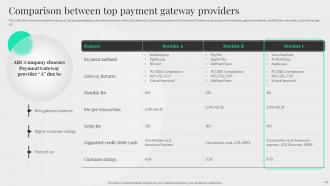
Slide 34: This slide shows the comparative analysis of top payment gateway providers.
Slide 35: This slide contains the Heading for the Topics to be covered in the next template.
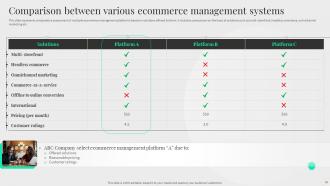
Slide 36: This slide illustrates the Comparison between various ecommerce management systems.
Slide 37: This slide reveals the Title for the Contents to be discussed further.
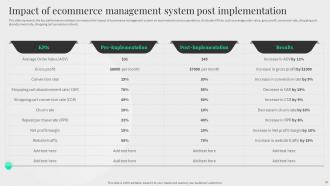
Slide 38: This slide presents Impact of ecommerce management system post implementation.
Slide 39: This slide contains the Heading for the Ideas to be discussed in the forth-coming slide.
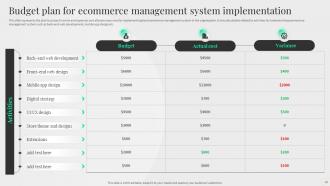
Slide 40: This slide represents the Budget plan for ecommerce management system implementation.
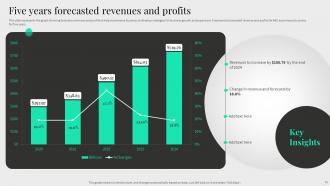
Slide 41: This slide displays theFive years forecasted revenues and profits.
Slide 42: This slide incorporates the Heading for the Ideas to be discussed further.
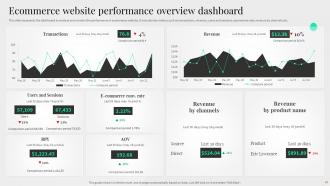
Slide 43: This slide represents the Ecommerce website performance overview dashboard.
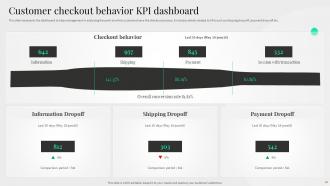
Slide 44: This slide highlights the Customer checkout behavior KPI dashboard.
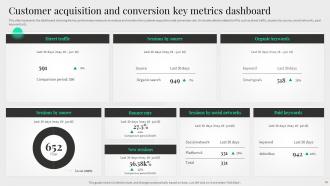
Slide 45: This slide reveals the Customer acquisition and conversion key metrics dashboard.
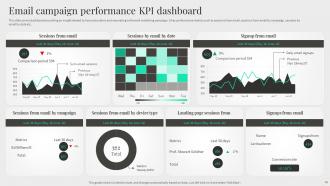
Slide 46: This slide focuses on the Email campaign performance KPI dashboard.
Slide 47: This is the Icons slide Content management system deployment containing the Icons used in the plan.
Slide 48: This is titled as the Additional slides for some extra information.
Slide 49: This slide displays the SWOT analysis.
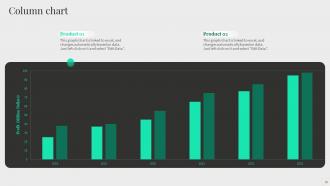
Slide 50: This slide focuses on the Column chart for comparison.
Slide 51: This is Our target slide for listing the Company targets.
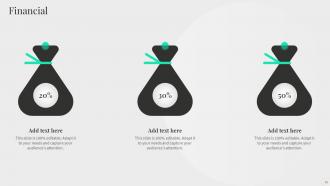
Slide 52: This slide depicts the information related to the Financial topic.
Slide 53: This is Our team slide. State your Organization's team information here.
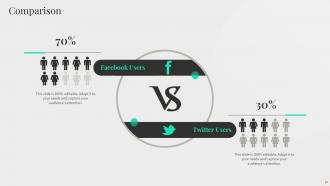
Slide 54: This slide covers the Comparison between two things.
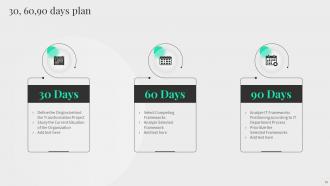
Slide 55: This slide includes the 30, 60,90 days plan for effective planning.
Slide 56: This slide contains the Important notes for Company reminders.
Slide 57: This is the Thank You slide for acknowledgement.
Content Management System Deployment Powerpoint Presentation Slides with all 62 slides:
Use our Content Management System Deployment Powerpoint Presentation Slides to effectively help you save your valuable time. They are readymade to fit into any presentation structure.








FAQs for Content Management System Deployment
Honestly, start with your actual pain points - what's driving you crazy about your current setup? Budget's obviously huge, plus who's gonna be using this thing daily. Your content team needs to actually understand how to post stuff or you're screwed. Technical requirements matter too - do you need fancy workflows or tons of customization? Don't forget about integrations with your existing tools. Oh and calculate the real long-term costs, not just setup fees. Hosting, maintenance, maybe developer time down the road. I'd make a list of problems you're trying to solve, then find features that actually fix those specific issues.
Honestly? Go with cloud CMS - way less of a headache. You just pay monthly and it scales automatically when your site gets busy. Self-hosted stuff gives you more control, sure, but then you're stuck managing servers and dealing with traffic spikes yourself. Plus there's all the upfront costs for hardware. I mean, unless you've got crazy compliance rules or already have DevOps people who know their stuff, cloud's the move. You can always switch later if you need to. Most teams don't realize how much time they'll waste on infrastructure nonsense.
Ok so first things first - ditch those default passwords and usernames, hackers basically have those memorized. Get SSL certificates set up for encryption, then lock down user permissions so people can't access random stuff they shouldn't. Turn on automatic security updates because honestly who remembers to do that manually? Your database connections need to be secure too, and a Web Application Firewall helps catch weird traffic. Oh and the tedious stuff - regular backups, checking your logs, keeping plugins current. I know it's boring but this covers like 90% of the common attacks you'll see.
Honestly, a CMS is perfect for this stuff. It creates one central spot where your whole team can jump in and work together. Multiple people can edit the same content without messing each other up, which is pretty sweet. The workflow tools are where it really shines though - you can set up who approves what, assign tasks, track progress. Version control means no one accidentally deletes your brilliant work (we've all been there). Comments let people give feedback right in the doc too. My advice? Set up user permissions first, then figure out your workflow process. Trust me, it'll save you so much chaos later.
Honestly, you can't skip training - I've watched so many companies blow their CMS budget because nobody knows how to use the damn thing. People get frustrated and either ignore it completely or mess everything up. Train them on your actual workflows, not just the basic buttons. The fanciest system in the world won't help if your team feels lost using it. Oh, and don't do some rushed one-day session right before launch. Start early and plan for ongoing help - that's where most places screw up.
Third-party integrations are a game changer - they turn your basic CMS into something way more powerful. You can connect analytics, payment systems, email tools, social feeds, whatever you need really. Way better than coding everything yourself from zero. Your users get features they actually want without you spending months building them. I'd start with whatever's bugging you most right now, then hunt for integrations that fix those exact issues. There's probably already a solid solution out there waiting.
Your CMS totally impacts SEO - mostly through site speed and how URLs look. Slow, clunky systems will hurt your rankings. Clean URLs are way better than those gross ones with tons of parameters everywhere. You want something where editing title tags and meta descriptions doesn't require a computer science degree. WordPress gets hyped for a reason - the SEO plugin options are endless. Though honestly? Most modern CMSs work fine if you set them up right. Just avoid anything that spits out terrible code or breaks on mobile. The key is being able to tweak content and technical stuff yourself without calling a developer every five minutes.
After you deploy, keep an eye on the basics first - how fast pages load, server response times, uptime. Google PageSpeed Insights works but honestly gets annoying with all its suggestions sometimes. Analytics matter too so you know people aren't just bouncing off immediately. CPU and memory usage can spike unexpectedly during busy periods, learned that one the hard way. Set up alerts for the critical stuff. Trust me, you don't want to be refreshing monitoring dashboards every five minutes like some kind of paranoid parent.
Honestly, most people mess up by not testing properly first. Mirror your production setup in staging - test those database migrations, plugins, all of it. Back up everything (trust me on this one). If you're switching domains, double-check DNS and SSL stuff too. Quick heads up to your team about the deployment window so nobody's editing content while you're working. Having a solid rollback plan saves your sanity - document it and actually test it beforehand. Nothing worse than scrambling to fix things at 2am because you skipped that step.
First thing - map out what content you've got vs what the new CMS wants. Build scripts to handle the bulk transfer because doing it manually will literally make you want to quit (learned that one the hard way). Test everything in staging first, obviously. Don't forget to keep your URLs and meta stuff intact or your SEO will tank. Have a backup plan ready too. Oh, and start small - migrate like 10% of your content first to catch any weird issues before you commit to the whole thing.
Dude, start with the boring stuff that actually matters - product catalogs, inventory tracking, payment processing. Search and filtering has to work perfectly or customers will bounce instantly. SEO tools are clutch for getting found on Google, plus you need analytics to see what's converting. Oh and mobile-first design is basically mandatory now since everyone shops on their phone during lunch breaks or whatever. User roles are smart too so store owners can limit access. Honestly, nail these basics before you even think about fancy features. The flashy stuff can wait - this foundation will make or break you.
Hook up Google Analytics to your CMS and actually look at the data regularly. Most teams think they know what's working but they're totally wrong - I've watched people get crushed when their "amazing" content was getting zero engagement. Check which pages people actually read vs where they bounce immediately. Set up some basic reports so you're not manually digging through numbers every week. Once you see patterns, dump the stuff that's not working and focus your energy on whatever's actually driving results. Oh, and start by analyzing your top 5 pieces to figure out why they're winning.
Honestly, start by sketching out your current process on paper first - way easier than jumping straight into software. Set up clear stages: draft, review, publish. Assign specific people to each step with role-based permissions so you don't get those annoying bottlenecks. Automatic notifications are a lifesaver here (trust me, content gets forgotten in inboxes constantly). For complex stuff, run parallel approvals - like having copy and legal reviews happen simultaneously instead of sequentially. Build in deadlines with escalation paths too. The key thing? Configure your CMS around how your team actually works, not whatever weird default workflow it comes with.
Oh man, responsive design is huge for CMS stuff. WordPress and Drupal usually have mobile-friendly themes already, but seriously test everything on your phone before going live. I can't tell you how many sites I've seen that look amazing on desktop but are trash on mobile. Your images need to scale right, menus have to work with fingers (not mouse clicks), and load times can't suck on slow connections. Don't just use Chrome's developer tools either - grab some actual phones and test it for real. Trust me on this one.
So headless/API-first stuff is basically the new standard now - lets you push content everywhere without rebuilding everything. AI content tools are actually pretty crazy good at streamlining workflows (I was skeptical but they work). Edge computing makes your sites way faster globally, which users notice immediately. Composable CMS is smart too since you're not stuck with one vendor's whole ecosystem - mix whatever works best. Oh and serverless cuts down on so much infrastructure BS. Honestly I'd start looking at this stuff now because retrofitting later always costs like 3x more and takes forever.
-
The way SlideTeam professionals work is exceptional. Thanks for being so helpful!
-
“Love it! I was able to grab an exciting proposal because of SlideTeam.”