


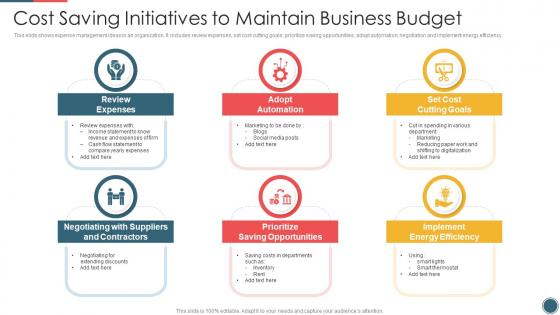
Cost Saving Initiatives To Maintain Business Budget




Try Before you Buy Download Free Sample Product
 Impress Your
 Audience
 100%
100% Editable
 Save Hours
 of Time


This slide shows expense management ideas in an organization. It includes review expenses, set cost cutting goals, prioritize saving opportunities, adopt automation, negotiation and implement energy efficiency.
People who downloaded this PowerPoint presentation also viewed the following :
Cost Saving Initiatives To Maintain Business Budget with all 6 slides:
Use our Cost Saving Initiatives To Maintain Business Budget to effectively help you save your valuable time. They are readymade to fit into any presentation structure.





FAQs for Cost Saving Initiatives To
Honestly, the biggest win is just cutting down meeting time. Those "quick" 30-minute check-ins that somehow become hour-long marathons? Good presentations actually end when they're supposed to. Travel costs drop too since you can make virtual meetings way more engaging - less flying people in for every pitch. Decision-making speeds up like crazy when you clearly lay out options upfront. Stakeholders can approve stuff in one go instead of this whole back-and-forth thing that drags on forever. Oh, and fewer follow-up meetings because people actually understand what got decided the first time around.
Dude, templates are a game changer. You'll cut design time by like 70-80% easy, which means way less money spent on designers or your team actually getting home at a reasonable hour. Most presentations follow the same basic structure anyway, so why start from zero every single time? The consistent branding alone saves you from those painful revision cycles that just drain your budget. I actually wish I'd started building a template library years ago – you notice the difference immediately on your first project. Honestly, it's one of those things that seems obvious once you do it.
Honestly, tailored presentations are a game changer for cutting down planning time. Instead of making generic slides that totally miss what people care about, you're laser-focused on what your audience actually needs. Way fewer revision rounds too since you're already hitting their main concerns upfront. Decision-makers get exactly what they want to see, so approvals happen way faster - none of that annoying back-and-forth where they're asking for clarification on stuff. I've watched projects speed up by like 30% just from this. Oh, and map out your audience's priorities before you even touch PowerPoint. Trust me, it'll save you hours of redoing everything later.
Dude, the time suck is brutal - you'll be up till midnight fighting with slide layouts instead of actually working on your pitch. Teams end up with presentations that look totally different from each other, which is honestly embarrassing in front of clients. I've seen people lose deals because their decks looked thrown together compared to the competition. You're basically starting from scratch every time instead of using stuff that already works. Here's the thing though - figure out what your time is worth per hour, then think about those 4-5 extra hours you spend designing. Makes the template price seem pretty smart, right?
Honestly, good-looking presentations save you so much money it's ridiculous. Clean slides keep people focused, so they ask smarter questions and make decisions faster. I've watched three-hour meetings shrink to one hour just because someone made their charts readable. That's fewer follow-ups, less time explaining messy data, and way fewer project delays. The design work upfront stops all that expensive back-and-forth later - you know how those revision cycles eat budgets alive. Try decluttering your next deck and see how much smoother approvals go.
Track your time-to-close rates and win percentages first - that's where you'll see if presentations actually work. I'd also watch prep time because honestly, once you get good at this stuff, the time savings are insane. Client feedback scores matter too. How many follow-up meetings do you need after presenting? Less is better, obviously. Revenue per presentation is clutch if you're in sales. Oh, and presentation prep hours - I forgot that one but it's huge. Start checking these monthly. You'll spot trends pretty fast and know what's working.
Honestly, think of templates as investments, not expenses. Do the math - if your designer makes $30/hour and a $200 template saves them 10 hours, you're already ahead. Good templates convert way better too, which hits your revenue directly. I've watched so many companies cheap out on templates, then spend forever fixing janky ones that scream "budget website." Track how much time you're burning on design stuff right now. Then compare that to just buying something proven that works. The math usually makes the decision pretty obvious once you see it on paper.
Honestly, cloud presentation tools are a game-changer for your budget. No more dropping cash on expensive software licenses – most run on cheap monthly subscriptions instead. Your team can work together without flying everyone to the same room, which saves a ton. Storage headaches? Gone. You're not buying drives or server space anymore. The version control mess alone used to drive me crazy, but that's history now. Everything just runs in your browser, so IT doesn't have to babysit anything. I'd start by adding up what you're spending on licenses and travel right now – you'll probably be shocked.
Honestly, templates are a game changer. People stop wasting time on blank slides, and you won't have marketing obsessing over animations while finance is still choosing Comic Sans (yes, that actually happens). Your design costs plummet since you're not constantly hiring outside help. Plus approvals go way faster - less of that endless revision cycle. I'd start with maybe 3-4 templates for your most common decks. You'll see the savings pretty much right away. It's one of those simple fixes that actually works.
Yeah, animated presentations are pricey upfront - like 3-5x more than static ones because of all the design work and extra time. The animation stuff can literally add days to your timeline, which is annoying. But honestly? They usually pay off in the long run since people actually remember them and stay engaged. Your audience retention shoots way up, so you won't need as many follow-up presentations or redos. I'd probably start with your most important presentations first - the ones where you really need people paying attention. Then just expand from there once you see how it goes.
So basically, better presentations free up money you can throw at the stuff that actually matters - R&D, expanding into new markets, hiring good people. Your teams stop burning hours on endless revisions and stakeholders aren't confused by messy messaging anymore. That's real labor cost savings right there. Faster decisions happen when presentations are actually clear, which speeds up your whole strategic timeline. One company I heard about saved like 30k just from standardizing their pitch decks (wild, right?). Honestly, just track how much time your team spends prepping presentations each month. You'll probably hate what you find.
So basically, presentation templates are a lifesaver because nobody has to start from zero every single time. Five people making similar decks from scratch? What a waste of time. Build one good template together and boom - everyone's got a head start. You'll skip all the annoying formatting stuff and design headaches since that's already handled. Your team's presentations end up looking way more professional too, which is nice. Oh, and start with whatever presentation types you guys make the most. Makes sense to tackle those first.
Look, presentation training pays for itself pretty fast. Your team stops wasting time on endless follow-up meetings because nobody understood what the hell was being proposed. I've literally watched projects get completely derailed just from bad communication in one presentation. Good presenters don't need their managers constantly stepping in to clarify things. They close deals instead of confusing clients. Decisions happen faster when people can actually explain their ideas clearly. Plus you'll save a ton on project revisions - those add up quick when stakeholders are constantly misaligned. Track your meeting times before and after, you'll be shocked.
Honestly, consulting firms see the biggest wins - they're pumping out client decks nonstop. Marketing agencies too, obviously. Financial services companies save a fortune since they're always doing investor stuff. Healthcare and tech are smart about this - tons of training materials and pitch decks. Look, if your team's doing presentations more than once a week, you'll see the money back fast. We're talking 60-80% less on design costs, which is nuts when you think about it. Just time how long your people spend making slides right now. That number will probably shock you tbh. Once you see those hours, the template investment makes total sense.
Dude, scope creep kills budgets every time - that "quick slide addition" becomes a total deck overhaul. Also, when there's no clear brief upfront? Your team's basically throwing darts blindfolded, creating like five versions. Poor project management means everyone's stepping on each other's work. Custom graphics and animations sound cool but they'll wreck your timeline. Honestly, the whole thing's preventable though. Just nail down requirements first, give people clear ownership of sections, and - this is key - set revision limits before anyone touches PowerPoint. Otherwise you'll be tweaking fonts until 2025.
-
One word for SlideTeam–Versatile!
-
“Easy to use. I always wanted to have a quick search for products and SlideTeam has helped me have it.”