

Costs And Benefits Of Data Center Deployment Powerpoint Presentation Slides




Try Before you Buy Download Free Sample Product
 Impress Your
 Audience
 100%
100% Editable
 Save Hours
 of Time


A data center is a physical facility where organizations store their critical applications and data. The process of moving specific assets from one data center environment to another is known as data center relocation. It is also known as data center migration. This presentation i.e. Costs and Benefits of Data Center Deployment provides information on the objectives of data center relocation, why the company wants to relocate the data center, creating a project plan for data center relocation, and prerequisites for data center relocation. This presentation also covers details on the current task status for data center relocation, assessment of the existing data center and team structure, key factors driving data center relocation, and the data center relocation process in detail. Additionally, this presentation provides details on risks and mitigation strategies for data center relocation, project plan for data center relocation, cost involved in data center relocation, data center migration best practices, and data center relocation benefits to the company. Download this template now.
People who downloaded this PowerPoint presentation also viewed the following :
Content of this Powerpoint Presentation
Slide 1: This slide introduces Costs and Benefits of Data Center Deployment. State your company name and begin.
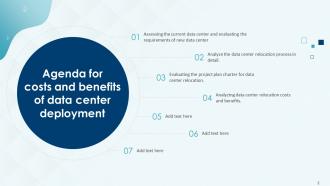
Slide 2: This slide displays the title Agenda for the topic.
Slide 3: This slide shows Table of Content for the presentation.
Slide 4: This slide highlights title for topics that are to be covered next in the template.
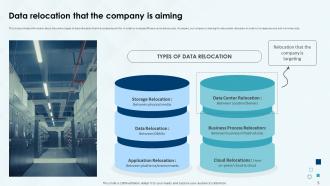
Slide 5: This slide provides information about the various types of data relocation that the companies aim for in order to increase efficiency and reduce costs.
Slide 6: This slide shows the reasons that why the company is looking to relocate its data center.
Slide 7: This slide exhibit table of content- Data Center Relocation Prerequisites and Current Status.
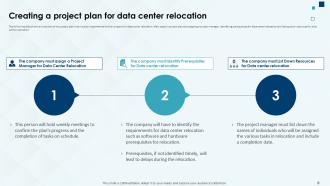
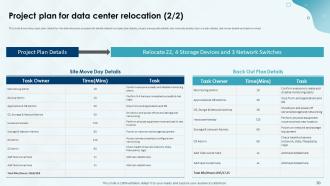
Slide 8: The following slide shows an overview of the project plan that must be implemented by the company for data center relocation.
Slide 9: This slide provides information about the person/individual who will be responsible for handling data center relocation activity.
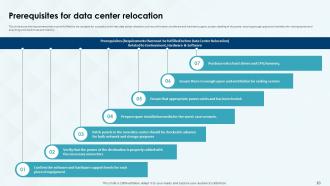
Slide 10: This slide shows the requirements that must be fulfilled by the company for successful and timely data center relocation.
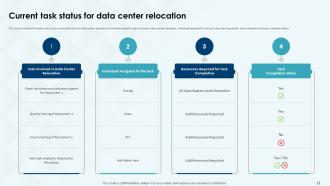
Slide 11: This slide provides information about the current task status for data center relocation.
Slide 12: This slide exhibit table of content- Assessing Excising Data Center and Team Structure.
Slide 13: This slide shows the major factors/drivers due to which the company is looking for data center relocation.
Slide 14: The following slide provides information about the key areas that are to be included while assessing the existing data center.
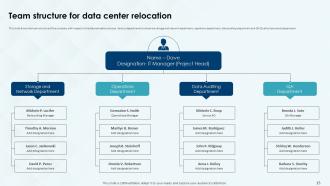
Slide 15: This slide shows the team structure of the company with respect to the data relocation process. This slide exhibit table of content.
Slide 16: This slide exhibit table of content- Data Center Relocation Process in Detail.
Slide 17: This slide provides information about the detailed overview of the data center relocation process.
Slide 18: This slide shows the first step that is involved in data center relocation process i.e. assessing the current data center.
Slide 19: This slide shows the second step that is involved in data center relocation process i.e. mapping existing functionality to new data center.
Slide 20: This slide shows the third step that is involved in data center relocation process i.e. choosing a relocation strategy.
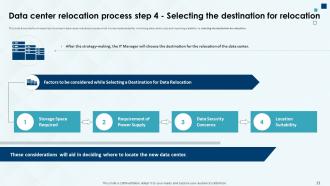
Slide 21: This slide shows the fourth step that is involved in data center relocation process i.e. selecting the destination for relocation.
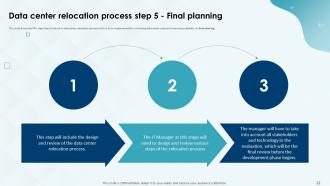
Slide 22: This slide shows the fifth step that is involved in data center relocation process i.e. final planning .
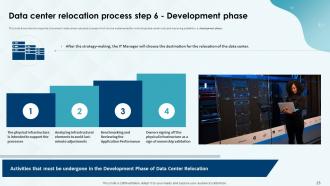
Slide 23: This slide shows the sixth step that is involved in data center relocation process i.e. development phase.
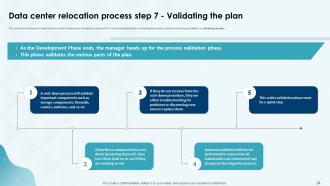
Slide 24: This slide shows the seventh step that is involved in data center relocation process i.e. validating the plan.
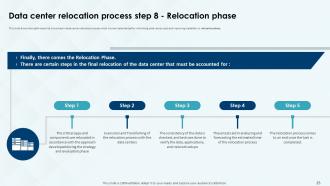
Slide 25: This slide shows the eighth step that is involved in data center relocation process i.e. relocation phase.
Slide 26: This slide shows the eighth step that is involved in data center relocation process i.e. post-relocation verification.
Slide 27: This slide exhibit table of content- Data Center Relocation Risk Mitigation Strategies and Project Plan Charter.
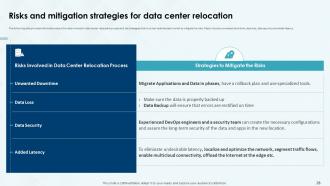
Slide 28: This slide provides information about the risks involved in data center relocation process and the strategies that must be implemented to mitigate the risks.
Slide 29: This slide shows the project plan charter for the data relocation process.
Slide 30: This slide also shows the project plan charter for the data relocation process.
Slide 31: This slide exhibit table of content- Data Center Relocation Costs, Best Practices and Benefits.
Slide 32: The following slide shows the various types of costs that are involved in the process of data center relocation.
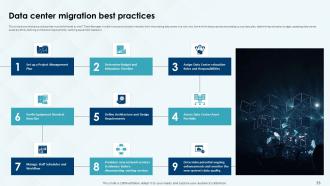
Slide 33: This slide shows the best practices that must be followed by the IT Team Manager in order to ensure a smooth transition from the existing data center to a new one.
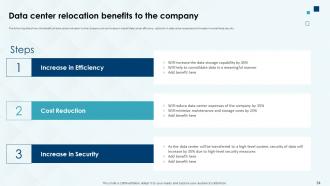
Slide 34: The following slide shows the benefits of data center relocation to the company.
Slide 35: This slide contains all the icons used in this presentation.
Slide 36: This slide is titled as Additional Slides for moving forward.
Slide 37: This is Our Mission slide with related imagery and text.
Slide 38: This is Our Team slide with names and designation.
Slide 39: This is About Us slide to show company specifications etc.
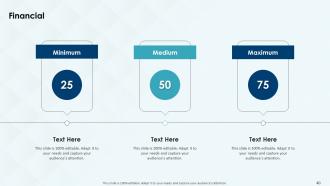
Slide 40: This is a Financial slide. Show your finance related stuff here.
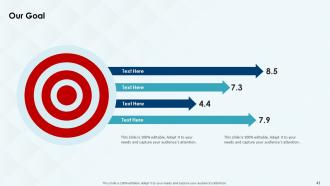
Slide 41: This is Our Goal slide. State your firm's goals here.
Slide 42: This is a Timeline slide. Show data related to time intervals here.
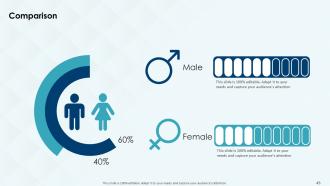
Slide 43: This is a Comparison slide to state comparison between commodities, entities etc.
Slide 44: This slide displays Mind Map with related imagery.
Slide 45: This slide depicts Venn diagram with text boxes.
Slide 46: This is Our Target slide. State your targets here.
Slide 47: This slide presents Roadmap with additional textboxes.
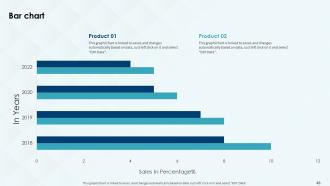
Slide 48: This slide presents Bar chart with two products comparison.
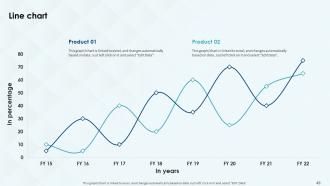
Slide 49: This slide describes Line chart with two products comparison.
Slide 50: This is a Thank You slide with address, contact numbers and email address.
Costs And Benefits Of Data Center Deployment Powerpoint Presentation Slides with all 55 slides:
Use our Costs And Benefits Of Data Center Deployment Powerpoint Presentation Slides to effectively help you save your valuable time. They are readymade to fit into any presentation structure.

























FAQs for Costs And Benefits Of Data Center Deployment
Location's gonna be your biggest hit - real estate costs are insane depending on where you build. Power and cooling will destroy your budget too, honestly those three things alone eat up most of the money. Hardware obviously costs a ton, plus you need solid network connections. Oh and don't sleep on the ongoing stuff like staff and maintenance - that adds up fast. Security gets expensive real quick, especially with compliance certs. Build for future growth from day one though, retrofitting later is a nightmare. Get multiple quotes early and add like 20% buffer because something always goes wrong.
Yeah, location is huge for ROI - like, it can totally make or break your budget. SF or Manhattan? You're looking at 40-60% higher costs just for land and construction. Brutal. But you get solid fiber, reliable power grids, and you're close to customers. Ohio or North Carolina are way cheaper, though connectivity might be more limited. Honestly, I'd hunt for emerging tech hubs with decent infrastructure before prices go crazy. Tax incentives can be pretty sweet too - definitely worth checking what local governments are offering.
Power and cooling will absolutely destroy your budget - we're talking 60-70% of operational costs. Staffing for round-the-clock monitoring is brutal too, especially if you're doing it in-house. Network connectivity, hardware replacements, security systems - it all adds up fast. HVAC repairs are weirdly expensive btw, learned that one the hard way. Insurance and compliance stuff you can't skip either. Honestly? Start by figuring out your power consumption first. That's where most people find the biggest savings, and it's kind of a no-brainer place to begin.
Dude, energy efficiency will make or break your data center budget. Power and cooling eat up like 60-70% of your operating costs over the facility's lifetime - it's insane. Better servers and cooling systems cut your electricity bills big time, especially running 24/7. You'll often get utility rebates too which is nice. The efficient gear pays for itself in 2-3 years through lower costs. Honestly I've seen people skimp on this and regret it later. Shoot for a PUE under 1.5 as your baseline when comparing options.
Honestly, start with virtualization if you haven't already - that's where you'll see the biggest savings right off the bat. Containerization works great too for cramming more onto less hardware. Cloud-hybrid is pretty much the standard now, saves you from that massive upfront spend. Those energy-efficient cooling systems? Total game changer for your power bill - I've seen some crazy high cooling costs that nobody thinks about. Software-defined networking cuts out all that expensive proprietary stuff. Oh, and automation tools help reduce how many people you need babysitting everything 24/7.
So instead of dropping huge money upfront on servers and all that hardware, you're basically paying monthly for what you actually use. Think of it like Netflix vs buying DVDs - way less commitment. Your IT team shrinks since you don't need people babysitting physical servers anymore. Plus no more guessing if you'll need 10 or 100 servers next year, you just scale up when busy and down when things are slow. Honestly the flexibility alone makes it worth it. I'd start by figuring out which of your current systems would be easiest to move over first.
Track both hard and soft savings for your ROI calc. Hard stuff's easy - hosting fees, energy costs, downtime expenses, hardware consolidation. Soft benefits are trickier but honestly more valuable long-term. Think better productivity from improved performance, security upgrades reducing breach risks, scalability supporting growth. Pain to measure though. I'd set quarterly check-ins to compare against your initial investment. Oh, and don't forget ongoing operational costs - people always miss those. The soft ROI is where you'll really win, just harder to prove to the bean counters.
Dude, the power bills will destroy you - cooling alone can double what you're paying now. ISPs absolutely gouge you for redundant connections too. Space planning? Add 20% to whatever you think because you're definitely being too optimistic lol. Then there's all the boring stuff nobody warns you about: fire system inspections, security audits, specialized training for your team. HVAC maintenance gets weird when it's data center grade. Honestly, map out every operational cost first before you even look at servers. Trust me on this one.
Oh man, compliance will absolutely wreck your budget - think 15-30% more than you planned. Healthcare and finance companies get destroyed the worst. You'll be stuck paying for separate environments, fancy security stuff, audit trails, the whole nine yards. Data sovereignty requirements are a pain too. The brutal part? It doesn't stop after deployment - you need compliance people on staff forever plus constant audits. Seriously though, figure out exactly what regulations hit you before you even start budgeting. Trust me, surprise compliance costs are the absolute worst kind of budget shock.
Honestly, modular data centers are a game-changer for deployment speed - you're looking at months vs years with traditional builds. Factory-built means way more predictable costs and quality too. The upfront savings are usually 20-30%, which is nice. You don't have to guess your future needs either since you can add modules as you grow instead of building this massive thing and crossing your fingers you'll fill it. Oh, and they're actually portable if you ever need to move - kinda wild when you think about it. I'd start by figuring out what you'll need in 3 years and see if the timeline makes sense.
Honestly, automation saves money by cutting down on all that manual work and those costly screw-ups that bring everything down. Start with the boring repetitive stuff - patch management, capacity reports, whatever's eating up your team's time. Smart cooling systems adjust to actual load instead of running full blast constantly. Predictive maintenance catches problems before they turn into disasters (which trust me, always happen at 3am). The monitoring alone is worth it - one team I know dropped their overnight emergency calls by 70%. Automated backups mean less babysitting too. You won't need as many people watching systems around the clock.
Honestly, you've got a bunch of options here. Bank loans are the obvious choice if your credit's decent. Equipment financing might be easier though - the gear itself backs the loan. Leasing's pretty popular since it spreads everything out and usually comes with maintenance deals. Some people do hybrid setups mixing loans and leases. Or you could partner with existing data center companies who front the cash. Oh, and cloud providers sometimes throw migration credits at you which can help with deployment costs - that's actually a sweet deal when you can swing it. Definitely shop around for rates because they're all over the place lately.
Honestly, it's all about upfront cash vs flexibility. Owning means huge initial costs - land, construction, all that equipment - but your per-square-foot costs drop over time. Leasing does the opposite. You get predictable monthly payments and can actually scale without being stuck with some massive empty building (which sounds like a nightmare tbh). Leased places usually have maintenance teams and backup systems built in, so that's one less headache. My advice? Run the actual numbers with your growth projections. See which cash flow makes more sense for where you're headed.
Honestly, the payoff is huge - you're looking at 30-50% cuts on your power bills, which is wild money over time. Systems run way cooler so you get less downtime from busted components. My buddy saved like $800 the first year alone. Maintenance becomes a breeze too since everything just works better. The whole green angle helps with compliance stuff, though that's probably not your main concern right now. ROI hits around 2-3 years typically. I'd crunch the numbers on what you're spending now vs upfront costs - bet it makes sense pretty quick.
Yeah, you're looking at 20-40% more upfront for all the backup stuff - duplicate hardware, power systems, spreading things across different locations. Honestly though, one bad outage will cost you way more than that whole investment. Think of it like insurance premiums. The math usually works out after your first major disaster that you actually avoid. I'd figure out what an hour of downtime costs you first - that'll help you decide how much redundancy is worth it. Trust me, it's not a matter of if something breaks, it's when.
-
Great product with effective design. Helped a lot in our corporate presentations. Easy to edit and stunning visuals.
-
What a stunning collection of customizable templates! Really a time-saver..