

Crm application dashboard powerpoint presentation slides




Try Before you Buy Download Free Sample Product
 Impress Your
Audience
 100%
Editable
 Save Hours
of Time


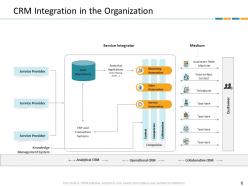
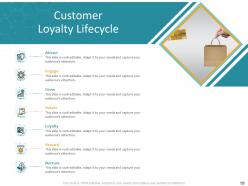
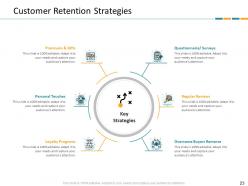
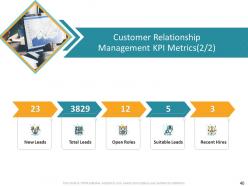
Introducing our CRM application dashboard PowerPoint presentation slides. Maintain productive customer relationships with help of this client relationship management PowerPoint deck. This consumer oriented PowerPoint theme consists of a slide that details the CRM (customer relationship management) integration in the organization. Deploy this consumer-company relationship management PPT layout to include the discussion of marketing, sales, and service automation in your presentation. This ready-to-use consumer friendly PowerPoint design contains slides which contain the database sales status report. Incorporating this particular customer relationship management PowerPoint set lets you display the data mining process involved in CRM. Utilization of this customer relationships PPT template allows you to have a discussion on the benefits, strategies, and impact of customer retention. This consumer organization PowerPoint deck contains a slide that discusses the technological initiatives to improve customer relationship. Selection of this user bond management PPT layout allows you to display the KPI metrics of customer relationship management. Download this PPT slide to explore true perfection.
People who downloaded this PowerPoint presentation also viewed the following :
Crm application dashboard powerpoint presentation slides with all 49 slides:
Use our CRM Application Dashboard Powerpoint Presentation Slides to effectively help you save your valuable time. They are readymade to fit into any presentation structure.















FAQs for Crm application dashboard
Focus on what actually matters: conversion rates at each pipeline stage, average deal size, and how long your sales cycles take. Track where leads come from so you know what's working. Individual rep performance too, obviously. Most dashboards I've seen are just packed with flashy numbers that don't help anyone sell more - total waste of time honestly. Keep it clean and actionable instead. Set up alerts when numbers drop below your targets. Way better than finding out about problems three weeks too late when you're already behind quota.
Oh man, customizable dashboards are a game changer. Your team can finally see what actually matters instead of digging through some cookie-cutter layout that makes zero sense. Put your sales pipeline front and center, tuck recent activities wherever feels natural - basically make it work for YOU. It's honestly night and day compared to the generic mess most CRMs dump on you. Your sales reps won't waste half their day hunting for basic info. Quick tip though - ask your team what they're checking first every morning, then just build around that. Way easier than guessing what they need.
Dude, charts and graphs are a game changer for CRM dashboards. You can instantly see which reps are killing it and where your leads are falling off instead of drowning in spreadsheets. Your brain processes visual stuff way faster than numbers anyway. I swear, once you set up a few key charts for your main metrics, everything clicks. You'll spot trends immediately and make decisions quicker. Plus it's way less painful than staring at endless rows of data – though I guess some people are into that sort of thing.
Dude, CRM dashboard templates will save your sanity. Instead of building tracking systems from zero, you get instant views of your sales pipeline and customer stuff. Hot leads, stalled deals, revenue patterns - it's all right there instead of scattered across random spreadsheets. Setup takes like 10 minutes vs hours of work, which is huge when you're already juggling everything. I'd grab a basic sales pipeline template first, then tweak it once you figure out what numbers actually move the needle for your specific business. Trust me on this one.
Dude, you absolutely need real-time data in your CRM. It's like the difference between GPS and some crusty paper map from 2015. Live data lets you catch problems before they explode and actually see what's happening with customers right now, not last week's drama. Your refresh rate depends on how crazy fast your business moves - maybe hourly works for most teams, but sales people are nuts and probably need updates every 15 minutes. The whole point is having current info so you can pivot when things change. Trust me, it makes a huge difference.
Honestly, once you start integrating your CRM it's like night and day. Your dashboard becomes this central hub instead of just another app you have to check. Email marketing, accounting stuff, support tickets - it all flows in automatically. No more toggling between like 5 different tools just to understand one customer. You'll actually see the full picture of each account rather than just sales data. I'd say start with whatever tools you use most, then add more later. Trust me, you won't want to go back to the old way once you see how smooth everything runs.
Biggest thing? Don't cram everything onto one screen - users will just bounce. I learned this the hard way lol. Skip vanity metrics that look cool but don't help anyone decide anything. Fresh data matters too, because old numbers are basically useless. Never make people scroll sideways (seriously, who does that anymore?). Pick 3-4 metrics your team actually cares about. That's it. You can always add more later when they're comfortable with the basics and start asking for deeper stuff.
Your CRM dashboard is way better than staring at endless spreadsheet rows - trust me on this one. You'll actually see which customer segments make you money and spot conversion patterns you'd never catch otherwise. The filtering options are pretty sweet too. Slice by demographics, buying history, how engaged people are, whatever works for your setup. Makes creating targeted campaigns so much easier than sending the same boring message to everyone. I'd start with maybe 3-4 key segmentation views based on your best customer traits, then use what you learn to personalize your outreach.
Honestly, go for widgets you can actually customize - tracking your main metrics without drowning in data. Drag-and-drop is huge because trust me, what matters to you now won't be the same in 6 months. You'll need pipeline views, lead scoring, activity dashboards. Real-time sync matters too since old numbers are pretty much garbage. Mobile definitely can't be an afterthought (you know you'll be checking this stuff constantly). Pipeline visualization is probably where you'll spend most of your time anyway. Keep it simple at first - your team can handle more complexity once they're used to it.
Honestly, mobile access is a total game-changer for CRM dashboards. Your sales team can update deals right after meetings instead of trying to remember details hours later. Real-time updates mean managers can spot problems and act fast. I learned this the hard way when our old system was desktop-only - so much info got lost between client visits and office time. Short sentences work better on mobile anyway. Make sure whatever CRM you pick actually works well on phones, not just "technically supports" mobile. It's basically non-negotiable now.
Honestly, just focus on the stuff that actually matters - conversion rates, how fast deals move through your pipeline, and customer lifetime value. Charts and graphs are your friend here because nobody wants to stare at endless spreadsheets. Group similar metrics together and use the same colors consistently so people aren't confused every time they look at it. You'll want the ability to dig deeper when someone asks questions about the high-level numbers. Oh, and this is crucial - keep that data fresh and show when it was last updated. Nothing kills credibility faster than outdated dashboards.
Honestly, CRM dashboards are game-changers for forecasting. You get this real-time view of your entire pipeline - deal stages, conversion rates, how fast stuff's moving. Way better than just winging it based on hunches. The visual breakdown shows you exactly where deals get stuck (which happens more than you'd think). Historical data helps too - you'll start noticing patterns like seasonal dips or common drop-off points. I'd say check those pipeline reports weekly and use them to focus your team on the deals that'll actually close.
Dude, cloud CRMs are game-changers for team collaboration. Everyone can access the same customer data in real-time, wherever they are. Gone are those annoying "let me dig through my files" moments. Sales, marketing, and support all see live updates on leads and deals instantly. Multiple people can jump on accounts without creating chaos - which honestly used to be such a headache. The visibility between departments means smoother handoffs and way less confusion about where customers stand. Just make sure you set up permissions right so people aren't drowning in data they don't need.
Dude, you gotta talk to your users constantly about this stuff. They're stuck using that dashboard all day while you're designing it from the outside. Ask what metrics actually matter to them, not what you think looks good. I've watched so many pretty dashboards flop hard because nobody bothered asking the sales team what they wanted to see when they logged in. Survey people, but also just sit behind them and watch how they click around - you'll catch stuff they won't even mention. Which features do they totally ignore? What makes them groan? Then actually change things based on their answers.
Start with your access controls - only let people see what they actually need for their job. GDPR compliance isn't optional, so get solid data retention policies in place. When customers want their info deleted, you need to handle that fast. For shared dashboards, mask the really sensitive stuff. Like, does marketing really need full SSNs? Probably not. Set up audit logs too so you can track who's poking around in what data. Honestly, just pretend it's your own personal info sitting there - that's usually enough motivation to lock things down properly.
-
Excellent work done on template design and graphics.
-
Professional and unique presentations.
-
Amazing product with appealing content and design.
-
Out of the box and creative design.
-
Unique and attractive product design.
-
Excellent template with unique design.
-
Colors used are bright and distinctive.