

Cross sell powerpoint presentation slides





Try Before you Buy Download Free Sample Product
 Impress Your
 Audience
 100%
100% Editable
 Save Hours
 of Time


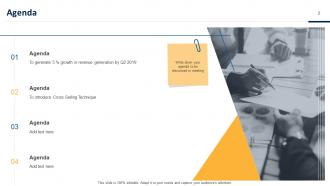
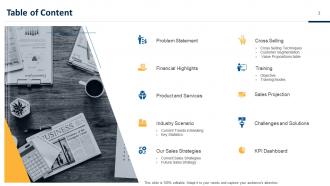
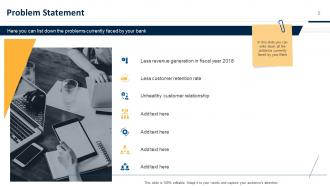
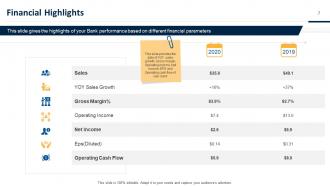
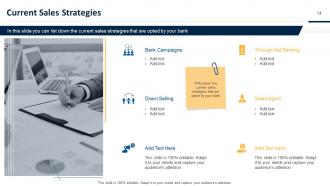
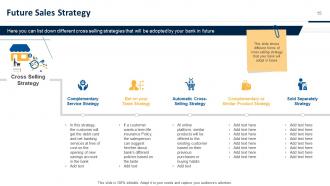
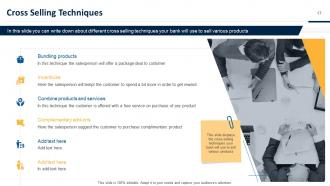
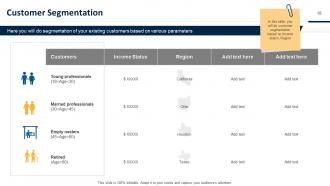
Showcase current and future sales projection with the aid of our ready-to-use Cross-Sell PowerPoint Presentation Slides. Talk about the current trends in the banking industry using this professionally designed customer value maximization PPT slideshow. The selling techniques PowerPoint complete deck includes various editable slides that will help you to illustrate key statistics. Take advantage of the value-added selling PPT slides to list down current and future sales strategies. Utilize this topic-specific business presentation to discuss cross-selling techniques such as bundling products, incentivize, combine products and services, complimentary add-ons, etc. Talk about different parameters for segmentation of existing customers like income status, religion, etc. by using the visually appealing cross-selling strategy PowerPoint templates. You can also use the informative sales promotion PPT graphics to discuss the challenges you face and solutions to overcome them while implementing cross-selling. Thus, download our content ready value-added selling PowerPoint templates to boost your sales. Discover the exact combination of elements with our Cross-Sell Powerpoint Presentation Slides. You will arrive at the best formula.
People who downloaded this PowerPoint presentation also viewed the following :
Cross sell powerpoint presentation slides with all 42 slides:
Use our Cross Sell Powerpoint Presentation Slides to effectively help you save your valuable time. They are readymade to fit into any presentation structure.















FAQs for Cross sell
Look, cross-sell slides are honestly genius for squeezing more value out of each client meeting. You're already there pitching one thing - might as well drop hints about other stuff they could use, right? Makes you look like the full-service partner instead of just some random vendor. Your existing clients are so much easier to sell to than strangers anyway. Plus it gives you perfect excuses to circle back later: "Remember that compliance thing we talked about?" Just don't go overboard or you'll mess up your main pitch. Keep those extra slides short and actually relevant to what they're dealing with.
Honestly, the best cross-sell slides don't feel like you're being sold to at all. Make them conversational - show actual scenarios where their workflow gets easier with your other products. Nobody wants to sit through a boring feature list (learned that the hard way). Ask questions to keep people engaged. Map out their customer journey first, then your slides become helpful suggestions instead of random pitches. Short story: I once sat through a 20-minute deck that was just bullet points. Brutal. Use visuals and storytelling so people actually lean in. Position everything as logical next steps.
Keep it clean with lots of white space - that's honestly the biggest thing. Your branding should match your main product, obviously. Use contrasting colors or bold fonts to create hierarchy. I swear, half the cross-sell slides I see are total disasters because they're way too cluttered. Stick to 2-3 colors max and get decent product images that actually make sense. Your CTA buttons need to pop without looking cheap. Oh, and definitely test a simple template first before you go crazy with it across everything.
Dude, tell a story instead of just dumping product info. Pick a customer like "Sarah started with basic CRM, then her team grew and she hit these roadblocks." Walk through how each new product fixes her next problem. Way more engaging than those snooze-fest feature lists everyone does. The story should feel like a natural progression - one thing leads to another, you know? I mean, people buy into journeys, not random product bundles. Just make sure it actually matches how your real customers typically expand. Otherwise it'll sound fake as hell.
Honestly, SaaS companies crush it with cross-sell templates - same with financial services and retail. Makes sense since their products naturally fit together. Insurance folks do really well too (once you've got someone's auto policy, pitching home coverage is pretty straightforward). Your sales team will probably thank you for having actual visuals ready instead of cobbling together random slides. Though I'd map out which products connect first - that way you're not just throwing stuff at the wall. Templates work best when they highlight those obvious product relationships customers actually care about.
Stick with your company colors for sure, but don't go crazy - 2-3 max. Blue's always solid for trust stuff, then maybe add orange or green to pop the important bits. Font-wise, boring is better: Calibri, Arial, whatever's clean and readable. I made this mistake once using some fancy script font... nobody could read it from like 10 feet away, it was embarrassing. Keep text at least 24pt so people in back can actually see. The whole point is looking professional without being distracting, you know? You want them thinking about what you're selling, not squinting at your slides.
Skip the data dumps - nobody wants to stare at spreadsheet hell. Go with simple visuals instead: bar charts for revenue stuff, line graphs for growth trends. Honestly, stick to 3-5 data points max per slide or people's eyes will glaze over. Your headlines should tell the actual story, not just say "Q3 Results" like every boring presentation ever. Use colors to make the cross-sell opportunity pop. Here's the thing though - always tie your data back to what it actually means for their business. That's what gets people to act on your recommendations.
Honestly, the biggest mistake I see is cramming way too many products into one pitch. Pick 2-3 max that actually solve their problems. Skip the feature laundry list too - nobody gives a shit about your fancy new dashboard update. Focus on their pain points instead. How does this make their life easier? Save money? Whatever keeps them up at night. Oh, and don't dump cross-sells at the end like an awkward afterthought. Work them in naturally when they make sense. Be super clear about pricing upfront - hidden fees are deal killers. Clean slides, lead with benefits, then explain what you're offering.
Honestly, the font size thing matters way more than people realize - but anyway, you need different versions of your deck depending on who's listening. Younger crowds want sleek designs and all the tech features. Older execs? They prefer clean, traditional layouts that emphasize reliability and track record. Industry stuff matters too. Healthcare clients need totally different examples than retail people. I'd make 2-3 template versions of your main slides, then just swap them out based on whatever research you did beforehand. Takes some prep work upfront but it's worth it.
So here's the thing - map out where your customers actually get stuck or need help throughout their whole experience with you. Then you'll spot those perfect moments where pitching another product actually makes sense (instead of just being pushy). Plot their journey first, figure out the natural transition points where they'd genuinely benefit from more stuff. Honestly, it beats just throwing features at them hoping something sticks. Use those insights when you're putting together your presentation - structure it around their real journey stages. Way better than the spray-and-pray approach most people use.
Dude, animations totally help with cross-sells! Instead of dumping everything on one slide, you can reveal benefits one at a time so prospects actually listen instead of reading ahead. Fade-ins and slide-ups work great - just don't go crazy with spinning text because that looks super cheesy. I learned that the hard way lol. Time your value props to appear as you're talking about them. It keeps people focused on what you're saying. Smooth transitions between slides help too since they maintain the flow without jarring interruptions.
Honestly, start with conversion rates - that's the big one. How many people actually bought what you pitched? Then watch your average deal size because cross-selling should definitely boost that. I'd also track how long deals take to close since sometimes these presentations can drag things out (been there). Customer satisfaction scores are huge too - nobody wants to come across as pushy and kill future business. Oh, and if you're sharing slides digitally, click-through rates help. But really, focus on conversions and deal size first. Those two metrics will tell you pretty quickly if your slides are worth a damn.
So basically you'll want to swap in your brand colors, fonts, and logo in the master slide layouts first. Most templates let you change colors globally - saves you from going slide by slide which is honestly a pain. Then add your visual stuff like icons or photos that match your company vibe. Oh, and don't forget the tone! If your brand's casual, don't write like you're announcing quarterly earnings or whatever. Just follow your brand guidelines and work through each template one by one. Takes some time but it's worth it to make them actually feel like yours instead of generic templates.
Quote bubbles with customer photos work great for testimonials. Split-screens are money too - show the problem on one side, results on the other after they used your cross-sell. Video testimonials embedded right in slides? Pure gold if you can swing it. Try the "day in the life" thing where you walk through how products actually work together. Before/after story arcs grab attention way better than boring bullet points. Keep quotes short though - nobody's reading a novel on your slide. Actually, mini stories beat generic praise every time.
Yeah, cross-sell slides are actually perfect for upselling too. You just flip the focus from showing different products to highlighting premium versions of what they're buying. The visual format works really well for side-by-side comparisons - like "here's your current plan" vs "here's what you could upgrade to." Honestly, I use the same templates for both and just swap the content. Way easier than starting from scratch. Make sure your value props connect to their actual problems though. Oh, and bigger packages or advanced tiers usually sell themselves when you lay them out visually like that.
-
Excellent template with unique design.
-
Content of slide is easy to understand and edit.
-
It saves your time and decrease your efforts in half.
-
Easily Editable.
-
The Designed Graphic are very professional and classic.