

Cyber Security Incident Response Monitoring Key Metrics Dashboard Ppt Slides Inspiration




Try Before you Buy Download Free Sample Product
 Impress Your
 Audience
 100%
100% Editable
 Save Hours
 of Time


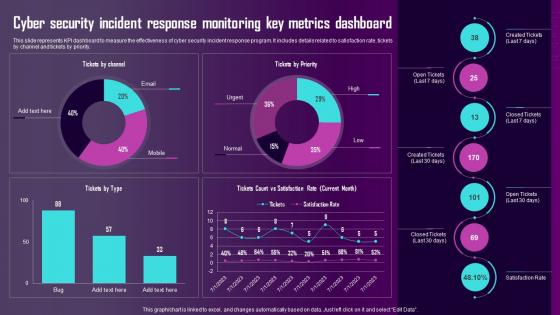
This slide represents KPI dashboard to measure the effectiveness of cyber security incident response program. It includes details related to satisfaction rate, tickets by channel and tickets by priority.
People who downloaded this PowerPoint presentation also viewed the following :
Cyber Security Incident Response Monitoring Key Metrics Dashboard Ppt Slides Inspiration with all 7 slides:
Use our Cyber Security Incident Response Monitoring Key Metrics Dashboard Ppt Slides Inspiration to effectively help you save your valuable time. They are readymade to fit into any presentation structure.






FAQs for Cyber Security Incident Response Monitoring Key Metrics Dashboard
Pick metrics that actually matter, not just stuff that looks good on paper. Start with incident response times and how fast you catch/fix vulnerabilities. Failed login attempts are weirdly useful - they show brewing attacks before they hit. Add security training completion rates and patch compliance too. System uptime and backup success matter obviously. Here's the thing though - dashboards turn into a hot mess real quick if you track everything. Stick to maybe 6 metrics that actually help you make decisions. I've seen teams drown in data while missing the obvious stuff.
Focus on metrics that actually matter - mean time to detect/respond, patch rates, incident trends. Heat maps are perfect for vulnerability hotspots. Simple line graphs show your month-to-month progress. Color-code everything so execs can instantly spot problems. Honestly? Most dashboards I've seen are just pretty but useless. Each metric needs to connect to an actual decision someone has to make. Always throw in industry benchmarks for context - makes a huge difference. Start with maybe 5-7 core metrics instead of drowning people in data they'll ignore anyway.
So operational metrics are like your daily grind stuff - incident response times, how many patches you pushed, phishing emails blocked. Strategic ones? That's the big picture execs actually care about: risk posture, budget efficiency, compliance. Most teams honestly just focus on operational because it's way easier to track. Which is kinda backwards if you think about it. You really need both though to show the full story. I'd start by mapping what you're already measuring, see what bucket each thing falls into, then figure out where you're missing that strategic view.
Honestly, daily updates work for most dashboards. But some stuff needs way more attention - like if you're dealing with active threats or incidents, you'll want real-time or hourly refreshes because waiting around is just asking for trouble. On the flip side, things like compliance scores barely move week to week, so monthly is totally fine there. I always tell people to start with daily as your default, then tweak it based on how fast things actually change. Oh and how quickly your team needs to make decisions with that data - that matters too.
Splunk and ELK stack are probably your best bet - they handle security data really well. Power BI or Tableau might work better if you've got executives who freak out at technical-looking stuff. Grafana's solid too, especially if you're already running Prometheus. Honestly though? The "best" tool thing is kinda BS - it really comes down to what data you're working with and who's gonna stare at these dashboards all day. I'd start by figuring out exactly which metrics matter to you first. Then just go with whatever plays nicest with your current setup. Way easier than fighting integration headaches later.
Honestly, these dashboards are game-changers for compliance stuff. You get all your security data in one spot instead of hunting through a million different systems when audit time rolls around. Real-time tracking of incident response, patch status, access controls - all the metrics SOC 2 and PCI DSS want to see anyway. The automated reporting is clutch though, saves you from that last-minute scramble we all know too well. Plus you can spot problems before auditors do, which is obviously way better. Set up some alerts so nothing sneaks up on you. Trust me, future you will thank present you for this one.
Look, real-time data basically turns your security dashboard from some useless historical recap into something that actually catches threats while they're happening. You'll spot sketchy activity right away instead of finding out about breaches days later when everything's already screwed. Speed matters here - the quicker you catch stuff, the less mess you have to clean up. Honestly, running security without real-time feeds is like trying to drive while only looking at your rearview mirror. Figure out what needs live monitoring first (failed logins, weird network stuff) versus what can wait for hourly updates.
Track cost-avoidance stuff alongside what you're spending - incidents stopped, downtime you didn't have, compliance fines avoided. Honestly the hardest part is proving "hey look what disasters DIDN'T happen" but whatever. Your dashboard needs mean time to detection, false positives, cost per incident. Business continuity metrics work great since execs eat that up. First step: find baseline breach costs for your industry, then show how your security investments cut those risks. Makes budget meetings so much less painful when you've got actual numbers to back everything up. Way better than just asking for money and hoping.
Don't jam everything onto one screen - nobody wants to stare at 50 charts trying to figure out what matters. Skip the vanity metrics too, they just make executives feel good without actually helping anyone make decisions. Your data needs to be fresh and reliable, otherwise what's the point? I learned this the hard way once. CISOs need completely different info than SOC analysts, so tailor it properly. Focus on stuff people can actually act on. Before adding any metric, ask yourself "okay, so what would someone DO with this?" Test it with real users first - they'll catch things you missed.
So most UBA platforms have APIs that'll pull behavioral scores straight into your dashboard widgets. Start with a "high-risk users" panel - rank people by their current risk scores and weird recent activity. Don't flood yourself with every tiny behavioral ping though, that noise gets old real quick. High-confidence anomalies are what you want. Connect those to your other security stuff like failed logins or privilege changes. Honestly, I'd probably throw in unusual access patterns too since those tend to be pretty telling. Focus on the big red flags, not every little deviation.
Honestly, pick KPIs that actually make people do something instead of just looking good in meetings. Your leadership probably cares about stuff like how fast you catch incidents, response times, and how quickly vulns get patched. I've watched so many teams build these massive dashboards with like 20 metrics that just sit there collecting dust. Keep it to maybe 5-7 solid indicators that actually tell you what's happening. Mix some forward-looking stuff (patch compliance) with the after-the-fact numbers (successful breaches). Oh, and make sure someone owns each metric - otherwise you're just making PowerPoint decorations.
Dude, ML totally changes the game for dashboards. Your system stops just telling you what already happened and starts predicting what's coming next. It gets scary good at spotting patterns in attack data over time. You'll catch insider threats that slip past normal rules, plus get automated risk scoring so you're not drowning in false alarms. Behavioral analysis is clutch here. Start with anomaly detection though - honestly it's the easiest way to see immediate results and you'll be shocked what threats were already lurking in your environment.
Start with the big three: MTTD, MTTR, and mean time to resolution. Break down incidents by severity too - you need to know if you're drowning in P1s or just dealing with regular stuff. Escalation rates are huge because they'll tell you if your L1 folks actually know what they're doing or if they're just passing everything up the chain. SLA compliance percentage is obvious but necessary. For security stuff specifically, track time-to-containment. Oh and make sure your dashboard shows trends over time, not just snapshots - way more useful that way. Those should cover your basics, then you can get fancy later.
Honestly, line charts are your best bet for tracking incident trends over time. Layer different incident types on the same chart - malware, phishing, data breaches, whatever you're dealing with. Heat maps are clutch for spotting patterns too, like which days incidents spike (spoiler: it's always Mondays). Add some trend arrows or percentage changes so leadership can quickly see if you're winning or losing. Match your time intervals to how often they want updates. Oh, and definitely include filters - people love drilling down into specific categories when they're trying to find someone to blame. Short sentences work. Longer ones with natural flow keep people reading without getting bored.
Honestly, ditch the tech jargon completely. Executives want visual stories - simple charts, color-coded risks, trend arrows they can grasp instantly. I bombed my first dashboard demo because I went way too technical and watched their eyes glaze over. It was painful. Talk business language instead: "customer data at risk" hits harder than "vulnerability count." Show potential dollar losses, not just metrics. Create summary views with maybe 3-5 key things they actually care about. Save the deep technical stuff for when they ask - which they probably won't.
-
Professional and unique presentations.
-
Good research work and creative work done on every template.