

Cyber Security Threat Activity Discovery Dashboard





Try Before you Buy Download Free Sample Product
 Impress Your
Audience
 100%
Editable
 Save Hours
of Time


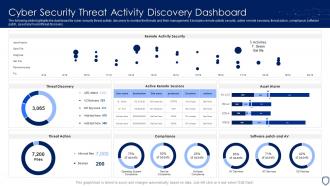
The following slide highlights the dashboard for cyber security threat activity discovery to monitor the threats and their management, it includes remote activity security, active remote sessions, threat action, compliance, software patch, asset alarm and threat discovery.
People who downloaded this PowerPoint presentation also viewed the following :
Cyber Security Threat Activity Discovery Dashboard with all 7 slides:
Use our Cyber Security Threat Activity Discovery Dashboard to effectively help you save your valuable time. They are readymade to fit into any presentation structure.






FAQs for Cyber Security Threat
Honestly, ransomware hitting remote workers is brutal right now. Supply chain attacks are getting nasty too - hackers break into your vendors first, then come for you. The new AI phishing emails are actually terrifying because they don't have those obvious red flags anymore. Cloud stuff gets misconfigured constantly since everyone rushed online during COVID. Oh, and manufacturing plus healthcare are getting hammered because their systems weren't built with security in mind. Train your people regularly and check those cloud permissions every few months - I learned that one the hard way.
Honestly, I'd start with admin accounts and remote access first - biggest impact for the effort. SMS is trash though, way too easy to hack with SIM swapping. Use authenticator apps instead, like Microsoft or Google's. Roll it out slowly to regular users after that, hitting email and critical stuff first. You'll definitely need a solid backup plan because people lose phones constantly. Training helps, but prep your IT team... they're gonna get slammed with "help I'm locked out" tickets those first couple weeks. Trust me on that one.
Look, most data breaches happen because someone clicked the wrong link or got tricked by a fake email. Your team can either be your weakest point or your best defense - it really depends on training. Hackers know this stuff too, so they go after people instead of just trying to crack your systems. Run some phishing simulations every few months, teach everyone to spot sketchy emails and social engineering tricks. Basic cybersecurity training goes a long way. I'd start with quarterly sessions - doesn't have to be fancy, just consistent.
Honestly, just nail the free stuff first - strong passwords, turn on two-factor authentication, and actually update your software when it bugs you to. That covers most attacks right there. Your employees will definitely click sketchy links though, so train them well. After that? Get a solid backup system - like, yesterday. Then grab decent antivirus. If you're dealing with customer data or whatever, cyber insurance isn't a bad idea either. Don't stress about doing everything immediately. Even throwing $50-100 monthly at this stuff helps. Just pick one weak spot and fix it.
So there's mainly four types you gotta worry about - viruses that spread through files, ransomware that locks up all your stuff until you pay, trojans pretending to be legit programs, and spyware watching everything you do. Ransomware's honestly terrifying because it can totally destroy businesses overnight. Keep your software updated and run decent antivirus. Don't open weird email attachments either - I learned that one the hard way lol. Back up your data regularly too. Really though, just don't click random suspicious stuff and you'll avoid most problems.
Okay so first thing - do a proper risk assessment. List all your assets, figure out where you're vulnerable, and map what threats could actually hurt you. Don't just let IT handle this alone though, different departments see totally different problems. Finance spots stuff operations would miss, you know? After that, rank everything by how likely it is and how bad it'd screw you over. Set up response procedures, get monitoring going, and make sure someone actually owns each problem area. Oh and this isn't a one-and-done thing - you gotta review quarterly since new threats pop up constantly.
Ugh, data breaches are such a nightmare legally. GDPR fines alone can hit millions - I've seen companies get absolutely destroyed by those. You'll have customers suing left and right, plus there's all these mandatory notification deadlines you can't miss. Healthcare and finance companies? They get it even worse with extra regulations. Then there's compliance audits that drag on forever, and if you were really negligent, criminal charges aren't off the table. Honestly though, the biggest thing is having your response plan figured out beforehand. Once you're breached, you're basically racing against the clock.
Okay so zero trust is basically the opposite of how we used to do security. Before, you'd trust anything inside your network - terrible idea honestly. Now you verify literally everyone and every device each time they want access to something. The whole "castle and moat" thing is pretty much dead because hackers break through perimeters all the time anyway. You're constantly checking who people are, giving them minimal access, and watching for weird behavior no matter where they're connecting from. Takes more effort upfront but way safer. I'd start with your most important stuff and lock that down first.
So you're gonna want a SIEM system first - Splunk or QRadar are solid choices for collecting all your security logs. CrowdStrike's pretty sweet for endpoint detection, catches malware like crazy. Wireshark's your friend for network monitoring, shows you exactly what traffic's doing. Oh and definitely get a vulnerability scanner - Nessus works great, OpenVAS too if you're on a budget. The tricky part is making sure they all work together instead of just sitting there as separate tools. Nothing worse than having blind spots during an actual incident, you know?
So encryption scrambles your data so only the right people can read it. Imagine sending a locked briefcase instead of an open envelope - even if someone grabs it, they can't see what's inside. It protects stuff stored on servers or hard drives if hackers break in or someone physically steals the device. Also works when data's moving around between networks, like emails or file transfers. Honestly, AES-256 is pretty solid if you're looking for standards. Just don't mess up managing your encryption keys or you'll have bigger problems than hackers.
Figure out what matters most to your business first - what systems or data would kill you if they went down? Put together a team where everyone knows their job (trust me, having someone whose role is basically "freak out productively" actually helps). Write down exactly what to do when shit hits the fan: how to spot problems, stop them spreading, investigate what happened, and get back up. Don't skip the communication part - you need scripts for telling your team, customers, and any regulators. The real key? Actually practice this stuff with fake scenarios. I've seen too many "perfect" plans completely crumble during actual emergencies. Oh, and check your backups work - seriously.
Multi-factor authentication is your best friend - seriously, just turn it on everywhere. Encrypt data when it's moving around and when it's sitting still (this should be standard by now but somehow isn't). Most breaches happen from dumb configuration mistakes, so double-check those bucket settings. Monitor who's accessing what and set up automated compliance checks. Your cloud provider will send security reports - actually read them instead of letting them pile up in your inbox. Oh, and audit user access regularly because people love hoarding permissions they don't need.
Oh man, remote work is a security nightmare honestly. Your attack surface just explodes when people aren't in the office anymore. Corporate firewalls can't protect them at home or at Starbucks - wherever they're working from. Personal devices are usually a mess security-wise too. I've seen some setups that would make you cringe. Now your company data is everywhere on networks you don't control. WiFi security is terrible most places, home routers are weak, and phishing attacks hit remote workers hard. You'll need VPNs and endpoint protection for sure. Regular training helps too.
Honestly, don't treat compliance like some yearly thing you check off and forget. Build it right into how you already work. Get some automated tools that'll ping you when regulations change in your industry - sounds boring but it's a lifesaver. Every quarter, have your legal and IT people sit down and compare new rules against what you're actually doing. Oh, and document literally everything. Your data flows, security stuff, all of it. Makes audits so much easier later. Start with mapping out when major regs get their updates throughout the year.
So basically AI and IoT are creating tons of new ways for hackers to get in, but they're also giving us better ways to fight back. AI is crazy good at catching threats humans would totally miss - like it can spot weird patterns in seconds. But attackers are using the same tech for nastier phishing scams and malware. Don't even get me started on IoT devices... your smart doorbell could literally become someone's way into your whole network. Most people never update their firmware either, which is honestly just asking for trouble. Zero-trust security is really your best bet here.
-
“Superb. What a great finding. Thankful for SlideTeam. We were paying people to make slides which went all in vain. We are so happy to have found you.”
-
Excellent products for quick understanding.