

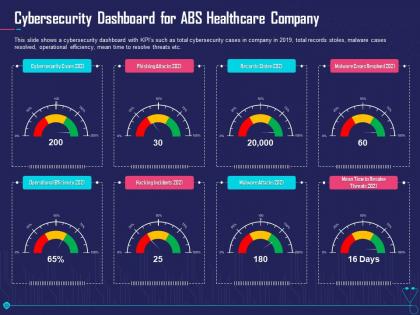
Cybersecurity dashboard for abs overcome challenge cyber security healthcare ppt layout




Try Before you Buy Download Free Sample Product
 Impress Your
 Audience
 100%
100% Editable
 Save Hours
 of Time


Our Cybersecurity Dashboard For Abs Overcome Challenge Cyber Security Healthcare Ppt Layout are topically designed to provide an attractive backdrop to any subject. Use them to look like a presentation pro.
People who downloaded this PowerPoint presentation also viewed the following :
Cybersecurity dashboard for abs overcome challenge cyber security healthcare ppt layout with all 2 slides:
Use our Cybersecurity Dashboard For Abs Overcome Challenge Cyber Security Healthcare Ppt Layout to effectively help you save your valuable time. They are readymade to fit into any presentation structure.
FAQs for Cybersecurity dashboard for abs overcome challenge cyber security
Track your threat detection rates and vulnerability counts first - those are your bread and butter metrics. Mean time to detection and response matters too, plus compliance status obviously. But here's the thing - user behavior stuff and network traffic patterns catch way more than people realize. Your dashboard needs real-time alerts AND historical trends so you can actually see patterns developing. Oh, and don't just throw up random charts that look impressive. Focus on metrics your team will actually use to make decisions every day. Start there, then add whatever else makes sense for your specific setup.
Dude, visualization tools are a game changer for cybersecurity data. Your brain picks up visual patterns way faster than sifting through endless log files - trust me on this. Heat maps show you attack patterns, real-time graphs track network traffic, and color-coded alerts tell you threat severity instantly. It's night and day compared to staring at raw text data. Start simple with dashboards showing your key metrics. You'll spot anomalies and trends almost immediately. Honestly, I wish more people knew how much easier this makes everything.
Keep your most important stuff visible in 3 seconds - that's the golden rule. Red for urgent, yellow for warnings, green for good. Don't jam everything on one screen though, seriously. I've worked with dashboards that looked like someone threw up rainbow confetti everywhere. Group similar things together - network stuff goes with network stuff, you know? Build in drill-down options so people can dig deeper when they need to. Oh, and test it with your actual team early on. What clicks for you might totally baffle everyone else.
Track stuff that actually matters - mean time to detect/respond, how many incidents you contain within SLA, false positive rates. Those "threats blocked" numbers? Total vanity metrics. Sure, they make execs happy, but they're basically useless for knowing if your controls work. Look at trends over months, not just snapshots. When incidents happen, dig into which controls failed - that's where you find the real gaps. Set alerts for when your key numbers go sideways so you're not caught off guard. Focus on metrics that show actual performance, not just impressive-looking dashboards.
Dude, you absolutely need real-time data for your cybersecurity dashboard. Without it, you're basically watching yesterday's news while hackers are having a field day. Live feeds catch threats the moment they pop up - not three hours later when everything's already compromised. It's like... imagine your smoke detector only going off the next morning, you know? Your dashboard should refresh every few seconds, maybe minutes at most. Configure those data sources for live monitoring instead of batch updates. Trust me, those extra milliseconds matter way more than you'd think when someone's trying to break into your network.
So basically you'll need to pull data from all your security tools using APIs and connectors. SIEM platforms like Splunk or Elastic can handle this through REST APIs or webhooks - honestly some tools are way pickier about data formats than they need to be, which gets annoying fast. The key thing is getting everything to use the same data format once it hits your dashboard. Map your common fields first - timestamps, severity levels, source IPs, that kind of stuff. I'd start with whatever data sources are most critical and just build out from there. Don't try to do everything at once or you'll go crazy.
Honestly, the biggest traps are info overload and those vanity metrics that look cool but tell you nothing useful. Don't cram every possible security stat onto one screen - it just creates chaos and you'll miss actual threats. Executives love flashy widgets, but resist that temptation if they don't help with real decisions. Your dashboard should answer "what do I need to do right now?" instead of just showing how busy everything is. Start with maybe 5-7 key metrics tops. Pretty charts are nice, but actionable insights matter way more.
So basically, just show people what they actually need for their job. Executives want the big picture stuff - risk scores, compliance status. They don't want to see every single alert popping up. Security analysts are the opposite - give them all the detailed threat feeds and incident queues they can dig into. IT managers are somewhere in the middle, caring more about system health and resources. The easiest approach? Just ask people what decisions they're making every day and what info would actually help. Then set up different access levels so everyone gets their slice without drowning in irrelevant data. Works way better than trying to guess what people need.
Focus on metrics that actually matter to business decisions - incident response times, how fast you're fixing critical vulnerabilities, and SLA compliance rates. Training completion percentages work well too. Honestly, executives just want to see those green compliance checkmarks. Skip the technical stuff like attack vectors or firewall data. They won't get it anyway. Instead, show security trends over time, budget tracking, and how you stack up against industry benchmarks. Stick to 5-7 key indicators tops, update monthly, and always explain what the numbers actually mean for operations.
Start with automated threat detection - it'll learn what's normal on your network and flag weird stuff. Honestly, the risk scoring is a game changer when you're buried in alerts all day. It prioritizes what actually matters. Behavioral analytics catches insider threats too, which is clutch. Don't try implementing everything at once though - pick one module and get it dialed in first. I'd automate whatever manual tasks eat up most of your time. Anomaly detection and predictive scoring are solid starting points.
Histograms are your best bet for incident response times - they'll show you how many got fixed quickly vs the ones that took forever. Box plots are solid too, especially for catching weird outliers that might mess with your averages. Oh, and time series work if you're tracking monthly trends or whatever. Just don't waste time with pie charts - they're completely pointless for this stuff. I'd start with a basic histogram first to see the big picture. Then use box plots to figure out where things are going wrong. Way more useful than staring at spreadsheets all day.
So basically, these dashboards show you everything that's happening with your security in real-time - which auditors absolutely love. You can see how fast you're fixing vulnerabilities, track incident response times, monitor who has access to what. Way better than frantically digging through emails and spreadsheets when audit time rolls around (been there, not fun). The best part? It automatically generates reports for whatever compliance framework you're dealing with - SOX, HIPAA, PCI DSS, you name it. Set up some alerts for the critical stuff and you'll actually stay ahead of problems instead of always playing catch-up.
You want dashboards with color-coded alerts - green means you're good, red means pay attention. Plain English explanations help way more than tech speak. Intuitive icons and simple charts that actually make sense are key. Automated summaries should tell you what happened and what to do next. Honestly, most cybersecurity tools are built by engineers who forget normal people need to use them too. Role-based views are clutch so your team doesn't get overwhelmed with irrelevant stuff. Ask vendors for demos that focus specifically on the non-technical experience - that'll save you headaches later.
The system pulls data from your security tools every 15 minutes, so you're basically seeing live info. Each data point gets checked against rules we set up - honestly saves me from missing obvious stuff. There's also this daily report that compares dashboard numbers to the actual source systems, which is pretty handy for catching weird drift issues. You can see timestamps on each widget showing the last refresh. If anything looks sketchy, just hover over that little info icon next to metrics. Shows you exactly where the data came from and when it updated. Super helpful when you're trying to figure out if something's actually broken or just delayed.
So definitely start with threat feeds and network monitoring - that's your foundation. Real-time alerts are non-negotiable though, otherwise you're basically watching Netflix while hackers party in your systems. Throw in vulnerability scans and user activity tracking too so you catch both outside attacks and sketchy insider stuff. Oh, and system health indicators - forgot about those for a sec. Make threat levels super obvious on your dashboard, plus incident response status. The whole point is seeing everything instantly without your brain melting from info overload. Build these basics first, then tweak it based on what your team actually looks at every day.
-
Unique and attractive product design.
-
Editable templates with innovative design and color combination.
-
It saves your time and decrease your efforts in half.
-
Appreciate the research and its presentable format.