

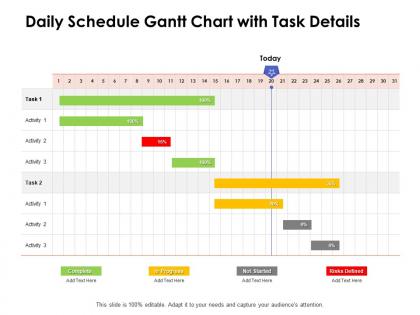
Daily schedule gantt chart with task details ppt powerpoint presentation pictures




Try Before you Buy Download Free Sample Product
 Impress Your
 Audience
 100%
100% Editable
 Save Hours
 of Time


Our Daily Schedule Gantt Chart With Task Details Ppt Powerpoint Presentation Pictures are ideal for any job. It even caters for impulsive ideas.
People who downloaded this PowerPoint presentation also viewed the following :
Daily schedule gantt chart with task details ppt powerpoint presentation pictures with all 2 slides:
Our Daily Schedule Gantt Chart With Task Details Ppt Powerpoint Presentation Pictures cater for impulsive ideas. It is ideal for any job.
FAQs for Daily schedule gantt chart with task details ppt
So basically, Gantt charts have four key parts you need to know about. Tasks get listed down the side, there's a timeline running across the top, and then you've got these horizontal bars that show how long each task takes. Oh, and dependency lines that connect related stuff together. The bars tell you start and end dates, while those dependency connections show which tasks need to finish before others can even start. Pretty useful for catching bottlenecks before they screw you over! Timeline keeps everyone on the same page about deadlines too. You'll be able to spot conflicts fast and actually see how things are progressing. My advice? Map out your big milestones first, then break those down into smaller chunks.
Honestly, Gantt charts are lifesavers for team chaos. Everyone can see who's doing what and when stuff's due - no more awkward "hey, where are we on that thing?" Slack messages. Dependencies become super obvious too, so you won't accidentally wait around for someone who's blocked. When priorities inevitably get shuffled (because they always do), just update the chart and boom - everyone knows how it affects their deadlines. I started using them last year and our project meetings actually make sense now. Try dropping one in your next team sync and see how much clearer everything gets.
Ugh, the worst mistake is going way too detailed right off the bat. You'll waste hours updating every little thing instead of actually getting work done. Buffer time is crucial - stuff ALWAYS takes longer than you think (trust me on this one). Don't create fake dependencies just because the tool lets you, and seriously, don't promise unrealistic deadlines just to keep your boss happy. I usually start with big milestones first, then drill down only where it matters. Keep updating it or it becomes useless pretty fast. Oh, and treat it like a guide, not gospel.
So Gantt charts are great for seeing your whole project timeline at once - all the deadlines, dependencies, the works. Kanban's more about moving stuff through different stages, and Scrum resets every sprint. Gantts can feel pretty rigid compared to Kanban's flexibility. But if you've got a complex project with tons of moving pieces? Or stakeholders who live for timelines? Gantt's your best bet. Daily team stuff though - Kanban just feels more natural. My advice? Use both honestly. Gantt for the big picture planning, then switch to Kanban when you're actually doing the work. Works way better than picking just one.
Oh totally! Construction guys usually add stuff like weather delays and permit approvals. Software teams throw in sprints and testing phases. Manufacturing needs production lines and supply chain headaches. Color-coding is honestly a lifesaver when you're juggling multiple streams - saves so much time. Time scales vary too depending on your industry. Some people track hours, others work in quarters. Custom fields are clutch for budget tracking or compliance stuff. I'd start by figuring out what constraints actually matter in your field, then just build those into whatever template you're using. Way easier than trying to force a generic one to work.
Oh man, I've been down this rabbit hole so many times! Microsoft Project is still solid if you want the full-featured beast. But honestly? Web tools like Asana and Monday.com are way easier to get your team actually using. Look for drag-and-drop scheduling and task dependencies - that stuff saves you hours. Smartsheet's pretty decent too, though the interface feels a bit... Excel-y? Make sure whatever you pick plays nice with your current tools. Trust me, manually copying data between platforms will make you want to scream. Grab free trials of like 2-3 options and test with something small first.
Oh man, Gantt charts are seriously lifesavers for project stuff. They show your whole timeline visually so you can actually see what connects to what - super helpful for catching problems early. Like if one task gets delayed, you'll know exactly which other things are gonna get screwed up too (honestly this has saved me so many headaches). They're perfect for updating your boss without drowning them in boring spreadsheet hell. Start with your most critical tasks first. Then just add everything else around it. Way easier to stay on track when you can literally see where you're supposed to be.
Oh man, Gantt charts are lifesavers for this stuff. They show you exactly who's supposed to be working on what and when - super visual. You'll spot conflicts right away, like when someone's accidentally double-booked (happens all the time). Resource bottlenecks become obvious too. The dependency tracking is clutch because you can see how one delayed task screws up everyone else's schedule. Honestly, I think most project disasters could be avoided if people actually looked at their Gantt charts more than once a month. Update it weekly and bring it to planning meetings - you'll catch problems before they explode.
Yeah totally! Some agile folks get weird about it, but Gantt charts can work great if you're smart about them. Don't try mapping every sprint task - that's a nightmare. Instead, focus on the big stuff like epics and major milestones. They're actually pretty useful for showing stakeholders your roadmap or tracking how different teams' work connects. Just don't get married to your timeline because things always change. I've seen them work well for quarterly planning. Oh, and definitely update them regularly or they become useless fast.
Dude, definitely pad your Gantt chart with extra time - like 10-15% buffer for big milestones. Trust me on this one, our project got absolutely wrecked last quarter when everything ran over! Set up some kind of formal process where people can actually request changes instead of just... expecting them to happen. Regular check-ins are huge too. That way you can approve stuff and update the chart before things get messy. Oh and use colors or notes to track what got changed and why - honestly this saves so much confusion later. The main thing is keeping everyone in the loop so nobody gets hit with surprise deadline shifts.
Update it weekly or whenever something major shifts. I always track actual dates vs what I originally planned - super helpful for spotting patterns. When tasks move, adjust the dependencies too. But don't just drag bars around randomly (honestly, people do this way too much and it drives me nuts). Write down why things changed so you'll get better at estimating next time. The key thing is telling your team right after you update it. A Gantt chart that's two weeks behind is basically useless. Just set a calendar reminder so you don't forget.
So your Gantt chart actually gives you tons of useful metrics without extra work. Schedule variance tells you if stuff's running late or early. Percent complete shows progress against your timeline - pretty straightforward. Critical path analysis is honestly a game-changer because it shows which delays actually matter for your end date (spoiler: not everything that feels urgent really is). You can also pull resource utilization and milestone rates. Most PM tools calculate this automatically anyway. Just set up a dashboard view and check it weekly instead of doing math by hand like some kind of masochist.
Dude, save your old Gantt charts! They're basically a cheat sheet for future projects. You'll see exactly where things went sideways compared to your original plan. Dependencies that seemed simple but weren't, tasks that always balloon (looking at you, stakeholder reviews). I kick myself for not doing this earlier - could've saved so much stress. Just toss completed ones in folders by project type. When you're planning something similar, pull them out. You'll spot the usual trouble spots and can actually give realistic timelines instead of wildly optimistic ones.
Skip Gantt charts when priorities keep changing - you'll waste time redoing them constantly. Simple projects don't need all that complexity either. Creative work? Forget it, that stuff doesn't follow neat timelines anyway. I swear some people get so obsessed with making their charts look perfect they barely touch the actual project. Plus they're way too detailed for stakeholders who just want to know "are we on track?" If you're doing lots of back-and-forth work, Kanban boards are honestly so much easier to manage.
Honestly, color-coding your Gantt charts will save you so much headache. I always use different colors for each team or project phase - makes it super easy to spot who's swamped or falling behind. You'll instantly see bottlenecks without squinting at tiny labels during those long meetings (you know the ones). Red for overdue, green for done, yellow for in progress - that kind of thing. Pro tip: stick with the same colors across all your charts. Trust me, your team will thank you for not making them decode a new rainbow every week.
No Reviews