

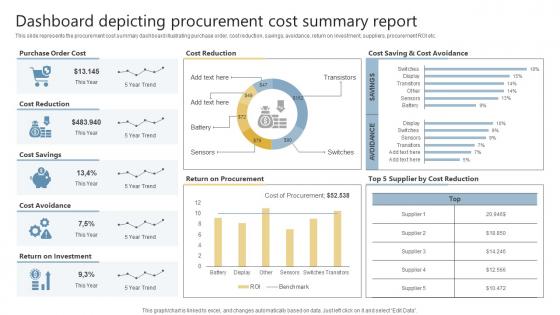
Dashboard Snapshot Depicting Procurement Cost Summary Report




Try Before you Buy Download Free Sample Product
 Impress Your
 Audience
 100%
100% Editable
 Save Hours
 of Time


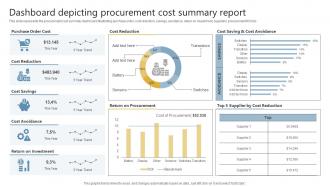
This slide represents the procurement cost summary dashboard illustrating purchase order, cost reduction, savings, avoidance, return on investment, suppliers, procurement ROI etc.
People who downloaded this PowerPoint presentation also viewed the following :
Dashboard Snapshot Depicting Procurement Cost Summary Report with all 7 slides:
Use our Dashboard Snapshot Depicting Procurement Cost Summary Report to effectively help you save your valuable time. They are readymade to fit into any presentation structure.





FAQs for Dashboard Snapshot Depicting Procurement
Focus on total spend by category and supplier performance scores first - those are your bread and butter. Cost savings vs targets is obvious but necessary. Here's what executives actually care about though: spend under contract percentage and supplier concentration risk. That second one always gets their attention because nobody wants to be screwed if one major vendor goes down. Purchase order cycle time shows if your processes are broken, and maverick spending reveals who's going rogue. Keep it simple so people can spot problems fast. Weekly updates work best, and set up alerts when things get weird.
Look, those procurement spreadsheets are a nightmare to read through. But turn that data into charts and graphs? Game changer. You'll spot spending patterns instantly instead of hunting through endless rows. Honestly, comparing vendor performance becomes so much easier when you can actually see the trends. Plus you'll catch budget issues early - way before they blow up. I'd start simple though, maybe just a dashboard showing your top 5 spending areas. Trust me, you'll find money you didn't even know you were wasting.
Dude, real-time data is like having a financial radar for all your procurement stuff. Instead of waiting for those useless monthly reports (seriously, who has time for that?), you see exactly where money's flowing as it happens. Catches budget overruns before they get crazy, spots duplicate orders, keeps vendors honest on pricing. I'd start with automated alerts on your biggest spending areas - that's where you'll actually notice a difference. The live dashboard thing sounds fancy but it's really just about getting pinged when something's off. Way better than playing catch-up later.
So basically you'd add forecasting models that look at your past spending, how suppliers have performed, and market trends to predict future costs. Your dashboard would show projected price increases, supplier risk scores, demand forecasting - all mixed in with your current spend data. Start simple with price trends and supplier forecasts before diving into the complex stuff (trust me on this one). It honestly sounds gimmicky but makes a real difference once you see it working. Set alerts for when predictions show big cost changes ahead.
Start with the big stuff - total spend, savings targets, your biggest supplier costs right up top. Bar charts and trend lines work way better than those annoying pie charts where you're squinting at tiny slices. Real-time data's pretty much essential now, plus you'll want filters for drilling down by department or whatever. Oh, and make sure people can actually figure out what they're looking at in like 30 seconds max. I've seen too many dashboards that look impressive but are completely useless because they're just... overwhelming, you know?
Focus on validation rules right at data entry - block bad stuff before it gets in. Monthly audits are a pain but you've gotta compare dashboard numbers to your ERP and P2P systems. Set up automated alerts for weird spikes or missing data too. Honestly, the training piece is huge - get your team following the same data entry standards. Someone needs to own dashboard accuracy or it'll just be chaos. I learned this the hard way when our Q3 numbers were completely off and we didn't catch it for weeks.
Power BI and Tableau are probably your best bets for procurement dashboards. Most companies already have Microsoft licenses so Power BI's usually cheaper. Tableau's visualization game is stronger though - like way stronger if you need fancy charts. Qlik Sense is solid too, especially with huge datasets. Some teams just build stuff directly in their ERP systems (SAP, Oracle, whatever). Honestly depends on your budget and what data you're working with. Oh, and definitely go with whatever your IT folks already know. Trust me on this one - you don't want to be the person who picked the tool nobody can fix when it crashes at 5pm on Friday.
Honestly, procurement dashboards are game-changers for tracking suppliers. You'll see delivery times, quality scores, costs, and contract stuff all on one screen instead of hunting through endless Excel files (which is the worst). The visual setup makes comparing suppliers way easier - you can spot patterns and see who's actually reliable vs. who's always causing problems. Most have alerts that ping you when something goes off track. Oh, and don't try to track everything at once - pick your top 3-5 metrics that actually matter to your day-to-day operations first.
Looking at your old procurement data on a dashboard is honestly a game changer. You'll catch seasonal price swings and figure out which suppliers actually show up on time and on budget. Cost creep becomes super obvious before it gets out of hand - wish I'd learned this sooner! Bottlenecks in your procurement cycles jump out visually too. Plus you can compare how you're doing now versus last quarter. The real power move though? Using all that concrete performance history to predict budgets and negotiate contracts instead of just winging it with guesswork.
So basically, procurement dashboards let you see all your spending patterns in one place - suppliers, categories, timeline, the whole deal. You'll spot your biggest cost drivers super fast and catch weird spikes that might signal issues. Honestly, seeing it all laid out visually is kind of shocking sometimes! Plus you can track if people are actually following contracts or going rogue with random suppliers. Oh, and definitely start with your top 3-5 spending categories first - that's where the real money is anyway.
Oh man, the data format nightmare is real. Your ERP spits out one thing, supplier invoices are totally different, and contract systems? They use completely random field names for identical stuff. Missing values everywhere, duplicates galore, plus everything updates at different times so nothing syncs up properly. Quality control becomes this massive pain. I swear it's worse than trying to organize a group chat sometimes. Map out your data sources first and figure out which fields you can actually standardize - don't even touch the dashboard until that's sorted. Trust me on this one.
Honestly, dashboards are clutch for catching compliance stuff early. Set up alerts for contracts about to expire, vendors missing certs, or when spending goes over approval limits. Way better than digging through endless spreadsheets - trust me on that one. You can track vendor performance and spot weird spending patterns that might be fraud. The audit trails get built in automatically which is nice. I'd do weekly compliance reports so you're not scrambling later. Oh, and the real-time thing actually works - you'll catch red flags before they blow up into bigger problems.
Basically just set up different views for different people. Executives want the big picture stuff - spend trends, how much you're saving, that kind of thing. Your procurement team needs all the nitty-gritty details about suppliers and categories. Finance wants budget variance and cash flow data (obviously). Use your dashboard's permissions so people only see what matters to them - honestly, nobody's got time to dig through tons of irrelevant charts. Oh, and definitely set up alerts for important thresholds. That way people know when something's up without having to constantly check the thing.
Don't cram 47 KPIs onto one screen - I've literally seen people do this and wonder why nobody opens the dashboard. Focus on maybe 5-7 things that actually matter for procurement decisions. Spend variance, supplier performance, contract compliance - stuff like that. Skip the vanity metrics that just look pretty but don't help anyone decide anything. Oh, and automate your data feeds because manual updates are a nightmare that always fall apart after like two weeks. Start with the basics, then only add more when people are bugging you for extra details.
Dude, you absolutely need to train your team on this stuff. Without it, they'll just stare at the dashboard like it's hieroglyphics or completely ignore it. Worse case? They misread the data and make terrible decisions based on wrong assumptions. Even if your dashboard looks super clean and intuitive, people still need help understanding which procurement KPIs actually matter for their day-to-day work. I'd honestly just throw everyone in a room for a hands-on workshop. Let them mess around with it and ask questions about scenarios they'd actually face. Way better than some boring presentation.
-
Impressive templates. Designing a presentation is fun now!
-
A big thanks to SlideTeam! An incredible and diverse library of templates helped me with my business project presentation.