

Dashboard For Tracking Customer Service Team Performance Digital Consumer Touchpoint Strategy




Try Before you Buy Download Free Sample Product
 Impress Your
 Audience
 100%
100% Editable
 Save Hours
 of Time


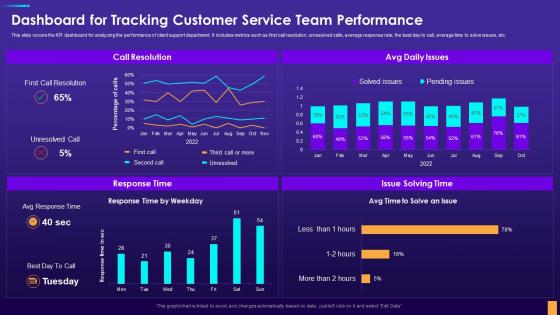
This slide covers the KPI dashboard for analyzing the performance of client support department. It includes metrics such as first call resolution, unresolved calls, average response rate, the best day to call, average time to solve issues, etc.
People who downloaded this PowerPoint presentation also viewed the following :
Dashboard For Tracking Customer Service Team Performance Digital Consumer Touchpoint Strategy with all 7 slides:
Use our Dashboard For Tracking Customer Service Team Performance Digital Consumer Touchpoint Strategy to effectively help you save your valuable time. They are readymade to fit into any presentation structure.





FAQs for Dashboard For Tracking Customer Service Team Performance Digital
Customer service performance dashboards should include response time, resolution rate, customer satisfaction scores, first-call resolution percentage, and agent productivity metrics. These KPIs enable organizations to streamline operations, enhance customer experiences, and optimize resource allocation, with many service teams finding that tracking these metrics simultaneously delivers faster resolution times, improved satisfaction rates, and ultimately stronger competitive advantage.
Data visualization enhances customer service performance dashboards by transforming complex metrics into intuitive charts, heat maps, and trend graphs that enable instant pattern recognition and anomaly detection. Through interactive visualizations, managers can quickly identify performance bottlenecks, track resolution times across channels, and monitor agent productivity in real-time, ultimately delivering faster issue resolution and improved customer satisfaction scores.
Best practices for implementing a customer service performance dashboard include defining clear KPIs aligned with business objectives, ensuring real-time data integration, designing user-friendly interfaces, establishing regular review processes, and providing comprehensive staff training. Through strategic dashboard deployment, organizations streamline performance monitoring, enhance response times, and improve customer satisfaction scores, with many companies finding that well-implemented dashboards ultimately deliver measurable improvements in service quality and operational efficiency.
Real-time data on customer service metrics improves response times by enabling instant identification of bottlenecks, automatic routing to available agents, and immediate escalation of priority cases. Through live monitoring dashboards, organizations can dynamically adjust staffing levels, streamline workflows, and proactively address service delays, with many companies finding response times reduced by 40-60% while enhancing overall customer satisfaction.
Customer feedback serves as the foundation for defining key metrics, identifying pain points, and setting performance benchmarks within service dashboards. Through sentiment analysis, satisfaction scores, and direct feedback integration, organizations can track resolution times, agent effectiveness, and service quality trends, with many companies finding that feedback-driven dashboards ultimately enhance customer experiences and operational efficiency.
Businesses can effectively measure customer satisfaction through Net Promoter Score surveys, Customer Satisfaction scores, response time tracking, resolution rates, and sentiment analysis from feedback channels. These metrics, when displayed through real-time dashboards with visual indicators and trend analysis, enable customer service teams to identify performance gaps quickly, ultimately delivering improved customer experiences and enhanced operational efficiency across organizations.
Common mistakes include overcrowding dashboards with excessive metrics, focusing solely on quantity over quality measures, neglecting real-time data integration, poor visual hierarchy, and inadequate stakeholder input during design. These oversights often result in dashboards that confuse rather than clarify, with many customer service teams finding that streamlined, outcome-focused designs deliver better decision-making and enhanced operational efficiency.
Automation tools significantly enhance dashboard accuracy by eliminating manual data entry errors, ensuring real-time synchronization across systems, and standardizing data collection processes. Through automated integration with CRM platforms, call center software, and customer feedback systems, organizations streamline data validation, reduce human inconsistencies, and ultimately deliver more reliable performance insights for strategic decision-making.
Mobile-accessible customer service dashboards should include responsive design, touch-optimized navigation, real-time metrics visibility, offline data synchronization, and simplified visualization formats. These features enable managers to monitor key performance indicators, respond to escalating issues, and make data-driven decisions from anywhere, ultimately delivering faster resolution times and enhanced customer experiences across organizations.
A customer service performance dashboard facilitates better team collaboration by providing shared visibility into metrics, enabling real-time communication around performance trends, and creating unified goals across departments. Through centralized data access, teams can coordinate responses more effectively, identify knowledge gaps collectively, and align support strategies, with many organizations finding that transparent performance visibility ultimately enhances cross-functional teamwork and customer satisfaction.
Trend analysis reveals patterns in customer service metrics like response times, resolution rates, and satisfaction scores, enabling organizations to identify improvement opportunities and performance deterioration before issues escalate. Through consistent tracking, companies in retail, telecommunications, and financial services can optimize resource allocation, predict seasonal demands, and benchmark against historical performance, ultimately delivering more proactive customer experiences and competitive advantage.
Organizations can tailor customer service performance dashboards by customizing metrics, data granularity, and visualization formats for specific roles, ensuring executives see strategic KPIs while frontline agents access real-time operational data. Through role-based permissions and personalized interfaces, companies enable managers to monitor team performance, agents to track individual goals, and leadership to assess overall customer satisfaction trends, ultimately delivering more targeted insights and improved decision-making across all organizational levels.
**INPUT**: What tools and platforms are best suited for designing a customer service performance dashboard? **OUTPUT**: Leading platforms for customer service performance dashboards include Tableau, Power BI, Salesforce Service Cloud, Zendesk Explore, and Google Data Studio, each offering real-time analytics and customizable visualization capabilities. These tools streamline performance tracking by integrating multiple data sources, automating reporting processes, and delivering actionable insights, with many service organizations finding that comprehensive dashboards enhance response times and customer satisfaction significantly. [Word count: 60 words]
A dashboard identifies customer service training needs by analyzing performance metrics like response times, resolution rates, customer satisfaction scores, and complaint categories across individual agents and teams. Through real-time data visualization, managers can pinpoint skill gaps, track recurring issues, and spot underperforming areas, with many organizations finding that targeted training programs based on dashboard insights ultimately enhance service quality and reduce customer churn.
Benchmarking against industry standards enhances customer service dashboards by providing contextual performance comparisons, identifying improvement opportunities, setting realistic targets, and revealing competitive positioning gaps. This strategic approach enables teams to prioritize initiatives based on industry best practices, ultimately delivering superior customer experiences while maintaining operational efficiency in an increasingly competitive service landscape.
-
Attractive design and informative presentation.
-
Use of icon with content is very relateable, informative and appealing.