

Dashboard For Training Program Evaluation Professional Development Training




Try Before you Buy Download Free Sample Product
 Impress Your
 Audience
 100%
100% Editable
 Save Hours
 of Time


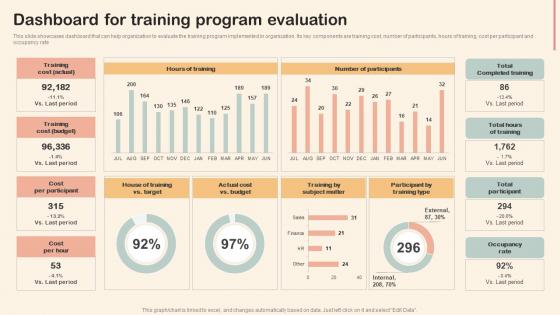
This slide showcases dashboard that can help organization to evaluate the training program implemented in organization. Its key components are training cost, number of participants, hours of training, cost per participant and occupancy rate.
People who downloaded this PowerPoint presentation also viewed the following :
Dashboard For Training Program Evaluation Professional Development Training with all 7 slides:
Use our Dashboard For Training Program Evaluation Professional Development Training to effectively help you save your valuable time. They are readymade to fit into any presentation structure.





FAQs for Dashboard For Training Program Evaluation
Essential KPIs for dashboard evaluation include conversion rates, customer acquisition costs, operational efficiency metrics, revenue growth indicators, and user engagement scores. These metrics enable organizations to track performance across sales, marketing, and operational functions, with many financial services and retail companies finding that strategic KPI combinations ultimately deliver enhanced decision-making capabilities and competitive advantages.
Data visualization techniques enhance dashboard clarity by incorporating intuitive charts, consistent color schemes, strategic white space, interactive elements, and hierarchical information organization. These approaches streamline data interpretation by reducing cognitive load, enabling quick pattern recognition, and facilitating seamless user navigation, with many organizations finding that well-designed visual elements ultimately deliver faster decision-making and improved operational efficiency.
Common pitfalls include information overload, unclear visual hierarchy, misaligned metrics with stakeholder needs, poor data accuracy, and lack of actionable insights. These design challenges can be avoided by prioritizing relevant KPIs, implementing intuitive navigation, and ensuring real-time data integration, with many organizations finding that stakeholder-focused dashboards ultimately enhance decision-making speed and strategic alignment.
Determining dashboard audience involves analyzing user roles, decision-making levels, technical expertise, and specific information needs through stakeholder interviews and workflow analysis. This directly shapes design choices, with executive dashboards emphasizing high-level KPIs and visual simplicity, while operational teams require detailed metrics and drill-down capabilities, ultimately ensuring each dashboard delivers relevant insights that drive actionable business outcomes.
Interactivity enhances dashboard evaluation by enabling real-time data exploration, customizable filtering, drill-down capabilities, and personalized views that adapt to user needs. These features streamline decision-making processes by allowing users to manipulate data dynamically, uncover deeper insights, and engage more meaningfully with information, ultimately delivering improved analytical efficiency and strategic outcomes.
Assessing dashboard accuracy involves validating data sources, implementing automated quality checks, conducting regular audits, and establishing clear data governance protocols. Organizations enhance reliability by cross-referencing metrics with source systems, setting up real-time monitoring alerts, and maintaining comprehensive documentation, with many financial services and healthcare institutions finding that systematic validation processes significantly improve decision-making confidence and operational efficiency.
User-friendly dashboards should prioritize visual hierarchy, intuitive navigation, consistent layout, responsive design, and clear data visualization. These principles streamline information consumption by reducing cognitive load, enhancing accessibility, and enabling quick decision-making, with many organizations finding that well-designed dashboards ultimately deliver improved operational efficiency and better user experiences.
Dashboards can be customized through role-based access controls, department-specific KPIs, tailored visualizations, personalized data filters, and industry-relevant metrics that align with each team's objectives. Sales teams might focus on pipeline analytics and conversion rates, while HR departments track employee engagement and retention metrics, ultimately enabling targeted decision-making and enhanced operational efficiency across organizational functions.
Real-time data is crucial for dashboard evaluation as it enables immediate decision-making, accurate performance monitoring, and rapid response to changing conditions. However, it presents challenges including increased infrastructure costs, data quality management complexity, and potential system performance issues, with many organizations finding that strategic implementation balances immediacy needs against technical feasibility for optimal business outcomes.
Best practices for maintaining dashboards include regular data accuracy audits, user feedback collection, performance monitoring, content relevance reviews, and systematic update scheduling. These practices streamline operational efficiency by ensuring reliable insights, minimizing outdated information, and enhancing user adoption, with many organizations finding that consistent maintenance ultimately delivers sustained competitive advantage and improved decision-making capabilities.
User feedback informs dashboard iterative design by identifying usability pain points, highlighting missing functionality, revealing workflow inefficiencies, and uncovering unexpected user behaviors through surveys, analytics, and direct observation. This continuous feedback loop enables designers to prioritize feature enhancements, streamline navigation paths, and optimize data visualization approaches, ultimately delivering more intuitive interfaces that enhance decision-making speed and user adoption rates.
**INPUT**: What tools and software are recommended for developing and evaluating effective dashboards? **OUTPUT**: Recommended dashboard development tools include Tableau, Power BI, Qlik Sense, Looker, and Google Data Studio, each offering distinct visualization capabilities and integration options. These platforms streamline dashboard creation through drag-and-drop interfaces, real-time data connectivity, and collaborative features, with many organizations finding that strategic tool selection significantly enhances decision-making speed and operational efficiency. **Word count: 56 words**
Storytelling through data integrates into dashboard design through progressive disclosure, contextual annotations, comparative visualizations, and guided navigation paths that reveal insights sequentially. This approach transforms static metrics into compelling narratives, with financial services and healthcare organizations finding that story-driven dashboards significantly enhance user engagement, accelerate decision-making processes, and ultimately deliver more actionable business intelligence.
Dashboard success metrics include user adoption rates, task completion times, data accuracy levels, user satisfaction scores, and decision-making speed improvements. These measurements help organizations assess operational efficiency through reduced reporting time, enhanced data-driven decisions, and improved user engagement, with many companies finding that effective dashboards ultimately deliver faster insights and measurable productivity gains.
Cultural differences significantly impact dashboard interpretation through varying data processing preferences, visual design expectations, color associations, and communication styles across diverse teams. Organizations increasingly find that localized dashboard designs, incorporating cultural context training and flexible visualization options, enhance cross-cultural data comprehension and decision-making effectiveness, ultimately delivering more inclusive and actionable business insights.
-
Really like the color and design of the presentation.
-
The design is clean-cut, modern, and sleek, keeping the users' needs in mind. The multiple uses make this product worth every penny!