

Dashboard Of Property Operations And Maintenance




Try Before you Buy Download Free Sample Product
 Impress Your
 Audience
 100%
100% Editable
 Save Hours
 of Time


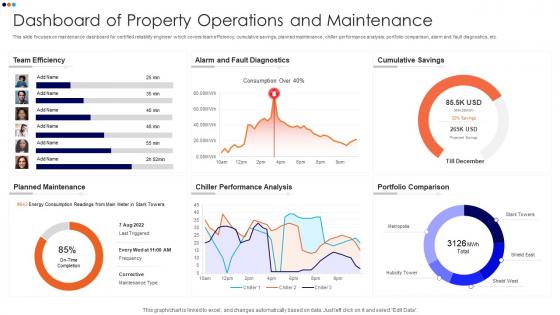
This slide focuses on maintenance dashboard for certified reliability engineer which covers team efficiency, cumulative savings, planned maintenance, chiller performance analysis, portfolio comparison, alarm and fault diagnostics, etc.
People who downloaded this PowerPoint presentation also viewed the following :
Dashboard Of Property Operations And Maintenance with all 7 slides:
Use our Dashboard Of Property Operations And Maintenance to effectively help you save your valuable time. They are readymade to fit into any presentation structure.






FAQs for Dashboard Of Property
Focus on vacancy rates, rent roll, and maintenance requests first - that's where your money lives or dies. Financial summaries are clutch too, plus tenant communication logs and lease renewal alerts. Mobile access is non-negotiable since you're probably running around half the time anyway. Automated reporting will save your sanity, trust me. Customizable widgets let you prioritize what actually matters for your specific properties. Honestly, start simple with these basics and build from there - you don't need every fancy feature right off the bat.
Charts and graphs will save your sanity - no more hunting through endless spreadsheet rows. You'll see occupancy rates, rent trends, maintenance costs right away. It's literally like comparing a textbook to a movie. Bar charts work great for starting out, then you can get fancier later. Patterns jump out at you super fast, like which buildings are money pits or when vacancy rates tank seasonally. I swear, once you switch from pure numbers to visual stuff, managing properties becomes way less of a headache. Your dashboard actually makes sense instead of looking like random data vomit.
Honestly, start with occupancy rates and rent collection - those two will tell you if you're making money or bleeding it. Maintenance costs per unit matter too, obviously. I'd also track how long units sit empty between tenants because that's where you lose the most cash. Tenant satisfaction is huge if you can measure it somehow - pisses me off when landlords ignore this because happy people don't move out every year. Your net operating income over time shows the real picture though. Don't overthink it at first, just nail these basics and add fancier metrics later.
Dude, real-time data is honestly a game changer. You'll catch maintenance stuff before it gets expensive, adjust pricing when the market shifts, respond to tenant issues right away. No more waiting around for monthly reports to tell you occupancy tanked or costs went crazy. It's wild how much clearer everything becomes when you can see what's happening as it happens - like having x-ray vision but for your properties lol. My advice? Figure out which numbers actually matter for your daily decisions first, then focus on automating just those feeds. Don't try to do everything at once or you'll go nuts.
Honestly, UI can totally make or break your dashboard. People will just give up if they can't find what they need quickly - then you're stuck fielding support calls all day. Make sure the navigation makes sense and your data visualizations are actually readable. Oh, and test it on mobile since that's how most people check this stuff now. I learned this the hard way on my last project. Keep things simple with fewer clicks to get tasks done. Bad design equals frustrated users who won't use your system. Do some user testing early on - trust me, it'll save you so many headaches down the road.
Oh man, these dashboards are seriously worth it. All your tenant stuff gets dumped into one spot instead of having emails and texts scattered everywhere. Mass announcements for maintenance? Easy. Automated rent reminders so you don't have to nag people? Done. Tenants get their own little portal where they can submit repair tickets and check payment history without blowing up your phone. Honestly the automated responses thing is clutch - set those up first for basic questions. I probably save like 5 hours a week just from that alone. Way better than playing phone tag all day.
First thing - figure out what data you actually check every day, not what looks impressive. Put that stuff right up front. I'd honestly just start super basic for like a week to see what you're actually missing, then build from there. Group similar things together (all your tenant stuff in one spot, etc.) and stick to the same colors throughout. Don't go crazy trying to make it perfect right away - that never works out how you think it will. Oh, and make sure your team can find shared info easily without clicking through a million screens. Trust me on that one.
Dashboard analytics are perfect for this - track your response times, request volumes by building/category, and completion rates. Those visual charts help you catch patterns fast. Like when HVAC requests always blow up in summer (obviously) or certain properties consistently lag behind. Weekly reports show which teams are killing it vs who needs backup. Oh and definitely set alerts for requests hitting your time limits - trust me, stuff gets forgotten otherwise. The data's honestly pretty eye-opening once you start digging into it.
Multi-layered security is your best bet here. Two-factor authentication is absolutely essential - don't even think about skipping it. Encrypt everything in transit and at rest, plus do regular security audits. Role-based access is clutch so your maintenance guys can't peek at financial stuff they shouldn't see. Back up religiously and actually test those restore procedures (learned that the hard way once). Session timeouts help too. Set up monitoring for weird login patterns and automated alerts for suspicious activity - catching problems early beats dealing with disasters later.
Dude, mobile access is absolutely critical for property management. You're always running around - dealing with tenant complaints while grabbing coffee, updating work orders between site visits, all that chaos. Without a mobile-friendly dashboard, you'll be stuck doing everything twice or waiting until you're back at your computer for basic stuff. Honestly, the good ones let you knock out most of your daily tasks right from your phone. Test yours out first though - if the navigation sucks or you can't read anything, it'll kill your efficiency. Trust me on this one.
Honestly, the worst mistake is jamming everything onto one screen. Pick maybe 5-7 metrics that actually matter day-to-day - occupancy rates, maintenance stuff, rent collection. I've worked with dashboards that looked like slot machines with all the blinking alerts, and surprise - nobody touched them. Make sure your data connections aren't garbage or you'll get unreliable numbers. Oh, and definitely build for mobile since property managers live on their phones. My advice? Start basic with your main KPIs, then slowly add more based on what people actually ask for.
Dude, these dashboards are seriously worth it. You get everything in one spot - rent collections, maintenance costs, vacancy rates, all that stuff. Way better than juggling a million spreadsheets (been there, done that). The cool part is you can actually see patterns in your data and predict when you'll need cash for big repairs. I caught a budget issue last month just because I set up alerts when I'm hitting my spending limits. Historical trends help too - like knowing December's always rough for collections. Makes planning so much easier when you're not flying blind, you know?
Honestly, these dashboards are lifesavers for compliance stuff. They track everything - lease renewals, safety inspections, rent control limits, all that regulatory nonsense - so you're not drowning in spreadsheets. The alerts hit before deadlines, reports generate themselves, and there's an audit trail for when inspectors show up. I learned this the hard way after almost missing a major inspection deadline last year. Your documentation stays organized instead of scattered across random filing cabinets. Set up those compliance alerts right away. Trust me, you'll be so grateful when inspection season hits and you're actually prepared for once.
Honestly, you absolutely need their feedback or you'll build something totally useless. Property managers know what actually matters - like seeing urgent maintenance stuff right away Monday morning, not some fancy chart that looks cool but serves no purpose. I'd literally shadow a few managers for a day before building anything. Their daily workflows should drive everything from your layout to how you set up notifications. Quick user interviews work too if shadowing isn't possible. They'll save you from creating something pretty but completely wrong for how they actually work.
Honestly, start with maintenance scheduling - that's where you'll see results fastest. Connect your dashboard to old maintenance records, tenant data, whatever historical stuff you've got. Machine learning does the heavy lifting, predicting HVAC failures or lease renewals. I've seen it work pretty well for rental price adjustments too, especially seasonal stuff. Your dashboard shows it all as charts and alerts. Kind of wild how accurate it gets - though sometimes I wonder if we're overthinking simple patterns. Once maintenance predictions are working, branch out to vacancy forecasting and budgets.
-
“Detailed and great to save your time.”
-
Amazing product with appealing content and design.