

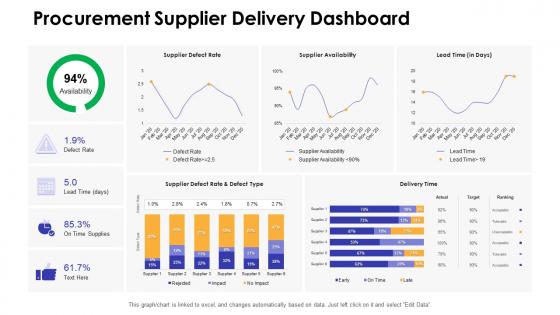
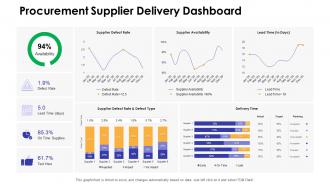
Dashboards Snapshot by function procurement supplier delivery dashboard




Try Before you Buy Download Free Sample Product
 Impress Your
 Audience
 100%
100% Editable
 Save Hours
 of Time


Our Dashboards Snapshot By Function Procurement Supplier Delivery Dashboard are topically designed to provide an attractive backdrop to any subject. Use them to look like a presentation pro.
People who downloaded this PowerPoint presentation also viewed the following :
Dashboards Snapshot by function procurement supplier delivery dashboard with all 7 slides:
Use our Dashboards Snapshot By Function Procurement Supplier Delivery Dashboard to effectively help you save your valuable time. They are readymade to fit into any presentation structure.





FAQs for Dashboards Snapshot by function procurement
Honestly, I'd stick to the stuff that actually matters for your procurement team. Cost savings is obvious - both what you've saved and what you're projecting. Spend under management and supplier performance scores are solid picks too. Contract compliance is massive but people always forget about it until something goes wrong. Procurement cycle times and PO accuracy should definitely make the cut. Oh, and supplier diversity if your company cares about that. Here's the thing though - don't go crazy with like 15 different metrics. Pick maybe 6-8 max that actually connect to what your business wants to achieve. Otherwise stakeholders just get overwhelmed and nothing changes.
Honestly, data visualization is a game changer for procurement stuff. You'll actually see what's happening instead of staring at boring spreadsheets all day. Quick glances at dashboards show you which suppliers rock, where you're bleeding money, and supply chain hiccups before they bite you. Real-time budget tracking? Yes please. You can even spot patterns to predict what you'll need next quarter - though sometimes those predictions are hilariously wrong. Start small with maybe 4 key metrics your team cares about and build basic charts first. Way less overwhelming that way.
Your procurement dashboard is pretty much useless without real-time data, honestly. You need live updates on spending, vendor performance, all that stuff - otherwise you're just staring at yesterday's news when you should be making today's decisions. It's like checking your bank balance from last week, totally pointless. Real-time feeds help you catch budget issues early and spot delivery problems right when they happen. Oh, and definitely set up automated alerts - learned that the hard way. No point having a fancy dashboard if it's not actually telling you when things go sideways.
Hey! So dashboards basically show you where you're bleeding money without realizing it. Like, you'll find departments buying identical stuff but paying totally different prices - drives me crazy when I see that. Look for duplicate vendors too, plus any purchases happening outside your contracts. Honestly, the visual breakdowns are a game changer. Makes it super obvious where everything's going. Start with your biggest spending categories first, then dig into anything that looks weird or off. You'll catch seasonal patterns and spot chances for volume discounts pretty quickly.
Focus on what procurement people check every single day - spend data, how vendors are performing, contract stuff. White space is your friend here. Don't make it look like Excel threw up on the screen (seen way too many of those). Fast loading is non-negotiable because these folks are busy. Put the most important stuff where eyes naturally go first. Your filters better be dead simple to use or people will just give up. Honestly? Just get some actual procurement team members to mess around with it early on. They'll roast whatever doesn't work.
Most dashboard tools have connectors for the big ERPs - SAP, Oracle, NetSuite, that stuff. You'll probably use APIs or those pre-built integrations to pull data straight from your system. Honestly though? The real pain is mapping all your data fields correctly. That's where you'll be pulling your hair out, not the actual connection part. If you're stuck with some ancient ERP, middleware might save you. I'd start by seeing what native connectors your dashboard vendor has for your specific version, then bug your IT team about setting up the sync schedule. Power BI and Tableau make this pretty straightforward usually.
Track your spend patterns and supplier performance first - those are non-negotiables. Budget vs actual is obvious stuff, but maverick spending will kill you if you're not watching it. Cycle times from requisition to delivery matter too. Payment terms, contract compliance, cost savings against targets - all critical. Pipeline visibility is honestly where most people mess up though. You need to catch bottlenecks early or they'll snowball on you. Oh and supplier risk indicators, can't forget those after what happened in 2020. Start simple with these basics, then build out your dashboard once you get the hang of it.
Start by figuring out what your company actually gives a damn about. Cost cutting? Track category savings and how well people stick to contracts. Growth mode? Focus on how fast you can onboard suppliers and cycle through POs. Here's the thing - don't just measure stuff because it's convenient. I've seen so many teams fall into that trap. Talk to finance, ops, whoever regularly to understand what's keeping them up at night. Then build KPIs around solving those headaches. Your dashboard should tell their story, not make you look busy.
Dude, just go with Power BI or Tableau. Power BI's probably your best bet since it plays nice with Microsoft stuff and most procurement teams are already drowning in Excel anyway. Tableau's got prettier charts if that's your thing, but honestly it's overkill for most people. QlikSense is decent too - really good for letting users dig into data themselves. Google Data Studio works if you're broke, though it's pretty basic. I tried it once and felt limited pretty quick. Start with Power BI, you won't regret it.
Real-time tracking is a game changer - you'll see exactly how suppliers perform on delivery, quality, defect rates, all that stuff. Way easier to spot problems early instead of scrambling later. The visual setup beats drowning in spreadsheets any day (trust me on this one). Compare different suppliers instantly and call out the slackers with actual data backing you up. Oh, and definitely set alerts for when things go sideways so you're not caught off guard. Makes those awkward supplier conversations way less awkward when you've got the numbers right there.
Ugh, the data nightmare is real. Your info comes from like five different places - ERP systems, supplier portals, contract databases - and none of them talk to each other properly. People make typos all the time during manual entry, then forget to update stuff when contracts change. Different teams will label the exact same expense totally differently too, which screws up your whole categorization system. It's honestly exhausting sometimes. Setting up automated validation rules helps a ton though. Also make sure someone actually owns each data source - otherwise nothing stays current and you're back to square one.
So basically a procurement dashboard shows you all your supplier stuff in real-time - like who's late on deliveries, costs going crazy, that kind of thing. You can track if your suppliers are financially sketchy or if you're too dependent on one region (learned that one the hard way). It'll ping you when things start looking bad so you're not scrambling later. I'd set up alerts for your biggest suppliers and maybe check the risk scores weekly? Honestly beats digging through spreadsheets trying to figure out what's broken.
Honestly, procurement dashboards are total game-changers. You'll catch price swings and supplier issues way before they bite you. Like, you can see which vendors are always late or jacking up prices. The seasonal patterns thing is wild - almost like predicting the future sometimes. Plus tracking diversity metrics and spotting where you could consolidate orders. Oh, and supplier reliability scores over time? Super helpful for contract talks. Market shortages become obvious before they actually screw you over. Bottom line - use all this data to negotiate better deals and spread your risk around different suppliers.
Dude, get the mobile app ASAP. You can approve purchase orders from literally anywhere - stuck in traffic, grabbing coffee, whatever. No more of those annoying delays where urgent requests just sit there waiting. Your team can update stuff in real-time from job sites too, which is pretty clutch. I was skeptical at first, but being able to check supplier performance while I'm out has saved my butt multiple times. Set up push notifications for approvals - trust me on this one. Those "we need this today" emergencies? Actually manageable now.
Honestly, the biggest issue is dashboards only show what they're set up to track. Numbers don't tell you everything - you might see great vendor performance metrics but completely miss that your key supplier is having internal drama or quality's going downhill. Short sentences can be deceiving too. Dashboards make you feel like you've got everything covered when really you're just seeing part of the story. I always tell people to treat them as your starting point, then actually talk to stakeholders and do random checks. Otherwise you'll think everything's smooth sailing while stuff's falling apart behind the scenes.
-
Best way of representation of the topic.