

Data Center Infrastructure Powerpoint Ppt Template Bundles




Try Before you Buy Download Free Sample Product
 Impress Your
 Audience
 100%
100% Editable
 Save Hours
 of Time


Our Data Center Infrastructure Powerpoint Ppt Template Bundles are topically designed to provide an attractive backdrop to any subject. Use them to look like a presentation pro.
People who downloaded this PowerPoint presentation also viewed the following :
Data Center Infrastructure Powerpoint Ppt Template Bundles with all 24 slides:
Use our Data Center Infrastructure Powerpoint Ppt Template Bundles to effectively help you save your valuable time. They are readymade to fit into any presentation structure.
-
Data Center Infrastructure
-
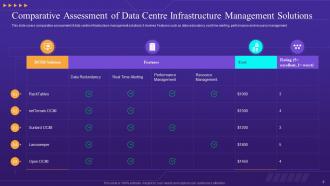
Comparative Assessment of Data Centre Infrastructure Management Solutions
-
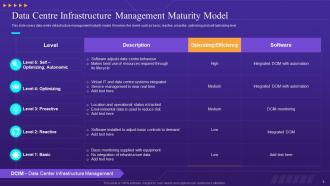
Data Centre Infrastructure Management Maturity Model
-
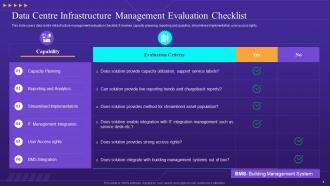
Data Centre Infrastructure Management Evaluation Checklist
-
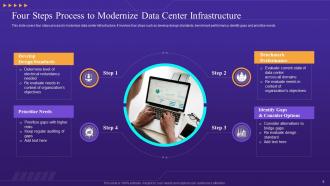
Four Steps Process to Modernize Data Center Infrastructure
-
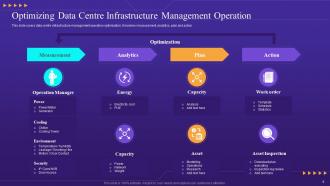
Optimizing Data Centre Infrastructure Management Operation
-
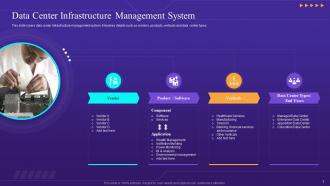
Data Center Infrastructure Management System
-
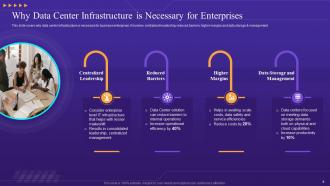
Why Data Center Infrastructure is Necessary for Enterprises
-
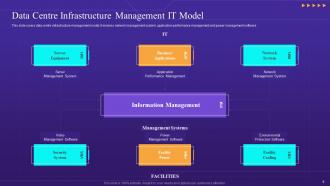
Data Centre Infrastructure Management IT Model
-
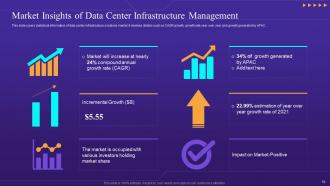
Market Insights of Data Center Infrastructure Management
-
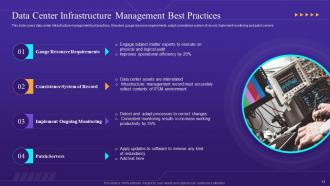
Data Center Infrastructure Management Best Practices
-
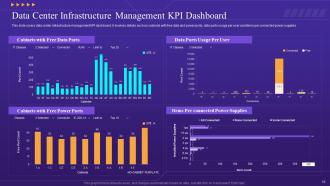
Data Center Infrastructure Management KPI Dashboard
-
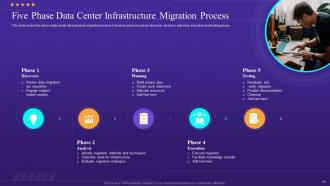
Five Phase Data Center Infrastructure Migration Process
-
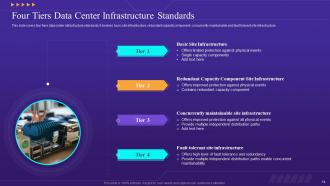
Four Tiers Data Center Infrastructure Standards
-
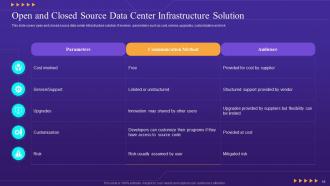
Open and Closed Source Data Center Infrastructure Solution
-
Data Center Infrastructure Management Icon
-
Data Center Infrastructure and Operations Icon
-
Data Center Infrastructure Management Software Icon
-

Thanks for Watching
-

-

-

-

-

FAQs for Data Center Infrastructure Powerpoint
So you'll need power, cooling, networking, and your actual compute/storage stuff. Power means UPS units, PDUs, plus backup generators. Cooling is HVAC, chillers, airflow management - honestly this is where everyone screws up and burns money. Don't be that guy. Your networking side covers switches, routers, cables, fiber connections. Then obviously servers, storage arrays, and racks to put it all in. Oh and start with power calculations first. Everything else just builds off that baseline anyway.
Dude, energy efficiency is huge for keeping costs down and avoiding system crashes. Poor efficiency = burning cash on cooling and power instead of upgrading your gear. Hot systems fail more often too, which sucks. I've watched companies slash power bills by 30-40% just from fixing airflow and swapping old servers. Honestly, newer hardware pays for itself pretty quick. Check your PUE first - anything over 1.5 means you're leaving money on the table. Short bursts of optimization work can save you thousands monthly.
Dude, virtualization is seriously a game changer. You can run multiple virtual machines on one physical server instead of wasting a whole box per application - which honestly always seemed ridiculous to me. Way less power usage, less space needed, and everything becomes super flexible. Need a new server? Spin it up in minutes, not weeks. You can move stuff around easily and scale based on what you actually need. Oh, and definitely start with your less critical stuff first while you're figuring it out. Trust me, once you see how much more efficient your data center gets, you'll wonder why you waited so long.
Okay so backup systems are basically everything - power, network, cooling, storage, the works. Get dual power feeds from different utilities, plus generators and UPS units. For internet, grab at least two ISPs with completely different cable routes (learned this the hard way once). Storage needs to be spread across multiple drives, maybe even different sites. Here's the thing though - cooling is probably more critical than people think. One busted AC unit can fry your whole setup in like an hour. Test everything regularly because redundant systems are useless if they don't actually work when stuff hits the fan. Oh, and document your failover steps so your team isn't scrambling around confused during an outage.
Start with airflow management - hot aisle/cold aisle setup is key. Keep server intake around 68-75°F and use variable speed fans to match your actual heat loads. I swear, half the data centers I've walked through are freezing cold because people freak out about hot spots. Check out liquid cooling for high-density racks. Free cooling's great when weather cooperates. Humidity should sit between 40-60% RH. Honestly, just do thermal mapping first - you'll probably spot some quick fixes by moving gear around or tweaking dampers.
So location is everything for latency. Your users are gonna notice lag when they're far from your servers - like, we're talking physics here, roughly 1ms per 60 miles. California to Virginia? That's 70ms right there just for the round trip, which honestly sucks for user experience. CDNs help a ton though. I'd put your main server close to where most users actually are. Oh and if you're going global, multiple regions is pretty much required these days - learned that one the hard way on a project last year.
Data centers are getting hit with everything these days - ransomware, insider threats, physical break-ins, you name it. What's really killing security teams is how the attack surface keeps growing with all the cloud stuff and IoT devices everywhere. Compliance requirements multiply like rabbits too, which doesn't help when you're already short-staffed. The threat landscape changes weekly, honestly. Zero-trust architecture is your best bet here - don't trust anything by default. Also, automate whatever you can because that's usually where human error screws things up. Manual processes are just asking for trouble at this point.
Honestly, edge computing is the big one - everything's moving closer to users now. Liquid cooling is finally going mainstream because these AI workloads are just insane power-wise. Modular designs are everywhere since you need to scale quickly. Oh, and sustainability stuff is mandatory now, not optional - carbon neutrality, renewables, all that. Most of this is happening because AI needs ridiculous compute in tiny spaces. Software-defined infrastructure and automation are cutting down on manual work too. My advice? Build flexible but don't overthink it. Requirements change so fast you'll go crazy trying to future-proof everything.
So you'll basically build a hybrid setup - connecting your existing data center to cloud providers through VPNs or dedicated lines. Honestly, this approach saves you from the headache of scrapping everything at once. You can move stuff gradually, which is way less stressful. During busy periods, use cloud for extra capacity. Or keep your sensitive data on-site while running processing in the cloud. My advice? Start small with non-critical apps first - they're perfect for testing how everything works together without risking your important systems.
So edge computing basically flips your whole data center approach - instead of huge centralized hubs, you're spreading smaller facilities closer to users. Yeah, it sounds like a pain to manage at first. But the performance gains are real since you're cutting down latency big time. The tricky part? Now you've got all these distributed sites to monitor instead of just a few big ones. Honestly, don't rush into it - figure out which apps actually need edge deployment first. Otherwise you'll end up with unnecessary complexity. Start small and see what works.
Dude, start with monitoring stuff - temperature, power, server health. Way better than checking everything manually like some kind of caveman. Provisioning new VMs automatically is a game changer too. Oh, and cooling system automation will literally save your sanity (plus your electric bill). Backup scheduling, patch management, capacity planning - all that boring stuff can run itself. Here's my advice though: don't try to automate everything at once. Just pick whatever repetitive task pisses you off most and start there. You'll thank me later.
Look, you'll save yourself so much headache if you plan for growth from the start. Modular systems are your best friend here - you can just add more compute or storage when you need it instead of ripping everything out later. Those budget meetings for complete overhauls? Brutal. Your business will change faster than you think, and scalable infrastructure means you won't crash when traffic suddenly spikes. Leave physical space in your racks and design your network with expansion in mind. It's way cheaper than scrambling to rebuild everything when you're already overwhelmed.
Look, compliance isn't just some checkbox exercise - it literally shapes how you build and run your data center. Physical security, access logs, environmental controls, data handling protocols... all that stuff depends on which standards hit your industry. HIPAA's different from SOX, PCI-DSS has its own weird requirements. Honestly, the worst part? Most companies get stuck juggling multiple frameworks at once. Your ops team will be drowning in documentation and audits. Oh, and definitely figure out which regs actually apply to you first - sounds obvious but you'd be surprised how many people skip that step.
Hey! So disaster recovery is basically about copying your data to backup sites - either real-time or close to it. Cloud DR is where most people are heading these days since it's way cheaper than running your own backup facility. Virtualization helps too because you can basically boot up your stuff anywhere when things break. Oh, and automated failover is clutch - seriously saves your ass when everything crashes at like 3am and nobody wants to be awake troubleshooting. I'd probably start with getting someone to assess what cloud options make sense for your current setup.
Dude, the hybrid thing totally changes your planning game. You can't just size for peak capacity anymore since stuff's bouncing between your data center and cloud constantly. Honestly, it's like trying to hit a moving target - super frustrating. Automation tools become your best friend for handling all that dynamic resource stuff across both places. Your network needs to be rock solid with consistent security no matter where things are running. Oh, and definitely audit what actually needs to stay on-prem first. That'll save you headaches later.
-
Exclusive and extensive collection of templates. Really helped me create a professional presentation in just no time.
-
I was really impressed with the presentation I created with their templates. I’ll be using their services moving forward.