

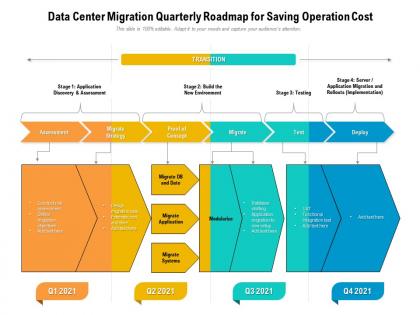
Data center migration quarterly roadmap for saving operation cost




Try Before you Buy Download Free Sample Product
 Impress Your
 Audience
 100%
100% Editable
 Save Hours
 of Time


A cohesive work plan is essential for achieving the desired target. Communicate your vision and lay a firm ground in front of your audience with our PowerPoint layout. Align your project milestones, budgets, deliverables, deadlines, and all the requisite information for a dynamic presentation by employing this amazingly designed Data Center Migration Quarterly Roadmap For Saving Operation Cost. Maximize team efficiency and streamline a work plan efficiently by introducing our ready made roadmap PowerPoint theme. You can quickly establish coordination between different activities across the organization and present an insight to your colleagues by utilizing this useful business tool. Color code specific tasks, prioritize, and keep a close eye on the deadlines with the help of our eye catchy PowerPoint template. Download our Data Center Migration Quarterly Roadmap For Saving Operation Cost for excelling at productive management.
People who downloaded this PowerPoint presentation also viewed the following :
Data center migration quarterly roadmap for saving operation cost with all 2 slides:
Use our Data Center Migration Quarterly Roadmap For Saving Operation Cost to effectively help you save your valuable time. They are readymade to fit into any presentation structure.

FAQs for Data center migration quarterly roadmap for
Honestly, most companies do this for three main reasons. Money's usually the biggest one - old infrastructure gets crazy expensive to maintain. Growing fast? Your current setup probably can't handle the capacity anymore. Latency issues are massive too, especially if you're trying to get closer to your users. Trust me, customers notice when things are slow. Sometimes regulatory stuff forces it, which sucks but whatever. Oh and scalability - that's the other big driver. I'd just audit what you're spending now and figure out your biggest headaches. That'll tell you if it's worth the hassle.
Definitely start with monitoring your CPU and memory for at least 30 days to catch those peak load patterns. Network and storage capacity matter too, obviously. Here's what people always forget though - check your power usage and cooling setup because that stuff will bite you later if you don't plan for it. Physical space constraints are another gotcha. I'd also document your current disaster recovery and uptime numbers since you'll need those to size everything properly. Trust me, getting that baseline data now saves you from either buying way too much or scrambling because you didn't get enough resources.
Start with mapping out everything you've got - apps, infrastructure, the whole mess. Dependencies between systems will bite you if you ignore them, trust me. Build your timeline in phases and test the hell out of everything before going live. I'd tackle the non-critical stuff first so you can figure out what breaks (something always does). Keep everyone in the loop or they'll freak out when things change. Your rollback plan better be rock solid too. Once you've worked out the bugs on smaller systems, then you can move the important stuff over.
Dude, compliance is gonna control your whole timeline and where you can even move stuff. First thing - figure out where your data can legally live. GDPR means EU data stays in EU regions, but other rules are different. Healthcare and finance? Total nightmare with all the audit requirements. Your compliance needs determine everything - security setup, backups, how you actually transfer files. Honestly, I'd audit what you're dealing with first, then find migration partners who already have the right certs for your industry. Way easier than trying to retrofit later.
Honestly, location picking is trickier than it seems at first. You'll need to think about how close you are to users - latency can kill performance. Power costs and reliability are huge too, trust me on that one. Natural disasters and weather patterns matter more than people realize. Also check what regulations you'll be dealing with in each area. Oh, and climate stuff affects cooling costs way more than I expected when I first looked into this. Make a simple scoring sheet with these factors and rank your top few options. The cheapest upfront price usually bites you later.
Encrypt everything - both when it's moving and when it's sitting there. VPN tunnels are a must for transfers, and don't skip multi-factor auth. The biggest screwups usually happen because someone on your team didn't follow access rules, so log everything they touch. Test your backups first (trust me on this one). Instead of moving everything at once, do it in chunks - way easier to spot problems that way. Oh, and document each step religiously. When something breaks at 2am, you'll thank yourself for having that roadmap to figure out what went wrong.
Honestly, cloud is pretty much running the show for data center moves these days. I'd start with a hybrid setup - way less risky than jumping straight into full cloud. Test things out in their staging environments first (saves you from those 3am panic calls). The cool part? No more dropping crazy money upfront on hardware that might sit there collecting dust. Figure out which apps can move easily and knock those out first. Oh, and the auto-scaling during transitions is clutch - your resources actually match what you're using. Build your timeline around those easy wins and you'll be golden.
Honestly, the worst part is always those undocumented app dependencies that bite you later. Downtime planning sucks too, and data transfers take forever - like way longer than anyone expects. Network configs will make you want to pull your hair out. Oh, and good luck getting all the teams on the same page! Security stuff gets messy if you're switching cloud providers. I learned this the hard way - map out everything early. Give yourself double the testing time you think you need. Maybe triple it? Trust me, something always breaks that nobody saw coming.
So break your migration costs into three main areas: infrastructure stuff (hardware, networking, security), operations (labor, training, downtime), and the sneaky hidden costs like compliance and testing. That last bucket always gets people - I've seen it blow budgets wide open. First, catalog what you have now, then get quotes for cloud or new datacenter space. Always add 20-30% buffer because migrations are never smooth. Map out your timeline with resource costs included. Oh, and don't forget the ongoing operational changes after you're done. Build your business case on 3-5 year total costs, not just the migration piece.
Testing everything in staging first is huge - make sure it actually matches your prod environment though. Run both systems at the same time so you can bail if needed (trust me on this one). Do it during slow hours and tell everyone what's happening ahead of time. Don't try to migrate everything at once - that's asking for trouble. Move the less critical stuff first, then work your way up. Oh, and document your rollback process before you start. Nobody wants to wing it when things break at 2am.
Dude, first thing - map out EVERYTHING before you touch anything. Every API, dependency, all of it. Don't do the big switchover at once (trust me on this one, been burned). Run stuff in phases instead. Build parallel environments so you can actually test with real workloads, not just made-up scenarios. Your rollback plan better be rock solid too. And honestly? Budget way more time than you think - production always throws you some curveball nobody saw coming. Integration testing is where you'll catch the weird stuff.
Dude, migration tools have gotten so much better lately. VMware vSphere and Hyper-V are solid for moving workloads around. Cloud stuff? AWS Migration Hub, Azure Migrate, or Google's Migrate for Compute Engine work great. Physical moves need something like Carbonite or Zerto for replication. Planning's honestly the worst part - way more annoying than the actual tech side. SolarWinds is decent for mapping out network dependencies first. Oh, and inventory everything before you start! I swear every company finds random servers they forgot about. It's like finding old takeout containers in your fridge but way more expensive.
You definitely want to track performance metrics - they're gonna save your ass when proving the migration worked. Set up monitoring for response times, network latency, CPU/memory usage, and uptime. Get baseline numbers before you start. I made this mistake once where we skipped proper monitoring and users were pissed about slow logins for weeks before we caught it. After the migration, compare your new numbers to the baseline. Same or better means you crushed it. Dashboards are clutch for catching problems early and showing the boss actual proof that everything went smoothly.
Honestly, everyone's going cloud-first now instead of just doing basic lift-and-shift migrations. Edge computing is where things get interesting though - it pushes your apps closer to users so you'll need to think about distributed setups. Containerization makes everything way more portable between environments, which is clutch. Hybrid models are pretty much standard at this point. Oh, and microservices architecture too - that's been huge for making migrations smoother. I'd definitely audit your current workloads first to see what can actually benefit from these approaches before you map out timing.
Honestly, automation is a lifesaver for this stuff. Discovery tools will map out all your infrastructure and dependencies automatically - saves you from weeks of tedious documentation work. You can automate the server setup, app deployment, and config management too. Testing scripts are clutch for validating everything after each migration batch. Orchestration platforms coordinate the whole cutover process, which cuts down downtime big time. Oh, and definitely start with your non-critical systems first to test the workflows. Trust me on that one - learned it the hard way.
-
Informative design.