

Data Center Relocation Process And Project Plan Powerpoint Presentation Slides




Try Before you Buy Download Free Sample Product
 Impress Your
 Audience
 100%
100% Editable
 Save Hours
 of Time


A data center is a physical facility where organizations store their critical applications and data. The process of moving specific assets from one data center environment to another is known as data center relocation. It is also known as data center migration. This presentation i.e. Data Center Relocation Process and Project Plan provides information on the objectives of data center relocation, why the company wants to relocate the data center, creating a project plan for data center relocation, and prerequisites for data center relocation. This presentation also covers details on the current task status for data center relocation, assessment of the existing data center and team structure, key factors driving data center relocation, and the data center relocation process in detail. Additionally, this presentation provides details on risks and mitigation strategies for data center relocation, project plan for data center relocation, cost involved in data center relocation, data center migration best practices, and data center relocation benefits to the company. Download this template now.
People who downloaded this PowerPoint presentation also viewed the following :
Content of this Powerpoint Presentation
Slide 1: This slide introduces Data Center Relocation Process and Project Plan. State your company name and begin.
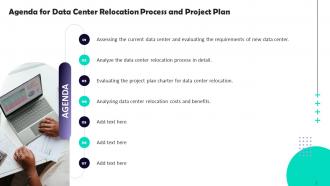
Slide 2: This slide states Agenda of the presentation.
Slide 3: This slide shows Table of Content for the presentation.
Slide 4: This slide highlights title for topics that are to be covered next in the template.
Slide 5: This slide provides information about the various types of data relocation that the companies aim for in order to increase efficiency and reduce costs.
Slide 6: This slide shows the reasons that why the company is looking to relocate its data center.
Slide 7: This slide highlights title for topics that are to be covered next in the template.
Slide 8: The following slide shows an overview of the project plan that must be implemented by the company for data center relocation.
Slide 9: This slide provides information about the person/individual who will be responsible for handling data center relocation activity.
Slide 10: This slide shows the requirements that must be fulfilled by the company for successful and timely data center relocation.
Slide 11: This slide provides information about the current task status for data center relocation.
Slide 12: This slide highlights title for topics that are to be covered next in the template.
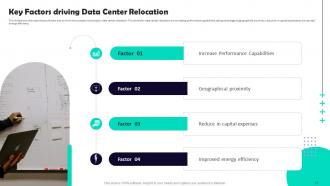
Slide 13: This slide shows the major factors/drivers due to which the company is looking for data center relocation.
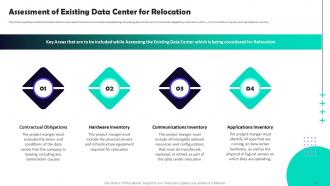
Slide 14: The following slide provides information about the key areas that are to be included while assessing the existing data center.
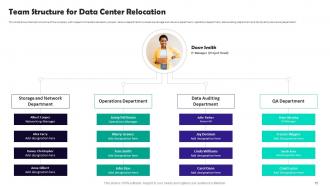
Slide 15: This slide shows the team structure of the company with respect to the data relocation process. This slide exhibit table of content.
Slide 16: This slide highlights title for topics that are to be covered next in the template.
Slide 17: This slide provides information about the detailed overview of the data center relocation process.
Slide 18: This slide shows the first step that is involved in data center relocation process i.e. assessing the current data center.
Slide 19: This slide shows the second step that is involved in data center relocation process i.e. mapping existing functionality to new data center.
Slide 20: This slide shows the third step that is involved in data center relocation process i.e. choosing a relocation strategy.
Slide 21: This slide shows the fourth step that is involved in data center relocation process i.e. selecting the destination for relocation.
Slide 22: This slide shows the fifth step that is involved in data center relocation process i.e. final planning .
Slide 23: This slide shows the sixth step that is involved in data center relocation process i.e. development phase.
Slide 24: This slide shows the seventh step that is involved in data center relocation process i.e. validating the plan.
Slide 25: This slide shows the eighth step that is involved in data center relocation process i.e. relocation phase.
Slide 26: This slide shows the eighth step that is involved in data center relocation process i.e. post-relocation verification.
Slide 27: This slide highlights title for topics that are to be covered next in the template.
Slide 28: This slide provides information about the risks involved in data center relocation process and the strategies that must be implemented to mitigate the risks.
Slide 29: This slide shows the project plan charter for the data relocation process.
Slide 30: This slide also shows the project plan charter for the data relocation process.
Slide 31: This slide highlights title for topics that are to be covered next in the template.
Slide 32: The following slide shows the various types of costs that are involved in the process of data center relocation.
Slide 33: This slide shows the best practices that must be followed by the IT Team Manager in order to ensure a smooth transition from the existing data center to a new one.
Slide 34: The following slide shows the benefits of data center relocation to the company.
Slide 35: This slide contains all the icons used in this presentation.
Slide 36: This slide is titled as Additional Slides for moving forward.
Slide 37: This is Our Mission slide with related imagery and text.
Slide 38: This is Our Team slide with names and designation.
Slide 39: This is a Timeline slide. Show data related to time intervals here.
Slide 40: This slide contains Puzzle with related icons and text.
Slide 41: This slide shows Post It Notes. Post your important notes here.
Slide 42: This slide presents Roadmap with additional textboxes.
Slide 43: This is a Location slide with maps to show data related with different locations.
Slide 44: This is a Thank You slide with address, contact numbers and email address.
Data Center Relocation Process And Project Plan Powerpoint Presentation Slides with all 49 slides:
Use our Data Center Relocation Process And Project Plan Powerpoint Presentation Slides to effectively help you save your valuable time. They are readymade to fit into any presentation structure.
-
Data Center Relocation Process and Project Plan
-
Agenda for Data Center Relocation Process and Project Plan
-
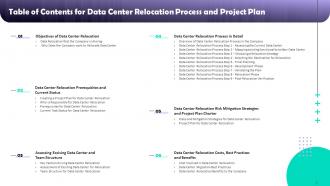
Table of Contents for Data Center Relocation Process and Project Plan
-
Table of Contents for Data Center Relocation Process and Project Plan
-
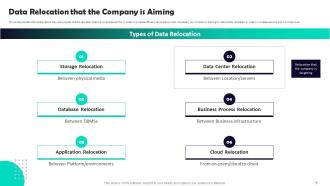
Data Relocation that the Company is Aiming
-
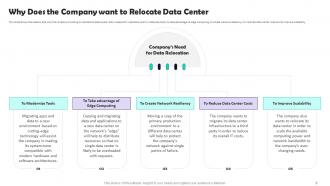
Why Does the Company want to Relocate Data Center
-
Data Center Relocation Process and Project Plan
-
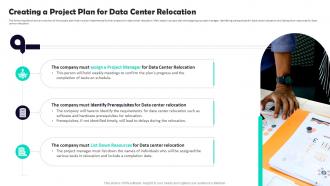
Creating a Project Plan for Data Center Relocation
-
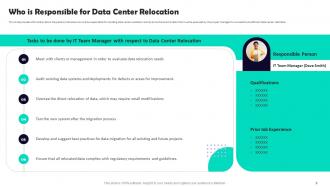
Who is Responsible for Data Center Relocation
-
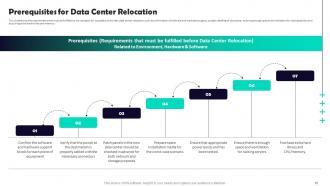
Prerequisites for Data Center Relocation
-
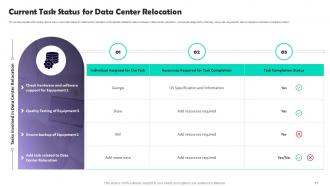
Current Task Status for Data Center Relocation
-
Table of Contents for Data Center Relocation Process and Project Plan
-
Key Factors driving Data Center Relocation
-
Assessment of Existing Data Center for Relocation
-
Team Structure for Data Center Relocation
-
Table of Contents for Data Center Relocation Process and Project Plan
-
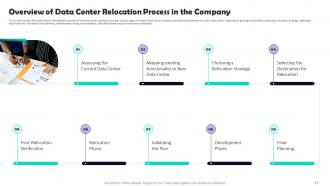
Overview of Data Center Relocation Process in the Company
-
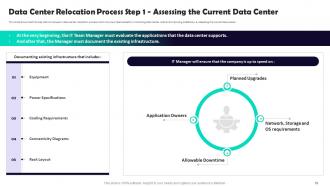
Data Center Relocation Process Step 1 Assessing the Current Data Center
-
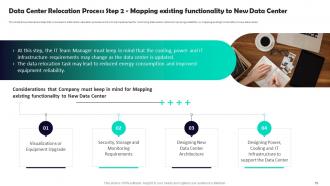
Data Center Relocation Process Step 2 Mapping existing functionality to New Data Center
-
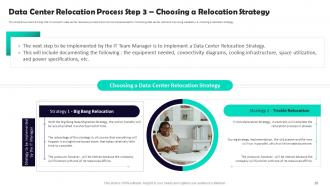
Data Center Relocation Process Step 3 Choosing a Relocation Strategy
-
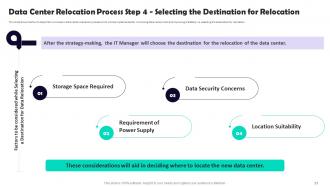
Data Center Relocation Process Step 4 Selecting the Destination for Relocation
-
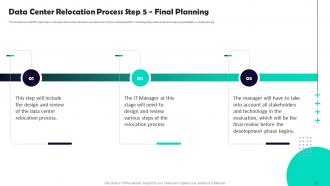
Data Center Relocation Process Step 5 Final Planning
-
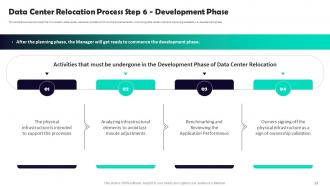
Data Center Relocation Process Step 6 Development Phase
-
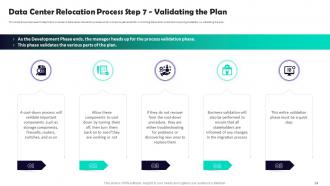
Data Center Relocation Process Step 7 Validating the Plan
-
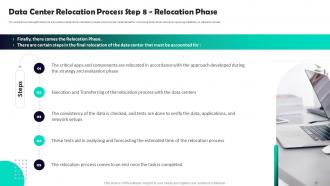
Data Center Relocation Process Step 8 Relocation Phase
-
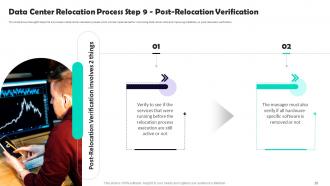
Data Center Relocation Process Step 9 Post Relocation Verification
-
Table of Contents for Data Center Relocation Process and Project Plan
-
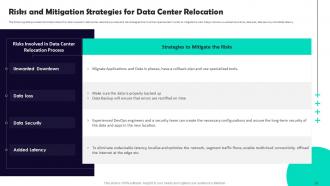
Risks and Mitigation Strategies for Data Center Relocation
-
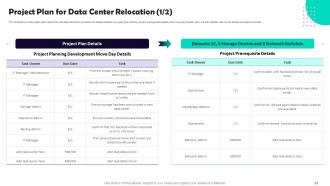
Project Plan for Data Center Relocation 1 2
-
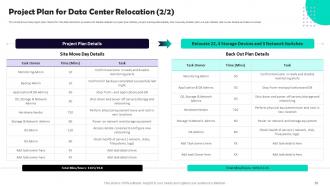
Project Plan for Data Center Relocation 2 2
-
Table of Contents for Data Center Relocation Process and Project Plan
-
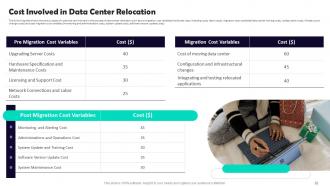
Cost Involved in Data Center Relocation
-
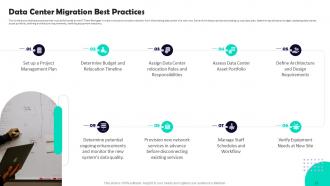
Data Center Migration Best Practices
-
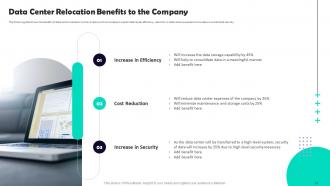
Data Center Relocation Benefits to the Company
-
Icons slide for Data Center Relocation Process and Project Plan
-

Additional Slides
-
Our Mission
-

Meet Our Team
-
Timeline
-
Puzzle
-
Post it Notes
-
Roadmap
-
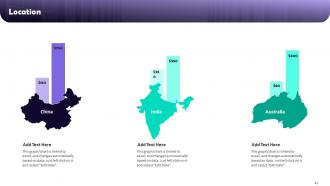
Location
-

Thank you for watching
-

-

-

-

-

FAQs for Data Center Relocation Process And Project Plan
First thing - map out your power needs and make sure the site can actually handle them. Multiple fiber providers are a must, plus you'll want low latency to wherever your users are. Location's huge too - steer clear of flood zones and earthquake areas, obviously. Political stability matters more than people think. Oh and the regulatory stuff can be a real pain, so factor in local taxes and compliance headaches early. Honestly, I'd start with the technical requirements first, then see which locations actually work. Nothing kills your day like unexpected outages.
Dude, location picking is honestly make-or-break stuff. Climate's huge - you don't want to deal with hurricanes or earthquakes (trust me on that one). Check historical weather data first, then look at power grid stability. Renewable energy availability matters too if you're thinking long-term costs. Extreme temps will kill your cooling budget. Local environmental regs can be sneaky expensive, so definitely research those early. Oh, and disaster frequency maps are your friend here. Sounds boring but it'll save you so much headache later.
Ugh, compliance stuff is such a pain but you really can't ignore it. Different places have totally different rules - HIPAA, SOX, data sovereignty laws, zoning requirements. What worked at your old location? Probably won't work at the new one, which is honestly super annoying. Start this headache early in your planning, not when you're about to go live. Loop in your legal team from the beginning. Trust me, you don't want to be scrambling for certifications at the last second. I learned that one the hard way!
Start with a solid risk assessment covering both tech stuff and business continuity. Map your critical systems and find those single points of failure - downtime scenarios are crucial since moves always take way longer than planned. Check your new location's infrastructure: power, network, disaster recovery options. Compliance matters if you're regulated. Build contingency plans for each risk and test them first. Honestly, I'd get a third-party expert to review everything. They'll spot the blind spots you missed because there's always something. Oh, and don't underestimate how much coordination this actually takes.
Dude, phase it out gradually - don't try doing everything at once. Start with the less critical stuff during downtime, then work your way up to the important systems. Parallel setups are your best friend here so you can actually test before flipping the switch. Document all your network configs beforehand because trust me, you don't want to be frantically googling IP ranges at 2am. Oh and definitely do a practice run with your whole team first. The "just wing it" approach sounds tempting but it's basically guaranteed chaos. Having solid backup plans ready makes all the difference when things inevitably get weird.
Honestly, you'll want to map out everything first - catalog your data and figure out what's mission-critical. Don't rush that part, I've watched teams skip it and completely mess themselves over later. Get your timelines solid and make sure everyone knows their role. Test the hell out of everything in the new environment before you flip the switch. If you can run both systems at once during the move, do it. Way less stressful than going all-in on day one. Oh and document as you go - your future self will thank you. Keep stakeholders in the loop constantly, even when there's delays (especially then).
Honestly, start with discovery tools to map what you've actually got - way too easy to forget about random servers. VMware vMotion is clutch for moving VMs without downtime. Asset tracking software will save your sanity during the chaos. Docker containers make everything portable, which is huge. You could also spin up temporary cloud instances in AWS while transitioning (costs more but buys you flexibility). Network orchestration tools handle the connectivity automatically instead of doing it manually like some kind of masochist. Get that current environment mapped first though - that's your roadmap for everything else.
First thing - add up all your servers, storage, networking stuff, plus factor in UPS losses and power distribution waste. Cooling's gonna need about 3.5-4 watts per watt of IT load, maybe less if it's a newer place. I always bump these numbers up 20-30% because you'll definitely add more gear later. Trust me on that one. Make sure they can actually deliver what they're promising too - some data centers are basically overselling their capacity. Oh, and get everything in writing. Have them show you around their power and cooling setup before you commit.
Hey! So yeah, distance totally screws with your network speed. Every 100 miles adds about 1ms of delay because of how light travels through fiber - sounds tiny but it's not. Gaming and video calls get really choppy with that lag. Your web apps will feel like they're running through molasses if users are hitting servers on the opposite coast instead of nearby ones. High-frequency trading guys are obsessed with this stuff for obvious reasons. When you're planning where to put things, just pick spots close to where most of your users actually are. Makes a huge difference.
Dude, get RFID tags or QR codes on everything before you even think about moving - trust me on this one. Those old spreadsheets are trash compared to this. Set up a cloud system so your whole team can see what's packed, shipped, and set up in real-time. The barcode scanners honestly changed my life for this kind of thing. Take photos of everything and do physical counts at both locations. Oh, and start tagging stuff like two weeks early - you'll thank me later when you're not scrambling.
Encrypt literally everything - data sitting around and stuff moving between locations. Document who touches what equipment and when. Seriously, those hard drives are like gold bars, so GPS tracking on transport vehicles is a must. Anyone handling this needs proper security clearance, no exceptions. Set up temp secure networks at both sites so you can actually verify nothing got corrupted during the move. Oh, and test your backup/recovery stuff first - learned that one the hard way on a previous project. You don't want surprises when you're already freaking out about the timeline.
Start planning disaster recovery into your move from the beginning. Run both locations at the same time until you're totally sure the new setup works - yeah, it's pricey but you don't want to mess around. Map out which systems are critical first. Test your failover at the new site before making the full switch. This is where people usually screw up - they just copy their old DR plan over. But your new environment might need totally different recovery steps, so rewrite everything with updated IPs and contact info. Make sure you can still hit your RTO/RPO targets during the transition.
Honestly, you're looking at anywhere from $500K to millions - depends how big your setup is. The sneaky part that'll kill your budget? Downtime costs. I've seen companies spend more on lost revenue than the actual move. First thing - catalog every piece of equipment you have. Get quotes from movers who actually know data centers (regular movers will break everything). Calculate what each hour of downtime costs you, then figure out your acceptable window. Don't forget staff overtime and prepping the new space. Oh, and definitely pad your budget by 20-30% because something always goes wrong.
Honestly, start by mapping your 3-5 year growth before you even think about breaking ground. Modular infrastructure is your best friend here - power distribution that scales, cooling systems ready for bigger loads, flexible racks. Network architecture needs to scale horizontally too. Oh, and seriously don't lowball your bandwidth requirements like everyone seems to do! Consider cloud-hybrid for those random capacity spikes. Document absolutely everything during the move because future you will thank past you. I've watched too many companies paint themselves into corners by not planning ahead.
Look, cloud services are honestly a lifesaver during data center moves. You can temporarily shift your critical apps to AWS or Azure before the physical move happens - no downtime stress. Some workloads you'll probably want to bring back after, but others? You might realize they're better off staying in the cloud permanently. We've seen this a ton where companies downsize their physical footprint once they see cloud performance. The hybrid thing is really popular now too. My advice is figure out which workloads can move to cloud first, then plan your timeline around that.
-
Great designs, Easily Editable.
-
It’s really cool, and you can find pretty much everything you could need for your work or school.