

Data Flow Diagram For Food Ordering System




Try Before you Buy Download Free Sample Product
 Impress Your
 Audience
 100%
100% Editable
 Save Hours
 of Time


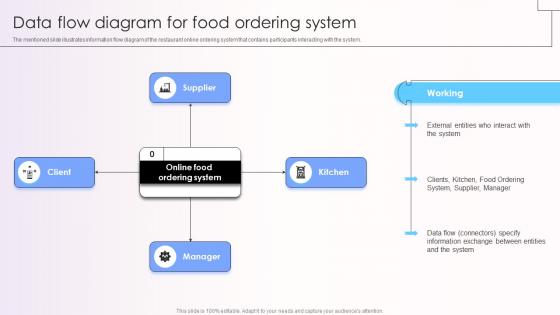
The mentioned slide illustrates information flow diagram of the restaurant online ordering system that contains participants interacting with the system.
People who downloaded this PowerPoint presentation also viewed the following :
Data Flow Diagram For Food Ordering System with all 9 slides:
Use our Data Flow Diagram For Food Ordering System to effectively help you save your valuable time. They are readymade to fit into any presentation structure.








FAQs for Data Flow Diagram For
A data flow diagram is a visual representation that maps how data moves through a system, illustrating processes, data stores, external entities, and data flows between them. These components work together by showing data inputs, transformations, and outputs, enabling organizations in sectors like banking and healthcare to streamline operations, identify bottlenecks, and enhance system efficiency.
Data flow diagrams focus specifically on how data moves through systems and processes, while flowcharts emphasize sequential decision-making steps and entity-relationship diagrams map database structures and relationships. While flowcharts guide procedural logic and ERDs optimize data storage, DFDs uniquely visualize information transformation across business processes, enabling organizations to streamline operations, identify bottlenecks, and enhance system integration for improved efficiency.
Data flow diagrams streamline system analysis by providing clear process visualization, identifying data dependencies, facilitating stakeholder communication, and revealing system inefficiencies or bottlenecks. These visual tools enable development teams to optimize workflows, reduce implementation errors, and accelerate project timelines, with many organizations finding that structured data mapping ultimately delivers more robust system architectures and smoother deployment processes.
Data flow diagrams help identify bottlenecks by visually mapping data movement, storage points, and processing stages throughout a system, revealing where delays or capacity constraints occur. Through systematic analysis of data flows, organizations can pinpoint inefficient processes, overloaded databases, and resource allocation issues, ultimately streamlining operations and enhancing system performance across departments.
Common data flow diagram symbols include circles or bubbles for processes, squares or rectangles for external entities, open rectangles for data stores, and arrows for data flows. These symbols work together by clearly mapping how information moves through systems, with many organizations finding that standardized DFD notation streamlines system documentation, enhances communication between stakeholders, and accelerates development timelines.
The level of detail in data flow diagrams depends on your audience, project scope, and implementation phase, with context diagrams providing high-level overviews while detailed DFDs break down specific processes. Organizations typically start with broad system boundaries for stakeholder communication, then progressively decompose processes into granular workflows, with many finding that balancing comprehensiveness with clarity delivers optimal understanding and actionable insights.
Data flow diagrams integrate effectively into agile project management by providing visual clarity for sprint planning, user story mapping, and iterative development cycles. While traditional DFDs require adaptation for agile's flexible nature, many development teams find that lightweight, iterative versions enhance communication between stakeholders, streamline requirement gathering, and ultimately deliver faster development cycles with reduced miscommunication risks.
Data flow diagram best practices include using consistent symbols, maintaining proper labeling, minimizing crossing lines, organizing processes logically, and ensuring balanced decomposition across levels. These approaches streamline diagram comprehension by reducing visual complexity, enhancing stakeholder communication, and facilitating system analysis, with many organizations finding that well-structured DFDs ultimately accelerate development cycles and improve project outcomes.
Data flow diagrams integrate into the software development life cycle during requirements analysis, system design, and testing phases by mapping data movement, identifying system boundaries, and validating functional requirements. Through visual documentation, development teams streamline communication between stakeholders, enhance system architecture planning, and accelerate debugging processes, with many software organizations finding that early DFD implementation reduces development costs and delivery timelines significantly.
**INPUT**: What tools or software are recommended for creating data flow diagrams? **OUTPUT**: Recommended DFD creation tools include Lucidchart, Microsoft Visio, Draw.io, Creately, and SmartDraw, each offering specialized templates, symbols, and collaborative features. These platforms streamline diagram development by providing intuitive drag-and-drop interfaces, real-time collaboration capabilities, and export options, with many organizations finding that cloud-based solutions like Draw.io deliver cost-effective scalability. [Word count: 56 words]
Data flow diagrams are particularly advantageous when mapping complex business processes, designing new systems, troubleshooting operational inefficiencies, and communicating technical workflows to non-technical stakeholders. These visual tools streamline system analysis by revealing data bottlenecks, redundancies, and integration points, with many organizations finding that DFDs accelerate project timelines and enhance cross-departmental collaboration.
You can validate a data flow diagram through systematic reviews with stakeholders, cross-referencing with system requirements, conducting walkthroughs with end users, and verifying data consistency across all levels. These validation approaches streamline accuracy by identifying gaps, confirming process flows, and ensuring alignment with business operations, with many organizations finding that comprehensive validation ultimately delivers more reliable system documentation and smoother implementation outcomes.
Common mistakes include unclear process naming, missing data stores, inconsistent leveling between diagrams, mixing logical and physical elements, and omitting external entities. These errors undermine diagram effectiveness by creating confusion during system analysis, complicating stakeholder communication, and hindering accurate requirements gathering, with many development teams finding that precise notation standards ultimately streamline project timelines.
External entities influence data flow by serving as sources and destinations of information, defining system boundaries, triggering processes, and establishing data exchange requirements. These entities, such as customers submitting orders, suppliers providing inventory updates, or regulatory bodies requesting compliance reports, create the input-output relationships that drive system functionality, ultimately determining how data moves through processes and transforms within the organization.
Data flow diagrams play a crucial role in compliance by providing clear documentation of data movement, processing activities, storage locations, and access controls required by regulations like GDPR, HIPAA, and SOX. These visual maps enable organizations to demonstrate regulatory adherence, identify potential vulnerabilities, and streamline audit processes, with many financial services and healthcare institutions finding that comprehensive data flow documentation significantly reduces compliance costs and accelerates regulatory approvals.
-
Great product with effective design. Helped a lot in our corporate presentations. Easy to edit and stunning visuals.
-
Excellent design and quick turnaround.