

Data Flow Diagram Powerpoint PPT Template Bundles CRP




Try Before you Buy Download Free Sample Product
 Impress Your
 Audience
 100%
100% Editable
 Save Hours
 of Time


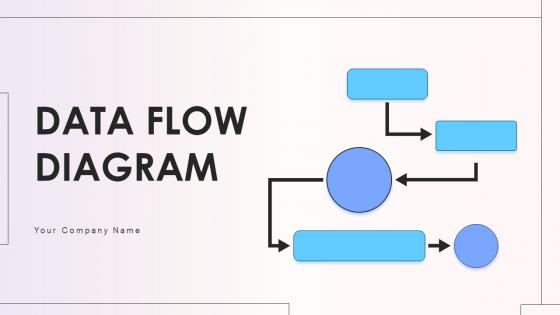
Introducing our comprehensive PowerPoint PPT presentation on Data Flow Diagrams DFD, a vital tool for visualizing and understanding system processes. Illuminate the intricacies of data movement with clear, concise diagrams illustrating how information flows seamlessly through your systems. Our PPT guides users through the intricacies of data process flow, showcasing key concepts in an accessible manner. Unlock the power of visual representation with compelling graphics that elucidate information flow dynamics. Perfect for professionals, educators, and students, this presentation ensures a comprehensive grasp of DFD, making complex data structures easily digestible. Elevate your understanding of system design with our Data Flow Diagram PPT, where clarity meets comprehension.
People who downloaded this PowerPoint presentation also viewed the following :
Data Flow Diagram Powerpoint PPT Template Bundles CRP with all 31 slides:
Use our Data Flow Diagram Powerpoint PPT Template Bundles CRP to effectively help you save your valuable time. They are readymade to fit into any presentation structure.




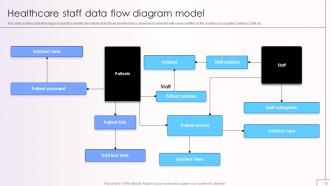
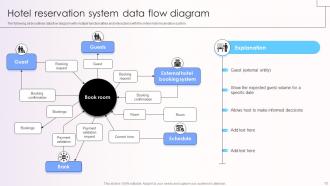
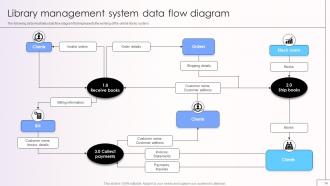
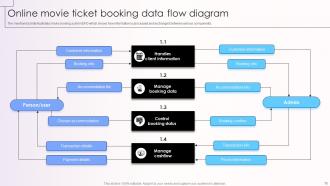
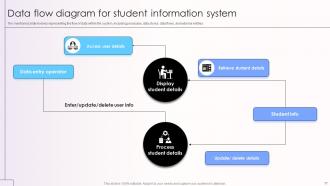










FAQs for Data Flow Diagram Powerpoint PPT
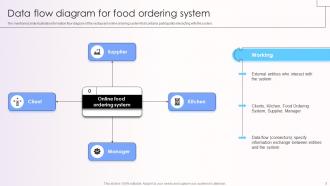
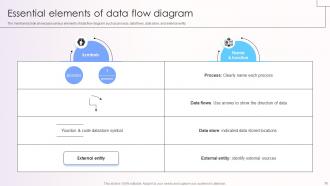
Data Flow Diagrams include external entities, processes, data stores, and data flows as their primary components. These elements work together by showing how information moves through systems, where it's processed and stored, and how external users interact with the data, ultimately delivering clear system documentation and streamlined process understanding for organizations implementing new technologies.
DFDs focus specifically on data movement and transformation within systems, unlike flowcharts which emphasize sequential process steps or UML diagrams which model object relationships and system architecture. While flowcharts track decision points and procedural logic, and UML captures detailed technical specifications, DFDs streamline system analysis by visualizing how information flows between processes, stores, and external entities, with many organizations finding that this data-centric approach enhances communication between technical teams and business stakeholders.
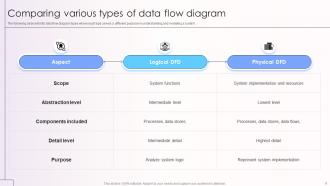
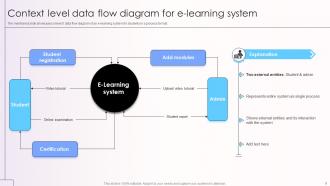
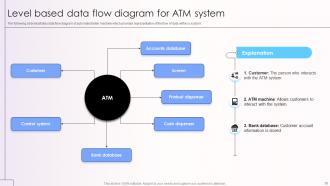
Data Flow Diagrams utilize multiple hierarchical levels including context diagrams (Level 0), overview diagrams (Level 1), and detailed process diagrams (Level 2 and beyond), each providing increasing granular detail of system processes. These levels enable organizations to streamline system analysis by decomposing complex processes into manageable components, facilitating better communication between stakeholders, and ultimately delivering clearer system documentation and more efficient development cycles.
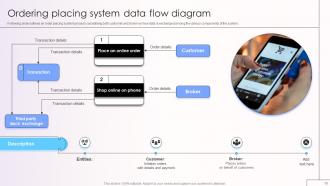
External entities represent sources and destinations of data outside the system boundary, including customers, suppliers, regulatory bodies, and other systems that interact with your process. These entities are significant because they define system scope, clarify data requirements, and establish interface points, with many organizations finding that properly mapped external entities streamline integration planning and enhance stakeholder communication.
Data stores in DFDs represent repositories where data is held temporarily or permanently, including databases, files, tables, and memory buffers, typically shown as open rectangles or parallel lines with descriptive labels. These components enable system designers to visualize data persistence and retrieval patterns, with organizations across sectors like banking, healthcare, and retail finding that well-defined data stores streamline database design and enhance system integration processes.
DFDs facilitate stakeholder communication by providing a universal visual language that translates complex technical processes into easily understood diagrams, eliminating jargon barriers between developers, business analysts, and management teams. Through standardized symbols and clear data pathways, project teams can align on requirements, identify integration points, and resolve conflicts early, with many organizations finding that visual documentation reduces miscommunication by significantly streamlining collaborative decision-making processes.
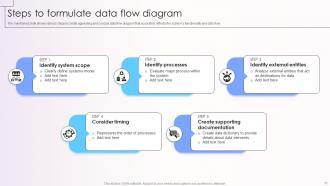
Best practices for creating Data Flow Diagrams include maintaining consistent naming conventions, using clear and descriptive labels, keeping processes atomic, ensuring data stores are properly connected, and validating flow logic. These practices enhance diagram clarity and accuracy, with many organizations finding that structured approaches streamline system analysis, improve stakeholder communication, and ultimately deliver more effective system designs and implementations.
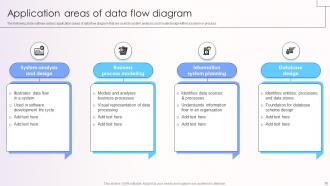
DFDs are essential when analyzing complex data transformations across organizational boundaries, investigating system integration challenges, or documenting regulatory compliance requirements where data lineage matters most. Unlike other modeling tools that focus on user interactions or system architecture, DFDs excel in scenarios like financial auditing, healthcare information systems, and supply chain management, where understanding how data moves and transforms between processes delivers critical operational transparency and regulatory assurance.
DFDs reveal system inefficiencies by visually mapping data movements, storage points, and processing steps, making bottlenecks, duplicate processes, and unnecessary data stores immediately apparent. Through systematic analysis, organizations can identify redundant approval workflows, eliminate duplicate data entry points, and streamline information pathways, ultimately reducing operational costs and accelerating business processes across departments.
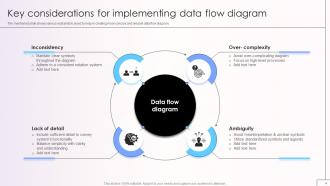
Common mistakes include mixing logical and physical elements, creating unbalanced data flows, omitting data stores, using inconsistent notation, and creating overly complex diagrams without proper decomposition. These errors lead to confusion during system development, with many organizations finding that establishing clear conventions, validating data flow completeness, and maintaining consistent abstraction levels ultimately delivers more accurate system documentation and smoother implementation processes.
DFDs are particularly beneficial in banking for transaction processing, healthcare for patient record management, retail for inventory tracking, manufacturing for supply chain optimization, and insurance for claims processing. These industries leverage DFDs to streamline complex data workflows, enhance operational efficiency, and ensure regulatory compliance, ultimately delivering faster services and improved customer experiences.
Ensuring DFD clarity for non-technical stakeholders involves using simple terminology, consistent symbols, logical layouts, and descriptive labels that avoid technical jargon. These approaches streamline communication by providing visual context, standardized notation, and clear process flows, with many organizations finding that well-designed DFDs enhance stakeholder engagement and facilitate better decision-making across departments.
Tools for creating Data Flow Diagrams include Lucidchart, Microsoft Visio, Draw.io, Creately, and SmartDraw, each offering drag-and-drop interfaces and pre-built templates. Draw.io and Lucidchart are particularly user-friendly, with many organizations finding that their intuitive design features, collaborative capabilities, and extensive symbol libraries streamline diagram creation while reducing learning curves.
DFDs integrate into the software development lifecycle during requirements analysis, system design, implementation planning, and testing phases, serving as blueprints for data architecture. Through visual mapping of information flows, development teams streamline coding processes, enhance system documentation, and facilitate stakeholder communication, with many software organizations finding that early DFD implementation reduces development time and improves project outcomes.
DFDs serve as visual representations that directly support and validate system requirements documentation by illustrating how data moves through proposed systems, processes, and external entities. This strategic combination enables requirements analysts, developers, and stakeholders to verify functional specifications against actual data flows, ultimately ensuring comprehensive system design and reducing implementation risks across complex organizational environments.
-
Illustrative design with editable content. Exceptional value for money. Highly pleased with the product.
-
Requested a complete pitch deck. Delivered immediately and with high quality well researched content.