

Data Management Services Powerpoint Presentation Slides




Try Before you Buy Download Free Sample Product
 Impress Your
 Audience
 100%
100% Editable
 Save Hours
 of Time


Storing the companys data on an offsite server requires a well-framed strategy, where our beautifully designed module comes into the picture. Grab our efficiently designed Data Management Services template that walks you through the data management agenda and its trends. It also highlights the need to manage data in an organization and discusses the challenges encountered in cloud data management. Some issues faced are data criticality, data sprawl, and data growth. It also gives a glimpse of competitive advantage after implementing cloud data management like flexibility, high security, data availability, etc. Emphasize master data management solutions by taking the assistance of this amazing cloud management PowerPoint module. Elucidate the master data management architecture seamlessly with supply chain management, relationship management, and enterprise resource planning by grabbing the given module. It also lists the services provided along with showcasing real-time data integration. You can also take the assistance of this data management services implementation roadmap. Download it now.
People who downloaded this PowerPoint presentation also viewed the following :
Content of this Powerpoint Presentation
Slide 1: This slide introduces Data Management Services. State Your Company Name and begin.
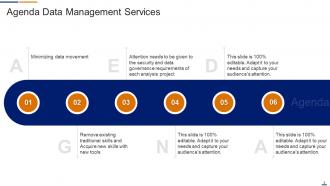
Slide 2: This slide states Agenda of the presentation.
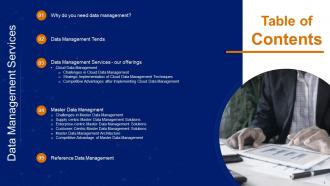
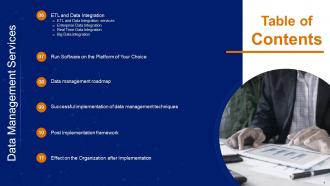
Slide 3: This slide presents Table of Content for the presentation.
Slide 4: This is another slide continuing Table of Content for the presentation.
Slide 5: This slide depicts title for two topics that are to be covered next in the template.
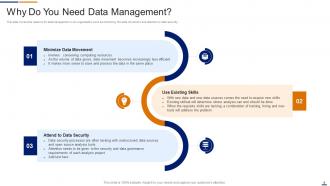
Slide 6: This slide covers the reasons for data management in an organisation such as minimizing the data movement and attention to data security.
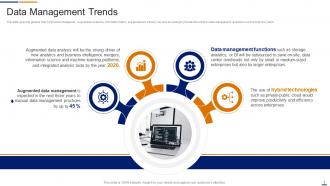
Slide 7: This slide gives the glimpse that continuous intelligence, augmented analytics, information fabric, etc.
Slide 8: This slide depicts title for three topics that are to be covered next in the template.
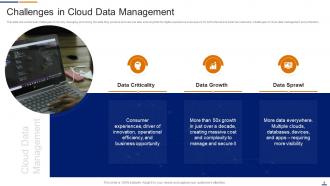
Slide 9: This slide shows the dual challenges of not only managing and mining the data they produce and use.
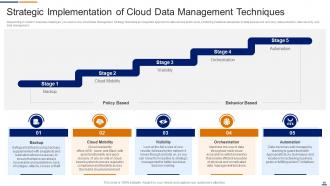
Slide 10: This slide presens Strategic implementation of cloud data management techniques.
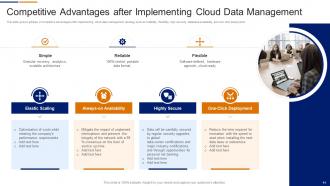
Slide 11: This slide gives a glimpse of completive advantages after implementing cloud data management strategy such as reliability, flexibility, etc.
Slide 12: This slide depicts title for six topics that are to be covered next in the template.
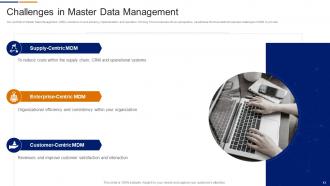
Slide 13: This slide exhibits Challenges in master data management.
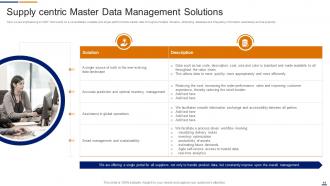
Slide 14: This slide shows Supply centric master data management solutions.
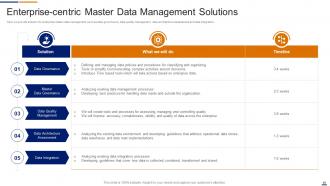
Slide 15: This slide displays Enterprise-centric master data management solutions.
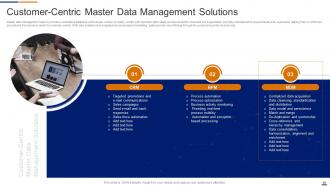
Slide 16: This slide presents Customer-centric master data management solutions.
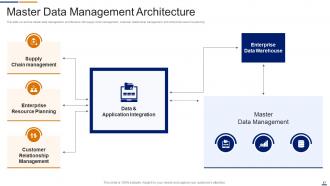
Slide 17: This slide covers the master data management architecture with supply chain management, customer relationship management and enterprise resource planning.
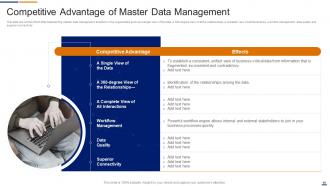
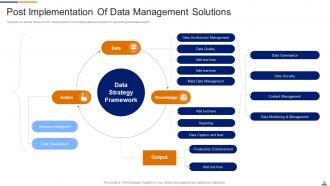
Slide 18: This slide shows the effect after implementing master data management solutions in the organization such as a single view of the data, etc.
Slide 19: This slide depicts title for the topic that is to be covered next in the template.
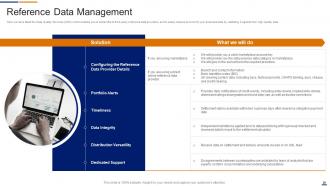
Slide 20: This slide highlights Reference data management.
Slide 21: This slide depicts title for four topics that are to be covered next in the template.
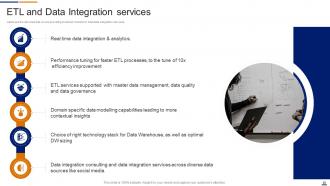
Slide 22: This slide illustrates ETL and data integration services.
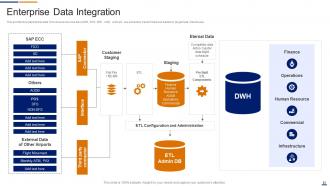
Slide 23: This slide depicts that data from diverse sources like AODB, POS, ERP, CRM, ASQ etc.
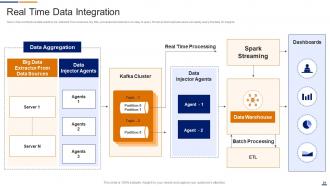
Slide 24: This slide displays Real time data integration.
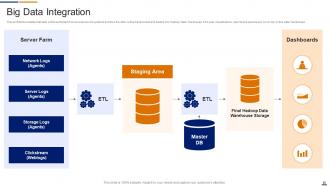
Slide 25: This slide presents Big data integration.
Slide 26: This slide depicts title for four topics that are to be covered next in the template.
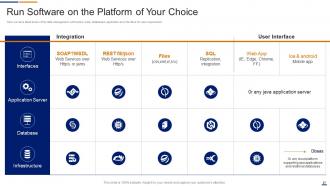
Slide 27: This slide exhibits Run software on the platform of your choice.
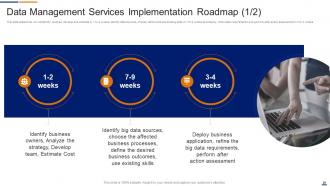
Slide 28: This slide states that we will identify, analyse, develop and estimate in 1 to 2 weeks, identify data sources, choose, etc.
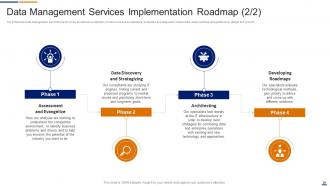
Slide 29: This slide showcases Data management services implementation roadmap.
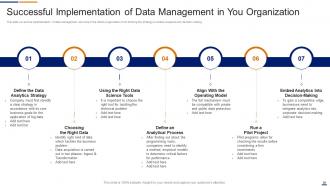
Slide 30: This slide covers the implementation of data management services in the clients organization from defining the strategy.
Slide 31: This slide depicts title for two topics that are to be covered next in the template.
Slide 32: This slide covers the framework for value extraction from multiple data sources and for generating actionable insights.
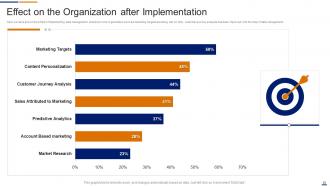
Slide 33: This slide exhibits Effect on the organization after implementation.
Slide 34: This slide displays Icons for Data Management Services.
Slide 35: This slide is titled as Additional Slides for moving forward.
Slide 36: This slide provides 30 60 90 Days Plan with text boxes.
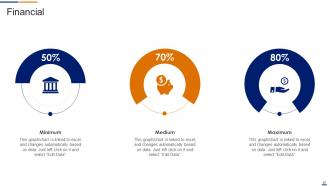
Slide 37: This is a Financial slide. Show your finance related stuff here.
Slide 38: This slide presents Roadmap with additional textboxes.
Slide 39: This slide depicts Venn diagram with text boxes.
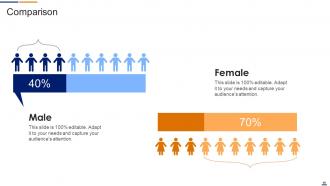
Slide 40: This is a Comparison slide to state comparison between commodities, entities etc.
Slide 41: This slide contains Puzzle with related icons and text.
Slide 42: This is a Timeline slide. Show data related to time intervals here.
Slide 43: This is About Us slide to show company specifications etc.
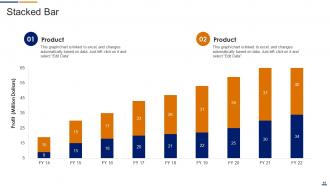
Slide 44: This slide represents Stacked Bar chart with two products comparison.
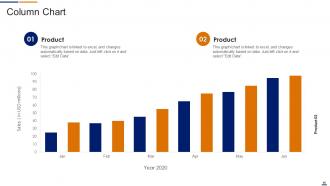
Slide 45: This slide displays Column chart with two products comparison.
Slide 46: This slide shows Post It Notes. Post your important notes here.
Slide 47: This is a Thank You slide with address, contact numbers and email address.
Data Management Services Powerpoint Presentation Slides with all 52 slides:
Use our Data Management Services Powerpoint Presentation Slides to effectively help you save your valuable time. They are readymade to fit into any presentation structure.







FAQs for Data Management Services
You'll need data governance, quality management, security protocols, and lifecycle management. Also map out clear architecture and integration processes. Honestly? Most people skip governance because it sounds boring, but trust me - your data becomes a nightmare without it. Security frameworks aren't optional anymore with all these regulations floating around. I'd start by actually figuring out what data you have and who's responsible for what pieces. That groundwork makes implementing everything else so much smoother. Oh, and don't forget compliance stuff - that'll bite you later if you ignore it now.
Start with a data audit - run automated checks for duplicates, missing values, and format errors. Most BI tools have profiling features that catch the obvious stuff. Compare your data against reliable sources to spot accuracy problems. The boring part? Document where everything comes from and how it flows through your systems. Trust me, that paper trail saves your butt when things break. Regular monitoring dashboards help too - way better to catch issues before they screw up your reports.
Look, data governance is like having house rules for your company's data - who can touch what, how it gets stored, all that stuff. Without it? Total mess. Different teams will just wing it however they want, and trust me, that never works out. It keeps your data clean, secure, and makes sure only the right people can access it. Plus you won't get in trouble with compliance stuff. Honestly, just start by figuring out who actually owns what data in your systems right now. That alone will probably blow your mind.
So big data helps you catch patterns you'd never spot manually - customer behaviors, market changes, operational hiccups. Pull info from everywhere: sales data, social media, sensors, whatever. The real challenge? Getting teams to trust data over their gut instincts (good luck with that one). I'd start with basic predictive stuff for forecasting. Real-time dashboards come later. Focus on numbers that actually matter for decisions. Don't get caught up in vanity metrics - they look pretty but won't help you much.
Honestly, start with encryption - both when data's sitting around and moving between systems. Multi-region backups are clutch because outages happen. Set up IAM policies that give people the bare minimum access they need (trust me on this one, I've cleaned up those messes before). Versioning saves your ass for critical stuff, and you'll want retention policies figured out early. Oh, and data classification helps with storage costs - hot, warm, cold tiers make a difference. First though? Audit what you've got and sort it by how sensitive and frequently accessed it is.
So GDPR basically flips your whole data approach - you need explicit consent for everything and users can demand you delete their stuff within 30 days. Build privacy into your system from the start, don't try to patch it later (trust me on this one). Map out what personal data you're collecting and where it all lives, because you'll be scrambling otherwise. Set up clear retention policies and automated deletion workflows. Yeah, it's annoying but honestly makes you handle data way better. Short version: know your data, get real consent, and be ready to nuke user info fast when they ask.
So for viz stuff, Tableau and Power BI are honestly your best bet - both handle messy data really well. Python's got Matplotlib and Seaborn if you're into coding, which is nice since they play well with your data pipelines. Google Data Studio is free (can't beat that), or there's Looker if you need something more robust. Excel still crushes it for quick dashboards too, don't let anyone tell you otherwise. I'd just start with whatever matches your current setup and budget. You can always upgrade once you figure out what you actually need.
So ML is actually really good at handling all that boring data stuff you probably hate doing. You can set it up to automatically tag and sort incoming data, which saves tons of time. The pattern recognition is wild - it'll catch data problems and weird anomalies way faster than you could manually. Plus it can predict when your systems might crash before it happens. Oh, and it'll optimize your storage too by moving old data to cheaper places. Honestly though, don't try to do everything at once. Just pick one annoying task and see if there's an ML tool for it first.
Ugh, data migration is such a pain. Your source data will be way messier than you expect - duplicates everywhere, weird formatting, missing stuff. Legacy systems are the worst too, they just refuse to work with newer platforms so you end up writing all this custom code. Business people also have zero patience and want everything done like... tomorrow. Honestly, the biggest mistake is not spending enough time looking at your data first. I'd say double whatever time you think it'll take, maybe even add 30% on top. Trust me on this one - you'll thank yourself later when you're not scrambling.
So data management services are basically your backup plan for staying compliant. They track where your data comes from, enforce how long you keep stuff, and create those audit trails regulators want to see. You can classify sensitive info and apply security controls automatically - super helpful for GDPR, HIPAA, all that fun stuff. Honestly, the best part is they catch risky practices before you get slapped with fines. Set up good governance frameworks from the start (yeah, boring but necessary), then let the tools handle the grunt work while you deal with more important things.
Indexing is your biggest bang for buck - just add it to whatever columns you're querying most. Don't do SELECT * either, grab only what you need with solid WHERE clauses. Caching repetitive queries honestly feels like cheating but it works so well. Oh and partition big tables if you've got them. Compression helps too but I'd tackle that later. Start with the indexing thing first - you'll probably notice the difference right away. It's way better than flipping through your whole database every time.
Honestly, pick one main database as your "master" and make everything else sync to that. Manual updates are where you'll lose your mind - been there. Set up automated validation so bad data gets caught early, and use the same naming conventions everywhere so your systems actually talk to each other. Real-time monitoring tools are a lifesaver for spotting problems before they get messy. Oh, and map out where all your data currently lives first - you might be surprised how scattered it is. Start with whatever's causing you the biggest headaches right now.
Dude, AI is seriously changing the data game. Most of those boring tasks like cleaning datasets and quality checks? Automated now. Machine learning spots patterns way faster than we ever could manually - honestly kind of scary how good it's gotten. The coolest part is how it automatically tags sensitive stuff and suggests what data to keep or toss. Oh, and predictive analytics for managing data lifecycles is huge. My advice? Don't overthink it. Just pick one annoying repetitive task you're doing and find an AI tool that'll handle it.
Honestly, just make the data actually accessible first - not locked away with your analysts. Most people get weird about numbers and charts, so you'll need some basic training. I'd pick one team to start with because trying to do everything at once never works. Make sure data comes up in your big meetings and decisions. The trick is showing off the wins when someone actually uses data well - like, "remember when Sarah's team boosted sales 15% because of that customer insight?" Once people see it's not just corporate BS and actually helps them do their job better, it spreads naturally. Start small, prove it works, then expand.
Track both tech stuff and business impact - that's where the real story is. Technical metrics like data quality scores and system uptime matter, sure. But honestly? Business metrics prove your worth way better. Focus on decision speed, cost savings, user adoption across teams. Compliance too if you're in finance or healthcare (ugh, the paperwork). My advice: pick 3-4 metrics that match your original goals instead of measuring everything. Track them consistently. I've seen too many projects get lost in metric overload and lose sight of what actually moves the needle for leadership.
-
The design is clean-cut, modern, and sleek, keeping the users' needs in mind. The multiple uses make this product worth every penny!
-
My team has been relying on SlideTeam’s professional PPT designs for a while now. It has greatly sped up quality work at my organization. So thanks!