

Data mapping and integration powerpoint presentation slides





Try Before you Buy Download Free Sample Product
 Impress Your
Audience
 100%
Editable
 Save Hours
of Time


Data Mapping And Integration PowerPoint Presentation Slides are designed to satisfy the business presentation needs of IT professionals. Computer experts from various industry verticals can employ this PPT slideshow to showcase data management essentials. This data transformation PowerPoint template deck features cutting-edge graphics and state-of-the-art diagrams. Elucidate the data migration approach with the help of our well-structured PPT presentation. Get access to a simplified illustration of the steps involved in data migration. Give a brief about data analysis, migration design, migration execution, and migration testing. Showcase the data migration lifecycle with the visual aid of a gripping diagram. The audience-friendly layout helps the viewer to gain insights into complex topics like data migration on the cloud. This data mapping PowerPoint theme is balanced visually. This reduces the cognitive load on the observer. Moreover, the information included is thoroughly researched by industry experts. So, smash the download button and design a personalized presentation within minutes. Our Data Mapping And Integration Powerpoint Presentation Slides are explicit and effective. They combine clarity and concise expression.
People who downloaded this PowerPoint presentation also viewed the following :
Content of this Powerpoint Presentation
Slide 1: This slide introduces Data Mapping & Integration. State your Company name and begin.
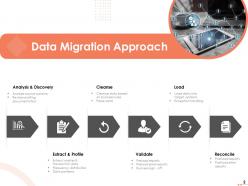
Slide 2: This slide displays Data Migration Approach.
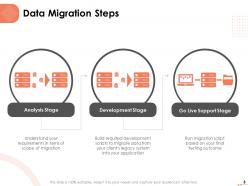
Slide 3: This slide showcases Data Migration Steps.
Slide 4: This slide depicts Simplified Illustration of Data Migration Steps
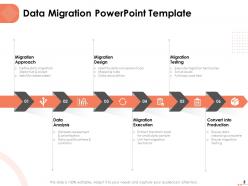
Slide 5: This slide shows Data Migration PowerPoint Template.
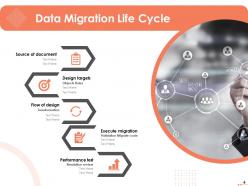
Slide 6: This slide showcases Data Migration Life Cycle.
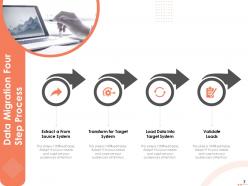
Slide 7: This slide highlights Data Migration Four Step Process.
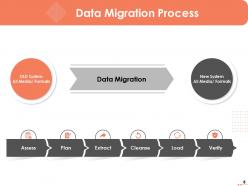
Slide 8: This slide depicts Data Migration Process
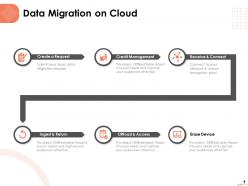
Slide 9: This slide shows Data Migration on Cloud
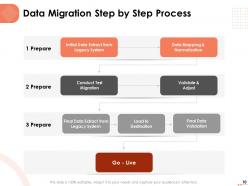
Slide 10: This slide displays Data Migration Step by Step Process.
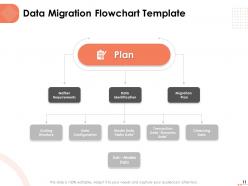
Slide 11: This slide represents Data Migration Flowchart Template
Slide 12: This is Data Mapping & Integration Icons Slide
Slide 13: This slide is termed as Additional Slides for showing further slides.
Slide 14: This is About Us slide to showcase Company specifications.
Slide 15: This is Our Team slide with Names and Designation.
Slide 16: This is Our Mission slide with Mission, Vision and Goal.
Slide 17: This slide shows Magnifying Glass.
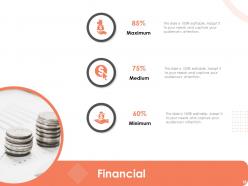
Slide 18: This is Financial slide for showing finance related stuff.
Slide 19: This slide displays Our Targets.
Slide 20: This is Puzzle slide.
Slide 21: This is Thank You slide with Address, Contact number and Email address.
Data mapping and integration powerpoint presentation slides with all 21 slides:
Use our Data Mapping And Integration Powerpoint Presentation Slides to effectively help you save your valuable time. They are readymade to fit into any presentation structure.








FAQs for Data mapping and integration
Think of data mapping like drawing up a blueprint first - you're figuring out which fields from system A match up with fields in system B. It's basically your translation guide. Data integration is when you actually execute that plan and start moving the data around. Mapping is the upfront design work (honestly the boring part), but integration is the ongoing process that keeps everything synced up. You'll map once per connection, then integration runs in the background doing its thing. Makes sense?
Think of data mapping like directions for moving your stuff between apartments - you're figuring out what goes where and how to handle the weird-shaped things that don't fit perfectly. So you match up source fields with target destinations, plus handle all the format changes and conversions needed. Trust me, skipping this step is asking for trouble. Your data will end up scattered everywhere or completely broken. Start with your most important datasets first (learned this the hard way). Document everything clearly so you don't hate yourself later when you forget why you made certain choices.
Think of data mapping as your sanity check - it makes you define exactly how info moves between systems, so you catch weird stuff early. Bad data *will* try to mess with you, but proper field mapping creates rules that block it. You'll spot format mismatches, missing chunks, or wonky data types before they explode later. Honestly, most quality issues are lurking in your source data formats anyway. Document what you currently have first. When things go sideways (and they will), you'll have a clear trail to follow back.
So there's direct mapping - that's just matching fields one-to-one. Pretty straightforward. Then transformation mapping where you're converting formats or data types (this is honestly where everything goes wrong lol). You've also got lookup mapping with reference tables, hierarchical stuff for nested data, and aggregation when combining multiple sources. Oh, and conditional mapping that applies rules based on criteria. Start with the simple direct mappings first, then add transformations later. Trust me on this - I learned the hard way that debugging gets messy fast when you try to do everything at once.
Start by mapping out what data you're moving and where it's going - this tells you how complex your tool needs to be. Budget matters, but don't forget about training costs and upkeep. Your team's coding skills are huge here. Some tools need developers, others you can basically point-and-click your way through. Honestly? Run a pilot with your top 2-3 picks using actual messy data from your setup. Demos always look perfect, but real data will show you what actually works. Oh, and test the worst-case scenarios too - that's where tools usually break.
Oh man, data quality issues will drive you absolutely insane - missing values, weird formats, duplicates everywhere. Field mapping is another nightmare when your source data looks nothing like what you actually need. Large datasets? Good luck with performance. Source systems love changing without telling anyone too, which is just fantastic. Honestly, I learned the hard way to validate everything upfront. Also build in way more time than you think - there's always some weird edge case that'll pop up and ruin your day.
Dude, automated data mapping is a game changer - cuts your manual work by like 70-80%. No more babysitting every single field connection between systems. The best part? It catches mapping errors before they become your problem, which honestly saves so much headache later. When you inevitably add new data sources (and trust me, you will), it scales without breaking everything. Your team can actually do analysis instead of constantly fixing broken stuff. Oh, and start with whatever mapping tasks you're doing over and over - that's where you'll see the biggest win right away.
Honestly, start with automated tools - OCR for docs, NLP for text, image recognition stuff. Machine learning can pull out the key entities and relationships way faster than doing it by hand. I've watched teams burn through weeks trying to manually sort everything first (huge mistake). Build flexible schemas that can adapt when you inevitably find weird new data formats. You want enough structure to actually query the stuff later, but not so rigid that everything breaks when something unexpected shows up. Oh, and don't try to categorize everything upfront - let the patterns emerge as you go.
Honestly, data mapping is like having a GPS for all your sensitive info - you'll know exactly where everything lives and how it moves around. When GDPR auditors show up (and they will), you can actually prove you're not just winging it. It's your audit trail that shows regulators what controls you've got in place. Without it? You're totally screwed when you need SOX compliance or have to track down customer data. I'd start with your riskiest data flows first since that's where they always dig. Plus it helps you spot privacy issues before they become expensive problems.
Okay so data mapping is huge for real-time stuff - honestly it makes or breaks everything. You're basically defining how fields translate between systems and handling transformations as they happen. The rough part? Real-time means zero room for error. Can't just pause and fix things like with batch jobs. Bad mapping will either fail immediately or (way worse) silently corrupt your data downstream. I've seen that mess up entire systems before. Map out your source and target schemas first, then build solid error handling into the logic. Trust me, the upfront work saves you massive headaches later.
Honestly, start with a data dictionary that everyone actually uses - not one that sits in some forgotten folder. Map out your most important data flows first. Create clear rules for how fields match up between platforms, because trust me, this gets messy fast if you don't. Set up validation at your integration points to catch weird stuff early. Oh and run regular quality checks - I learned this the hard way when bad data made it downstream and caused chaos. Skip the less critical flows for now. You can always add those later once you've got the main stuff locked down.
Dude, bad data mapping will absolutely wreck your BI reports. You'll be making decisions off completely wrong info - like seeing revenue numbers that are actually just customer counts, or dates showing up as random text. Super frustrating when you find out later. The worst part? Your dashboards look totally normal on the surface while everything underneath is broken. False trends, garbage forecasts, expensive mistakes - the whole nine yards. I learned this the hard way at my last job. Test your mappings with sample data first, trust me.
So ETL is where data mapping actually happens. You pull data from sources, transform it (mapping rules come in here), then dump it into your target system. The transform part does most of the work - you're figuring out how fields from different sources line up, converting data types, fixing inconsistencies. Honestly, it's kind of like translating between systems that don't speak the same language. Your mapping is what makes or breaks whether the final data actually makes sense. Oh, and definitely map out your source-to-target stuff first before you start building anything.
Update your data mapping docs as you go - seriously, don't let them turn into those useless files everyone ignores. Use version control and get stakeholders to actually approve changes. Document WHY you mapped things that way, not just what you did. Trust me, you'll be grateful when you're debugging some random issue later. Include data lineage and transformation rules too. Oh, and assign someone to own this stuff - otherwise it'll get outdated the second your systems change. Business context is huge as well since it helps new people understand your decisions.
So ML basically watches how you've mapped data before and suggests matches for new stuff. Pretty cool how it picks up on your patterns. You can also use it to spot data types and catch weird anomalies upfront - saves tons of manual checking. The system gets smarter as you feed it more data (though honestly, sometimes the suggestions are still wonky at first). I'd start with just one dataset to see if it actually works well for your setup. Gets way less tedious once it's trained on your specific data quirks.
-
Out of the box and creative design.
-
Great product with highly impressive and engaging designs.