

Data Quality Metrics Powerpoint Ppt Template Bundles




Try Before you Buy Download Free Sample Product
 Impress Your
 Audience
 100%
100% Editable
 Save Hours
 of Time


Our Data Quality Metrics Powerpoint Ppt Template Bundles are topically designed to provide an attractive backdrop to any subject. Use them to look like a presentation pro.
People who downloaded this PowerPoint presentation also viewed the following :
Data Quality Metrics Powerpoint Ppt Template Bundles with all 29 slides:
Use our Data Quality Metrics Powerpoint Ppt Template Bundles to effectively help you save your valuable time. They are readymade to fit into any presentation structure.






FAQs for Data Quality Metrics Powerpoint
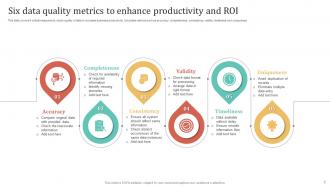
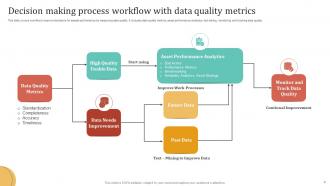
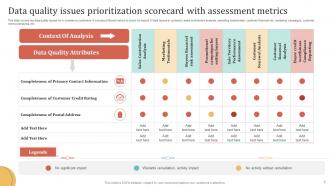
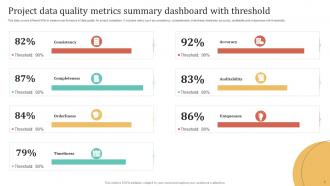
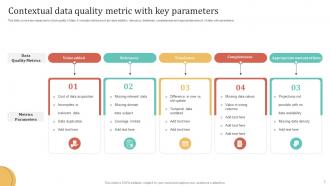
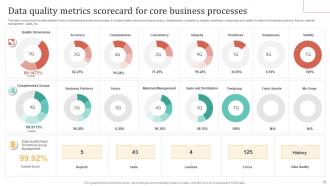
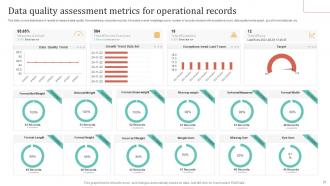
Focus on accuracy, completeness, consistency, timeliness, validity, and uniqueness. Accuracy's pretty straightforward - is your data actually right? Completeness means checking for missing stuff in important fields. Consistency is where things get messy (honestly, most companies are terrible at this) - same data should look identical across different systems. You'll want timeliness to know if data's fresh enough for decisions. Validity confirms everything follows the right formats and rules. Uniqueness spots duplicates. Don't try tackling all of these at once though. Pick 2-3 that are causing the biggest headaches right now and start there.
So basically, grab a sample of your data and check it against whatever source you trust most - could be the original records, a reliable database, whatever. Then just calculate what percentage matches up. I'd set up some automatic checks too that catch obvious stuff like wonky email formats or dates that make no sense. Manual spot-checks work great when you can't automate everything. Here's the thing though - different data needs different accuracy levels. Customer names? Maybe 95% is fine. Product codes? You'll want 99.9% or you're screwed. Start with your most important stuff first.
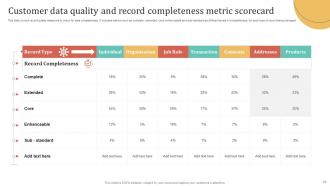
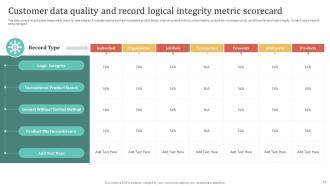
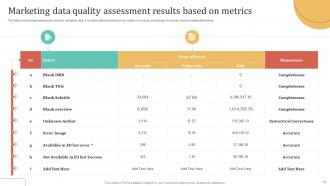
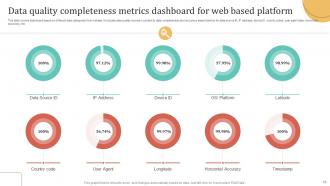
Data completeness is your starting point for any quality check - missing chunks of data make everything else pointless. It's just tracking what percentage of your fields actually have values versus being empty. Like trying to bake when you're missing half the ingredients, honestly. Check completeness at both field and record levels to see the whole mess. Figure out which fields are actually critical first. Then set realistic thresholds - you don't always need 100% completion for every single field, but you gotta know what works for your specific situation.
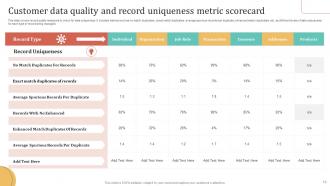
Start with standardized schemas across your data sources - same formats, same field definitions. Then run comparison queries to catch inconsistencies. Automated checks are clutch for flagging when identical data shows up differently between systems. Honestly, data profiling tools will save you so much time here. They'll spot outliers and mismatches way faster than doing it manually. Build scorecards that track duplicates, conflicting values, format issues - stuff like that. Oh, and establish your baseline metrics first before monitoring regularly. Trust me, catching drift early beats dealing with a massive mess later.
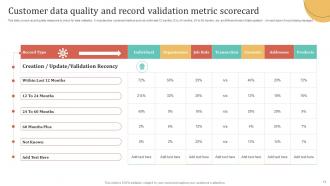
Track how old your data is - like time since it was created or last updated. Set up alerts when stuff gets too stale (customer data older than 24 hours kills real-time campaigns). Processing delays between systems are huge too. Honestly, I've watched so many teams get wrecked by outdated inventory numbers it's not even funny. You'll want to see how data freshness actually impacts your KPIs - conversion rates tank when you're working with old info. Start with your most critical datasets first and figure out what "fresh enough" means for each one.
Basically structured data has clear rules to follow - you're checking completeness, accuracy, stuff like that against set schemas. Super straightforward. Unstructured data? Totally different beast. You're dealing with text, images, whatever - and measuring things like relevance or sentiment gets subjective fast. Honestly it's kind of a nightmare to quantify sometimes. The tools are completely different too. My take is you've gotta figure out what "quality" even means for your specific case first. Otherwise you'll just be spinning your wheels picking random metrics that don't actually help.
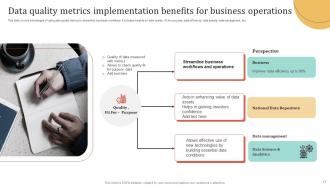
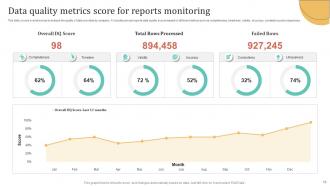
First thing - assign clear owners for each data area so someone's actually responsible when stuff breaks. Build automated dashboards tracking completeness, accuracy, and consistency (the usual suspects). Getting teams on board is honestly the hardest part since everyone assumes their data's perfect until you prove otherwise. You'll want standardized rules that ping you when metrics hit certain thresholds. Make these numbers visible to leadership and connect them to real business impact - that's when people start caring. Oh, and don't go crazy measuring everything right away. Pick 3-5 critical metrics first.
Honestly, bad data is way more expensive than most people think. Start with the obvious stuff - hours your team wastes fixing errors, customer complaints, marketing campaigns that totally flop. Multiply those hours by what you're paying people and it adds up fast. Then there's the sneaky costs like missed sales opportunities and compliance headaches. There's this rule called 1-10-100: costs $1 to prevent mistakes, $10 to fix them, $100 when they blow up later. Pick one process and track it for a month - you'll probably be horrified at what you find.
So for real-time data quality monitoring, I'd probably start with Apache Griffin or Great Expectations - both are solid open-source options that'll run continuous checks on your pipelines. Cloud-wise, you've got AWS Datalake, Google Cloud Data Quality, and Monte Carlo if you want something with better dashboards out of the box. Fair warning though, the initial setup is kind of a headache. You could also go custom with Kafka for streaming validation or just bake quality checks right into your ETL. Oh, and definitely start with just one critical dataset first - don't try to boil the ocean on day one.
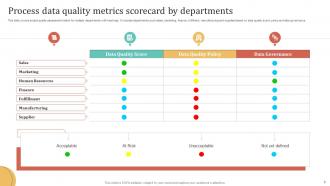
Honestly, you gotta stop throwing around technical percentages and start telling stories they actually care about. Like instead of "94% data completeness," say "we're missing info on 6% of customers - that's potential lost sales." Visual dashboards are your friend here because nobody wants to stare at spreadsheet hell first thing Tuesday morning. Show trends over time, not just random snapshots. Always tie it back to money, happy customers, or making their jobs easier. Oh and create one of those red/yellow/green systems so they can instantly see what's broken without thinking too hard.
Think of data lineage as your detective tool for tracking where your data comes from and where it goes. Super helpful when things break! You can trace quality issues right back to the source instead of just staring at messy data wondering what happened. Honestly, I'd start with your most important data flows first - don't try to map everything at once, you'll go crazy. It's like having breadcrumbs through your whole pipeline. When stuff goes wrong (and it will), you'll know exactly which process or transformation messed things up.
Honestly, ML is a game-changer for catching data quality problems you'd never spot manually. It'll flag outliers, duplicates, missing values - basically anything that looks off. The algorithms get pretty good at learning what your "normal" data should look like over time, which I think is the coolest part. Instead of doing one-off checks, you get continuous monitoring happening in the background. I'd start with your most important datasets first and build out from there. Way better than staring at spreadsheets all day trying to find issues yourself.
Honestly, just focus on what's breaking your most important stuff first. Impact assessment is clutch - figure out which data problems are messing with your biggest revenue streams or core processes. Risk-based works too, especially if you've got compliance issues lurking around. I always tell people to do the cost-benefit math upfront because it stops those endless debates later (trust me on this one). Oh, and data lineage mapping is super helpful - sometimes fixing one upstream thing solves like five problems downstream. Don't overthink which framework to use though. Pick one and run with it.
So regulatory stuff basically forces you to focus on certain data quality metrics depending on your industry. Healthcare? You're obsessed with completeness and accuracy because of HIPAA and patient safety - bad data can literally kill people. Financial companies care way more about lineage and timeliness thanks to SOX and Basel rules. Pharma has to be crazy strict about data integrity for the FDA. Here's the annoying part though - some regulations are super vague about *how* to actually measure quality, just that you have to do it. I'd start by figuring out which regulations map to which data quality areas, then build your metrics from there.
Honestly, the worst thing you can do is try tracking everything right away - you'll just end up with a million metrics nobody looks at. Most companies get obsessed with technical accuracy but completely miss whether the data actually helps anyone make decisions. Also (and this drives me crazy), people set these random thresholds without knowing their baseline first. So you get impossible targets that just piss everyone off. Manual checks? Forget it. Those die within weeks because who has time for that? Pick maybe 3-5 metrics that actually matter for big decisions. Automate it. Then expand once you've shown it works.
-
Wow, never been this impressed with any online service provider. Really appreciate the customer support all along from the navigation to purchasing the right products.
-
Their designing team is so expert in making tailored templates. They craft the exact thing I have in my mind…..really happy.