

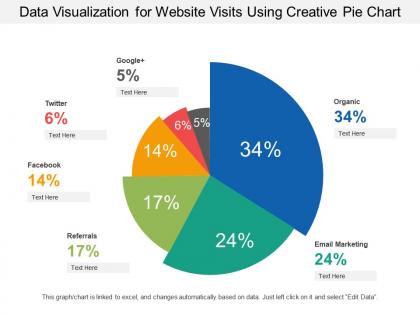
Data visualization for website visits using creative pie chart





Try Before you Buy Download Free Sample Product
 Impress Your
 Audience
 100%
100% Editable
 Save Hours
 of Time


Folks follow the correct course with our Data Visualization For Website Visits Using Creative Pie Chart. Keep everyone's eyes on the chart.
People who downloaded this PowerPoint presentation also viewed the following :
Data visualization for website visits using creative pie chart with all 6 slides:
Emerge as a good employer with our Data Visualization For Website Visits Using Creative Pie Chart. Generate greater enthusiasm among your employees.
FAQs for Data visualization for website visits using
So basically start with what story you're trying to tell - that's honestly the most important part. Bar charts work great for comparing stuff, line charts for showing trends over time. I'd stick to simple colors that actually mean something, not just random pretty ones. Label everything clearly so people aren't guessing what they're looking at. And please don't go crazy with 3D effects or fancy animations - I've seen so many charts that look cool but tell you absolutely nothing! Keep it simple and focus on one main point per chart. Oh, and contractions are fine in labels if it makes things clearer.
Honestly, the chart you pick totally changes how people read your data - like, same exact numbers but completely different takeaways. Bar charts are perfect when you want clear comparisons. Line charts show trends over time really well. Pie charts... ugh, they're pretty bad for precise stuff but decent for showing parts of a whole (I try to avoid them tbh). Scatter plots are awesome because they'll show you correlations that other charts completely miss. Just think about what story you're actually trying to tell first. Want people comparing values? Spotting trends? Seeing relationships? That's your answer right there.
Honestly, color can make or break your charts. It's what separates boring spreadsheets from actually compelling visuals that people want to look at. Use it to group similar data or highlight the most important stuff - basically guide people's eyes where you want them to go. Different colors work great for showing categories, while gradients are perfect for value ranges. Oh, and this is kinda random but I learned this the hard way - always check if your colors work for colorblind people. Red-green combos are the worst offenders. Your charts will thank you later!
Dude, you've gotta try interactive dashboards - they're game changers. People don't just stare at boring static charts anymore. Add some filters or hover effects? Suddenly everyone's clicking around like they're detective solving mysteries. It's honestly wild how much more people engage when they can explore the data themselves. The movie trailer vs video game comparison is spot on - users go from passive to totally invested. I mean, even something simple like a dropdown filter makes people feel like they're in control. Your engagement will definitely spike once you give it a shot.
Don't cram too much info onto one chart - it just confuses people. Also, misleading scales are sketchy and will make you look bad. Pick colors that don't hurt to look at! Rotated text is the worst - nobody wants to crane their neck around. Skip the 3D effects too, they're honestly just distracting even though they seem cool. You shouldn't cherry-pick your data ranges either. Keep things straightforward. Oh, and here's what I always do: look at your finished chart and see if you'd "get it" in like 5 seconds if someone random showed it to you.
Think of yourself as telling a story, not just showing charts. Start by hooking people with context they actually care about. Then walk them through your data step by step - annotations and colors should guide the journey, not just look nice. I usually sketch out my story arc before I even open the data (sounds nerdy but it works). Set up the problem first, then reveal findings progressively. Don't dump everything at once. Your goal? Be a tour guide who leads people to those "aha!" moments. Trust me, it makes viz way more memorable.
So for professional data viz, Tableau and Power BI are your best bet if you need dashboards and heavy analysis stuff. They're expensive though. Python's great if you like coding - matplotlib and seaborn are super flexible. R with ggplot2 is solid too. Actually, don't laugh, but Excel's gotten way better lately and most people already have it anyway. D3.js is amazing for web stuff but honestly? The learning curve will make you want to cry. I'd just start with whatever matches your current skills and budget. You can always upgrade later once you figure out what you actually need.
Oh man, this is so crucial but people totally overlook it! Red means danger here but luck in China - wild, right? Your reading patterns matter too since some cultures go right-to-left, which messes with chart flow. Honestly, I've seen presentations bomb because someone used icons that meant nothing to half the audience. Some cultures actually prefer dense data tables over those clean, minimal graphics we love. I made this mistake on a client project - thought I was being smart with simplified visuals but they wanted way more detail. Always test your stuff with different users first!
So here's the thing - don't try plotting every single point or you'll get a useless mess. Aggregate stuff first with binning or rolling averages, that's what makes patterns pop. Heatmaps work way better than scatter plots when you've got overlapping data everywhere. Interactive filters are clutch because people can dig into whatever segment they care about. Oh and density plots too - those are underrated honestly. Start broad, then let users zoom into details. Statistical summaries help a ton for the overview before diving deeper.
Honestly, charts and graphs are game-changers for spotting stuff you'd never catch in spreadsheets. Your brain processes visuals way faster than rows of numbers anyway. Line charts show you where things are headed, heat maps make correlations pop out, and scatter plots highlight weird outliers. I always start by just plotting my main metrics over time - sounds basic but you'd be shocked what patterns show up. Like, trends that were totally invisible suddenly become obvious. Heat maps are probably my favorite though, they make relationships between variables super clear at a glance.
Dude, scale choice literally makes or breaks your chart. Start your y-axis at 50 instead of 0? Suddenly a tiny 5% bump looks like the world's ending. I've fallen into this trap myself - it's so easy to accidentally make small changes look dramatic or completely bury the real story. Your intervals and labels have to match what's actually going down in the data. But here's the thing: different scales can be totally valid for different purposes. Just always double-check - would someone else looking at this reach the same conclusion you would from the raw numbers?
Dude, real-time dashboards are a game changer - you'll catch problems the second they happen instead of finding out days later when it's too late. Customer behavior shifts? You'll see it instantly. Your friend Jake probably thinks I'm crazy, but I literally have live charts open all day now. It's weirdly addictive once you get hooked. The speed factor is huge because you're working with what's happening RIGHT NOW, not yesterday's stale numbers. Oh, and definitely set up alerts for your critical stuff so the dashboard actually pings you when something's off. Way better than just staring at static data all day.
Honestly, just don't be sketchy with your data. Those bar charts that randomly start at 50 instead of zero? Total BS move. Always show your sources and sample sizes - people deserve to know what they're looking at. Think about whether you're accidentally leaving groups out or pushing some weird stereotype too. I hate when visualizations make things look way more dramatic than they actually are. Short version: if someone showed you your own chart, would you feel like they were trying to trick you? That's basically your test right there.
Honestly, data viz is a game changer because it gets rid of that scary technical wall between messy data and actually understanding what's going on. Your brain just processes pictures way faster than endless spreadsheet rows - like, it's not even close. When you make good charts, suddenly non-tech people can follow along and actually contribute to conversations instead of just nodding. They'll start asking way better questions once they can see the patterns. Oh, and definitely keep each chart focused on one thing - I've seen too many cluttered dashboards that just confuse everyone.
Honestly, interactive dashboards are huge right now - everyone wants to click around instead of staring at static charts. Real-time streaming is another big one, plus all the AI stuff that automatically spots trends for you. Mobile design is critical since we're all glued to our phones anyway. AR visualizations look pretty sick but they're still kind of experimental. The storytelling approach is really catching on too - basically guiding people through your data like a narrative instead of just throwing numbers at them. I'd start by making your current dashboards more interactive and mobile-friendly first. Then maybe check out some automated insight tools.
No Reviews