

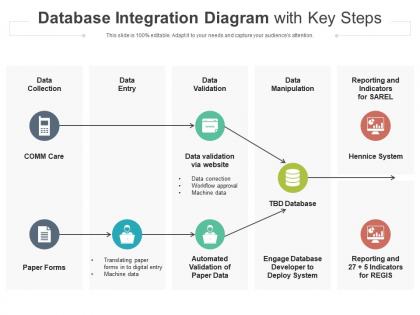
Database integration diagram with key steps




Try Before you Buy Download Free Sample Product
 Impress Your
 Audience
 100%
100% Editable
 Save Hours
 of Time


Our Database Integration Diagram With Key Steps are topically designed to provide an attractive backdrop to any subject. Use them to look like a presentation pro.
People who downloaded this PowerPoint presentation also viewed the following :
Database integration diagram with key steps with all 2 slides:
Use our Database Integration Diagram With Key Steps to effectively help you save your valuable time. They are readymade to fit into any presentation structure.
FAQs for Database integration diagram
A Database Integration Diagram is a visual blueprint that maps data flow, connections, and relationships between multiple database systems, applications, and external sources within an organization's architecture. It streamlines complex integration planning by identifying data dependencies, transformation requirements, and potential bottlenecks, ultimately enabling seamless information exchange and enhanced operational efficiency across enterprise systems.
A Database Integration Diagram visualizes data connections, transfer protocols, and interdependencies between systems, enabling organizations to trace information pathways, identify bottlenecks, and optimize data synchronization processes. Through clear mapping of data flows, businesses can streamline integration projects, reduce redundancies, and enhance system performance, with many enterprises finding that visual documentation accelerates troubleshooting and ensures seamless connectivity.
Key components include data sources and destinations, integration middleware, transformation processes, data flow arrows, security layers, and error handling mechanisms. These elements work together by mapping data pathways, defining transformation rules, and establishing monitoring protocols, with many organizations finding that comprehensive diagrams streamline troubleshooting, enhance team collaboration, and ultimately accelerate integration project delivery timelines.
**INPUT**: How do you determine the appropriate level of detail for a Database Integration Diagram? **OUTPUT**: The appropriate level of detail depends on your audience, project complexity, and documentation purpose, balancing technical accuracy with stakeholder comprehension needs. Enterprise architects typically require comprehensive schemas and data flows, while executives need high-level system relationships, with many organizations finding that iterative refinement based on stakeholder feedback delivers optimal clarity and actionable insights.
Data models serve as the foundational blueprint for Database Integration Diagrams by defining entity relationships, data structures, attribute mappings, and integration points between systems. They enable architects to visualize how information flows across platforms, identify potential conflicts, and establish standardized formats, with organizations in healthcare, finance, and retail finding that well-designed models streamline integration processes and reduce implementation errors.
Database Integration Diagrams visually represent databases through distinctive shapes like cylinders or rectangles, APIs through connector nodes or gateway symbols, and data sources through labeled boxes or cloud icons. These visual elements streamline complex system architecture by clearly mapping data flows, connection points, and integration pathways, with many organizations finding that standardized symbols enhance team communication and accelerate development workflows.
Common challenges include mapping complex data relationships, ensuring accurate schema representation, managing multiple database formats, handling data transformation requirements, and maintaining diagram clarity across large systems. These integration complexities often overwhelm teams initially, but organizations in healthcare, finance, and retail find that systematic diagramming ultimately streamlines database migrations, enhances system interoperability, and delivers significant operational efficiency gains.
Stakeholders can use a Database Integration Diagram to ensure project alignment by visualizing data flows, identifying integration points, and establishing shared understanding of system dependencies across teams. This strategic documentation enables technical teams, business analysts, and project managers to coordinate requirements, minimize conflicts, and streamline implementation timelines, ultimately delivering seamless integration and operational efficiency.
Common tools for creating Database Integration Diagrams include Microsoft Visio, Lucidchart, Draw.io, ERDPlus, and MySQL Workbench, along with enterprise solutions like IBM InfoSphere and Oracle SQL Developer Data Modeler. These platforms streamline diagram creation by offering pre-built database symbols, automated relationship mapping, and collaborative features, with many organizations finding that cloud-based tools enhance team coordination and accelerate project timelines.
Database Integration Diagrams focus on data flow and connectivity between multiple systems, databases, and applications, emphasizing integration points, transformation processes, and real-time synchronization across platforms. While ERDs concentrate on structural relationships within a single database, integration diagrams showcase how disparate systems communicate, with organizations in retail, healthcare, and finance finding that these diagrams streamline complex multi-system architectures and enhance operational visibility.
Database integration diagram maintenance requires regular reviews, version control, automated documentation tools, stakeholder collaboration, and change management processes. Organizations should establish quarterly assessment cycles, implement real-time monitoring systems, and designate data architects to oversee updates, with many enterprises finding that proactive diagram management streamlines troubleshooting, enhances system reliability, and accelerates integration projects.
A Database Integration Diagram facilitates microservices integration by visualizing data flows, API connections, and service dependencies across distributed systems. Through clear mapping of database schemas, transaction boundaries, and communication patterns, organizations streamline service coordination, minimize data inconsistencies, and accelerate deployment cycles, with many enterprises finding that visual documentation reduces integration complexity by up to 40%.
Data governance ensures data quality, security, and compliance standards are maintained throughout database integration processes depicted in these diagrams. It establishes clear protocols for data access, transformation, and storage across integrated systems, with organizations in healthcare, finance, and retail finding that robust governance frameworks minimize integration risks, ensure regulatory compliance, and ultimately deliver more reliable, trustworthy data flows.
Database Integration Diagrams incorporate security through encryption protocols, access control mechanisms, authentication layers, firewall configurations, and data masking techniques. These security elements streamline compliance requirements by visualizing threat vectors, monitoring points, and protective barriers, with financial services and healthcare organizations finding that comprehensive security mapping ultimately delivers regulatory adherence and enhanced data protection.
Real-time data requirements significantly impact Database Integration Diagram design by necessitating low-latency connections, streaming data pipelines, event-driven architectures, and optimized data flow pathways. These requirements drive architects to implement change data capture technologies, in-memory processing systems, and direct API integrations, ultimately enabling faster decision-making and improved operational responsiveness across organizations.
-
Designs have enough space to add content.
-
Informative design.