

Developing User Engagement Strategies Powerpoint Presentation Slides




Try Before you Buy Download Free Sample Product
 Impress Your
 Audience
 100%
100% Editable
 Save Hours
 of Time


Customer engagement includes processes to interact with customers in order to strengthen the relationship. For this, an efficiently designed Developing User Engagement Strategies template is here. The purpose of this deck is to encourage customer loyalty, convert customers into passionate promoters and increase business revenues. Also, it covers marketeer challenges, the impact of brand engagement strategy, competitive assessment, etc. Further, this presentation shows the future scenario by addressing customer needs and experience valuation. This deck also represents the customer onboarding process timeline, strategies to create a positive customer experience, initiatives to personalize relationships, and key statistics associated with mobile e-commerce sales. Moreover, this PPT exhibits customer journey mapping, website optimization techniques, use of chatbots, selection of visual engagement instruments, and usage of conversational AI. Additionally, it captures the customer engagement platform ecosystem, comparative analysis, and key considerations. Also, this presentation showcases costs involved in customer engagement plan implementation, its impact on marketing priorities, and word of mouth. At last, it depicts a dashboard to measure customer experience and analytics. Get access to this powerful template now.
People who downloaded this PowerPoint presentation also viewed the following :
Content of this Powerpoint Presentation
Slide 1: This slide introduces Developing User Engagement Strategies. State Your Company Name and begin.
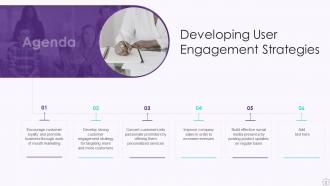
Slide 2: This slide states Agenda of the presentation.
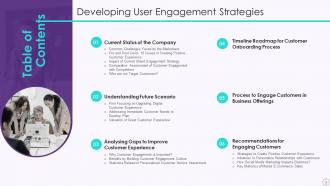
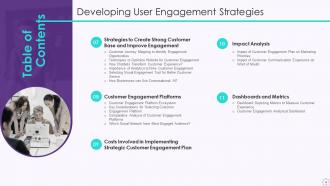
Slide 3: This slide presents Table of Content for the presentation.
Slide 4: This is another slide continuing Table of Content for the presentation.
Slide 5: This slide highlights title for topics that are to be covered next in the template.
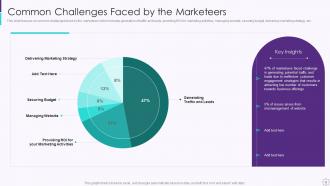
Slide 6: This slide shows Common Challenges Faced by the Marketeers.
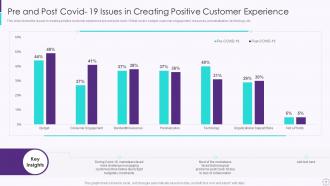
Slide 7: This slide shows the issues in creating positive customer experience pre and post covid-19.
Slide 8: This slide highlights title for topics that are to be covered next in the template.
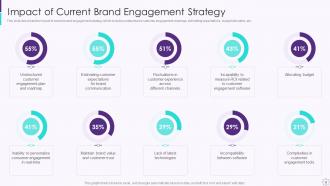
Slide 9: This slide presents Impact of Current Brand Engagement Strategy.
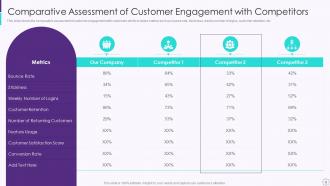
Slide 10: This slide displays Comparative Assessment of Customer Engagement with Competitors.
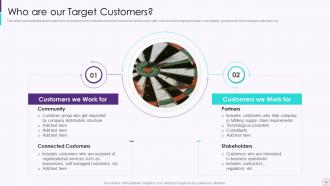
Slide 11: This slide represents the target customers of company.
Slide 12: This slide highlights title for topics that are to be covered next in the template.
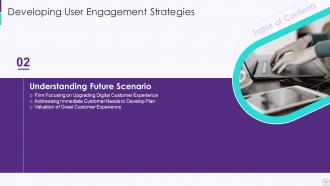
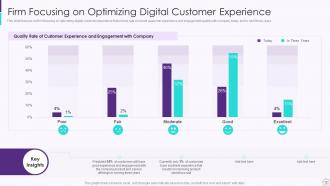
Slide 13: This slide showcases Firm Focusing on Optimizing Digital Customer Experience.
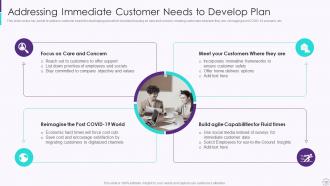
Slide 14: This slide shows Addressing Immediate Customer Needs to Develop Plan.
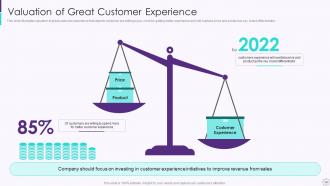
Slide 15: This slide presents Valuation of Great Customer Experience.
Slide 16: This slide highlights title for topics that are to be covered next in the template.
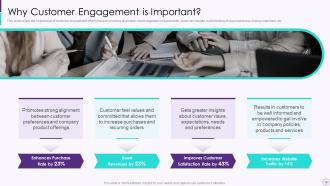
Slide 17: This slide covers the importance of customer engagement.
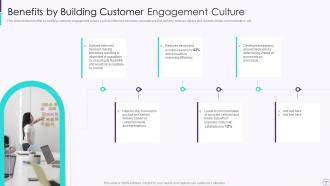
Slide 18: This slide displays Benefits of Building Customer Engagement Culture.
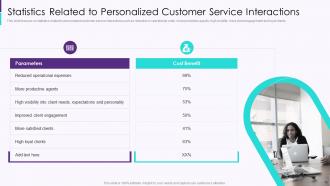
Slide 19: This slide represents Statistics Related to Personalized Customer Service Interactions.
Slide 20: This slide highlights title for topics that are to be covered next in the template.
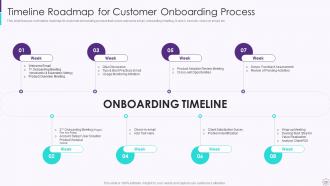
Slide 21: This slide showcases Timeline Roadmap for Customer Onboarding Process.
Slide 22: This slide highlights title for topics that are to be covered next in the template.
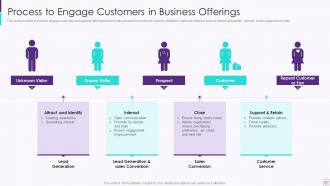
Slide 23: This slide shows Process to Engage Customers in Business Offerings.
Slide 24: This slide highlights title for topics that are to be covered next in the template.
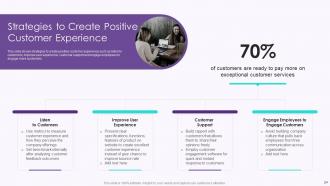
Slide 25: This slide presents Strategies to Create Positive Customer Experience.
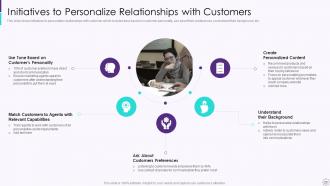
Slide 26: This slide displays Initiatives to Personalize Relationships with Customers.
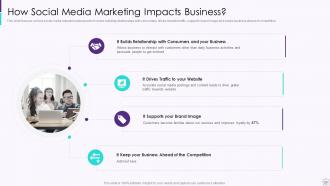
Slide 27: This slide focuses on how social media impacts business.
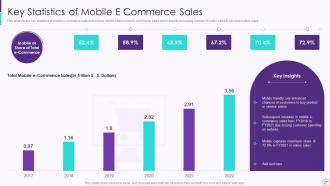
Slide 28: This slide represents Key Statistics of Mobile E Commerce Sales.
Slide 29: This slide highlights title for topics that are to be covered next in the template.
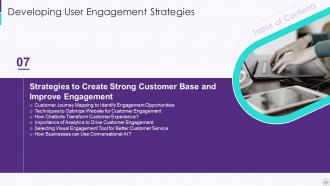
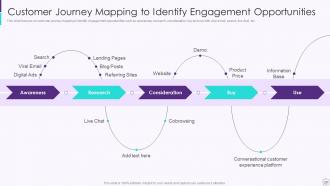
Slide 30: This slide showcases Customer Journey Mapping to Identify Engagement Opportunities.
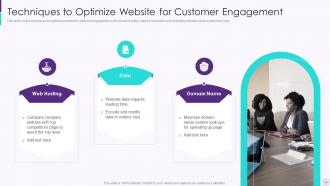
Slide 31: This slide shows Techniques to Optimize Website for Customer Engagement.
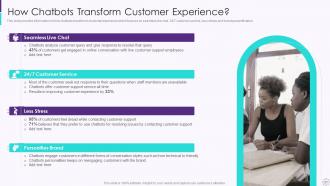
Slide 32: This slide presents How Chatbots Transform Customer Experience.
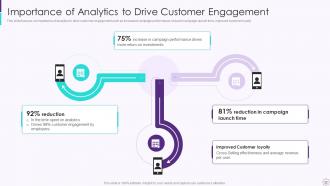
Slide 33: This slide displays Importance of Analytics to Drive Customer Engagement.
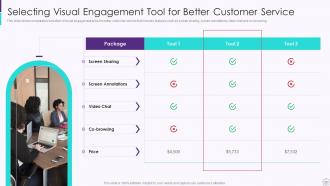
Slide 34: This slide represents Selecting Visual Engagement Tool for Better Customer Service.
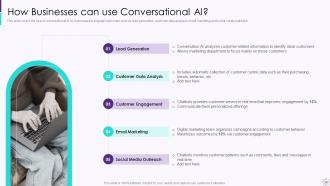
Slide 35: This slide covers the use of conversational AI by businesses to engage customers.
Slide 36: This slide highlights title for topics that are to be covered next in the template.
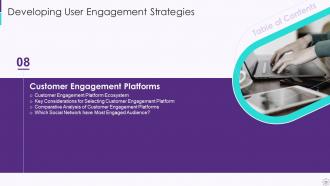
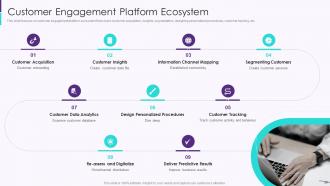
Slide 37: This slide focuses on customer engagement platform ecosystem that covers customer acquisition.
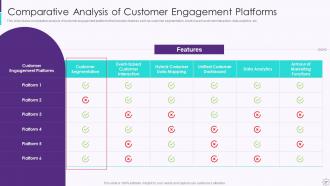
Slide 38: This slide presents Comparative Analysis of Customer Engagement Platforms.
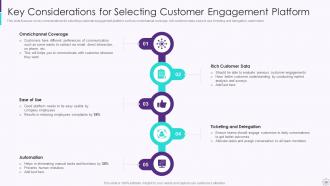
Slide 39: This slide displays Key Considerations for Selecting Customer Engagement Platform.
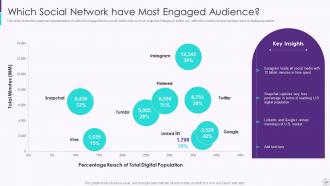
Slide 40: This slide shows the graphical representation of customer engagement by social media sites.
Slide 41: This slide highlights title for topics that are to be covered next in the template.
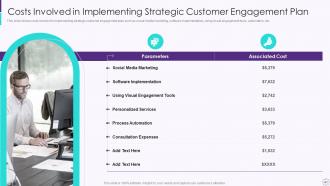
Slide 42: This slide presents Costs Involved in Implementing Strategic Customer Engagement Plan.
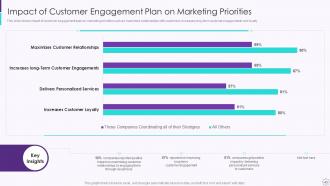
Slide 43: This slide displays Impact of Customer Engagement Plan on Marketing Priorities.
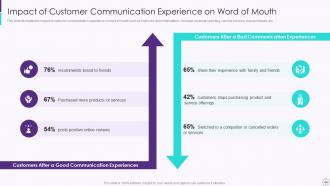
Slide 44: This slide represents Impact of Customer Communication Experience on Word of Mouth.
Slide 45: This slide highlights title for topics that are to be covered next in the template.
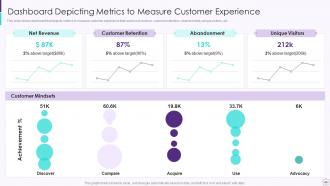
Slide 46: This slide showcases Dashboard Depicting Metrics to Measure Customer Experience.
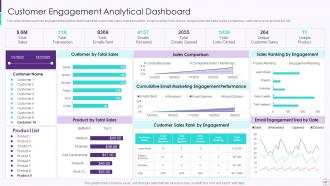
Slide 47: This slide shows Customer Engagement Analytical Dashboard.
Slide 48: This slide displays Icons for Developing User Engagement Strategies.
Slide 49: This slide is titled as Additional Slides for moving forward.
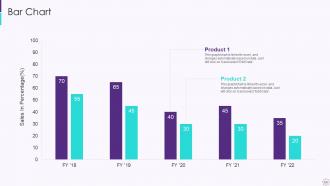
Slide 50: This slide presents Bar chart with two products comparison.
Slide 51: This slide presents Roadmap with additional textboxes.
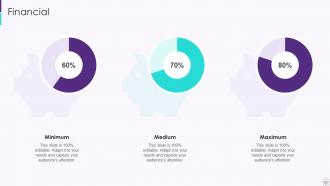
Slide 52: This is a Financial slide. Show your finance related stuff here.
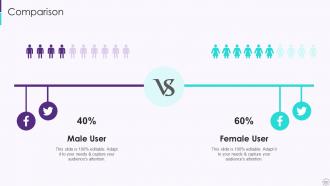
Slide 53: This is a Comparison slide to state comparison between commodities, entities etc.
Slide 54: This is Our Goal slide. State your firm's goals here.
Slide 55: This slide shows Post It Notes. Post your important notes here.
Slide 56: This slide depicts Venn diagram with text boxes.
Slide 57: This is a Timeline slide. Show data related to time intervals here.
Slide 58: This slide contains Puzzle with related icons and text.
Slide 59: This is an Idea Generation slide to state a new idea or highlight information, specifications etc.
Slide 60: This is a Thank You slide with address, contact numbers and email address.
Developing User Engagement Strategies Powerpoint Presentation Slides with all 65 slides:
Use our Developing User Engagement Strategies Powerpoint Presentation Slides to effectively help you save your valuable time. They are readymade to fit into any presentation structure.





FAQs for Developing User Engagement Strategies
Dude, visuals literally save presentations. Your brain gets fried processing walls of text, but throw in some good images or charts? Suddenly people actually pay attention. I've sat through way too many boring slide marathons - you know the ones. People remember visual stuff so much better than just words. Plus visuals hit you emotionally, which keeps everyone engaged instead of checking their phones. Oh, try that 6x6 thing - six bullet points max, six words each. Then pack the rest with relevant images or whatever fits your topic.
Dude, storytelling is like a cheat code for engagement. People connect with stories on this weird emotional level that just hits different than boring facts. When you share a customer's struggle or even just what went wrong in your day, suddenly everyone's invested. They actually care about the outcome, you know? Instead of listing features like some robot, you're creating these little journeys people want to follow. Honestly, I was skeptical at first but tried it with a behind-the-scenes post last week and the comments went crazy. Short sentences work great too. Just don't overthink it - start with something real and watch what happens.
Kick things off with a quick poll or "raise your hand if..." question - gets everyone awake from the start. I swear people's attention spans have gotten so bad, so break things up every 10-15 minutes with partner chats or small activities. Don't just lecture at them the whole time. Throw in stories they'll actually connect with and ask about their own experiences. The trick is weaving participation naturally into your presentation flow instead of randomly asking "any questions?" at the end when everyone's already checked out mentally.
Honestly, just ask people directly - surveys work, but so do usage stats and random comments. People will tell you exactly what's annoying them if you listen. Track your most/least used templates and figure out why some flop. I do quarterly check-ins to spot trends, then actually tell users when I fix stuff based on their complaints (they love knowing you heard them). Oh, and if everyone's bitching about the same slide layout? That's literally your to-do list right there. Don't overthink it.
Honestly, white space is your best friend here. Cramped slides are the worst - nobody wants to squint at tiny text. Cut your content in half, then cut it again. I'm not kidding. Use clear headings and bullet points that aren't smashed together. One strong image per slide beats five mediocre ones every time. Bold colors work great, but don't go crazy with fonts - stick to maybe two max. Here's the thing though: if someone can't scan your slide in like 3 seconds and know what you're talking about, you've already lost them. People's brains are fried from too much screen time anyway.
Polls and quizzes work great for this! I'd start simple - maybe just one live poll where people earn points for answering. Breaking into teams for quick challenges is fun too. Honestly, leaderboards get people way more competitive than you'd expect, even in boring meetings lol. Those "choose your own adventure" slides are cool where everyone votes on what direction to go next. Oh, and don't overcomplicate it - just pick one gamified thing and see how it goes. The main thing is tying whatever game element you use back to your actual content so it's not just random.
You gotta be crazy specific about next steps. Like, don't just say "contact us" - tell them exactly "book your demo by Friday" or "grab the template from slide 12." Strong action words beat weak suggestions every time. I bombed so many presentations before figuring this out! Throw in some urgency too, but not in a sleazy way. Limited spots or deadlines work great. Oh, and here's the thing - don't save your ask for the very end. Mention it twice, maybe three times throughout. People zone out, you know? Try different versions and see what actually gets responses. Makes a huge difference.
Honestly, your audience totally dictates how you structure everything. With executives? Hit them with the outcomes first, skip the nitty-gritty. Technical folks want to jump straight into the methodology though. I made this brutal mistake once where I put the main point like 10 slides in when presenting to our CEO – never again lol. The thing is, their expertise level tells you whether you need tons of context upfront or can just dive into solutions. Also their attention span matters way more than you'd think. Don't organize around what makes logical sense to you – structure it around what they actually care about.
During presentations, watch for chat comments, poll responses, and Q&A participation - that's your real-time pulse check. Drop-off rates matter too; if half your audience bails midway, something's wrong. After the session, look at follow-up emails, downloads, and meeting requests. Social mentions are nice but honestly, they don't pay the bills. The stuff that actually counts? People taking action afterward - booking demos, starting trials, or using your advice. I've learned that measuring what people DO beats tracking what they SAY every time. Oh, and always check who stayed until the very end versus just logged in and disappeared.
Dude, polls and quizzes are game-changers for keeping people awake during presentations. Nobody wants to just sit there while you drone on (guilty of this myself lol). When you toss in a quick poll, suddenly everyone's paying attention because they're actually participating instead of checking their phones. You'll get instant feedback on whether people are following along, plus it breaks up those long sections that make eyes glaze over. The responses also help you figure out what to focus on next. Honestly, even just one poll halfway through makes a huge difference. Don't overthink it - start small and see how it goes.
So for real-time stuff, Mentimeter and Poll Everywhere are solid for quick polls. Discord and Slack work great for ongoing chats too. Most video platforms already have chat built in - Zoom, YouTube Live, Twitch, all that. Oh and don't sleep on social media integration! Twitter walls and Instagram story polls can be clutch. Honestly though, you don't need to go crazy with tools. Pick one main platform where your people actually are, then maybe add one or two others. I've seen people try to use like six different things at once and it just gets messy.
Oh man, pacing is everything! Go too fast and you'll lose people completely. Too slow and they're definitely scrolling Instagram. What works for me is mixing it up - hit those key points quick and sharp, then pump the brakes when you're explaining something tricky. Honestly, pauses are your best friend. Drop one after big ideas and actually look around to see if people are tracking with you. Maybe record yourself practicing? You'll catch where you're racing through stuff or dragging things out way too long.
Honestly? Interactive stuff kills it every time - polls, Q&As, behind-the-scenes moments. Makes people feel included instead of just watching from the sidelines. Video's still huge, even if you're just rambling into your phone for 30 seconds. Stories and case studies work great too since everyone loves a good narrative. But here's what I've learned the hard way: being consistent beats being perfect. Your audience wants regular, real content over those "flawless" posts you stress about for hours. Pick one thing you're comfortable with and just show up with it regularly.
Stop dumping data on people - tell them stories instead. Real customer quotes work way better than bullet points. Use actual photos of people, not those weird stock images everyone recognizes. Colors matter too (warm for comfort, bright for urgency, you get it). Honestly? The presentations I remember most are kinda messy and real. Ask questions that make them think about their own stuff. And here's the thing - share your failures. I know it sounds scary, but people connect with humans who've screwed up, not some polished robot presenter.
Honestly, consistent design is a game-changer for trust. Your users won't have to relearn everything when they click around - same buttons, colors, fonts across the board. People can actually focus on what they came to do instead of wondering how stuff works. I learned this the hard way on a project once. Inconsistent design makes you look super unprofessional, like you threw everything together last minute. Users bounce fast when that happens. Just make a basic style guide with your main elements and stick to it everywhere. Sounds obvious but you'd be surprised how many teams skip this step.
-
I never had to worry about creating a business presentation from scratch. SlideTeam offered me professional, ready-made, and editable presentations that would have taken ages to design.
-
“I always have a wonderful experience with SlideTeam. It's my ""go to"" when I need a template.”