

Developing Utility Billing And Invoicing Software Powerpoint Presentation Slides




Try Before you Buy Download Free Sample Product
 Impress Your
Audience
 100%
Editable
 Save Hours
of Time


Customer billing software is an organized system to invoice clients for services. Its purpose is to ensure proper administration and company performance. Check out our expertly crafted Developing Utility Billing and Invoicing Software template. It provides a general overview of invoicing software technology along with types, features, frameworks, and challenges faced by businesses while implementing billing systems. Additionally, our Customer Billing Software deck covers steps to develop a structured billing platform; these include business model selection, research methodology, function requirements, hiring a development team, creating a minimum viable product, etc. Furthermore, the complete Presentation exhibits an employee training plan for successful invoicing operations. Moreover, our Invoicing Management module showcases the overall cost and budget for software deployment and maintenance. Lastly, it represents the estimated impact and KPI dashboard to assess the performance of the client billing system. Get access to this powerful template now.
People who downloaded this PowerPoint presentation also viewed the following :
Content of this Powerpoint Presentation
Slide 1: This slide introduces Developing Utility Billing and Invoicing Software. Commence by stating Your Company Name.
Slide 2: This slide depicts the Agenda of the presentation.
Slide 3: This slide includes the Table of contents.
Slide 4: This is yet another slide continuing the Table of contents.
Slide 5: This slide includes the Title for the Topics to be discussed further.
Slide 6: The Following slide shows survey results to understand challenges in company billing system.
Slide 7: This slide talks about the Operational issues in current billing structure.
Slide 8: This slide highlights the Impact of poor billing system on company performance.
Slide 9: This slide includes the Hedaing for the Contents to be covered in the following template.
Slide 10: This slide reveals the Introduction to modern billing system software.
Slide 11: This slide states the Types of billing software for various industries.
Slide 12: This slide continues the Types of billing software for various industries.
Slide 13: This slide continues the Key features of billing and invoicing software.
Slide 14: This slide exhibits the Key features of billing and invoicing software.
Slide 15: This slide talks about Emerging trends in billing software system.
Slide 16: The Following slide shows checklist to select suitable software based on various features.
Slide 17: This slide displays the Modern billing & revenue management system framework.
Slide 18: This slide showcases the Title for the Ideas to be discussed in the upcoming template.
Slide 19: This slide illustrates the Process to develop billing software application.
Slide 20: This slide depicts the Heading for the Ideas to be covered further.
Slide 21: This slide reveals the Research questionnaire to select software for business model.
Slide 22: This slide presents the Categories of software development business model.
Slide 23: This slide shows the Software business models for various companies.
Slide 24: This slide displays the Title for the Contents to be discussed next.
Slide 25: This slide states the Steps to determine billing software design.
Slide 26: This slide deals with Determining essential functionalities for company services.
Slide 27: This slide includes the Heading for the Topics to be covered in the folloiwng template.
Slide 28: This slide states the Essential requirements for hiring development team.
Slide 29: This slide highlights the Approaches for efficient development team hiring.
Slide 30: This slide reveals the Title for the Topics to be discussed in the upcoming template.
Slide 31: This slide highlights information of minimum viable product to assure effective billing system development.
Slide 32: The Following slide exhibits process of developing effective minimum viable product (MVP).
Slide 33: This slide indicates the Heading for the Contents to be covered in the forthcoming template.
Slide 34: This slide highlights the Key parameters for efficient software development.
Slide 35: This slide portrays the Various phases for effective software maintenance.
Slide 36: This slide depicts the Software updates and maintenance best practices.
Slide 37: This slide reveals the Title for the Ideas to be discussed in the following template.
Slide 38: This slide highlights the Business criteria for selecting billing system.
Slide 39: This slide continues the Business criteria for selecting billing system.
Slide 40: The Following slide represents technological factor to consider while selecting billing system.
Slide 41: This slide displays the Various criteria to select effective billing software.
Slide 42: This slide portrays the Heading for the Ideas to be covered in the following template.
Slide 43: This slide provide information about various software that is suitable for small business billing operations.
Slide 44: This slide displays the Title for the Contents to be discussed in the next template.
Slide 45: This slide provide information about total cost requirements to install and operate customer billing system.
Slide 46: This slide states the Budget allocation for billing software development.
Slide 47: This slide incorporates the Heading for the Topics to be covered further.
Slide 48: This slide highlights training plan for operating customer billing system.
Slide 49: This slide dipslays the Team structure for billing system development project.
Slide 50: The Following slide highlights impact of using billing system on company performance.
Slide 51: This slide portrays the Title for the Topics to be discussed in the upcoming template.
Slide 52: This slide exhibits billing system dashboard that assure efficient time tracking and bills management.
Slide 53: This slide shows the Billing software dashboard to track company performance.
Slide 54: The Following slide displays the dashboard to track company recurring billing processes and online payments.
Slide 55: This is the Icons slide containing all the Icons used in the plan.
Slide 56: This slide is used for depicting some Additional information.
Slide 57: The Following slide highlights structure of billing system that helps to understand working process of network.
Slide 58: This slide states the Various billing software comparison chart.
Slide 59: This slide indicates the Major integrations of automation customer billing system.
Slide 60: This slide elucidates information related to the Financial topic.
Slide 61: This slide contains Post it notes for reminders and deadlines.
Slide 62: This is the Puzzle slide with related imagery.
Slide 63: This is the 30 60 90 Days Plan slide for effective planning.
Slide 64: This slide reveals the SWOT analysis.
Slide 65: This is the Thank You slide for acknowledgement.
Developing Utility Billing And Invoicing Software Powerpoint Presentation Slides with all 73 slides:
Use our Developing Utility Billing And Invoicing Software Powerpoint Presentation Slides to effectively help you save your valuable time. They are readymade to fit into any presentation structure.
-

Developing Utility Billing and Invoicing Software
-

Agenda for developing utility billing and invoicing software
-

Table of contents for developing utility billing and invoicing software
-

Table of contents for developing utility billing and invoicing software
-

Table of contents for developing utility billing and invoicing software
-
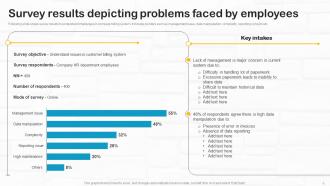
Survey results depicting problems faced by employees
-
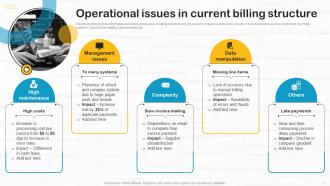
Operational issues in current billing structure
-

Impact of poor billing system on company performance
-

Table of contents for developing utility billing and invoicing software
-

Introduction to modern billing system software
-

Types of billing software for various industries
-

Types of billing software for various industries contd
-

Key features of billing and invoicing software
-

Key features of billing and invoicing software contd
-

Emerging trends in billing software system
-

Criteria checklist to select billing software for businesses
-

Modern billing revenue management system framework
-

Table of contents for developing utility billing and invoicing software
-

Process to develop billing software application
-

Table of contents for developing utility billing and invoicing software
-

Research questionnaire to select software for business model
-

Categories of software development business model
-

Software business models for various companies
-

Table of contents for developing utility billing and invoicing software
-

Steps to determine billing software design
-

Determining essential functionalities for company services
-

Table of contents for developing utility billing and invoicing software
-

Essential requirements for hiring development team
-

Approaches for efficient development team hiring
-

Table of contents for developing utility billing and invoicing software
-

Overview of minimal viable product for billing software
-

Billing software MVP development process workflow
-

Table of contents for developing utility billing and invoicing software
-

Key parameters for efficient software development
-

Various phases for effective software maintenance
-

Software updates and maintenance best practices
-

Table of contents for developing utility billing and invoicing software
-

Business criteria for selecting billing system
-

Business criteria for selecting billing system contd
-

Technical criteria for billing and management system
-

Various criteria to select effective billing software
-

Table of contents for developing utility billing and invoicing software
-

Billing software systems for small businesses
-

Table of contents for developing utility billing and invoicing software
-

Cost for setting billing system structure
-

Budget allocation for billing software development
-

Table of contents for developing utility billing and invoicing software
-

Employee training plan for operating billing software
-

Team structure for billing system development project
-

Estimated impact of customer billing software on company
-

Table of contents for developing utility billing and invoicing software
-

Dashboard to track reporting and billing time
-

Billing software dashboard to track company performance
-

Recording company transactions through billing software
-

Developing Utility Billing and Invoicing Software
-

Additional slides
-

Customer billing system architecture framework
-

Various billing software comparison chart
-

Major integrations of automation customer billing system
-

Financial
-

Post it notes
-

Puzzle
-

30 60 90 days plan
-

SWOT Analysis
-

Thanks for watching
-

-

-

-

-

-
-
-

FAQs for Developing Utility Billing And Invoicing Software
Honestly, focus on three key things: automated meter reading, flexible billing rates, and a decent customer portal. Built-in payment processing is huge too - saves so much headache. You want automated late notices and good reporting, obviously. Different billing cycles matter since some places don't do monthly. The interface better not suck because your staff will live in it daily. Oh, and make sure it grows with you and plays nice with whatever accounting software you're using. Demo like 2-3 systems with real data first - you'll know pretty quick what clicks.
Look, automated billing is a game changer for customer happiness. No more angry calls about wrong amounts or bills showing up late - that stuff drives people crazy. Bills go out on time every month, customers can set up autopay, and they actually get to see their usage patterns online. Way more transparent than the old system. Your support team stops spending half their day fixing billing screw-ups and can actually help customers with real issues. I've seen companies boost their satisfaction scores just by getting this one thing right. It's honestly one of those behind-the-scenes fixes that makes everything else easier.
Honestly, connecting your billing software to your CRM is a game changer. Your team gets everything in one spot - payment history, service calls, billing drama, all of it. No more juggling between different systems (which is honestly exhausting). You'll start noticing payment patterns pretty quick and can actually reach out before people get in trouble. The automated stuff cuts down on data entry mistakes too. But here's the real benefit - when customers call upset, your support people already know what's going on. They can fix things way faster instead of playing detective first.
So basically this software handles all the annoying compliance stuff automatically - generates reports exactly how regulators want them. Set it up once and it'll collect usage data, rate info, customer demographics, whatever. No more last-minute panic when deadlines hit! It even tracks when regulations change (honestly such a pain to keep up with manually). Different agencies want their data formatted differently of course, but you can customize templates for each one. Once everything's configured, the system just runs itself while you deal with actual utility operations instead of paperwork.
For utility billing, you need layers of security - start with encrypted storage and transmission plus role-based access. Multi-factor auth is non-negotiable for admins. Regular backups are huge because ransomware hits utilities constantly now (seriously, it's crazy how often). Set up automatic session timeouts and do security audits. If you're taking credit cards, PCI compliance is mandatory. Oh, and mask data in test environments - seen too many people forget that one. Document your processes and train staff regularly since people mess up more than tech does. The whole thing falls apart if your team doesn't know what they're doing.
Dude, this stuff is seriously helpful for catching billing problems before they blow up. Instead of waiting weeks to find issues, you'll see them immediately and fix them on the spot. Your customer service gets so much better - no more awkward "I'll have to look into that and call you back" conversations. Track usage as it happens, spot meter errors fast, and handle disputes with actual live data. Honestly, leak detection alone makes it worth it since you can alert customers about high usage right away. I'd start with dashboards for your biggest accounts first, then expand from there.
Dude, cloud billing software is perfect for scaling up. You can add thousands of customers without buying new servers or dealing with infrastructure headaches. Your IT folks won't hate you either since there's no hardware to babysit. When you jump from 10K to 50K customers, it handles all that extra data automatically. You're only paying for what you actually use too. New service areas? That's days, not months to set up. Oh, and definitely map out your 3-5 year growth first - helps you pick the right solution size from the start.
Run a 12-month usage report from your billing system first - that's your goldmine right there. Peak times jump out immediately, plus you'll catch seasonal stuff like AC cranking up bills in July. Commercial accounts are weird though, they'll have random dips that usually mean broken equipment. Residential patterns are way more predictable. Once you spot the trends, you can tweak pricing and actually call customers before their bills go crazy. I spent hours on this last month and found patterns I never would've guessed. It's basically free money sitting in your data.
Ugh, honestly the data migration will make you want to scream. Nothing transfers cleanly despite what they tell you - customer records get mangled, rate structures clash, and you're stuck cleaning up for weeks. Your staff will hate you temporarily because nobody wants to learn new systems when the old one "works fine" (even though it sucks). Oh and connecting it to your existing accounting stuff? Total pain. Start getting people involved in picking the system early so they don't revolt later. Also budget way more time than you think for fixing all the data mess.
Dude, mobile apps are a game changer for utility billing. Your customers can track usage in real-time, get alerts when bills are due, and pay with literally one tap. No more sitting on hold for 20 minutes just to check an account balance, you know? People can report outages, set up payment plans, whatever they need. Honestly the convenience keeps them way more engaged instead of just autopaying and ignoring everything. Oh and push notifications are huge - definitely focus on those first along with good usage analytics if you're building one.
Look, utility billing software catches a ton of stuff you're probably missing. First off, it'll spot billing errors and weird usage spikes that might mean theft or broken meters. The automation part saves crazy amounts of time on manual work - honestly that alone usually covers the cost. You can also optimize rate structures better and flag customers who'd benefit from different pricing. Oh, and digital billing cuts way down on paper and postage costs. I'd definitely run an audit on your current process first to see where you're bleeding money. The software pays for itself pretty fast once you implement it right.
So basically, this software tracks your water, gas, and electricity usage in real-time - which is honestly way better than trying to figure it out manually. It'll catch weird spikes automatically, like if you've got a leak or some equipment acting up. The analytics show you exactly when you're using the most power and where you're being wasteful. Most systems connect to smart meters too, so customers can see their own usage patterns. Oh, and it helps people actually conserve more when they can see the data. Start with whatever's costing you the most money first - that's where you'll notice the biggest difference right away.
Honestly, the interface can totally make or break everything. If your billing team has to fight with confusing menus all day, they'll hate it from day one. Clean design means fewer mistakes and way faster workflows - plus people won't dread using it. I've seen teams completely ignore amazing features just because the basic navigation sucked. Your staff processes tons of accounts daily, so intuitive design isn't negotiable. Definitely do demos and trials first. Trust me, spending time upfront testing usability will save you so much headache later when people actually embrace the system.
Honestly, customization is everything with utility billing software. Your billing structure, rate schedules, regulatory stuff - it's all different whether you're dealing with electric, water, gas, or telecom. The good software lets you set up whatever meter reading cycles you need, build custom rate tiers, create workflows that actually make sense for how you operate. Some utilities have crazy complex demand charges, others just do simple flat rates. You want something that works with your existing systems too - customer portals, payment options, all that. Don't get stuck with software that makes you completely overhaul how you do things.
AI analytics are huge right now for predicting demand better. Cloud platforms that don't crash every week, mobile portals customers can actually navigate. Most utilities are still running like 15 different systems - integration tools are finally catching up to fix that mess. Real-time billing's becoming the norm, and everyone wants prepaid options plus payment plans that aren't terrible. Oh, and if you might expand services later, definitely look for platforms that handle multiple utility types. Way easier than switching systems again down the road.
-
Innovative and attractive designs.
-
Excellent template with unique design.