

Entwicklung von Software zur Abrechnung und Fakturierung von Versorgungsleistungen, Powerpoint-Präsentationsfolien




Try Before you Buy Download Free Sample Product
 Impress Your
Audience
 100%
Editable
 Save Hours
of Time


Kundenabrechnungssoftware ist ein organisiertes System zur Rechnungsstellung von Kunden für Dienstleistungen. Sein Zweck besteht darin, eine ordnungsgemäße Verwaltung und Unternehmensleistung sicherzustellen. Schauen Sie sich unsere fachmännisch erstellte Vorlage für die Entwicklung von Abrechnungs- und Fakturierungssoftware für Versorgungsunternehmen an. Es bietet einen allgemeinen Überblick über die Technologie der Rechnungsstellungssoftware sowie über Typen, Funktionen, Rahmenbedingungen und Herausforderungen, mit denen Unternehmen bei der Implementierung von Abrechnungssystemen konfrontiert sind. Darüber hinaus behandelt unser Deckblatt zur Kundenabrechnungssoftware Schritte zur Entwicklung einer strukturierten Abrechnungsplattform; Dazu gehören die Auswahl des Geschäftsmodells, die Forschungsmethodik, Funktionsanforderungen, die Einstellung eines Entwicklungsteams, die Erstellung eines Minimum Viable Product usw. Darüber hinaus enthält die vollständige Präsentation einen Mitarbeiterschulungsplan für erfolgreiche Rechnungsstellungsvorgänge. Darüber hinaus zeigt unser Rechnungsverwaltungsmodul die Gesamtkosten und das Budget für die Softwarebereitstellung und -wartung. Schließlich stellt es die geschätzten Auswirkungen und das KPI-Dashboard dar, um die Leistung des Kundenabrechnungssystems zu bewerten. Erhalten Sie jetzt Zugriff auf diese leistungsstarke Vorlage.
People who downloaded this PowerPoint presentation also viewed the following :
Inhalt dieser Powerpoint-Präsentation
Folie 1 : Diese Folie stellt die Entwicklung von Software zur Abrechnung und Rechnungsstellung von Versorgungsunternehmen vor. Beginnen Sie mit der Angabe Ihres Firmennamens.
Folie 2 : Diese Folie zeigt die Agenda der Präsentation.
Folie 3 : Diese Folie enthält das Inhaltsverzeichnis.
Folie 4 : Dies ist eine weitere Folie, die das Inhaltsverzeichnis fortsetzt.
Folie 5 : Diese Folie enthält den Titel der Themen, die weiter besprochen werden sollen.
Folie 6 : Die folgende Folie zeigt Umfrageergebnisse zum Verständnis der Herausforderungen im Abrechnungssystem des Unternehmens.
Folie 7 : Auf dieser Folie geht es um die betrieblichen Probleme in der aktuellen Abrechnungsstruktur.
Folie 8 : Diese Folie beleuchtet die Auswirkungen eines schlechten Abrechnungssystems auf die Unternehmensleistung.
Folie 9 : Diese Folie enthält die Hedaing für die Inhalte, die in der folgenden Vorlage behandelt werden sollen.
Folie 10 : Diese Folie zeigt die Einführung in moderne Abrechnungssystemsoftware.
Folie 11 : Auf dieser Folie werden die Arten von Abrechnungssoftware für verschiedene Branchen aufgeführt.
Folie 12 : Auf dieser Folie werden die Arten von Abrechnungssoftware für verschiedene Branchen fortgesetzt.
Folie 13 : Auf dieser Folie werden die wichtigsten Funktionen von Abrechnungs- und Rechnungssoftware vorgestellt.
Folie 14 : Diese Folie zeigt die wichtigsten Funktionen von Abrechnungs- und Rechnungssoftware.
Folie 15 : Auf dieser Folie geht es um neue Trends im Abrechnungssoftwaresystem.
Folie 16 : Die folgende Folie zeigt eine Checkliste zur Auswahl geeigneter Software basierend auf verschiedenen Funktionen.
Folie 17 : Diese Folie zeigt das moderne Abrechnungs- und Revenue-Management-System-Framework.
Folie 18 : Diese Folie zeigt den Titel der Ideen, die in der kommenden Vorlage besprochen werden sollen.
Folie 19 : Diese Folie veranschaulicht den Prozess zur Entwicklung einer Abrechnungssoftwareanwendung.
Folie 20 : Diese Folie zeigt die Überschrift der Ideen, die weiter behandelt werden sollen.
Folie 21 : Diese Folie zeigt den Forschungsfragebogen zur Auswahl von Software für das Geschäftsmodell.
Folie 22 : Auf dieser Folie werden die Kategorien des Geschäftsmodells für die Softwareentwicklung vorgestellt.
Folie 23 : Diese Folie zeigt die Software-Geschäftsmodelle verschiedener Unternehmen.
Folie 24 : Auf dieser Folie wird der Titel des als nächstes besprochenen Inhalts angezeigt.
Folie 25 : Auf dieser Folie werden die Schritte zur Festlegung des Designs der Abrechnungssoftware aufgeführt.
Folie 26 : Auf dieser Folie geht es um die Festlegung wesentlicher Funktionalitäten für Unternehmensdienstleistungen.
Folie 27 : Diese Folie enthält die Überschrift für die Themen, die in der folgenden Vorlage behandelt werden sollen.
Folie 28 : Auf dieser Folie werden die wesentlichen Anforderungen für die Einstellung eines Entwicklungsteams aufgeführt.
Folie 29 : Diese Folie beleuchtet die Ansätze für eine effiziente Einstellung von Entwicklungsteams.
Folie 30 : Diese Folie zeigt den Titel der Themen, die in der kommenden Vorlage besprochen werden sollen.
Folie 31 : Diese Folie hebt Informationen zum Minimum Viable Product hervor, um eine effektive Entwicklung eines Abrechnungssystems sicherzustellen.
Folie 32 : Die folgende Folie zeigt den Prozess der Entwicklung eines effektiven Minimum Viable Product (MVP).
Folie 33 : Diese Folie gibt die Überschrift für den Inhalt an, der in der kommenden Vorlage behandelt werden soll.
Folie 34 : Diese Folie beleuchtet die Schlüsselparameter für eine effiziente Softwareentwicklung.
Folie 35 : Auf dieser Folie werden die verschiedenen Phasen einer effektiven Softwarewartung dargestellt.
Folie 36 : Auf dieser Folie werden die Best Practices für Software-Updates und Wartung dargestellt.
Folie 37 : Diese Folie zeigt den Titel der Ideen, die in der folgenden Vorlage besprochen werden sollen.
Folie 38 : Auf dieser Folie werden die Geschäftskriterien für die Auswahl des Abrechnungssystems hervorgehoben.
Folie 39 : Auf dieser Folie werden die Geschäftskriterien für die Auswahl des Abrechnungssystems fortgesetzt.
Folie 40 : Die folgende Folie stellt den technologischen Faktor dar, der bei der Auswahl des Abrechnungssystems berücksichtigt werden muss.
Folie 41 : Auf dieser Folie werden die verschiedenen Kriterien zur Auswahl einer effektiven Abrechnungssoftware angezeigt.
Folie 42 : Diese Folie stellt die Überschrift für die Ideen dar, die in der folgenden Vorlage behandelt werden sollen.
Folie 43 : Diese Folie bietet Informationen über verschiedene Software, die für die Abrechnung in kleinen Unternehmen geeignet ist.
Folie 44 : Auf dieser Folie wird der Titel des Inhalts angezeigt, der in der nächsten Vorlage besprochen werden soll.
Folie 45 : Diese Folie bietet Informationen zu den Gesamtkosten für die Installation und den Betrieb des Kundenabrechnungssystems.
Folie 46 : Auf dieser Folie wird die Budgetzuweisung für die Abrechnung der Softwareentwicklung angegeben.
Folie 47 : Diese Folie enthält die Überschrift für die Themen, die weiter behandelt werden sollen.
Folie 48 : Auf dieser Folie wird der Schulungsplan für die Bedienung des Kundenabrechnungssystems hervorgehoben.
Folie 49 : Diese Folie zeigt die Teamstruktur für das Projekt zur Entwicklung des Abrechnungssystems.
Folie 50 : Die folgende Folie zeigt die Auswirkungen der Verwendung eines Abrechnungssystems auf die Unternehmensleistung.
Folie 51 : Diese Folie stellt den Titel der Themen dar, die in der kommenden Vorlage besprochen werden sollen.
Folie 52 : Diese Folie zeigt das Dashboard des Abrechnungssystems, das eine effiziente Zeiterfassung und Rechnungsverwaltung gewährleistet.
Folie 53 : Diese Folie zeigt das Dashboard der Abrechnungssoftware zur Verfolgung der Unternehmensleistung.
Folie 54 : Die folgende Folie zeigt das Dashboard zur Verfolgung wiederkehrender Abrechnungsprozesse und Online-Zahlungen des Unternehmens.
Folie 55 : Dies ist die Icons-Folie, die alle im Plan verwendeten Icons enthält.
Folie 56 : Diese Folie dient der Darstellung einiger Zusatzinformationen.
Folie 57 : Die folgende Folie beleuchtet die Struktur des Abrechnungssystems, die hilft, den Arbeitsprozess des Netzwerks zu verstehen.
Folie 58 : Auf dieser Folie wird die Vergleichstabelle verschiedener Abrechnungssoftware aufgeführt.
Folie 59 : Diese Folie zeigt die wichtigsten Integrationen des automatisierten Kundenabrechnungssystems.
Folie 60 : Diese Folie erläutert Informationen zum Finanzthema.
Folie 61 : Diese Folie enthält Haftnotizen für Erinnerungen und Fristen.
Folie 62 : Dies ist die Puzzle-Folie mit zugehörigen Bildern.
Folie 63 : Dies ist die Folie zum 30-60-90-Tage-Plan für eine effektive Planung.
Folie 64 : Diese Folie zeigt die SWOT-Analyse.
Folie 65 : Dies ist die Dankesfolie für die Danksagung.
Powerpoint-Präsentationsfolien zur Entwicklung von Abrechnungs- und Rechnungssoftware für Versorgungsunternehmen mit allen 74 Folien:
Nutzen Sie unsere Powerpoint-Präsentationsfolien zur Entwicklung von Abrechnungs- und Fakturierungssoftware für Versorgungsunternehmen, um effektiv wertvolle Zeit zu sparen. Sie sind gebrauchsfertig und passen in jede Präsentationsstruktur.
-

Developing Utility Billing and Invoicing Software
-

Agenda for developing utility billing and invoicing software
-

Table of contents for developing utility billing and invoicing software
-

Table of contents for developing utility billing and invoicing software
-

Table of contents for developing utility billing and invoicing software
-
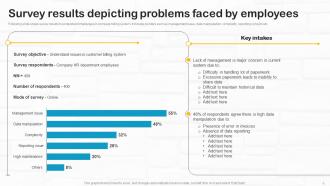
Survey results depicting problems faced by employees
-
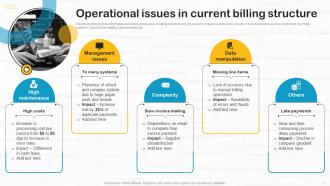
Operational issues in current billing structure
-

Impact of poor billing system on company performance
-

Table of contents for developing utility billing and invoicing software
-

Introduction to modern billing system software
-

Types of billing software for various industries
-

Types of billing software for various industries contd
-

Key features of billing and invoicing software
-

Key features of billing and invoicing software contd
-

Emerging trends in billing software system
-

Criteria checklist to select billing software for businesses
-

Modern billing revenue management system framework
-

Table of contents for developing utility billing and invoicing software
-

Process to develop billing software application
-

Table of contents for developing utility billing and invoicing software
-

Research questionnaire to select software for business model
-

Categories of software development business model
-

Software business models for various companies
-

Table of contents for developing utility billing and invoicing software
-

Steps to determine billing software design
-

Determining essential functionalities for company services
-

Table of contents for developing utility billing and invoicing software
-

Essential requirements for hiring development team
-

Approaches for efficient development team hiring
-

Table of contents for developing utility billing and invoicing software
-

Overview of minimal viable product for billing software
-

Billing software MVP development process workflow
-

Table of contents for developing utility billing and invoicing software
-

Key parameters for efficient software development
-

Various phases for effective software maintenance
-

Software updates and maintenance best practices
-

Table of contents for developing utility billing and invoicing software
-

Business criteria for selecting billing system
-

Business criteria for selecting billing system contd
-

Technical criteria for billing and management system
-

Various criteria to select effective billing software
-

Table of contents for developing utility billing and invoicing software
-

Billing software systems for small businesses
-

Table of contents for developing utility billing and invoicing software
-

Cost for setting billing system structure
-

Budget allocation for billing software development
-

Table of contents for developing utility billing and invoicing software
-

Employee training plan for operating billing software
-

Team structure for billing system development project
-

Estimated impact of customer billing software on company
-

Table of contents for developing utility billing and invoicing software
-

Dashboard to track reporting and billing time
-

Billing software dashboard to track company performance
-

Recording company transactions through billing software
-

Developing Utility Billing and Invoicing Software
-

Additional slides
-

Customer billing system architecture framework
-

Various billing software comparison chart
-

Major integrations of automation customer billing system
-

Financial
-

Post it notes
-

Puzzle
-

30 60 90 days plan
-

SWOT Analysis
-

Thanks for watching
-

-

-

-

-

-
-
-

FAQs for Developing Utility Billing And Invoicing Software
Honestly, focus on three key things: automated meter reading, flexible billing rates, and a decent customer portal. Built-in payment processing is huge too - saves so much headache. You want automated late notices and good reporting, obviously. Different billing cycles matter since some places don't do monthly. The interface better not suck because your staff will live in it daily. Oh, and make sure it grows with you and plays nice with whatever accounting software you're using. Demo like 2-3 systems with real data first - you'll know pretty quick what clicks.
Look, automated billing is a game changer for customer happiness. No more angry calls about wrong amounts or bills showing up late - that stuff drives people crazy. Bills go out on time every month, customers can set up autopay, and they actually get to see their usage patterns online. Way more transparent than the old system. Your support team stops spending half their day fixing billing screw-ups and can actually help customers with real issues. I've seen companies boost their satisfaction scores just by getting this one thing right. It's honestly one of those behind-the-scenes fixes that makes everything else easier.
Honestly, connecting your billing software to your CRM is a game changer. Your team gets everything in one spot - payment history, service calls, billing drama, all of it. No more juggling between different systems (which is honestly exhausting). You'll start noticing payment patterns pretty quick and can actually reach out before people get in trouble. The automated stuff cuts down on data entry mistakes too. But here's the real benefit - when customers call upset, your support people already know what's going on. They can fix things way faster instead of playing detective first.
So basically this software handles all the annoying compliance stuff automatically - generates reports exactly how regulators want them. Set it up once and it'll collect usage data, rate info, customer demographics, whatever. No more last-minute panic when deadlines hit! It even tracks when regulations change (honestly such a pain to keep up with manually). Different agencies want their data formatted differently of course, but you can customize templates for each one. Once everything's configured, the system just runs itself while you deal with actual utility operations instead of paperwork.
For utility billing, you need layers of security - start with encrypted storage and transmission plus role-based access. Multi-factor auth is non-negotiable for admins. Regular backups are huge because ransomware hits utilities constantly now (seriously, it's crazy how often). Set up automatic session timeouts and do security audits. If you're taking credit cards, PCI compliance is mandatory. Oh, and mask data in test environments - seen too many people forget that one. Document your processes and train staff regularly since people mess up more than tech does. The whole thing falls apart if your team doesn't know what they're doing.
Dude, this stuff is seriously helpful for catching billing problems before they blow up. Instead of waiting weeks to find issues, you'll see them immediately and fix them on the spot. Your customer service gets so much better - no more awkward "I'll have to look into that and call you back" conversations. Track usage as it happens, spot meter errors fast, and handle disputes with actual live data. Honestly, leak detection alone makes it worth it since you can alert customers about high usage right away. I'd start with dashboards for your biggest accounts first, then expand from there.
Dude, cloud billing software is perfect for scaling up. You can add thousands of customers without buying new servers or dealing with infrastructure headaches. Your IT folks won't hate you either since there's no hardware to babysit. When you jump from 10K to 50K customers, it handles all that extra data automatically. You're only paying for what you actually use too. New service areas? That's days, not months to set up. Oh, and definitely map out your 3-5 year growth first - helps you pick the right solution size from the start.
Run a 12-month usage report from your billing system first - that's your goldmine right there. Peak times jump out immediately, plus you'll catch seasonal stuff like AC cranking up bills in July. Commercial accounts are weird though, they'll have random dips that usually mean broken equipment. Residential patterns are way more predictable. Once you spot the trends, you can tweak pricing and actually call customers before their bills go crazy. I spent hours on this last month and found patterns I never would've guessed. It's basically free money sitting in your data.
Ugh, honestly the data migration will make you want to scream. Nothing transfers cleanly despite what they tell you - customer records get mangled, rate structures clash, and you're stuck cleaning up for weeks. Your staff will hate you temporarily because nobody wants to learn new systems when the old one "works fine" (even though it sucks). Oh and connecting it to your existing accounting stuff? Total pain. Start getting people involved in picking the system early so they don't revolt later. Also budget way more time than you think for fixing all the data mess.
Dude, mobile apps are a game changer for utility billing. Your customers can track usage in real-time, get alerts when bills are due, and pay with literally one tap. No more sitting on hold for 20 minutes just to check an account balance, you know? People can report outages, set up payment plans, whatever they need. Honestly the convenience keeps them way more engaged instead of just autopaying and ignoring everything. Oh and push notifications are huge - definitely focus on those first along with good usage analytics if you're building one.
Look, utility billing software catches a ton of stuff you're probably missing. First off, it'll spot billing errors and weird usage spikes that might mean theft or broken meters. The automation part saves crazy amounts of time on manual work - honestly that alone usually covers the cost. You can also optimize rate structures better and flag customers who'd benefit from different pricing. Oh, and digital billing cuts way down on paper and postage costs. I'd definitely run an audit on your current process first to see where you're bleeding money. The software pays for itself pretty fast once you implement it right.
So basically, this software tracks your water, gas, and electricity usage in real-time - which is honestly way better than trying to figure it out manually. It'll catch weird spikes automatically, like if you've got a leak or some equipment acting up. The analytics show you exactly when you're using the most power and where you're being wasteful. Most systems connect to smart meters too, so customers can see their own usage patterns. Oh, and it helps people actually conserve more when they can see the data. Start with whatever's costing you the most money first - that's where you'll notice the biggest difference right away.
Honestly, the interface can totally make or break everything. If your billing team has to fight with confusing menus all day, they'll hate it from day one. Clean design means fewer mistakes and way faster workflows - plus people won't dread using it. I've seen teams completely ignore amazing features just because the basic navigation sucked. Your staff processes tons of accounts daily, so intuitive design isn't negotiable. Definitely do demos and trials first. Trust me, spending time upfront testing usability will save you so much headache later when people actually embrace the system.
Honestly, customization is everything with utility billing software. Your billing structure, rate schedules, regulatory stuff - it's all different whether you're dealing with electric, water, gas, or telecom. The good software lets you set up whatever meter reading cycles you need, build custom rate tiers, create workflows that actually make sense for how you operate. Some utilities have crazy complex demand charges, others just do simple flat rates. You want something that works with your existing systems too - customer portals, payment options, all that. Don't get stuck with software that makes you completely overhaul how you do things.
AI analytics are huge right now for predicting demand better. Cloud platforms that don't crash every week, mobile portals customers can actually navigate. Most utilities are still running like 15 different systems - integration tools are finally catching up to fix that mess. Real-time billing's becoming the norm, and everyone wants prepaid options plus payment plans that aren't terrible. Oh, and if you might expand services later, definitely look for platforms that handle multiple utility types. Way easier than switching systems again down the road.
-
Innovative and attractive designs.
-
Excellent template with unique design.