

DevOps Application Life Cycle Management Powerpoint Presentation Slides




Try Before you Buy Download Free Sample Product
 Impress Your
 Audience
 100%
100% Editable
 Save Hours
 of Time


DevOps is the combination of various practices and tools which helps to increase the organizations ability to deliver applications and services faster. Check out our competently designed DevOps Application life cycle Management template that defines DevOps in an organization by focusing on development, operations, and quality assurance. We have outlined the fundamental principles of DevOps culture, its goals and achievements, benefits and challenges, and more. The template presents details related to the methodology with the advantages, aligning the principles with practices and challenges, IT Organization structure, etc. One can even exhibit developer responsibilities, process flow, steps involved in methodology, agile process, and more. The insightful PowerPoint presentation showcases details related to the adopted maturity model, choosing the right tools for the company, steps considered while selecting the tools, etc. We have covered how toolchain workflow supports DevOps, the development testing approach, the continuous integration deployment process, the implementation delivery pipeline, and ways to implement DevOps in an organization. Download this 100 percent editable template. Customize it according to your needs now.
People who downloaded this PowerPoint presentation also viewed the following :
Content of this Powerpoint Presentation
Slide 1: This slide displays the title DevOps Application Life Cycle Management.
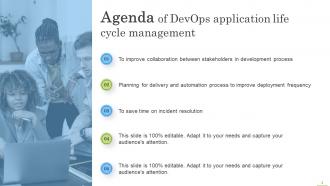
Slide 2: This slide displays the title Agenda of DevOps application life cycle management.
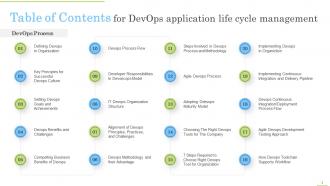
Slide 3: This slide exhibit table of content.
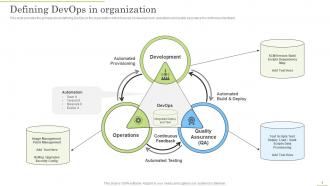
Slide 4: This slide provides the glimpse about defining DevOps in the organization which focuses on development, operations and quality assurance for continuous feedback.
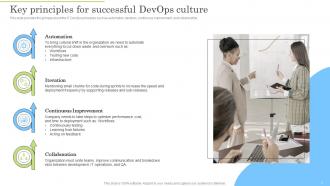
Slide 5: This slide provides the glimpse about the IT DevOps principles such as automation, iteration, continuous improvement, and collaboration.
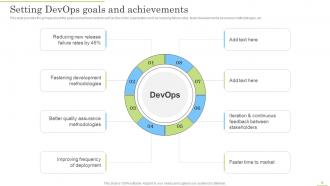
Slide 6: This slide provides the glimpse about the goals and achievements to set DevOps in the organization.
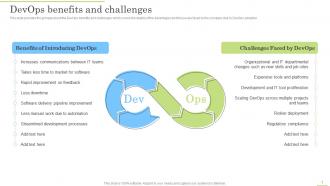
Slide 7: This slide provides the glimpse about the DevOps benefits and challenges.
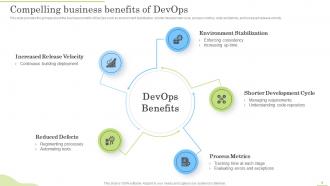
Slide 8: This slide provides the glimpse about the business benefits of DevOps.
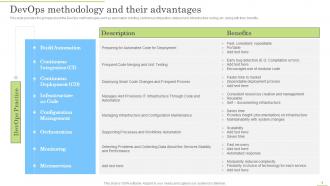
Slide 9: This slide provides the glimpse about the DevOps methodologies such as automation building, continuous integration, deployment, infrastructure coding, etc.
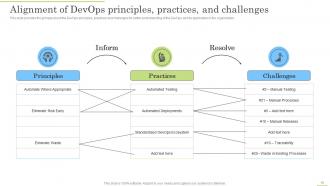
Slide 10: This slide provides the glimpse about the DevOps principles, practices and challenges for better understanding of the DevOps and its application in the organization.
Slide 11: This slide provides the glimpse about the 4 tier of IT organization structure.
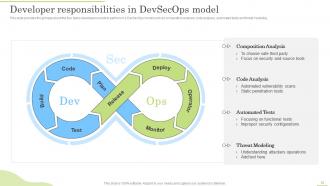
Slide 12: This slide provides the glimpse about the four tasks developers needs to perform in a DevSecOps model.
Slide 13: This slide provides the glimpse about the DevOps process flow which covers stages such as plan, code, create, test, release, deploy and operate.
Slide 14: This slide provides the glimpse about the steps involved in DevOps process and methodology.
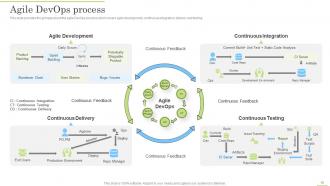
Slide 15: This slide provides the glimpse about the agile DevOps process which covers agile development, continuous integration, delivery and testing.
Slide 16: This slide provides the glimpse about the DevOps maturity model adoption which cover 5 steps such as initial, managed, defined, measured, and optimized.
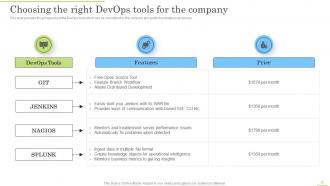
Slide 17: This slide provides the glimpse about the DevOps tools which can be considered by the company along with their features and prices.
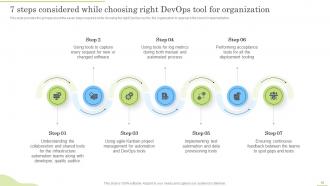
Slide 18: This slide provides the glimpse about the seven steps required while choosing the right DevOps tool for the organization to approach the correct implementation.
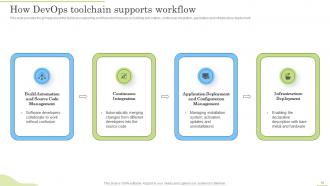
Slide 19: This slide provides the glimpse about the toolchain supporting workflow.
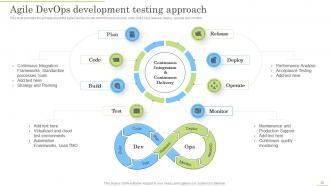
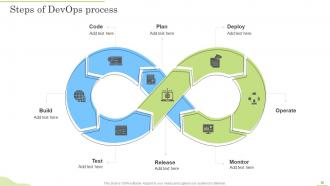
Slide 20: This slide provides the glimpse about the agile DevOps model which focuses on plan, code, build, test, release, deploy, operate and monitor.
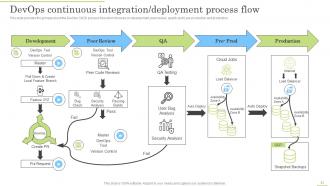
Slide 21: This slide provides the glimpse about the DevOps CI/CD process flow which focuses on development, peer review, quality audit, pre production and production.
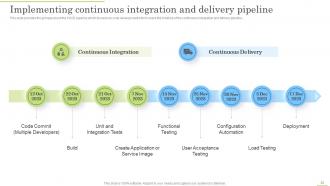
Slide 22: This slide provides the glimpse about Implementing continuous integration and delivery pipeline.
Slide 23: This slide provides the glimpse about the steps involved in implementing DevOps in the organization.
Slide 24: This is the icons slide.
Slide 25: This slide presents title for additional slides.
Slide 26: This slide display the title Steps of DevOps process.
Slide 27: This slide display Venn.
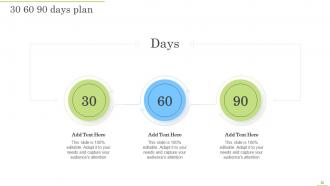
Slide 28: This slide depicts 30-60-90 days plan for projects.
Slide 29: This slide exhibits ideas generated.
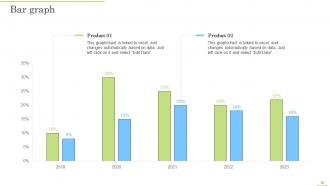
Slide 30: This slide displays yearly bar graph for different products.
Slide 31: This slide display Magnifying glass.
Slide 32: This is thank you slide & contains contact details of company like office address, phone no., etc.
DevOps Application Life Cycle Management Powerpoint Presentation Slides with all 37 slides:
Use our DevOps Application Life Cycle Management Powerpoint Presentation Slides to effectively help you save your valuable time. They are readymade to fit into any presentation structure.











FAQs for DevOps Application Life Cycle Management
So basically, old-school ALM keeps dev and ops teams totally separate - like, they literally hand stuff off to each other in these long cycles. It's very waterfall-ish but more organized around the whole process. DevOps throws that out the window though. Teams work together constantly, you get way faster feedback, and everything's automated. Plus you can ship updates super frequently instead of waiting forever. Honestly, it just makes way more sense - you catch problems early and users get new features in days instead of months. The whole "toss it over the fence" thing never really worked anyway.
Look, DevOps is basically about cutting out all those annoying waits between dev, testing, and going live. Your CI pipelines catch bugs super early. Automated tests run in the background - perfect time for that coffee break, honestly. No more "pray it works in production" moments since deployment automation handles releases smoothly. The real game-changer? Getting your dev and ops people to actually collaborate instead of just tossing code back and forth. I'd start with automating whatever manual stuff drives you crazy first. You'll notice the difference right away.
So CI/CD is like the engine that runs your whole DevOps setup - it handles everything from when you commit code to actually getting it live. Honestly, once you nail it down, releases become way less stressful. The CI part catches bugs early by running tests every time someone pushes changes. Then CD takes those validated changes and ships them automatically. You'll get faster feedback and way fewer human screw-ups. My advice? Start simple with basic tests and builds, then add fancier deployment stuff later. Don't try to boil the ocean right away.
Honestly, start with the DORA metrics - they're popular for a reason. Track your deployment frequency, how long it takes from commit to production, recovery time when stuff breaks, and change failure rates. Those will tell you if your technical process is actually improving. Don't forget the business side though - customer satisfaction, feature adoption, time-to-market for new stuff. Here's the thing: get your baseline numbers first, otherwise you're just guessing if things are getting better. Pick maybe 3-4 metrics that actually matter to your company instead of trying to measure the entire universe at once.
Start with Git for version control - that's non-negotiable. For CI/CD, Jenkins or GitLab CI work great, though Azure DevOps is solid too if you're already in that ecosystem. Docker and Kubernetes will handle your containerization needs. Terraform's basically become the go-to for infrastructure as code at this point. You'll want monitoring stuff like Prometheus or Datadog. Oh, and don't sleep on test automation frameworks - pick ones that actually fit your tech stack. Honestly though? Integration between tools matters way more than which specific ones you choose. Build it out piece by piece.
So when dev and ops actually talk to each other instead of just lobbing code over the wall, everything flows better. Feedback loops get way faster since ops can jump in early with their two cents. Developers finally get what production actually looks like - which honestly should've happened ages ago. You'll catch problems earlier, automate more stuff since everyone's using the same tools, and releases won't feel like rolling dice anymore. Rollbacks become less of a nightmare too. Just stick both teams in the same meetings first and see what happens.
Honestly, the biggest pain is usually getting people to actually change how they work. Teams hate switching from waterfall - they'll fight you on it. Integration is a nightmare too since your old ALM tools probably won't talk to the new DevOps stuff without serious work. Breaking down those dev/ops/QA silos is tough when people have been doing their own thing for years. Oh, and compliance teams will slow everything down because their processes weren't built for quick deployments. My advice? Start with a small pilot project first to show it actually works before trying to change everything at once.
Honestly, automated testing is a game changer - you catch bugs way earlier instead of scrambling to fix them after launch when everything's on fire. Every time someone pushes code, your tests run automatically. Never misses anything, unlike us humans who definitely forget stuff. Your team can refactor without sweating bullets because you'll know instantly if something broke. The feedback loop keeps code quality solid and stops old bugs from creeping back in. I'd start with testing your main user flows first - probably the stuff that'd make your boss panic if it went down. Way less stressful than manual testing everything.
So DevOps ALM basically bakes security right into your dev pipeline instead of dealing with it later. You get automated scanning in CI/CD, static analysis while you're coding, plus monitoring once stuff goes live. Way better than the old days when security was this separate thing at the end - honestly that approach sucked. Your infrastructure becomes code too, which means security policies get versioned and applied consistently. Oh, and definitely throw a basic vulnerability scanner into your build process first. You won't believe the stuff it'll catch before you even deploy.
Infrastructure as code is your best friend here - treat environment configs like any other code and throw them in version control. Make dev look exactly like prod (this saves so much pain later). Tools like Terraform or Ansible will automate deployments for you. Manual changes are honestly where everything goes to hell and you get those awful "works on my machine" situations. Oh, and definitely separate config from code using environment variables. Always test configs before production! I'd start with your most critical stuff first, then work outward. Trust me on this one.
Honestly, retrospectives are your best friend here - but only if you actually do something with what comes up. Let teams mess around with new tools without freaking out when stuff breaks (which it will). Feedback loops everywhere: monitoring, customers, the whole team. Give people time to learn too - hack days, training, whatever works. I'm obsessed with measuring everything because how else do you know if you're getting faster or just spinning your wheels? Oh, and don't try to fix everything at once. One improvement per sprint keeps it manageable.
Okay so there's basically four things you wanna watch. Deployment frequency and lead time are huge - like how often you're actually shipping stuff and how long it takes to go from "hey good idea" to live code. Then there's MTTR and change failure rate, which honestly matter more than people think because things WILL break. Also track team stuff like cycle time and how long code reviews take (ugh, don't get me started on slow reviewers). The trick is getting all these moving in the right direction together instead of just fixating on one number. Just start with whatever's easiest to measure right now.
Dude, cloud computing makes DevOps so much smoother. Instead of waiting weeks for hardware, you can spin up environments in minutes. Your CI/CD pipelines scale way better too since you're not stuck with whatever's sitting in your office. All the managed services handle monitoring and database stuff for you - saves tons of headache honestly. The big thing is you'll need to think infrastructure-as-code right from the start, which feels weird at first but makes sense later. Oh and definitely pick one provider and master their tools before you get distracted by multi-cloud nonsense.
Honestly, microservices and containers will make your DevOps pipeline so much more flexible. Instead of wrestling with one giant monolith, you can develop and deploy each service separately - total game changer when deadlines hit. Containers solve that annoying "works on my machine" problem since everything runs the same from dev to production. Your CI/CD gets way faster too because you're only building what actually changed. Though I'd start small - containerize just one service first and figure out the workflow. Trust me, don't jump into full microservices mode right away or you'll hate yourself later.
Build feedback loops straight into your pipeline instead of tacking them on later. Automate user feedback collection - in-app surveys, analytics, support tickets - so it flows right into your backlog tools. But here's the thing: most teams collect mountains of feedback then do absolutely nothing with it. Don't be those guys. Feature flags help you test changes with specific user groups first. Oh, and set up regular feedback reviews during sprint planning. Your users basically become QA testers who actually care about the product. Just pick one feedback channel to start and automate how it connects to your dev workflow.
-
“Immediate response, professional support, and effective solutions that were customized and immediately provided. Well done- Thank you!”
-
They helped us design the pamphlets for our church’s food drive! The people loved the design, and I’m happy to say it was successful. Thank you, SlideTeam!