

Digital Marketing Campaign Performance Dashboard




Try Before you Buy Download Free Sample Product
 Impress Your
 Audience
 100%
100% Editable
 Save Hours
 of Time


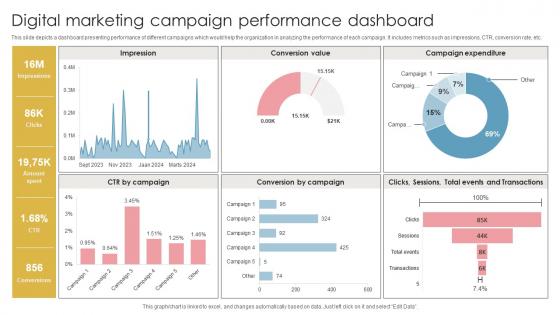
This slide depicts a dashboard presenting performance of different campaigns which would help the organization in analyzing the performance of each campaign. It includes metrics such as impressions, CTR, conversion rate, etc.
People who downloaded this PowerPoint presentation also viewed the following :
Digital Marketing Campaign Performance Dashboard with all 10 slides:
Use our Digital Marketing Campaign Performance Dashboard to effectively help you save your valuable time. They are readymade to fit into any presentation structure.









FAQs for Digital Marketing
Skip the vanity metrics - they're useless. Focus on stuff that actually matters: traffic sources, conversion rates, cost per acquisition, ROI by channel. These tell you what's working and what isn't. Bounce rate and time on page are solid too since they show if people actually care about your content. Then add email open rates, social engagement, lead gen numbers. Oh, and don't go crazy with like 20 different metrics or you'll never look at the dashboard. Start with maybe 6-8 that match your goals. You can always add more later once you're in the habit of checking regularly.
Honestly, most dashboards are just packed with useless vanity metrics that look cool but don't help you make real decisions. Figure out what you're actually trying to achieve first - like revenue growth or better conversions. Pick maybe 5-7 KPIs that directly connect to those goals and ditch everything else. Put your most important stuff at the top where you'll actually see it. Make sure you can filter by different time periods and channels since that's how you'll probably want to slice the data anyway. Run it by your team for a week and see what they keep asking about - that'll tell you what's missing.
Honestly, just start with Looker Studio (used to be Google Data Studio). It's free and hooks up to basically everything you're already using - Analytics, Google Ads, whatever. Tableau and Power BI are decent if your company's already paying for them, but ugh, the learning curve is brutal. There's also Klipfolio and Databox which are pretty solid - they're made specifically for marketing stuff so they don't overcomplicate things. My advice? Build one simple dashboard first and see how your team actually uses it. You can always add more fancy features later once you figure out what you actually need.
Dude, real-time data is a game changer. Instead of waiting around for days to see if your ads are tanking, you'll catch problems as they happen. I watched one campaign blow through $500 over a weekend once because nobody was checking - learned that lesson the hard way. When you're monitoring live, you can kill underperforming ads immediately. Traffic suddenly spikes? Jump on it. Your ROI gets way better since you're making moves based on what's happening right now, not scrambling to fix yesterday's mess.
Oh man, the worst thing you can do is cram like 15 different metrics on one dashboard. It just turns into visual chaos. Pick maybe 5-7 KPIs that actually matter to your business - skip the vanity stuff like total impressions, nobody cares. Don't randomly mix timeframes either (daily conversion stats next to monthly brand trends? Confusing as hell). Here's the thing - resist making it super polished right away. Function beats pretty every time. Build something basic, see what your team actually uses for a couple weeks, then improve it. Trust me on this one.
Honestly, charts are a game-changer because your brain just processes visual stuff way faster than rows of data. Heat maps instantly show where people actually click on your site. Bar charts make comparing conversion rates across different channels super obvious - way better than digging through boring spreadsheets. Line graphs are perfect for spotting those seasonal trends you might miss otherwise. Oh and pie charts work great for breaking down traffic sources. I'd start with whatever metrics actually matter for your specific goals, then pick chart types that tell the story your data's trying to show you. Makes everything click.
Honestly, you need to segment because averages lie to you big time. Different customer groups act completely different - your Facebook traffic might convert terribly while email subscribers are gold. But you'd never know if you're just looking at overall numbers! I learned this the hard way when I kept throwing money at ads that brought junk traffic. Break people down by where they came from, what they do, demographics, whatever. Then you can actually fix what's broken instead of optimizing blind. Way better ROI when you know which segments matter.
Daily updates are your sweet spot, but real-time is even better if you can swing it. Google Analytics, Facebook Ads, all that stuff can automatically push fresh data throughout the day. For most campaigns daily works fine. But if you're running something time-sensitive or spending serious cash? Real-time all the way. Weekly is way too slow - you'll miss optimization chances and important shifts. Honestly, set up automated refreshes so you're not pulling reports manually every morning. That's just painful and totally unnecessary these days.
So social media analytics basically tracks how your posts are doing - engagement, reach, follower growth, all that stuff. Honestly, it's pretty eye-opening because what you think is working usually isn't lol. The dashboard pulls everything together so you can spot trends and see which content types actually perform well. You can also track mentions and see if people are talking positively about your brand (or not). I check mine weekly - maybe that's overkill but I'd rather catch any weird drops early. Oh and it saves you from jumping between like 5 different apps to get the full picture.
Look, you gotta connect your revenue straight to what you're spending on marketing in your dashboard. Set up conversion tracking so you actually see which channels bring in sales, not just random clicks. Focus on CAC and LTV - those numbers don't lie like engagement rates do. Most customers don't buy right away, so your attribution needs to track their whole journey. Oh, and don't try to track everything at once or you'll go crazy. Pick one or two channels, nail the tracking there first, then add more. Way easier than trying to figure out five different platforms simultaneously.
Okay so definitely customize each dashboard for who's using it - execs want the big picture KPIs, but your marketing folks need all the nitty-gritty details. Automated reports are a lifesaver, trust me on this one. People won't bug you constantly for updates. Add notes explaining weird spikes or dips in the data because someone will always ask. When you roll it out, do a quick walkthrough session first. Everyone's gonna be confused otherwise. Oh, and make a simple cheat sheet explaining what each metric actually means for their job. Give them view-only access though - you don't want people accidentally breaking stuff.
Honestly, just grab a dashboard tool like Tableau, Power BI, or Google Data Studio. They connect straight to most stuff - Google Analytics, Facebook Ads, your CRM, whatever. Way less painful than it used to be, trust me. Here's the thing though: start small. Pick your two biggest data sources first and mess around until you get the hang of it. Then add more gradually. I learned this the hard way - trying to build some perfect mega-dashboard right away will make you want to throw your laptop out the window. Oh, and double-check that your data fields match up between sources or everything gets wonky.
Honestly, real-time integration is clutch – you want it syncing with Google Analytics, your socials, email tools, all that stuff. The drag-and-drop widgets should be stupid simple to use. I swear half these platforms make you feel like you need a computer science degree just to move a chart around. Automated reports are a game changer if they actually work right. Make sure it won't crash when pulling from multiple sources. Good filtering is key, and mobile access too since you'll definitely end up checking stats while waiting in line somewhere. Always test that free trial hard before you commit.
Just pull up your historical data and see what actually worked. Your top 3 campaigns from last quarter are a good starting point - figure out why they killed it. Seasonal stuff matters too, like which campaigns crushed it during holidays or big events. I'm always checking year-over-year views (probably too obsessively lol) but that's where the good insights hide. Look at your CTRs and conversion rates to set realistic goals. Oh, and don't forget which channels brought in the most conversions - that'll save you from wasting budget on dead ends.
Honestly, KPI dashboards are game-changers because they filter out all the BS metrics that don't actually matter. You know how regular dashboards dump every possible data point on you? It's overwhelming. With KPIs, you're only tracking stuff that directly impacts revenue - conversion rates, customer acquisition costs, the real money-makers. Page views might look nice but they won't pay your bills. I learned this the hard way when I was obsessing over follower counts instead of sales. Pick your top 5 metrics that actually drive results and ignore everything else.
-
Great work on designing the presentation. I just loved it!
-
“Thanks to SlideTeam. Now I can make smart presentations in a fraction of time without any hassle.”