

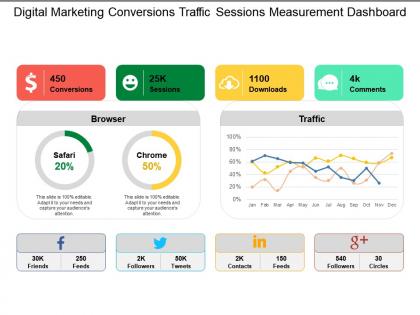
Digital marketing conversions traffic sessions measurement dashboard





Try Before you Buy Download Free Sample Product
 Impress Your
 Audience
 100%
100% Editable
 Save Hours
 of Time


Our Digital Marketing Conversions Traffic Sessions Measurement Dashboard bring about attitudinal change. They exude a can do feeling.
People who downloaded this PowerPoint presentation also viewed the following :
Digital marketing conversions traffic sessions measurement dashboard with all 5 slides:
Give credible advice on career choices with our Digital Marketing Conversions Traffic Sessions Measurement Dashboard. You will become a campus favorite.
FAQs for Digital marketing conversions traffic
Honestly, start with the basics - conversion rate, CPA, ROAS, and CTR. Those will tell you the most right off the bat. I'd also keep an eye on engagement stuff like time on page and bounce rate because what's the point if people hate your content, you know? Oh, and don't sleep on lifetime customer value - sometimes you can afford higher acquisition costs if customers stick around forever. My friend learned that the hard way with her skincare brand. Once you've got these dialed in, then worry about the fancy channel-specific metrics.
Dude, Google Analytics is seriously a game changer for figuring out your marketing stuff. Track which channels actually bring in good traffic, not just random visitors. The audience data shows you who's really into your brand vs people who bounce immediately - that part's super useful. Oh and definitely set up goal tracking for conversions, maybe 3-4 goals that actually matter to your business. I probably check mine too often lol but it's addictive seeing the patterns. You'll spot where people drop off in your funnel too. Just peek at reports weekly and you'll start noticing trends pretty quick.
Dude, A/B testing is honestly a game changer - you just pit two versions of something against each other and see which one wins. Could be email subject lines, landing pages, whatever. Way better than sitting there wondering "hmm, should I use this button color or that one?" Just test both! I usually start super simple, like testing two different headlines on emails to see which gets more opens. The data doesn't lie, even when your gut feeling is screaming the opposite. Plus you can scale up from there - test whole campaign strategies once you get the hang of it.
Honestly, measuring digital marketing ROI is way trickier than it should be. You'll want to set up proper attribution in Google Analytics - but skip that last-click stuff because people bounce around channels before they actually buy. UTM parameters are your best friend here (trust me on this). Focus on connecting real revenue to what you spent, not just fancy metrics like impressions that don't mean much. Customer acquisition cost and lifetime value by channel? That's where the gold is. The whole point is seeing which campaigns actually make you money instead of just looking pretty on a dashboard.
Honestly, Google Analytics is where I'd start - it's free and shows you pretty much everything you need. Hotjar's really cool too, you can literally watch people use your site which is kind of fascinating in a creepy way lol. For social stuff, Sprout Social works well. Adobe Analytics is solid if you've got the budget for something fancier. Facebook Pixel's useful if you're running ads there. But yeah, definitely begin with Google Analytics and set up some goals first. That's where you'll actually see what people are doing vs just looking at random numbers.
Honestly, social media analytics are totally different from regular digital marketing stuff. Instead of just tracking conversions and sales, you're looking at engagement - likes, comments, shares, all that. The demographic data is insanely detailed too, way more than web analytics usually gives you. Real-time updates are kind of addictive to check, not gonna lie. Traditional analytics show you what people actually do, but social tells you how they feel about your brand. That's huge. Just focus on 3-4 metrics that connect to your actual business goals and you'll be good.
Start with UTM parameters - get those standardized first or you'll hate yourself later. Same naming conventions across everything. Manual data exports are the worst, so automate what you can. I've had good luck with GA4 and Supermetrics for pulling everything into one place. Don't just look at last-click stuff though. Map out the whole customer journey so you actually see how people move through your channels. Honestly? Begin with maybe 2-3 channels, nail that process down, then add more. Way less overwhelming that way.
So predictive analytics is basically using old customer data to guess what's gonna happen next. Pretty cool stuff - you can figure out which leads will actually buy, spot customers who might bail, or predict what content will hit with your audience. I mean, it's not perfect but way better than just winging it. Budget gets way more targeted when you know who's worth focusing on. Honestly I'd start super simple though - like predicting email opens or social media engagement first. Once you get the hang of that, you can tackle the bigger predictions.
So you know how you've been looking at those confusing analytics dashboards? Customer segmentation is honestly a game-changer. Break your audience into 2-3 groups based on what matters most to your business. Suddenly you'll see patterns like "millennials convert way better on Instagram" instead of just... generic numbers that don't help anyone. Different groups behave completely differently - some need tons of touchpoints, others buy immediately. I learned this the hard way after months of staring at useless overall metrics. Once you segment, your data actually tells you what to do next.
Dude, mobile analytics totally change the game for digital marketing. People act completely different on their phones - they're jumping between apps, switching devices halfway through buying stuff, and honestly their attention spans are shot. The data shows you need faster loading times and campaigns built for mobile first, not desktop. Location tracking and in-app behavior data? You can't get that stuff from desktop users. Short bursts work way better than long-form content. Focus on those quick micro-moments when people are actually scrolling with their thumbs instead of sitting at a computer clicking around.
Heat maps are honestly game-changers - they show exactly where people click, scroll, and hover on your site. You'll see if users are totally ignoring your main button or getting confused and clicking random stuff that doesn't work (which pisses them off). Scroll maps tell you if your best content is buried where no one bothers looking. I always check high-traffic pages first since tweaks there give you the most bang for your buck. Then just move the important stuff up higher, fix whatever's confusing people, or relocate buttons to spots that actually make sense.
Just be upfront about what data you're grabbing and get real consent first - none of that sneaky tracking BS. GDPR and CCPA are the big ones to follow, though honestly the rules change constantly and it's annoying to track. Basic rule though: only collect what you actually need. Secure it well and let people control their own stuff. Strip out personal info from reports when you can. Oh and definitely audit what you're collecting now because I bet your privacy policy doesn't match what's actually happening. Most don't.
Dude, first thing I do is panic for like 2 seconds, then check if there were any campaign changes or random events I forgot about. Traffic sources are usually the culprit - maybe a new ad placement went live or something broke. Cross-reference with other metrics to see if it's everywhere or just one thing acting weird. Double-check your attribution windows too. Oh and pixels - those things love to randomly stop working. Honestly, tracking errors happen way more than you'd think. Don't make any big moves until you figure out what actually caused it though.
So sentiment analysis tracks whether people are saying good or bad stuff about your brand online - social media, reviews, all that. Super helpful for catching PR disasters before they blow up. You can see which campaigns actually work and how people's opinions change over time. Honestly, the insights from just tracking tone are crazy good. It shows you what features people love vs hate, plus who your biggest fans and critics are. Oh, and definitely set up alerts when sentiment drops - that's like your emergency warning system so you can jump on problems fast.
Start by digging into your old data to find those seasonal patterns - you know, like when everyone goes crazy shopping during holidays or how summer just kills B2B sales. Most people totally skip this step then act shocked when their campaigns tank. Check your year-over-year numbers to see what's actually happening. Boost your ad spend right before busy seasons hit, then dial it back when things get slow. Also switch up your messaging to match how people think during different times of year. Oh, and start planning like 6-8 weeks early so you're not panicking at the last second.
-
Understandable and informative presentation.
-
Very unique, user-friendly presentation interface.