

Discovery Session Powerpoint Ppt Template Bundles





Try Before you Buy Download Free Sample Product
 Impress Your
Audience
 100%
Editable
 Save Hours
of Time


Our Discovery Session Powerpoint Ppt Template Bundles are topically designed to provide an attractive backdrop to any subject. Use them to look like a presentation pro.
People who downloaded this PowerPoint presentation also viewed the following :
Discovery Session Powerpoint Ppt Template Bundles with all 18 slides:
Use our Discovery Session Powerpoint Ppt Template Bundles to effectively help you save your valuable time. They are readymade to fit into any presentation structure.


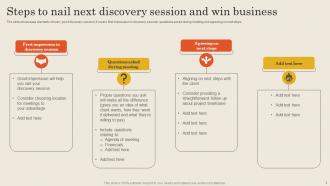




FAQs for Discovery Session Powerpoint
For your discovery session template, start with agenda/objectives and client background research. Then hit current state assessment, pain points, goals they want to hit, and next steps. Oh, and definitely add a "parking lot" slide - trust me, random ideas always pop up mid-conversation and you don't want to lose them. Include sections for stakeholder mapping, budget talk, timeline expectations, and how you'll measure success. The whole thing should feel like a natural conversation, not some corporate interrogation. Leave tons of white space because you'll be scribbling notes like crazy during the actual session.
Dude, visuals are a game changer for Discovery Sessions. Charts and diagrams beat boring bullet points every time - your clients will actually stay awake and remember stuff. I always throw in icons or process flows to show how things work. The real magic happens when people can *see* what you're talking about because then they ask way better questions. You end up having actual conversations instead of just presenting at them. Oh, and clients share more insights too when they're not zoning out. Start small - just swap half your text-heavy slides for something visual and you'll see the difference immediately.
Kick off with a quick agenda, but honestly the magic happens when you ask about their pain points early on. People spill way more when they're fresh versus exhausted an hour in. I always throw in those "what's keeping you up at night" questions right after we cover where they are now. From there, dig into goals, decision process, timeline - you know the drill. Budget talk comes naturally once they're comfortable. 15-20 slides tops, leave room for notes. Oh and definitely build in spots where you can pivot based on what they're telling you. Keep it conversational, not like you're deposing them in court.
Dude, storytelling is a game-changer for discovery sessions. People's brains are just wired for stories, not boring data dumps. Start with something like "Picture this scenario..." and watch everyone put their phones down. I swear it works every time. Frame client challenges like actual stories - you know, with characters facing real problems and needing solutions. Your audience will stay engaged and actually remember what you said later. Maybe I'm biased, but opening each PowerPoint section with a quick client story or hypothetical situation beats bullet points any day. Makes the whole thing feel less like a presentation and more like you're solving actual human problems.
So for discovery sessions, process flows and journey maps are total lifesavers - they show current state vs where you're headed. Stakeholder maps help too since people can actually see all the relationships. Simple before/after comparisons work great, and timeline diagrams are solid. Oh, and pain point matrices if you need to prioritize what's broken. Honestly though, the best deliverable is whatever gets people pointing at your screen going "YES, that's exactly our mess." Keep things visual but don't go overboard - you want conversations, not people squinting at your diagrams confused.
So basically just swap out all the industry stuff for whatever sector you're targeting. Like, ditch the generic case studies and throw in ones that actually relate to their world. Your question frameworks? Same deal - tweak them to hit their specific pain points. Colors and visuals are super easy to change too, just match their brand vibe or whatever looks normal in their industry. Honestly, the agenda part is where you'll make the biggest impact though. Figure out 3-4 major challenges they're dealing with, then rework your slides to tackle those head-on. Way more effective than the one-size-fits-all approach.
Okay so branding really matters for your Discovery Session deck. Put your logo, colors, and fonts throughout the whole thing - it makes you look legit right off the bat. I've watched people use random templates and honestly? They look like amateurs. Don't go crazy with it though, the content still needs to shine. Prospects need to feel like they're dealing with a real business, not some fly-by-night operation. Keep everything clean and consistent. Oh, and stick your contact info on every slide because people forget stuff. Trust me on this one.
Build in polls and breakout activities right into your slides - don't just wing it and hope people speak up. Clickable buttons work really well for letting the group choose what to dive into next. Quick voting slides help you read the room too. Oh, and definitely create a "parking lot" slide for random questions that pop up (there's always at least three). Honestly, most people zone out during regular presentations. Map out 2-3 interactive moments beforehand and you'll actually keep everyone awake. Way better than talking at slides for an hour straight.
Yeah, biggest thing is don't jam your slides full of text. Nobody wants to read essays during a discovery call. Keep it super conversational and ask good questions instead of showing off everything you know. Don't assume stuff about their business or jump into solutions before you actually get their problems. Your template shouldn't be too rigid either - you need room to pivot based on what comes up. Oh, and here's the real mistake most people make: not giving them enough time to actually talk. You should be listening like 70% of the time, so throw in discussion prompts and keep slides light.
Don't just throw data at people - tell them a story with it. Walk them through problem → evidence → what it means → what to do next. Charts help, but honestly? Sometimes a basic before/after comparison works better than some complicated analysis. One insight per slide or you'll lose everyone. Yeah, visuals matter, but the real goal isn't showing off all your research. You want people to actually get what the data means for moving forward. Keep it simple and focused on conclusions that matter.
Honestly, I'd chop everything into 15-20 minute chunks. People's brains just shut off after that - doesn't matter how brilliant you think you are! Throw in polls or quick breakouts between sections. Get them moving around too - sticky notes, partner stuff, whatever. The "popcorn style" thing where people randomly jump in works great. You've gotta change the energy every quarter hour or you'll lose them. Oh, and always wrap each section clearly before moving on. Trust me, I've bombed enough sessions to know this stuff actually works.
Drop pulse-check slides every few sections - honestly game-changer for engagement. Build in dot voting, parking lots for random ideas, rating scales for priorities. Don't just ask "questions?" at the end (nobody ever speaks up anyway). Make feedback visual and immediate instead. Oh, and set it up so people can actually steer the conversation as you go. Way more insights that way. The whole point is getting stakeholders involved in shaping the session, not just sitting there nodding. Interactive beats passive every time.
Discovery sessions are all about listening and digging for info, which is honestly pretty different from your typical meeting. You're asking open-ended questions and trying to understand their pain points - not pitching anything yet. It's more like conducting an interview than giving a presentation (though you still need some structure, obviously). Most other meetings have set agendas and clear outcomes. But discovery sessions? They should feel exploratory and conversational. That's why the PowerPoint template has question prompts and note-taking spaces instead of flashy slides. Use it to guide things, not take over the whole conversation.
Honestly, case studies are game-changers for discovery calls. People's brains just love stories way more than hearing about random features. When you share how another company (similar to theirs) actually solved the same problem, they can picture themselves getting those results too. It builds trust because you're not just making promises - you're showing proof it worked. The trick is picking examples that match their industry or situation closely. I learned this the hard way after boring prospects with generic pitches for months. Stories stick, features don't.
PowerPoint's honestly your best bet to start - the built-in animations are pretty solid and won't overwhelm you. If you're terrible at design (like me lol), Canva has templates that'll make you look way more professional than you actually are. Mentimeter's cool for live polling if you want audience interaction. Prezi does that fancy zooming thing, though it can be kinda nauseating if overdone. Figma works great too if your whole team wants to collaborate on something custom. Just pick whatever doesn't stress you out given your timeline.
-
Professional and unique presentations.
-
I am extremely pleased with these PPT slides that we used for our event. They were easy to modify and came out great in all aspects!