

Docker architecture introduction to dockers and containers ppt powerpoint presentation templates




Try Before you Buy Download Free Sample Product
 Impress Your
 Audience
 100%
100% Editable
 Save Hours
 of Time


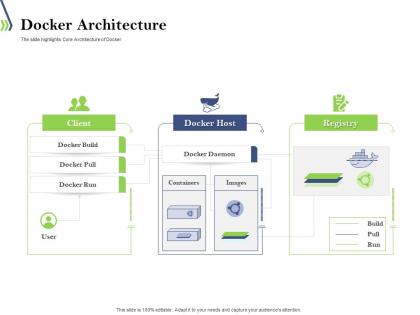
The slide highlights Core Architecture of Docker
People who downloaded this PowerPoint presentation also viewed the following :
Docker architecture introduction to dockers and containers ppt powerpoint presentation templates with all 2 slides:
Use our Docker Architecture Introduction To Dockers And Containers Ppt Powerpoint Presentation Templates to effectively help you save your valuable time. They are readymade to fit into any presentation structure.
FAQs for Docker architecture introduction to dockers and containers ppt
So Docker Engine runs your containers - that's the main thing. Images are like templates, and the Daemon handles all the background stuff. You'll mostly use the CLI though, that's where the action happens. Registries store images, containers are what actually runs your apps. Pretty straightforward once you get it. Oh and definitely wrap your head around how images turn into containers first - I swear that's the lightbulb moment. Everything else makes way more sense after that clicks. It's honestly not as complicated as it sounds at first.
So Docker works through a REST API - your client talks to the daemon using HTTP requests over UNIX sockets (or TCP/named pipes on other systems). Run `docker run` and you're basically sending a message to the daemon telling it what to do. The daemon handles all the heavy lifting with containers and images. On Linux it listens on `/var/run/docker.sock` by default. You can set up remote access too if you want to manage stuff from another machine, though that gets into security territory which... yeah, be careful there. It's honestly pretty straightforward once you get it.
So images are like blueprints for your app - they've got all your code, dependencies, everything bundled up. Once they're built, you can't change them. Containers are what actually run from those images. It's kinda like the difference between a recipe and the actual cake you bake from it, if that makes sense? You can spin up tons of containers from one image, which is pretty cool for scaling. Images stay the same (static), but containers can change while they're running. Honestly, just grab some images from Docker Hub first - way easier to learn that way.
So Docker registries are like storage hubs for your container images - kind of like GitHub but for Docker stuff instead of code. You build an image, push it to a registry (Docker Hub is the main one, or AWS ECR), then pull it down wherever you need it. They're super important because you can share images with your team and deploy the exact same thing across different environments. Otherwise you'd be rebuilding everything locally each time, which honestly sounds terrible. I'd start with Docker Hub since it's free and straightforward, then maybe look into private ones later when you need more control.
So basically Docker gives each container its own little network bubble - they can't mess with each other or your main system. There's this default bridge network that acts like a virtual router, letting containers chat with each other and hit the internet. Custom networks are pretty handy when you want certain containers grouped together securely. Host networking exists too if you need containers sharing your machine's network directly, though I rarely use that one. Docker does all the boring routing stuff automatically which is nice. Just stick with the default setup at first, then add custom networks when you actually need them.
So bridge networking is Docker's default thing - keeps containers talking on your local machine in their own little isolated network. Overlay is totally different though. It connects containers across multiple hosts, like they're all sitting on the same network even when they're on different servers. Kind of like bridge is your home network and overlay is... well, connecting multiple homes together I guess? You'll need Docker Swarm or some external store to make overlay work since it has to coordinate between machines. Honestly, if you're just messing around locally, bridge does the job fine. But once you need that multi-host setup, overlay's your best bet.
So Docker Swarm lets you cluster multiple Docker hosts together - pretty cool stuff. One machine becomes the manager (handles all the orchestration), others become workers that actually run your containers. The system automatically spreads containers around based on what resources are available. Scaling services is dead simple, just run a command and boom - more replicas. It also does load balancing and service discovery automatically, which honestly saves a ton of headache. Best part? Same Docker API you already know, so you won't be learning everything from scratch. Just init a swarm on one node, then add workers whenever you need them.
So Docker's got some decent security stuff built in. Namespace isolation keeps containers from stepping on each other, and cgroups limit how much resources they can hog. There's also capabilities that restrict what containers can actually do - pretty handy. The daemon running as root by default is kinda annoying though. You've also got seccomp profiles filtering system calls, plus AppArmor/SELinux if you're into that. User namespaces are clutch for mapping container root to regular host users. Main thing - run containers as non-root whenever you can and keep those images lean.
So Docker volumes are basically how you save data when containers die - which they do constantly since that's just how Docker works. Without them you'd lose everything every time you restart, which sucks. Docker manages the storage on your host but keeps it separate from the container's life cycle. It's like having a backup drive that multiple containers can access. Named volumes are way better than bind mounts btw - learned that the hard way when trying to move stuff between environments. You can mount the same volume to different containers too, makes sharing data super easy.
Honestly, Docker makes multi-cloud stuff so much simpler. You package everything once - app, dependencies, the works - then it runs the same whether you're on AWS, Azure, whatever. The container handles all the weird OS differences between providers, which is pretty sweet. No more vendor lock-in headaches either. Your stuff stays portable, so switching clouds doesn't mean rewriting everything. I'd start containerizing now even if you're only using one cloud. Trust me on this - you'll thank yourself later when you need to move things around. It's one of those decisions that just keeps paying off.
So Docker uses these two things called namespaces and cgroups to keep containers separate. Namespaces basically trick each container into thinking it has its own filesystem, network, processes - the whole deal. Even though they're all sharing one kernel, which is kinda wild if you think about it. Cgroups are different - they're like the bouncer controlling how much CPU and RAM each container gets to hog. Way better than VMs honestly, since you're not running a bunch of separate operating systems. Oh and when you run `docker stats`? That's just cgroups showing off the resource numbers.
So Docker with microservices can actually help performance through better isolation and scaling. Yeah, there's overhead - maybe 2-5% CPU and memory per container vs running everything native. But you get to scale each service separately based on what's getting hammered, which is honestly pretty cool for resource optimization. Network latency between containers will bite you though, especially if your services talk constantly. I'd definitely watch your inter-service communication patterns. Oh, and think about where you place containers to cut down network hops - that stuff adds up fast.
So Docker Compose is basically a layer on top of regular Docker that lets you manage multiple containers at once. You write everything in one YAML file - your database, web server, APIs, all of it. Way better than running separate `docker run` commands for each thing, trust me. It automatically handles the networking between containers and manages volumes and startup order. Just run `docker-compose up` and your whole app fires up together. I started using it on this project last month and honestly can't imagine going back. If you've got more than one container, definitely make the switch.
Honestly, the biggest pain points are gonna be resource management and networking headaches. Once you're juggling hundreds of containers, orchestration becomes a total mess without something like Kubernetes or Docker Swarm. Load balancing gets weird fast too. Storage is probably the trickiest part though - containers don't keep state, so figuring out persistent data across scaled instances is rough. I'd say start simple with Docker Compose, then move to Kubernetes when things get serious. Oh, and definitely nail down your data strategy early or you'll hate yourself later.
So basically, third-party tools plug into Docker using APIs and plugins to add way more functionality. Monitoring stuff like Datadog hooks into Docker's API to track how your containers are performing. Security tools scan at the registry level. The whole ecosystem has gotten pretty massive tbh - Kubernetes handles orchestration while Jenkins can auto-build and deploy your images. Most solutions just use Docker's REST API, so you're not stuck with whatever Docker gives you out of the box. Actually makes Docker way more powerful than it'd be alone.
-
Unique design & color.
-
Great experience, I would definitely use your services further.