

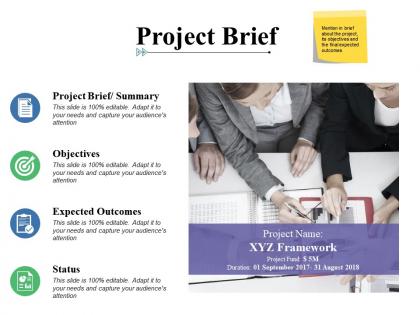
Project brief ppt powerpoint presentation layouts slide portrait




Try Before you Buy Download Free Sample Product
 Impress Your
 Audience
 100%
100% Editable
 Save Hours
 of Time


Get applauded instantaneously with our Project Brief Ppt Powerpoint Presentation Layouts Slide Portrait. Your effort will be immediately appreciated.
People who downloaded this PowerPoint presentation also viewed the following :
Project brief ppt powerpoint presentation layouts slide portrait with all 5 slides:
Exude dynamism with our Project Brief Ppt Powerpoint Presentation Layouts Slide Portrait. The air will be brimming with enthusiasm.
FAQs for Project brief ppt powerpoint presentation
Honestly, start with what you're trying to accomplish and why it matters - that's your foundation. Then map out scope, deliverables, and timeline with actual milestones people can hit. Budget's obvious but don't lowball it. Figure out who does what AND who approves stuff (seriously, this one bites people constantly). Your audience and how you'll measure success are huge too. Oh, and write it so someone could grab it off your desk and get the full picture without bugging you every five minutes. Keep it tight but detailed enough to actually be useful.
Honestly, a solid project brief is like your secret weapon for dealing with stakeholders. It stops all those awkward "wait, what are we actually building?" conversations before they happen. You get everyone aligned on objectives and scope right from the start, so people can actually contribute instead of just pretending they know what's going on. Oh, and it'll save your sanity later - no more endless email chains trying to explain the same thing over and over. When someone inevitably tries to add "just one small feature" (spoiler: it's never small), you've got something concrete to point back to. I always pull it up at the start of meetings to keep things on track.
Oh god, the vague objectives thing will bite you so hard later. Like, don't just say "increase engagement" - actually put numbers on it, maybe "boost email opens by 25%" or whatever. I learned this lesson the messy way, but get everyone on the same page before you start anything. Unrealistic timelines are another trap - I know it's tempting to lowball everything to get approval, but it backfires. Write down your constraints too, like if you're waiting on the dev team or only have two people working on it. Sounds boring but it'll save you from so many "wait, I thought you meant..." conversations later.
Dude, it's literally like the difference between texting vs writing a formal email. Executives want the big picture stuff - ROI, business impact, that kind of thing. Technical people? Go nuts with the specs and details. For creative folks, paint the picture of user experience and make it visual. I learned this the hard way when I wrote super technical briefs for leadership once - total disaster. Match how they actually talk and what they care about. Short and punchy for busy execs, collaborative tone for team projects. Honestly, getting this right is like 80% of getting people on board with your project.
Okay so research is honestly make-or-break for your project brief. Without it, you're basically throwing darts blindfolded. I'd start with user interviews and competitive analysis - trust me on this one. Those will catch most of the big problems before they bite you later. You gotta understand your audience, what the market's doing, who you're up against. Budget realities too (everyone forgets this part). Technical feasibility matters obviously. Don't be like those people who just wing it and wonder why their brief falls apart. Your team needs actual direction, not guesswork in the dark.
Honestly, visuals are a game-changer for project briefs. Instead of making people wade through paragraphs, throw in some flowcharts or mockups. Way easier to grasp what you're actually going for. I've watched so many good ideas die because the brief was just... boring text blocks that nobody bothered reading. Timelines help too - shows how everything fits together. Even basic stuff like bullet points makes a huge difference. People can scan for what they need instead of hunting through dense writing. Oh, and screenshots work great if you're explaining something technical. Trust me, your stakeholders will actually engage with the brief instead of skipping it entirely.
Honestly, grab coffee with department heads first - it'll save you tons of headaches later. Before writing anything, look at what your company actually cares about (their strategic goals and stuff). Then map your project deliverables directly to those business goals. Use the exact same language they use in planning docs, trust me on this. You want measurable outcomes that connect to company KPIs, not just "we delivered X thing." Oh and get leadership buy-in early by showing how your project actually moves the needle on what keeps them up at night. Makes everything so much smoother.
Honestly, just pick whatever tool your team's already using - Notion, Miro, or Google Docs all work great. Build a template with your usual brief sections (seriously saves so much time later). Real-time editing means everyone can jump in and make changes without the whole "who has the latest version?" mess. Version history's clutch too - you won't accidentally lose stuff. Oh, and sharing's way easier with links instead of those giant PDF email chains that clog everyone's inbox. My team got obsessed with Notion templates last year, but honestly any of these will do the job.
Get your draft to the main players early - team leads, clients, whoever's actually doing the work. Honestly, I'd do a quick meeting first because people are way more engaged than with email feedback (go figure). Set up anonymous channels too if there's weird hierarchy stuff going on. Instead of just asking for "thoughts," give them specific stuff to review - timeline realistic? Do we have enough resources? Give them like 2-3 days to respond, then do a final call to hash out any conflicts. That's usually when the real issues come up anyway. Then you're good to finalize it.
So with Agile, keep your brief pretty loose and focus on outcomes instead of getting super specific about deliverables. I'd go with broad goals, user stories, and success metrics rather than detailed feature lists. Waterfall's the opposite - you can get really comprehensive upfront since you won't be changing direction halfway through. Honestly, I think the biggest difference is Agile briefs should hit the "why" and what success looks like, while Waterfall can dive into all the "how" and "when" stuff. Just start with whatever template you normally use and adjust how detailed you get based on your methodology.
Look, KPIs are basically your project's report card - they show what success actually means instead of leaving everyone guessing. Trust me, I've watched projects implode at the end because nobody could agree if they'd actually won or failed. Super awkward stakeholder meetings. You need concrete numbers to track progress and make smart calls as you go. Pick 3-5 measurable ones upfront and get everyone nodding yes before you start. Otherwise you're just shooting in the dark and hoping for the best.
Dude, yes - totally dig through your old retrospectives when you're writing new briefs. My memory is garbage so I keep this running doc of all the ways projects went sideways. Scope creep, missing stakeholders, communication disasters - all that fun stuff. Then I literally bake those lessons into my brief templates. Like if every project blows up because nobody knows what "done" looks like, I'll add super specific acceptance criteria next time. Honestly, retrospectives are way more useful than people think. Your future self will be so grateful when things actually go smoothly for once.
Your project brief is honestly your best friend for risk management. It gives you that baseline to catch scope creep and budget issues early. When things go sideways (they always do), you can point back to what everyone originally agreed to. Super helpful for explaining to stakeholders why certain risks actually matter - you're literally using their own words against them, which sounds harsh but works. I'd say keep pulling it out during your status meetings. It's like having receipts when someone tries to change the game plan halfway through.
Look, you've gotta set up regular check-ins - every sprint or big milestone works. Have someone own the brief and keep it updated as you learn stuff. Version control is clutch so everyone's on the same page. And honestly? Tell stakeholders they should speak up when scope changes or new requirements pop up. I've watched projects crash and burn because the brief just sat there collecting dust after kickoff. Make it a living document instead of some relic nobody touches. Trust me, you'll be grateful later when you need to justify decisions or remember why you made certain calls.
Honestly, a good project brief is a lifesaver - it gets everyone aligned before things get messy. Define who's doing what and when upfront. Make sure each team understands how their piece fits with everyone else's work. Include those key handoff points between departments too (you know how Marketing and Dev always clash later). Oh, and actually share the damn thing with everyone! Get their feedback before you start. I'm telling you, one extra hour fixing the brief now beats three weeks of "wait, who was supposed to handle that?" drama. It's basically giving everyone the same roadmap instead of watching them stumble around blind.
No Reviews