

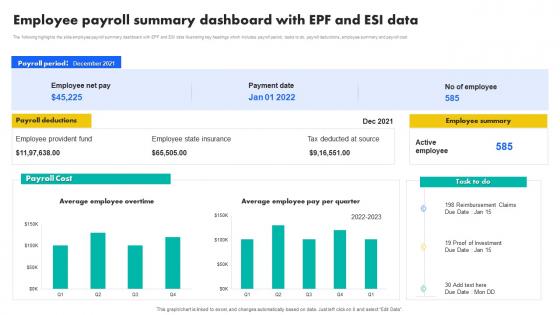
Employee Payroll Summary Dashboard With EPF And ESI Data




Try Before you Buy Download Free Sample Product
 Impress Your
 Audience
 100%
100% Editable
 Save Hours
 of Time


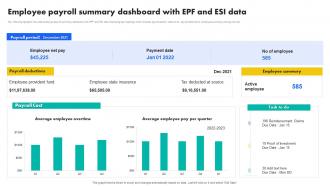
The following highlights the slide employee payroll summary dashboard with EPF and ESI data illustrating key headings which includes payroll period, tasks to do, payroll deductions, employee summary and payroll cost
People who downloaded this PowerPoint presentation also viewed the following :
Employee Payroll Summary Dashboard With EPF And ESI Data with all 7 slides:
Use our Employee Payroll Summary Dashboard With EPF And ESI Data to effectively help you save your valuable time. They are readymade to fit into any presentation structure.





FAQs for Employee Payroll Summary Dashboard With EPF
An employee payroll dashboard should include total payroll costs, cost per employee, overtime expenses, benefits allocations, departmental breakdowns, year-over-year comparisons, and budget variance tracking. These metrics enable HR and finance teams to streamline cost management, identify spending patterns, and optimize resource allocation, ultimately delivering enhanced operational efficiency and strategic financial oversight across organizations.
An employee payroll dashboard facilitates compliance by automating tax calculations, tracking regulatory changes, maintaining detailed audit trails, and generating mandatory reports for various jurisdictions. Through real-time monitoring and built-in compliance checks, organizations streamline tax filings, ensure accurate wage calculations, and minimize compliance risks, ultimately reducing penalties while enhancing operational efficiency.
**INPUT**: What graphical representations work best for visualizing payroll data on a dashboard? **OUTPUT**: Effective payroll dashboard visualizations include bar charts for department comparisons, pie charts for cost breakdowns, line graphs for trend analysis, heat maps for performance metrics, and gauge charts for budget tracking. These representations streamline data interpretation by highlighting cost patterns, identifying anomalies, and enabling quick decision-making, with many HR departments finding that visual dashboards reduce reporting time while enhancing strategic workforce planning. **Word Count**: 60 words
Integrating real-time data enhances payroll dashboard functionality by providing instant visibility into attendance, overtime calculations, commission tracking, and regulatory compliance updates. This enables HR teams to process accurate payroll faster, identify discrepancies immediately, and deliver timely payments, while reducing manual errors and ultimately improving employee satisfaction and operational efficiency.
User experience (UX) plays a critical role in payroll dashboard design by ensuring intuitive navigation, clear data visualization, mobile responsiveness, and streamlined workflows that minimize user errors. Through thoughtful UX design, organizations enhance employee satisfaction, reduce HR support tickets, and accelerate payroll processing times, with many companies finding that well-designed dashboards significantly improve both employee engagement and operational efficiency.
Organizations customize payroll dashboards by incorporating industry-specific metrics, compliance requirements, regulatory reporting features, and specialized data visualizations tailored to their sector. Financial services firms prioritize risk management displays, while healthcare organizations emphasize certification tracking and shift differentials, ultimately delivering enhanced operational efficiency and ensuring regulatory compliance across diverse business environments.
Common payroll dashboard implementation challenges include data integration complexities, ensuring regulatory compliance across jurisdictions, user adoption resistance, system compatibility issues, and maintaining real-time accuracy. While these obstacles require careful planning, organizations increasingly find that strategic implementation with proper training, phased rollouts, and robust security protocols ultimately delivers enhanced operational efficiency, reduced processing errors, and improved employee satisfaction.
An employee payroll dashboard supports workforce planning and budgeting by providing real-time visibility into labor costs, salary distributions, overtime patterns, and departmental spending trends. Through automated data analytics, organizations can forecast future staffing needs, identify cost optimization opportunities, and allocate resources more strategically, ultimately enabling better financial planning and competitive workforce management.
Payroll dashboard development typically leverages business intelligence platforms like Tableau, Power BI, and Qlik Sense, alongside HR software integrations with Workday, ADP, and BambooHR. These strategic combinations streamline data visualization, automate compliance reporting, and enhance payroll accuracy across departments, with many organizations finding that integrated dashboards reduce processing time while delivering real-time workforce analytics and operational transparency.
Historical payroll data enables forecasting through trend analysis, seasonal pattern recognition, headcount growth modeling, and compensation increment tracking within dashboard analytics. By analyzing past salary distributions, overtime patterns, and benefit costs across departments, organizations can project quarterly budgets, anticipate hiring costs, and optimize resource allocation, ultimately delivering more accurate financial planning and strategic workforce investments.
Employee payroll dashboards require multi-layered security including role-based access controls, end-to-end encryption, multi-factor authentication, audit trails, and regular security updates. These measures work together by restricting data visibility to authorized personnel, protecting information during transmission and storage, and enabling compliance tracking, with many organizations finding that strategic security implementation enhances employee trust while minimizing regulatory risks.
Employee payroll dashboard assists in identifying pay discrepancies by providing real-time visibility into salary calculations, overtime tracking, deduction accuracy, and payment timing across all employees. Through automated alerts and comparative analytics, HR teams can quickly spot inconsistencies, streamline corrections, and maintain transparent communication with employees, ultimately delivering faster resolution times and enhanced payroll accuracy for organizational compliance.
Payroll dashboards enhance employee satisfaction by providing real-time access to pay stubs, deduction breakdowns, tax withholdings, leave balances, and overtime calculations, creating complete transparency in compensation processes. Through self-service portals, employees can track earnings, understand benefit contributions, and access historical payroll data instantly, with many organizations finding that this transparency reduces HR inquiries while building trust and engagement.
Mobile accessibility significantly enhances payroll dashboard effectiveness by enabling real-time access to salary information, instant payslip downloads, and seamless expense submissions from any location. With remote work increasingly common, mobile-optimized dashboards streamline HR processes, reduce administrative delays, and improve employee satisfaction, ultimately delivering faster payroll operations and enhanced workforce productivity.
Employee turnover rates on payroll dashboards reveal critical workforce patterns including departmental retention challenges, seasonal fluctuations, cost-per-hire trends, and compensation competitiveness gaps. These insights enable organizations to identify high-risk departments, optimize recruitment budgets, and implement targeted retention strategies, with many companies finding that proactive turnover analysis reduces hiring costs and enhances operational stability.
-
“Ample and amazing variety of templates available, really helpful for making professional PPT for day to day workings.”
-
My presentations were a bit amateur before I found SlideTeam’s designs. I’ve been able to find slides for nearly every topic I’ve had to present. Thanks, Slideteam!