

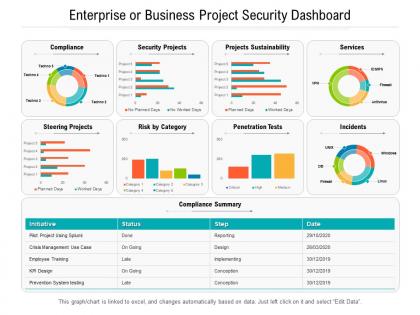
Enterprise or business project security dashboard





Try Before you Buy Download Free Sample Product
 Impress Your
 Audience
 100%
100% Editable
 Save Hours
 of Time


Our Enterprise Or Business Project Security Dashboard are topically designed to provide an attractive backdrop to any subject. Use them to look like a presentation pro.
People who downloaded this PowerPoint presentation also viewed the following :
Enterprise or business project security dashboard with all 2 slides:
Use our Enterprise Or Business Project Security Dashboard to effectively help you save your valuable time. They are readymade to fit into any presentation structure.
FAQs for Enterprise or business
Honestly, start with real-time threat monitoring and vulnerability tracking - that's your foundation right there. Access management controls are clutch so you can track who's accessing what. Risk scoring gives you that instant visual snapshot of your security posture, which is super helpful. Compliance indicators are boring but necessary (auditors eat that stuff up). Make everything visual with charts and color-coding, but keep it dead simple. If your team needs training just to read the dashboard, you've gone overboard. Build these core pieces first, then add bells and whistles once everyone's comfortable with the basics.
Dude, real-time dashboards are a total game changer for security stuff. Instead of finding out about threats days later, you'll catch them as they're happening. Heat maps and interactive charts make it super obvious when something's off - like weird login patterns or suspicious activity. Way better than scrolling through endless log files (which honestly nobody wants to do). Your whole team can actually understand what's going on at a quick glance. Set up some automated alerts for when things get sketchy. I'd start with your top 3-5 security metrics and build from there.
Focus on vulnerability metrics first - critical/high severity counts and how fast you're fixing them. Then track access control stuff like failed logins and privileged access reviews. Compliance status too, obviously. Honestly? Skip those flashy pie charts that executives love but tell you nothing useful. Trending data is where the magic happens - you need to see if things are improving or getting worse. Also throw in security training completion rates since people are still the weakest link. Start simple with these basics, then get fancy once your team actually looks at the thing daily.
So basically you get this real-time view of where you stand compliance-wise across all your projects. Super helpful for catching gaps before they bite you. When audit season rolls around (ugh), you're not frantically digging through random spreadsheets - everything's right there. All your security metrics live in one place, which is clutch when regulators show up asking questions. You can set it up so different people see what they actually care about, plus automated alerts ping you if something goes sideways. Trust me, it'll save your sanity.
Think of user access control like having a bouncer for your security dashboard. Different people need different views - devs should see code vulnerabilities, while execs get the big picture risk stuff. Map out everyone's actual job needs first, then create permission groups around that. Trust me, you don't want random people accidentally setting off alerts (been there, not fun). Role-based permissions are your friend here. Just make sure you check who has access to what every few months. Oh, and definitely don't overthink it at first - you can always adjust later as things get more complex.
Honestly, dashboards are a game changer for catching security issues before they blow up. You can see outdated dependencies, failed scans, weird access patterns - all right there instead of hunting through endless logs (which is the worst). Set up alerts for the really critical stuff and make sure everyone knows who to ping when things go sideways. I'd start with whatever keeps you up at night security-wise and build from there. Plus it's nice showing the higher-ups that you're actually on top of this stuff. Track your fixes too so you can see progress over time.
Start with your most critical security tools - SIEM stuff like Splunk or QRadar for log analysis works great. Vulnerability scanners (Nessus, Qualys) can feed risk data straight in. API connections to firewalls, antivirus, and identity systems give you real-time visibility across everything. The tricky part? Not drowning in information overload - I've seen dashboards become totally useless because of too much noise. Threat intel feeds from VirusTotal are worth adding too, though maybe not right away. Focus on what your team actually checks daily first, then build out from there.
Honestly, you want those security dashboards updating every 5-15 minutes for the important stuff. Critical events should hit you instantly - that's a given. But your regular metrics like failed logins and network weirdness? They need frequent refreshes or you're basically flying blind. I learned this the hard way at my last gig when we had hourly updates and missed some sketchy activity for way too long. Compliance reports can wait an hour between updates though. Set your high-priority stuff to refresh every 10 minutes and make sure breach indicators alert immediately.
Start with the most important security stuff right at the top - people need to get the story immediately. Red means bad, green means good, you know the drill. Group similar things together so it's not chaos. I swear, half the dashboards I see look like someone threw confetti at a wall. Don't cram everything into one view - let people click deeper if they want details. Test it with regular folks, not just security people. They'll tell you real quick what makes zero sense. Oh, and short sentences help too. Nobody wants to decode paragraphs when there's an actual incident happening.
So basically predictive analytics flips your security from "oh crap, we got hacked" to actually seeing stuff coming. It looks at your data patterns and flags weird behavior before it becomes a real problem - way better than just finding out about breaches after the fact. Honestly, it's like finally getting ahead of the bad guys instead of always playing catch-up. You can spot which systems are sketchy, prioritize where to focus your time, and get alerts when something's about to go sideways. Start with anomaly detection to catch unusual user activity first.
Put validation checks at every spot where data gets entered - that's your first line of defense. Daily automated backups are non-negotiable, but honestly the real test is making sure you can actually restore from them (learned that one the hard way). Role-based access keeps random people from messing with your dashboard data. Audit logging tracks every change so you'll know exactly who did what. Encrypt everything in transit and at rest - boring stuff but it matters. Set up monitoring alerts for weird patterns or sketchy access attempts, then test your recovery process regularly.
So basically, a security dashboard shows you all the threats hitting your network in real-time. Way better than frantically switching between like 5 different tools when everything's on fire. You can see which alerts are actually critical versus the ones that can wait until tomorrow (trust me, not everything is as urgent as it seems). It tracks how well your incident response is going too, so you know if you're actually stopping the bad stuff or just spinning your wheels. Oh, and set up those automated alerts for the really serious thresholds—your team will thank you when they get pinged immediately instead of finding out hours later.
Don't cram everything onto one screen - seriously, I've seen dashboards that look like a Vegas slot machine. Pick 5-7 KPIs that actually help people make decisions. Context is huge too. If you show "417 alerts," nobody knows if that's normal or if the building's on fire compared to last week. Color coding should make sense (red = bad, obviously). Your thresholds need to match what the business can actually tolerate for risk. Oh, and make sure stakeholders aren't playing hide-and-seek with the info they need. Start basic, then build based on what questions keep coming up.
Honestly, just hook up your security dashboard to whatever chat platform your team actually uses - Slack, Teams, whatever. Most dashboards have APIs for this stuff, or you can embed chat widgets right in the interface. The trick is setting up smart notification rules so you don't drive everyone crazy with alerts. I learned this the hard way when our team got pinged every 5 minutes for minor stuff. Start with your main communication tool first. Then tweak the alert thresholds based on what actually needs immediate action versus what can wait.
Look, generic dashboards are basically useless - you'll spend forever scrolling through stuff that doesn't matter while missing the alerts you actually need. Different projects have totally different risk profiles too. Like, a customer app versus some internal tool? Completely different concerns. I'd start by figuring out your top 3-5 security worries, then build your views around just those areas. The whole point is showing only the KPIs and alerts that match your project's specific needs and whatever compliance boxes you gotta check. Trust me, it's way better than drowning in irrelevant metrics.
-
Perfect template with attractive color combination.
-
Excellent template with unique design.
-
Excellent design and quick turnaround.