

Escalation management system project raid analysis ppt slides clipart




Try Before you Buy Download Free Sample Product
 Impress Your
 Audience
 100%
100% Editable
 Save Hours
 of Time


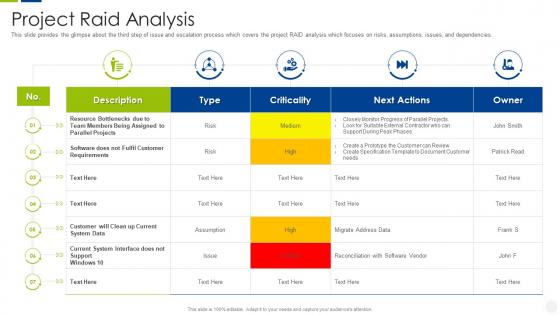
This slide provides the glimpse about the third step of issue and escalation process which covers the project RAID analysis which focuses on risks, assumptions, issues, and dependencies.
People who downloaded this PowerPoint presentation also viewed the following :
Escalation management system project raid analysis ppt slides clipart with all 6 slides:
Use our Escalation Management System Project Raid Analysis Ppt Slides Clipart to effectively help you save your valuable time. They are readymade to fit into any presentation structure.






FAQs for Escalation management system project raid analysis
First thing - figure out your triggers. SLA breaches, VIP customers, whatever makes sense for your setup. Map out who handles what and how long each level gets before it bumps up. Most places mess this up by not writing anything down, then everyone's confused when stuff hits the fan. Get automated alerts going so tickets don't just sit there. Oh, and don't forget rollback steps when higher-ups fix things. Honestly? Start with whatever's breaking right now and work backwards from there.
Set your escalation triggers before stuff hits the fan - severity levels, timelines, impact thresholds. System down or security breach? Escalate immediately. Customer screaming about core services not working? Same deal. I've watched teams just wing this and it never ends well. Document when your team doesn't have the skills to fix something, when revenue's at risk, or when you're past normal SLA windows. Minor bugs don't need the whole cavalry, but anything breaking critical business functions does. Make it foolproof so nobody's left wondering "should I escalate this?" Write it down somewhere everyone can actually find it.
Honestly, communication makes or breaks your whole escalation process. Everyone needs to know what's happening and when - otherwise you'll have issues just sitting there while people play the "I thought you were handling it" game. Set clear triggers for when to escalate and who gets looped in. Regular updates are huge too. Make sure the handoff procedures actually work (test them!) and build in feedback loops so you can figure out what went sideways. Oh, and double-check that people can actually reach the right person when things go south - sounds obvious but you'd be surprised how often that breaks down.
Honestly, the automation piece is a game changer - no more emails disappearing into the void or people "forgetting" to respond. You can set rules that automatically route stuff based on urgency or issue type. Real-time dashboards show you exactly where things are getting stuck, which is super helpful. The notifications keep everyone updated without you having to chase people down constantly. Plus you'll actually have data on what's slowing everything down instead of just guessing. Oh, and definitely map out your current mess of a process first - then find tools to handle the boring repetitive stuff.
Start with resolution time - how fast your team fixes escalated stuff versus what you promised customers. Volume and frequency patterns matter too since they show you where systems are breaking down. Customer satisfaction after resolution is critical (I've seen teams nail speed but totally bomb on quality). Track what issue types escalate most and when they typically get bumped up the chain. Internal stuff like workload balance and repeat escalations for identical problems. Honestly, these basics will keep you busy at first. You can always get fancier with tracking once you spot the main patterns.
Honestly, the biggest pain is getting everyone to actually agree on when stuff should get escalated. Half the time people make these crazy complicated systems that nobody understands. Or they keep it too basic and important things just sit there. Office politics are the worst part though - some managers get all weird about being bypassed. Response times end up all over the place, and different levels barely talk to each other. Your team really needs to know the actual process or it's pointless. Start by figuring out how things get escalated now (even the messy informal way) - shows you what's broken.
Make it part of your regular routine instead of some big training event. Role-play during team meetings so people actually practice the steps - I swear, those fancy PowerPoints are useless when everything's on fire. Keep procedures super accessible, like pinned in Slack or on reference cards. Do quick refreshers every quarter and always talk through what happened after real escalations. Oh, and honestly? The goal is making it automatic, not hoping someone remembers a policy doc when they're stressed. You want muscle memory, not just knowledge sitting in their heads.
Honestly, your company culture makes or breaks whether escalation actually happens. Hierarchical places? People get scared to escalate because they don't want to piss off their manager or seem like they're going around them. Pretty counterproductive if you ask me. Open cultures are way better - people feel safe flagging issues early before they blow up. Culture affects everything too: how fast people respond, whether escalations get taken seriously, all of it. When you're building the process, figure out your cultural stuff first. Otherwise you'll design something that looks great but nobody uses.
So it totally depends on what industry you're in. Healthcare has super rigid escalation rules because, well, people could literally die if something gets missed. Financial companies are strict too but they're more worried about fraud and staying compliant with regulations. Tech is way more chill - most places just ping people on Slack or send quick messages. Manufacturing's all about safety chains of command. Oh, and timeframes matter a lot in some industries but not others. You really gotta look at what risks your company actually faces when you're setting this stuff up.
So for automating escalations, ServiceNow and Jira Service Management are solid if you need the heavy-duty stuff - they're great with complex routing and SLA tracking. Zendesk or Freshservice work well for simpler setups and won't cost you a fortune. Power Automate's actually pretty decent too, especially if you're already using Microsoft everything (which, let's be honest, most companies are these days). My advice? Don't overthink it. Map out how your escalations work now, then pick whatever plays nicest with your current ticketing system. The fancy features don't matter if it's a pain to set up.
Set up checkpoints after resolving each escalation - send quick surveys to customers and do short post-mortems with your team. Track resolution times, satisfaction scores, and what actually caused the issues. Here's the thing most teams mess up: they collect all this data but never use it to fix their processes. Feed everything back into tweaking your escalation triggers and training. Otherwise you'll keep dealing with the same problems on repeat. Oh, and make sure someone's actually responsible for analyzing the feedback - can't tell you how many times I've seen great data just sit there collecting dust.
Honestly, prevention beats putting out fires every time. Get your team trained up so they catch problems early. Your documentation needs to actually help people - not just exist in some forgotten folder somewhere. Most escalations happen because someone didn't know who to call or what steps to take, which is just frustrating for everyone. Set up those regular check-ins with stakeholders. Decision trees work great for the usual stuff that comes up. I'd start by looking at your current escalation mess to figure out where things keep breaking down. Clear communication channels make a huge difference too.
So basically you want clear escalation paths so customer issues don't just sit there forever. Nothing's worse than being bounced between three different departments - I've been there and it's maddening! Quick escalation means the right specialists actually handle stuff they know how to fix. Set specific triggers and timeframes so things move up the chain smoothly. Your customers won't feel ignored when problems get passed to someone who can solve them. It prevents that whole "we'll get back to you" black hole situation. Makes everyone happier honestly.
Honestly, bad escalation planning is like leaving a ticking bomb in your business. Critical stuff just sits around getting worse while nobody with actual authority knows what's happening. Your outages drag on forever. Customers get pissed. The whole thing snowballs into this massive mess that could've been avoided. Teams start burning out because they're constantly firefighting instead of actually fixing things. Plus compliance gets sketchy and costs go through the roof - I've seen companies spend 10x more on recovery than they would've on prevention. Set up clear escalation paths now with some automation. Trust me, it's so much better than panicking later.
So data analytics basically stops you from escalating stuff based on pure panic mode. Track which issues actually need urgent attention vs the ones that just seem scary. I'd start with your top 3-5 escalation triggers and measure those religiously - you'll spot patterns fast. Set up dashboards showing real-time metrics on volume, resolution times, customer satisfaction. Honestly, the data can be pretty surprising when you see what's really happening vs what you thought was happening. Response times across teams, success rates of different escalation paths - it all adds up to smarter decisions instead of just throwing everything upstairs.
-
Perfect template with attractive color combination.
-
Awesome use of colors and designs in product templates.