

Executive summary powerpoint slides design




Try Before you Buy Download Free Sample Product
 Impress Your
 Audience
 100%
100% Editable
 Save Hours
 of Time


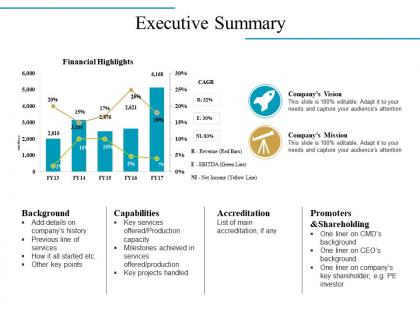
Our Executive Summary Powerpoint Slides Design are ideal for brainstorming. It encourages the development of creative ideas.
People who downloaded this PowerPoint presentation also viewed the following :
Executive summary powerpoint slides design with all 5 slides:
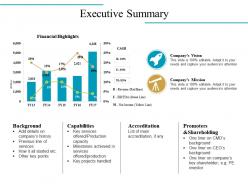
Gradually establish a huge advantage with our Executive Summary Powerpoint Slides Design. You will continue to inch ahead.

FAQs for Executive summary
For exec summary slides, hit these three things: the problem you're solving, your main recommendation, and what impact it'll have. That order works because it flows like a story. Skip all the detailed stuff - save that for backup slides if they ask questions. Busy executives need to get your point in 30 seconds, honestly less if possible. One good number can be powerful, but don't go crazy with charts and bullet lists everywhere. Clean and focused wins every time. Pro tip: test it on someone first. If they can't immediately tell you what you're proposing after a quick read, you've got more work to do.
Dude, stop dumping raw data on executives - they'll tune out instantly. Build a story instead. Use charts that show progression, before/after comparisons, maybe some simple graphics. Way more engaging than bullet points, trust me. I learned this the hard way after watching too many eyes glaze over in meetings. Short sentences work. Longer ones help you explain the flow between ideas. Your metrics become sticky when they're woven into a narrative people can actually follow. Outline your story arc first, then create visuals that support each part.
Go with navy blue, charcoal gray, or deep green - they scream "I know what I'm doing" without putting people to sleep. Bright colors are a hard no (though I love a good orange moment, just not here lol). White or light gray backgrounds give you that clean contrast you need. One accent color max for highlighting key stuff. Three colors total, that's it. Oh, and definitely test everything on different screens first - learned that the hard way when my "professional blue" turned purple on the conference room projector. Trust me, you don't want that surprise.
Yeah, every industry has its own thing going on with these slides. Tech companies are all about that clean, minimal look - tons of white space and sleek fonts to scream "we're the future." Finance? Super conservative because nobody trusts a flashy bank presentation. Healthcare uses warmer colors and way too much text (probably some compliance thing). Creative agencies get to have all the fun with wild layouts and colors - honestly kind of jealous. Check out what your competitors are doing and match that energy. You don't want to be the one presentation that sticks out for the wrong reasons.
Dude, just go with Calibri, Arial, or Helvetica for exec summaries. Clean fonts are clutch. Those fancy serif ones? Total disaster on conference room projectors - learned that the hard way. Body text should be 24pt minimum, headers around 36pt. Otherwise people squinting in back rows will hate you. Actually, test your slides from across the room first. I always forget to do this and regret it later. Sans-serif stays crisp even on those ancient projectors every office seems to have. Trust me on this one.
Only show charts that actually prove your point - like, if you're asking for budget approval, lead with that revenue growth chart instead of boring them with paragraphs of numbers. Executives scan fast, so keep it dead simple. One killer chart that tells the whole story works way better than multiple confusing ones. I'd go with something like before/after comparisons or you vs. competitors. Honestly, skip any fancy animations - they just slow things down. Clean design, high contrast, and test if someone gets your main point in 10 seconds. That's really all you need.
Ugh the worst thing you can do is cram everything onto one slide - execs will just zone out. Put your biggest point right at the top where they can't miss it. Max 3-5 bullets, and honestly bigger fonts than you think you need (these people are squinting at laptops all day). Skip the boring "Executive Summary" titles too - just say what you're actually talking about. Oh and here's something I learned the hard way: always end with what you want them to DO about it. Otherwise you'll get that awkward "so... any questions?" moment where nobody knows what's next.
Ugh, I made this mistake SO many times before figuring it out. Big fonts and white space actually help people remember your stuff better. Cram too much on one slide? Your audience's brain just checks out completely. Use 24pt font minimum for exec summaries - trust me on this one. One message per slide works best, and go easy on bullet points. Oh, and here's a weird test I do now: if you can't read it from the back corner of the room, nobody's gonna retain it anyway. Sounds obvious but you'd be surprised how often people ignore this.
Okay so white space is literally your secret weapon here. Don't cram everything together - executives hate squinting at messy slides. I learned this the hard way lol. Leave space around your main points so they can actually breathe. It's like when you're talking and need those natural pauses, you know? About 40-50% of your slide should be empty space. Sounds weird but trust me on this. The eye naturally flows to what matters when you're not competing with clutter. I see people try to fill every corner and it just makes everything harder to read. Clean beats busy every single time.
Okay so there's this 6x6 rule that actually works - max 6 bullet points, 6 words each. Then pair each point with one solid visual. I used to cram everything onto slides like I was writing a book (terrible idea). Your exec summary needs to tell a story where the visuals do most of the work. Text just backs them up. Think Instagram vibes - the photo hooks people, caption adds context. Don't fill every space either. White space looks clean and professional. Here's a quick test: show someone your slide for 10 seconds, then ask what stuck. If they can't remember the main point, you've got too much going on.
Pick your top 3-5 insights and dump the rest. Bar charts beat complex tables every time - execs just scan anyway. Start with your conclusion, then back it up with data. I see people mess this up constantly by cramming everything in. Bullet points with standout numbers work best. More detail? Stick it in an appendix. Simple visuals like trend lines are your friend here. You're telling a story that drives decisions, not showing off how much analysis you cranked out. Trust me, less is way more effective than overwhelming them with data they won't read.
Your exec summary should match the rest of your deck visually - same colors, fonts, all that stuff. I've literally watched people present slides that looked like they grabbed the summary from another company's presentation! Just keep the layout consistent but maybe dial back the complexity since you're covering highlights. Someone should glance at it and instantly know it belongs with your presentation. Honestly, this slide deserves as much attention as any other part. Don't just slap it together at the end because you're rushing to finish.
Honestly, just stick with PowerPoint for exec summaries - those C-suite people expect it and it handles tricky layouts without breaking. Google Slides is clutch when you're collaborating in real-time though. Canva's gotten way better for sleek, modern stuff, but fair warning - some older execs think it looks too flashy. Figma's amazing if you want total design control, but you'll spend forever learning it. Here's the thing though: your tool choice doesn't really matter. Focus on making your story clear and your data jump off the page. Start with whatever you know best, then worry about the fancy stuff later.
Dude, you've gotta completely switch gears depending on your audience. C-suite wants bottom line impact right away - no fluff. Technical people? They actually want the nitty-gritty details and potential roadblocks. Board meetings are weird though - super high-level but frame everything as risks or opportunities. I've literally watched brilliant presentations crash because someone got too technical with executives. Your slides matter too. Engineers can handle complex visuals, but execs want clean and simple. Oh, and always have extra detailed slides ready - someone's bound to ask random follow-up questions that'll throw you off.
Dude, visuals are game-changers for exec summaries. People's brains just eat up images way faster than text - I swear a simple chart icon beats paragraphs every time. Your audience will actually remember the important stuff longer too. Just make sure whatever you're adding actually relates to what you're saying, not random clip art nonsense. Oh and here's what works: swap out 2-3 of those boring bullet points for icons or quick diagrams. Trust me, you'll see the difference in how people react.
-
Unique design & color.
-
Understandable and informative presentation.