


Federated Powerpoint Template Bundles Learning Ppt Template





Try Before you Buy Download Free Sample Product
 Impress Your
Audience
 100%
Editable
 Save Hours
of Time


Our Federated Powerpoint Template Bundles Learning Ppt Template are topically designed to provide an attractive backdrop to any subject. Use them to look like a presentation pro.
People who downloaded this PowerPoint presentation also viewed the following :
Content of this Powerpoint Presentation
Slide 1: This slide introduces Federated Learning. State your company name and begin.
Slide 2: The purpose of this slide is to highlight various strategies for federated learning such as centralized federated learning, decentralized federated learning and heterogeneous federated learning leading to cross- company collaboration platform, etc.
Slide 3: The purpose of this slide is to highlight federated learning enabling various models to be trained using decentralized data sources. It includes key insights such as initiating global model parameters are sent to client nodes, etc.
Slide 4: The purpose of this slide is to showcase various solutions to overcome challenges such as privacy and data protection, statistical heterogeneity and communication efficiency in federated learning.
Slide 5: The purpose of this slide is to represent various applications of federated learning such as transportation, manufacturing, healthcare, smartphones, etc. to improve communication efficiency.
Slide 6: The purpose of this slide is to highlight federated learning working to enhance AI training process such as initialization and distribution, aggregation and model updates, etc.
Slide 7: The purpose of this slide is to showcase open source software comparative assessment including software such as NVIDIA FLARE, FLOWER, Substra, etc. to push further R&D in federated learning.
Slide 8: The purpose of this slide is to highlight market size forecasting in federated learning including market growth drivers such as efficiency and scalability of decentralized data processing, increase in adoption in healthcare sector, etc.
Slide 9: The purpose of this slide is to highlight key players in federated learning market such as Acuratio Inc., Edge delta, Enveil, etc. with services offered, market revenue and market share.
Slide 10: The purpose of this slide is to highlight use cases in medical sciences in federated learning such as medical image analysis, drug discovery and disease surveillance.
Slide 11: The purpose of this slide is to highlight regional outlook of federated learning market including various regions such as north America, Europe, middle east Asia, APAC, LATAM.
Slide 12: The purpose of this slide is to highlight crucial considerations in federated learning such as efficiency of communication, heterogeneity of systems and data and privacy concerns, to ensure centralized learning
Slide 13: The purpose of this slide is to showcase federated learning market global size across various projected number of years with compound annual growth rate of 10.2% due to medical image analysis and drug discovery.
Slide 14: The purpose of this slide is to showcase dashboard for tracking client communication effectively by use of federated learning including elements such as appearance results, project name, query type, etc.
Slide 15: The purpose of this slide is to highlight steps to leverage federated learning in healthcare organization via determining goals, choosing accurate federated learning framework and configuring federated learning framework.
Slide 16: The purpose of this slide is to highlight steps of federated machine learning process such as selecting model based on pre-trained functionality on central server, distributing initial model to clients, etc.
Slide 17: The purpose of this slide is to showcase various trends in federated learning such as communication protocols, federated transfer learning and federated reinforcement learning.
Slide 18: The purpose of this slide is to highlight essential models under federated learning domain to enhance model training process including models such as federated averaging algorithm, secure aggregation protocol, etc.
Slide 19: The purpose of this slide is to highlight security concerns involved with federated learning by mitigating risks such as interception of user data summaries, model poisoning, etc.
Slide 20: The purpose of this slide is to highlight best practices in navigating successful path to implement federated learning successfully via device selection, regular synchronization, appropriate learning rate, etc.
Slide 21: The purpose of this slide is to highlight federated learning deployed in practice by major companies in supporting privacy-sensitive applications where training data are distributed at edge. It includes key insights such as predicting health events, etc.
Slide 22: The purpose of this slide is to highlight federated learning framework enabling multiple actors to collaboratively build robust machine learning model. It includes insights such as aggregating results in centralized server.
Slide 23: This slide shows Decentralized federated machine learning icon.
Slide 24: This slide presents Centralized federated machine learning icon.
Slide 25: This slide displays AI enabled federated machine learning icon.
Slide 26: This is a Thank You slide with address, contact numbers and email address.
Federated Powerpoint Template Bundles Learning Ppt Template with all 20 slides:
Use our Federated Powerpoint Template Bundles Learning Ppt Template to effectively help you save your valuable time. They are readymade to fit into any presentation structure.
-

Federated Learning
-
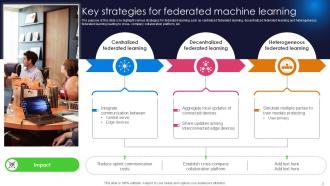
Key strategies for federated machine learning
-

Federated learning working to train models
-
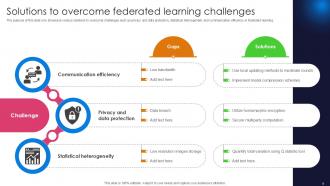
Solutions to overcome federated learning challenges
-

Use cases of federated machine learning
-

Role of federated learning to improve AI training
-

Comparative analysis of federated learning open source software
-
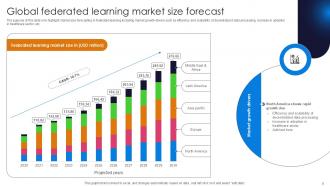
Global federated learning market size forecast
-

Competitive landscape of federated learning market players
-

Federated learning applications in medical sciences
-

Federated learning market regional analysis
-

Key considerations in federated machine learning
-

-

-

-

-

-
-
-

FAQs for Federated Powerpoint Template Bundles
So federated templates automatically pull updated content from a central hub - logos, brand colors, messaging, all that stuff. Your slides stay current without you doing anything. Traditional templates? They're just static files that become useless the second marketing decides to change the font (happened to us last quarter, such a pain). Real-time syncing is honestly a game changer for teams. You also get compliance features built in and better collaboration tools. I'd probably start small though - maybe test it on one project first to see how the workflow feels with your team.
Oh yeah, this is actually pretty straightforward! Hit View > Slide Master and you can mess with fonts, colors, logos - basically everything at once instead of doing it slide by slide. Way easier than I thought it'd be when I first tried it. Add your own headers, footers, whatever branding stuff you need. Just save it as a .potx file so you don't accidentally wreck the original template for everyone else. I'd definitely test it on a few slides first though - learned that one the hard way when I rolled out a wonky template to my whole department last year.
Honestly, federated templates are a lifesaver when you've got different teams who need to stay on brand but aren't total control freaks about it. Sales teams, regional offices, product groups - they all want some creative freedom without going completely rogue. I've seen companies with like 50+ random template versions floating around and it's chaos. The cool thing is you can push updates from the top while teams still get to customize their stuff. Regional managers love this setup. Start with whichever teams are the worst at following brand guidelines but actually need flexibility to do their jobs.
Focus on three things: colors (get those hex codes locked down), fonts (max 2-3 styles), and where your logo goes. Trust me, people will ignore everything else anyway, but nail these and you're golden. Oh, and throw in some template slides - agenda, team intros, the usual stuff. I learned this the hard way after spending hours fixing presentations that looked like they were made by five different people. Short sentences work better than long explanations. You'll thank yourself later when you're not constantly playing design police.
So federated templates are basically a shared design system for your whole team. Everyone gets access to the same fonts, colors, layouts - no more random Comic Sans disasters lol. The cool part? When you update the master template, changes roll out to everyone automatically. Honestly, it's kind of a lifesaver for avoiding those endless formatting arguments. Version control becomes way less of a headache too. I'd start by just getting shared access set up to your template library first. Trust me, it'll save you so many revision rounds later.
Start with PowerPoint's Master Slide editor - it's your best friend here. SharePoint or OneDrive for Business work great for pushing updates to teams. Microsoft's Template Gallery is surprisingly solid for distribution too, though I feel like people sleep on it. Once you get the basics down, Templafy or Master Slides can handle the fancy stuff like automatic branding enforcement. But honestly? Don't overthink it at first. Build one killer master template, test it with a couple teams, then add the bells and whistles later. Pick one way to distribute and get that working smoothly before you complicate things.
Okay so basically a federated template stops everyone from going rogue with their slides. It locks in your company's approved colors, fonts, and messaging so you don't end up with presentations that look like they're from totally different companies. You know how some people pick the most random fonts? This fixes that mess. Sales, marketing, HR - everyone's presentations will actually match now. The template has all the right brand stuff built in, so you just plug in your content and you're good. Honestly just use it, makes your life way easier.
Just throw everything in a SharePoint library and organize it by department or campaign type. Name your files consistently - something like "2024_Brand_Presentation_Template_v2.pptx" so people aren't hunting forever. Set permissions so regional teams can grab what they need without accessing everything. The real trick? Getting everyone to actually stick to the same system instead of doing their own thing. Make a quick cheat sheet showing where templates live and pin it somewhere obvious. Oh, and maybe add version numbers - trust me on this one, you'll save yourself headaches later.
Dude, those federated PowerPoint templates are honestly a game changer. You just grab one and plug your stuff in instead of building slides from zero every time. No more messing around with fonts and colors for half an hour (which I totally used to do). Your whole org gets the same look automatically - brand colors, layouts, all that. They've got the usual suspects already made: agenda slides, charts, wrap-up slides. Honestly feels like cheating sometimes, but in a good way. Try it on your next presentation - you'll probably finish way faster than usual.
Honestly, I'd start with completion rates and how much time people are saving when building decks - that's where you'll see the biggest impact. Check if teams are actually using the template pieces consistently too. Brand messaging staying on point is pretty easy to spot once you know what to look for. Oh and definitely do quarterly surveys with your presenters because they'll tell you straight up what's working and what sucks. Engagement scores from audiences matter too, but don't try tracking everything at once. Pick maybe 2-3 metrics that actually move the needle for your company first.
Honestly, multimedia stuff in federated PowerPoint templates is a game changer for keeping people awake during presentations. Videos and interactive charts that auto-sync from shared sources? So much better than endless bullet points. Your content updates everywhere automatically when the source data changes, which is pretty sweet. Different people learn differently too - some need visuals, others want audio, and some folks need to click around to stay engaged. I'd say pick 2-3 slides that are currently boring everyone to death and start there. Trust me, your audience will actually pay attention for once.
So basically, federated PowerPoint templates are pre-loaded with all the accessibility stuff already baked in. Color contrast, readable fonts, layouts that play nice with screen readers - you don't have to think about it. Which is honestly great because who has time to research contrast ratios? The whole "federated" thing just means your entire team gets the same accessible setup. Nobody accidentally creates slides that exclude people with visual impairments or other needs. You just grab a template and boom - your presentation's already inclusive without needing to become some accessibility wizard first.
Honestly, just do quick surveys after presentations and track what people actually do with your templates. The analytics are gold - you'll see which slides get trashed or completely rewritten, which basically screams "this sucks." Skip the generic "rate your satisfaction" garbage and ask stuff like "what sections felt pointless?" Interview a few teams who've used them too. Then - and this part matters - actually tell people when you make changes based on their feedback. Do quarterly reviews where you look at everything and push out new versions. People love feeling heard, plus your templates won't become outdated junk sitting in some folder.
Honestly, the worst mistake is assuming you know what different regions need without asking them first. Don't go overboard with rigid branding that won't work everywhere - like red might be lucky in China but screams "danger" elsewhere. Also keep it simple enough that non-designers can actually use it. I've seen templates so complex that teams just gave up and made their own anyway lol. Test with real users from different places before you launch. Simple navigation is key. Give clear localization guidelines too. Way easier to fix things early than deal with angry feedback later.
Oh, federated PowerPoint templates are perfect for this! You're getting modular design without even realizing it. Teams can grab different slide layouts, colors, and design bits from a shared library, then mix and match whatever they need. It's like having LEGO blocks instead of building everything from scratch every single time - honestly such a time saver. Everything still looks cohesive even when people customize their decks, which is pretty neat. I'd start with whatever slide types you use most (probably intro slides and data charts?). Those become your first modular pieces.
-
A perfect platform for all your presentation needs. Unlimited products at an affordable price.
-
Best Representation of topics, really appreciable.