

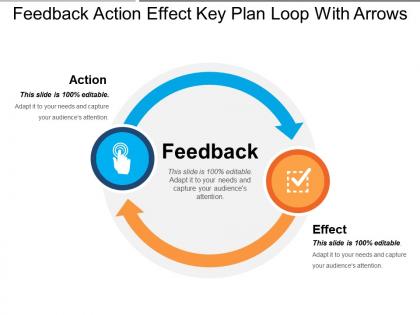
Feedback action effect key plan loop with arrows




Try Before you Buy Download Free Sample Product
 Impress Your
 Audience
 100%
100% Editable
 Save Hours
 of Time


Our Feedback Action Effect Key Plan Loop With Arrows believe in good habits. They follow the best customs.
People who downloaded this PowerPoint presentation also viewed the following :
Feedback action effect key plan loop with arrows with all 5 slides:
Enjoy a joyride with our Feedback Action Effect Key Plan Loop With Arrows. It is guaranteed to be amusing.
FAQs for Feedback action effect key plan
Dude, feedback loops are game-changers for presentations. Basically you ask people what worked and what sucked, then actually use that info next time. Don't just ask "how was it?" - get specific about your slides, your delivery, whatever. I used to skip this step completely (big mistake). Now I collect feedback after every presentation and my skills have gotten way better. It's like having cheat codes for improvement. The tricky part is remembering to actually implement what people tell you instead of just nodding and forgetting about it later.
Dude, feedback is a game changer - turns your generic template into something that actually connects with your audience. People feel good when you ask their opinion, so it's basically free research. You'll figure out which slides work and which ones make everyone's eyes glaze over. The trick is being specific with your questions though. Like instead of "thoughts?" ask "did that comparison on slide 5 make sense?" Way better insights that way. I learned this the hard way after bombing a presentation once. You can tweak your flow, swap out visuals, fix confusing parts - whatever needs work.
Okay so first thing - figure out what you actually want to know before you present. Like, are you looking for content feedback or delivery tips? Then grab input right after while it's fresh. Surveys work, but honestly just asking people directly gets better responses. Here's what I always mess up though - write down their exact words, not what you think they meant. Your brain will totally twist it later. Oh and here's the game changer: actually tell people what you changed based on their input. They'll give you way more useful stuff next time when they see you're not just asking to be polite.
Definitely ask for feedback after each presentation, but be smart about it. Don't just go "how was it?" - that's pointless. Ask stuff like "what part clicked for you?" or "when did I lose you?" Way more helpful. I'd track what people say across multiple talks too. You'll start noticing patterns - maybe you always rush through slides or your examples are confusing. Honestly, small changes work better than trying to fix everything at once. Just pick one thing from your last feedback and work on that next time. Oh, and generic feedback is basically useless, so push for specifics.
Honestly, just pick one thing and stick with it - that's where most people mess up. I'd start with simple Google Forms or email follow-ups after someone downloads your templates. Hotjar's pretty cool since people can leave comments right on specific slides. Coffee chats with regular users? Those always give me the best insights, way better than formal surveys sometimes. Feedback widgets work if you embed them in the templates themselves. Oh, and don't sleep on Slack polls for quick questions. Focus groups are solid too but require more setup. The key is actually using whatever method you choose consistently.
Honestly, your presentations get so much better when you actually pay attention to how people react. I watch for when folks start checking their phones or which parts get questions. Then I go back and fix what didn't work - maybe cut boring slides or explain things differently. Used to think once I finished the deck, I was done. Wrong! Now I take notes during each presentation about what bombed. It's weird how much you notice once you start looking. Those little tweaks add up fast. Your next presentation will actually connect instead of just... existing.
Getting feedback early on your presentation is honestly a lifesaver. You can fix problems while they're still manageable instead of panicking the night before. I've watched so many people bomb presentations that could've been solid if they'd just shown someone a draft earlier. When you get feedback at like 75% done, you have time to actually make changes - tighten your message, clarify the confusing parts, make sure your main points hit right. The more rounds of feedback you get, the stronger it gets. Don't wait until you think it's perfect to ask for input.
Start with just tracking one or two things you'll actually look at - maybe poll responses and how long people stay on each slide. Heat maps are honestly game-changers for seeing where attention goes (the results can be wild). Post-presentation surveys with ratings give you solid numbers to track trends. Oh, and if you embed links, definitely check those click rates. Set up a simple dashboard to collect everything automatically - way easier than manually gathering feedback each time. The real trick is picking metrics you'll actually review and do something about.
Honestly, most people clam up because they don't feel safe giving real feedback. Instead of "any questions?" try something specific like "what part was confusing?" Works way better. I always set up different ways for people to respond - anonymous polls, small groups, even those sticky note things during breaks. The trick is actually responding when someone does speak up, not just nodding and moving on. People can tell when you're faking it. Oh and this one's gold - end with "what's one thing you'd change?" Gets them talking every time. You want pushback, not silence.
Dude, the worst thing you can do is ask something bland like "how was my presentation?" You'll just get "it was fine!" back. Ask specific stuff instead - did my intro hook you? Was that one slide confusing? Did I talk too fast during the product demo? Way more useful. Oh, and don't wait forever to ask. People forget details pretty quick. Get feedback within a day or two max while it's still fresh in their heads. Also? Skip asking your work bestie who never criticizes anything. Find someone who'll actually be straight with you, even if it stings a little. Set up a quick form or just grab coffee with a few people.
So basically you make a template, see how people actually use it, then tweak it based on what they tell you. Way better than just throwing stuff out there and hoping it works. Set up some kind of regular way to collect feedback - could be surveys, looking at usage data, whatever. The cool thing is your templates keep getting better instead of just sitting there being mediocre forever. Oh and don't try to do this with every template at once, you'll go crazy. Pick one first and get a rhythm going with it.
Honestly, start with the obvious stuff - engagement scores and post-presentation surveys. Questions and comments are huge too. I'm obsessed with tracking audience participation over time because it tells you everything. Also check if people actually use your feedback in their next presentations (that's the real test, right?). Response times matter - how fast do they get back to you when you ask for input? Oh, and retention rates if it's ongoing training. But here's what really works: do a simple before/after comparison of presentation quality scores. You'll see the improvement right away.
Dude, you HAVE to segment your templates - this isn't optional. Millennials and Gen X react completely differently to the same message. B2B folks need way more formal language than your B2C crowd. I've literally watched response rates triple just from tweaking templates for specific groups. The trick is actually using the feedback you collect instead of hoarding useless data (guilty of that myself tbh). Set up A/B tests for each segment and track what works. Start with your biggest two audiences this week and see what happens.
Try digital polls or QR codes for quick surveys - way less disruptive than constantly stopping to ask questions. Those real-time polling tools are honestly amazing because people don't have to raise their hands in front of everyone. Set up a shared doc where folks can drop thoughts as you present. Oh, and sticky notes work great during natural breaks too. Instead of the whole "any questions?" thing every five minutes, just do quick 30-second pulse checks at specific moments. Make it feel totally optional though - nobody wants feedback to feel like extra work.
Oh man, this is such a minefield when you're presenting abroad! Japanese audiences will give you these super subtle nods and expressions instead of actually saying anything. Germans? They'll tell you exactly what they think - no sugar coating. The power distance thing is huge too. Some cultures won't challenge you even if you're completely wrong, which is... not helpful. I learned this the hard way in South Korea once. Eye contact's another weird one - totally normal in the US but can come off as rude elsewhere. My advice? Do your homework on the culture first, then adjust how you ask for feedback.
-
It saves your time and decrease your efforts in half.
-
Topic best represented with attractive design.