

Finance and administration presentation graphics




Try Before you Buy Download Free Sample Product
 Impress Your
 Audience
 100%
100% Editable
 Save Hours
 of Time


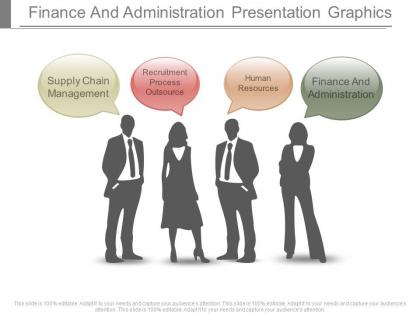
Presenting Finance and Administration Presentation Graphics for your impressive commercial presentations. This is an ideal PPT slide template for the diverse departments of an organization. The business PPT slide template use lively graphics to represent your trade information and make it an appealing presentation for you. There may be many ideas to represent your industry information, but when it is presented in a fascinating PPT slide icon, it hardly fails to make an impact on the audience. This professionally crafted finance and administration PPT design comprises of four stages. Every stage covers the chief part of a business industry, which makes it a most preferred PPT slide template design. The finance And administration PPT design offer you to replace the slide icons and edit the entire information in the slide icons. The four icons in the finance and administration PowerPoint design mainly refer to the Supply Chain management, Human Resources, Recruitment process outsource and finance and administration. You just download, save and make it your own PPT design while editing it the way you want to. Get amply complimented with our Finance And Administration Presentation Graphics. They will draw fulsome admiration.
People who downloaded this PowerPoint presentation also viewed the following :
Finance and administration presentation graphics with all 7 slides:
Get more bang for the buck with our Finance And Administration Presentation Graphics. Give more force to your words.
FAQs for Finance and
Keep it simple and clean - readable fonts, colors that make sense, charts that actually support your point. Bar charts work great for comparisons, line charts for trends over time. Don't cram everything on one slide (seriously, white space is your friend). Label your axes properly and cite sources. Pick a clear title that tells people exactly what they should walk away knowing. Honestly? The biggest mistake I see is people overthinking it. Less really is more with data viz - your audience will thank you for not making their brains work overtime.
Honestly, charts and graphs are game-changers for financial stuff. Your brain processes visual info way faster than rows of numbers. I'd much rather look at a line chart showing revenue trends than scroll through 500 spreadsheet rows - wouldn't you? Heat maps and dashboards make those weird connections between metrics super obvious. Try this: grab your most confusing financial report and turn it into a simple bar chart. You'll spot patterns and outliers instantly. It's like turning a foreign language into something that actually makes sense. Start small with basic trend lines.
Honestly, just stick with bar charts and pie charts for budget stuff. Bar charts are clutch when you're comparing different categories or showing planned vs actual spending. Pie charts work well for breaking down your total budget by department - though I swear some people are so over pie charts at this point. Oh, and waterfall charts are pretty solid if you need to show how you went from point A to point B with your numbers. Don't get fancy with gauges or those weird 3D things that make everything look like it's from 2005. Simple charts actually get your point across.
Dude, infographics are a game changer for financial stuff. People's eyes just glaze over when you throw spreadsheets at them, but charts and icons? They actually pay attention. Budget breakdowns become way easier to follow, and trends over time make sense visually. Performance comparisons don't feel like torture anymore either. Honestly, I think our brains are just wired better for visuals - numbers stick when they're not just sitting there in boring rows. Try making one for your next quarterly thing. You'll probably be surprised how much more people actually engage instead of checking their phones.
Dude, the chart you pick totally changes how people interpret your numbers. Line charts are clutch for trends - like tracking revenue month by month. When you're comparing stuff (department budgets, quarterly results), bar charts are your friend. Pie charts get a bad rap but they work fine for expense breakdowns, even though everyone and their mom uses them. Here's the thing though - same data, different chart, completely different story. I've seen people reach opposite conclusions just because of how they visualized it. Just pick whatever makes your point clearest.
Dude, color choices will literally make or break your finance charts. People expect green for gains, red for losses - just go with it. But seriously, don't create some rainbow nightmare that looks like a 5-year-old went crazy with crayons. Three colors tops, maybe four if you really need it. Test everything in grayscale first - if it still works without color, you're golden. Also make sure there's enough contrast so people can actually read the thing. The whole point is guiding people to what matters without making their eyes bleed, you know?
Dude, it's all about knowing what each group actually wants to see. Investors? Hit them with ROI data, performance metrics, all that comparison stuff - they're hunting for growth signals. But clients just want to know how THEIR money is doing, you know? Show them simple charts of their account balance, maybe where their investments are spread out, how close they are to their goals. Oh and honestly - half of this is just using the right words for each audience. Like, don't talk to your 65-year-old client the same way you'd present to a VC firm. Always think: what's this person trying to figure out from my chart?
For time trends, line charts are honestly your go-to option - they show financial changes perfectly. Comparing different periods? Bar charts work well. Here's where people mess up constantly: always start your y-axis at zero unless there's a compelling reason not to. Don't get tempted by flashy effects that just distract from your data. Keep colors consistent and label everything clearly, including the time period in your title. Oh, and match your intervals to what actually matters - you don't need daily details for monthly trends. Have someone else look at it first to catch what you missed.
Think of your data like telling a story - start with "here's the problem we faced," then walk through what happened using your charts, and wrap up with what you learned. Don't just say "Q3 revenue hit $2M." Instead, go with something like "remember that scary July dip? Here's how we bounced back." Build each chart on the previous one, kinda like chapters. Add little notes explaining why certain spikes or drops happened - people always want the backstory. Trust me, they'll remember your narrative way better than random numbers floating around. You're basically their tour guide through all the financial chaos.
Honestly, just start with Excel or Google Sheets - they're way better for basic charts than people give them credit for. Tableau and Power BI are what most finance teams use if you want something fancier that plugs right into your data. Python's cool too if you're into coding, but matplotlib has this annoying learning curve that might not be worth it. Actually, even Canva has chart templates now which is kinda wild. I'd probably just use whatever your team's already working with for data stuff, then maybe upgrade later once you figure out what you actually need to make regularly.
Oh man, this is such a good question! Colors are huge - like red means danger here but prosperity in China, so your profit charts could totally backfire. Reading patterns mess with things too since some cultures scan right-to-left. Chart types hit different depending on whether it's a more collective or individual society. I learned this the hard way on a project once, haha. You'll definitely want to test stuff with local people first. Maybe even make separate versions for different regions if it's a big presentation?
Misleading scales will kill you every time - seriously, people notice that stuff. Cherry-picked timeframes are just as bad. If you truncate the y-axis, make it super obvious or you'll look sketchy. Oh, and don't go crazy with fancy colors and effects. I swear, some people think more gradients = better data visualization. Wrong! A basic line graph usually beats some rainbow monstrosity with spinning animations. Show your chart to someone fresh before you publish it. If they're confused after 10 seconds, you've got work to do. Simple wins.
Dude, you've gotta try interactive finance graphics for your next presentation. People can click through different time periods or hover over data points instead of just sitting there glazing over. Way better than talking at a static chart, honestly. When someone asks a random question, you can drill down into whatever they want to see right there. I learned this the hard way after way too many boring presentations. Your audience actually stays awake when they can mess around with the data themselves. Build in like 2-3 interactive pieces – they'll remember your stuff way longer.
Honestly, finance graphics are a game changer - way better than scrolling through endless spreadsheet rows. You'll spot trends and weird outliers instantly. Plus when you're presenting to executives (who basically have the attention span of goldfish), visuals keep them engaged instead of glazing over at raw numbers. Dashboards let you dive into problem areas fast, and comparing different budget scenarios side-by-side becomes super straightforward. I mean, you could spend hours explaining variances with words, or just show a chart that makes it obvious. Bottom line: visual summaries help you make quicker decisions and actually get your team on board.
So everyone's obsessed with interactive dashboards right now - real-time stuff that updates constantly. Mobile design is huge since we're all doom-scrolling our portfolios anyway lol. AI charts are getting scary good at spotting weird patterns automatically. Dark mode is everywhere too (thank god, my eyes were dying). There's this whole push toward making data tell actual stories instead of just dumping numbers on people. Animations help explain confusing finance stuff better. Oh, and definitely steal ideas from Robinhood or Mint - they've nailed making money topics less terrifying for normal humans.
-
Perfect template with attractive color combination.
-
Informative presentations that are easily editable.