

Financial graph historical and projection revenue operating year powerpoint presentation graphic tips




Try Before you Buy Download Free Sample Product
 Impress Your
 Audience
 100%
100% Editable
 Save Hours
 of Time


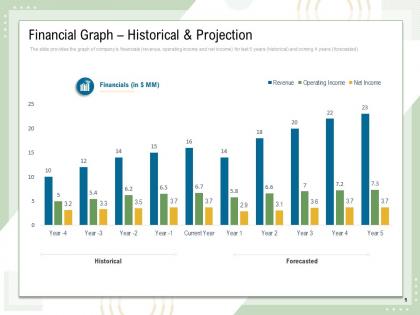
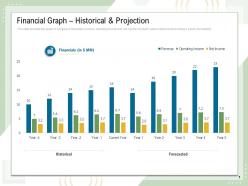
The slide provides the graph of companys financials revenue, operating income and net income for last 5 years historical and coming 4 years forecasted.
People who downloaded this PowerPoint presentation also viewed the following :
Financial graph historical and projection revenue operating year powerpoint presentation graphic tips with all 2 slides:
Use our Financial Graph Historical And Projection Revenue Operating Year Powerpoint Presentation Graphic Tips to effectively help you save your valuable time. They are readymade to fit into any presentation structure.
FAQs for Financial graph historical and projection revenue operating year powerpoint
Line charts are your go-to for showing trends over time. Bar charts work best when you're comparing stuff. Pie charts? Good for parts of a whole, though some people hate them lol. Finance presentations always use waterfall charts - they show how different things affect revenue changes. Took me forever to figure those out but they're actually pretty solid. Column charts are great for year-over-year comparisons too. Real talk: just pick whatever tells your story clearest. Don't go fancy just because you can - your audience won't sit through confusing charts anyway.
Honestly, line graphs are clutch for financial stuff because you can instantly see what's happening. Trends jump out at you - whether things are going up, down, or doing that crazy seasonal thing that always catches people off guard. Way better than scrolling through endless spreadsheet cells (been there, done that, never again). Keep your time periods consistent though. And don't throw like 5 different lines on there - three max or it looks like spaghetti. Different colors help if you need multiple variables. Oh, and definitely label everything clearly. Maybe add little notes for big events that caused those dramatic spikes. Start with your main trend first, then add others.
Dude, bar charts are honestly the way to go for financial stuff. You can immediately see which company's crushing it just by looking at bar heights - no more squinting at endless spreadsheet rows. During presentations they're clutch because trends jump out at you. Like, you'll instantly spot if someone's revenue tanked or if there's crazy growth. Works great for quarterly reports or comparing competitors too. Oh, and make sure your scales match up between charts or you'll accidentally make things look way off. Trust me, learned that one the hard way once.
Honestly, pie charts are clutch for budget stuff because you can instantly see what's draining your money versus what's bringing it in. Way better than scrolling through endless spreadsheet rows with tiny percentages that make your eyes glaze over. The visual thing just hits different - like when you see that one slice taking up almost half the pie, you know that's your problem child (or your cash cow). Just don't go crazy with like 15 microscopic slices or it'll look like confetti. Keep it to your biggest 5-7 categories and you're golden.
Label your axes with units - "Price ($)" or whatever makes sense. Also throw the time period somewhere obvious. Don't go crazy labeling every single data point, but definitely call out the big stuff like earnings or stock splits. Honestly, I've seen so many charts where you literally can't tell if it's daily or monthly data... drives me nuts. Bar charts should start at zero or you'll mislead people. Oh, and add your data source plus when you last updated it. People always want to know how current everything is.
Honestly, area graphs are clutch for this kind of data. They stack all your components so you can see exactly how each piece contributes to the total - like if you're tracking different revenue streams building up your overall numbers. Way clearer than line charts since the filled sections make it super obvious when one part drops while another shoots up. Your stakeholders will get it instantly too. Oh, and definitely use different colors for each section - makes it way easier to spot which areas are growing or shrinking each quarter. I probably sound like a broken record about colors but trust me on this one.
Honestly, just start with Excel or Google Sheets - they're way more capable than most people think. Tableau and Power BI are amazing for fancy interactive stuff, but they cost money. Python's cool if you're into coding (I tried learning it once... that was fun). PowerPoint actually makes decent charts too, weirdly enough. Don't overthink it though. Whatever you already have access to is probably fine to start. You can always level up later when you figure out exactly what you need. Excel handles like 90% of financial charting anyway.
Okay so basically just match the chart to what you're trying to show. Line charts are perfect for trends - like stock prices or revenue over time. Bar charts? Great for comparing stuff like quarterly sales between departments. Scatter plots work well when you want to show how two things relate to each other. Pie charts show proportions but honestly they're way overused (I'm guilty of this too lol). If you've got multiple data sets with totally different scales, try a dual-axis chart. Before picking anything though, just think "what story am I telling here?" That'll point you in the right direction every time.
Color schemes can totally make or break financial graphs. Use contrasting colors so people can actually tell your data series apart - I've watched presentations where everything was different shades of blue and it was impossible to follow. Red for losses, green for gains makes intuitive sense. Also think about colorblind viewers since red-green combos won't work for everyone. Start simple with your palette, then add more colors only when you really need to show distinct data points. Honestly, less is usually more with this stuff.
Interactive graphs are honestly a game-changer - people can actually poke around your data instead of just glazing over some static chart. Hover effects, date filters, zooming in on specific timeframes... all that stuff turns boring viewers into people who are genuinely curious. When someone discovers something by clicking around themselves, they'll remember it way better than if you just showed them. I always think of it like the difference between watching someone else play a video game versus playing it yourself (random comparison but whatever). Start small with hover tooltips or clickable legends - even tiny interactions make people stick around longer.
Honestly, the worst thing you can do is mess with your y-axis - like starting it at some random number that makes tiny changes look dramatic. Also don't cherry-pick weird date ranges. Way too many people cram everything into one chart and it becomes unreadable chaos. Keep your colors consistent and meaningful (nobody needs a rainbow disaster). Skip the 3D effects too - they look dated and confuse the data. Oh, and I learned this the hard way - always label your axes clearly. Think about what your audience actually needs to see first, then build from there.
Look, financial charts are totally different beasts than what you'd see in marketing or healthcare. They're all about precision and real-time data - none of that flashy storytelling stuff. Marketing graphs are colorful and designed to persuade (like those conversion funnels), while healthcare focuses more on population trends over time. But finance? It's pure time series data, volatility tracking, and exact numbers. Honestly, traders don't care if it's pretty - they just want risk, performance metrics, and data they can act on immediately. Keep yours clean and focus on what actually impacts financial decisions.
Revenue trends, profit margins, and cash flow - that's what actually matters. Don't get caught up in all the other metrics until you've figured these out first. Debt-to-equity is huge too because I've seen profitable companies go under from too much debt. You want consistent growth, not crazy ups and downs (though tech stocks are always gonna be a bit wild). Check if their revenue's growing faster than their spending over time. Just grab their quarterly reports and focus on those four things - honestly everything else is just fluff at this point.
Think of your graphs like chapters in a story - problem, journey, solution. Don't just slap charts on slides. Walk people through it: "Here's where we started, this crazy spike happened when the market flipped, now look where we ended up." Each graph should move your audience forward somehow. I'm big on adding annotations to call out the important stuff (saves you from pointing at the screen awkwardly). Build your charts step by step if they're complex. The whole point? Make people feel like they're discovering something cool with you, not sitting through another boring data dump.
Honestly, infographics are a game changer for financial presentations. Most people's brains just shut down when you throw spreadsheets at them - I learned this the hard way with a few disasters early in my career. Visual stuff sticks way better than rows of numbers. You can actually tell a story with your data instead of making everyone decode tables. Plus stakeholders who aren't finance people will thank you. Those key trends and comparisons you're trying to show? They'll pop when you design them right. Trust me, next time you present try turning your biggest metrics into one solid visual story.
No Reviews