

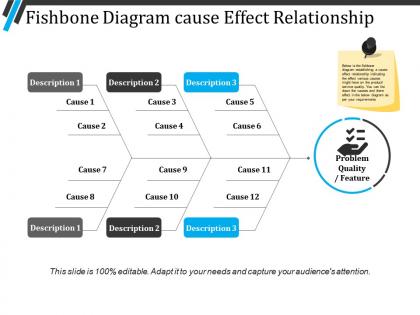
Fishbone diagram cause effect relationship presentation pictures




Try Before you Buy Download Free Sample Product
 Impress Your
 Audience
 100%
100% Editable
 Save Hours
 of Time


Experience a feeling of fulfillment with our Fishbone Diagram Cause Effect Relationship Presentation Pictures. It ensures a good innings.
People who downloaded this PowerPoint presentation also viewed the following :
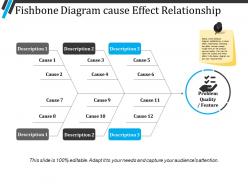
Fishbone diagram cause effect relationship presentation pictures with all 5 slides:
Your arguments appear genuinely convincing due to our Fishbone Diagram Cause Effect Relationship Presentation Pictures. Folks begin to echo your feelings.

FAQs for Fishbone diagram cause effect
So you've got the "head" which is your main problem, then there's this horizontal "spine" line. Off that spine, you draw branches for different categories - people, process, equipment, materials, environment, methods. Way more organized than those chaotic brainstorming sessions where everyone talks over each other, honestly. For each branch you keep asking "what could cause this?" until you can't think of anything else. The whole visual thing makes it really obvious if you missed something or if there's a pattern. Oh and start with maybe 4-6 categories max - otherwise you'll drive yourself crazy trying to fill out like 10 branches.
Oh, fishbone diagrams are super flexible! You just swap out the main categories depending on your industry. Manufacturing usually goes with the "6 Ms" - man, machine, material, method, measurement, and mother nature (which is just environment, but whoever named it was feeling creative I guess). Healthcare teams switch these up for things like patient factors, procedures, equipment, communication issues, policies, that sort of stuff. Start with whatever's standard for your field, then tweak the categories based on what problems your team actually runs into most. Works way better than forcing some generic template.
Honestly, the biggest screw-up I see is people being way too vague about what problem they're actually trying to solve. You've gotta pin that down first. Don't let your team just brainstorm random stuff either - every cause needs to actually fit its branch. I've watched so many groups jump straight into solutions when they should still be mapping out causes. It drives me nuts! Also, don't try doing this alone. You'll miss a ton of good perspectives if you don't loop in people from different departments. Keep your main categories simple too - overcomplicated branches just confuse everyone.
Fishbone diagrams are great because they get your whole team looking at the same visual thing instead of everyone just shouting ideas randomly. You break everything into categories like "people" or "equipment" - keeps things way more organized. Honestly, I've noticed quieter people actually speak up more since they can see exactly where to jump in. Short sentences work. The structure prevents those annoying meetings where someone derails everything for twenty minutes about their pet theory. Try having different people "own" different sections of the diagram. Makes them way more invested in actually contributing good stuff instead of just sitting there.
So you're gonna want to figure out your main cause categories first. Most people use the "6 Ms" - Method, Machine, Material, Manpower, Measurement, and Mother Nature. But honestly? Don't get stuck on those if they're weird for your situation. Service problems work better with People, Process, Policy, Place - stuff like that. Pick 4-6 broad categories that actually make sense for what you're dealing with. I usually just think about what could realistically mess things up, then group everything into those big buckets before diving into specifics.
So 5 Whys is like drilling straight down - you just keep asking "why" until you find the root cause. Works great when things are pretty straightforward. Fishbone diagrams are totally different though - more like getting your team together to brainstorm every possible cause across categories like people, equipment, processes, whatever. I'm biased toward fishbone for messy, complex stuff because it forces you to think bigger picture first. But honestly? Why not use both - fishbone to map out all the possibilities, then 5 Whys to dig deeper into the ones that seem most likely. That combo has saved me so many times.
Honestly, brainstorming is what makes fishbone diagrams actually work instead of just looking pretty on a whiteboard. You'll need it twice - once for figuring out your main categories (people, process, equipment, whatever fits your situation) and then again when you're digging into specific causes under each branch. The key is letting everyone just dump ideas without anyone shooting them down right away. Sometimes the random stuff people blurt out ends up being spot-on. Get that back-and-forth going where people bounce off each other's thoughts. Oh, and definitely have someone writing everything down as you go - you can sort through the chaos later.
Dude, fishbone diagrams are actually clutch for this stuff. Instead of slapping band-aids on problems, you break down all the potential causes - people, processes, materials, whatever. It's basically like being a detective but way less exciting lol. What's cool is when your whole team does this together, you catch things that would've totally blindsided you later. I'd say run one whenever the same issue pops up twice. You'll start connecting dots you missed before. The categories help too - stops you from just blaming everything on "bad communication" or whatever the usual suspect is.
Honestly, going digital with fishbone diagrams is a game changer. Your team can jump in and add ideas even when they're not in the same room - super helpful these days. I love that you can drag stuff around without erasing and starting over like with whiteboards. Miro and Lucidchart have these ready-made templates that'll save you at least 15 minutes of setup time. You can color-code different categories too, which looks way cleaner. Oh, and linking directly to your data sources is clutch. When you're done, just export it straight into your presentation instead of rebuilding the whole thing.
So first thing - walk them through the problem statement before diving into the diagram. Don't dump the whole thing on them at once (learned that the hard way lol). Go through each bone category one by one instead. Colors help a ton for highlighting the big issues or grouping stuff together. Miro's solid for sharing, or honestly just PowerPoint works fine since people can zoom in. Oh and definitely have next steps ready for the major causes you find. The whole point is getting people talking about it, not just staring at some fancy chart on the wall.
After you implement fixes, you've gotta actually track if they're working - the fishbone only shows you possible causes. Set up your metrics first, then watch them after each change goes live. Honestly, some solutions will totally bomb (been there), others might work better than expected. Give each fix enough time to actually show results before jumping to the next one. Oh, and start with the cheap, easy stuff first - builds momentum when you can show quick wins to people.
Toyota's whole quality thing is basically built on fishbone diagrams - they work great in manufacturing. Hospitals use them all the time for patient safety stuff and cutting down medical errors. Software teams love them for tracking down those annoying system bugs that have like 10 different possible causes. Oh, and restaurants map out food safety issues this way too. Service companies use them when customers keep complaining about the same problems. The cool part is they make you actually think through all the possibilities instead of just randomly guessing. You should totally try one next time you're stuck on something that keeps happening.
So fishbone diagrams are actually super useful for tracking down what's causing problems. You break things into categories - people, processes, materials, equipment - then brainstorm what could go wrong in each. Honestly, I love how visual it gets, makes everything click better. The cool part is it stops you from just blaming the obvious stuff and digs into actual root causes. We use them when planning projects or investigating why something went sideways. Trust me, you'll catch way more potential issues this way and your solutions will be way more solid.
Oh there's tons of stuff you can do! The "5 Whys" version makes you ask "why" five times for each cause - sounds annoying but it actually works. Weighted fishbones let you score how important each branch is. Instead of the usual categories, try following your actual workflow steps. I've seen people go nuts with color-coding (honestly sometimes too much). Reverse fishbone is pretty cool though - you start with what's working and trace backwards. Digital ones can link to your data sources too. Just pick whatever doesn't make your team's eyes glaze over, you know?
Yeah, cultural stuff totally affects how fishbone diagrams work. In places like Japan or South Korea, junior people won't speak up much when senior folks are around - kind of limits the whole brainstorming thing. US teams throw out way more ideas but then can't agree on anything (classic). Some people are super visual and love the diagram format, others just want to hash it out verbally. I've literally sat through meetings where half the room's drawing arrows and the other half's rolling their eyes. You've gotta read the room and adjust how you run things so everyone actually participates.
-
Great designs, really helpful.
-
Excellent products for quick understanding.