

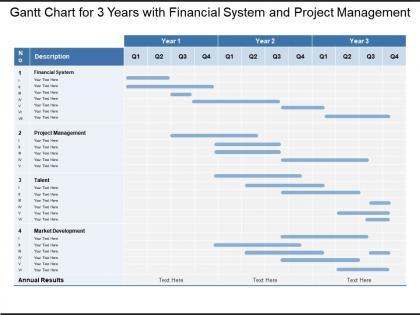
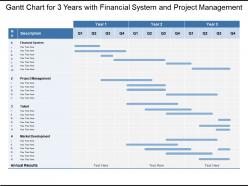
Gantt chart for 3 years with financial system and project management




Try Before you Buy Download Free Sample Product
 Impress Your
 Audience
 100%
100% Editable
 Save Hours
 of Time


Face fierce challenges with our Gantt Chart For 3 Years With Financial System And Project Management. Develop the grit to counter anything.
People who downloaded this PowerPoint presentation also viewed the following :
Gantt chart for 3 years with financial system and project management with all 5 slides:
Instill greater courage in the disabled with our Gantt Chart For 3 Years With Financial System And Project Management. Inspire folks to care for the disabled.
FAQs for Gantt chart for 3 years with financial system
Okay so Gantt charts are basically horizontal bar charts where each task gets its own bar showing start to finish dates. You can see everything at once - what overlaps, dependencies, if you're falling behind. Way better than those endless to-do lists, trust me. They're lifesavers for catching bottlenecks early, plus your boss will actually understand your timeline when you show them visually. Most project tools have them built in now. I'd definitely try one next time you've got multiple moving parts to juggle.
Dude, Gantt charts are game-changers for team chaos. Everyone can actually see who's doing what and when stuff is due - no more confused looks during meetings. Dependencies become super obvious too, so people get how their work impacts others. Honestly, there's something weirdly satisfying about watching those progress bars move (maybe that's just me?). The best part is real-time updates. Bottlenecks jump out before they mess everything up. Just throw together a timeline for your next project and share it. You'll get so many "wait, I had no idea" responses it's not even funny.
You'll want tasks with start/end dates, duration bars, and who's doing what. Dependencies are huge - shows which tasks block others. Milestones too. Honestly, most people go overboard and create these monster charts nobody actually uses. Keep it simple! Make sure you can spot your critical path easily - that's where your bottlenecks live. Oh, and progress tracking is clutch if you need regular updates. Like 50% complete, that kind of thing. I'd start basic and build from there. Way easier than trying to perfect everything upfront then having to redo it later.
Honestly, just start with what you've got - Excel or Sheets work fine for basic stuff, though they get messy fast with bigger projects. Team size matters a lot here. If people need to collaborate and you're dealing with dependencies, grab something like Asana or Monday.com instead. Microsoft Project is solid too but kinda overkill sometimes. Budget's obviously a thing, plus whether it plays nice with your other tools. My move? Download 2-3 free trials and actually test them on a real project. You'll know pretty quick which one doesn't make you want to throw your laptop.
Dude, the biggest thing is people make these charts way too complicated. Like, cramming every tiny detail in there until it's just chaos. You'll go cross-eyed trying to read it. Dependencies are huge too - if you don't map out what depends on what, everything falls apart the second one task runs late. And honestly? Half the Gantt charts I've seen are basically fiction because nobody bothers updating them. Keep it clean, don't be overly optimistic with your timelines (we all do this), and actually maintain the thing. Trust me on this one.
Look, I know Agile purists hate Gantt charts, but hear me out - they're actually pretty useful for keeping stakeholders happy. Just don't make them like the old-school rigid ones. Break everything into sprints instead of those massive month-long blocks. Focus on your epics and user stories rather than getting bogged down in dependencies. Keep it high-level and update it constantly since priorities change every five minutes anyway. Think of it more like a rough roadmap than some concrete schedule. Perfect for release planning and showing your progress to leadership without making them panic.
Oh totally! Most Gantt chart tools play nice with other PM software these days. I'd start with whatever's bugging you most - like if tracking hours is a nightmare, connect it to Toggl or Harvest first. Those automatically sync your actual time against what you planned. Slack integration is pretty sweet too since you get updates without switching apps constantly. Honestly, the coolest part is when your task manager (Asana, Monday, whatever) talks to your Gantt chart - change something in one place and boom, it updates everywhere. Just don't go crazy adding every integration at once or you'll overwhelm yourself.
Gantt charts are honestly a game-changer for tracking deadlines. Those diamond shapes and markers make it so obvious when stuff is due - way better than digging through random project files. You can see which tasks might mess up your timeline if they run late. The visual layout shows how everything connects too. I always color-code mine by priority so the urgent milestones pop out right away. Makes it super easy to tell if you're actually gonna hit your dates or not. My manager got me hooked on these things last year and now I can't work without them.
Look, I'd update that Gantt chart at least weekly, but honestly? Daily works better if things are moving fast. Track your real progress against what you planned and shift dates when the scope inevitably changes - because it always does lol. Color-coding by status helps you catch problems fast (green for on track, red for delayed, whatever). Jump on communicating delays right away, especially when they mess up other people's tasks. Don't treat it like some sacred document you create once. Set a weekly reminder or you'll totally forget about it.
So basically, you just draw arrows between tasks that depend on each other - pretty straightforward stuff. When tasks overlap, the bars literally sit on top of each other on the timeline. Most software lets you mess around with how these look, which is nice I guess. Here's what works for me: tackle your critical path dependencies first (the ones that'll actually break your project), then worry about the other connections. The arrows should flow left to right following your timeline. Oh, and overlapping bars show when people are working on different things simultaneously - super useful for spotting conflicts.
So Gantt charts are basically like a visual timeline showing who's doing what and when. Super helpful for spotting if someone's drowning in work while others have nothing going on. The timeline shows dependencies too - like when Tom can't start until Jessica wraps up her piece. Honestly, they're lifesavers for catching resource conflicts before they blow up, especially with multiple projects fighting over the same people. Just don't let it get outdated or you'll be worse off than before. I learned that one the hard way last quarter.
So basically you can tweak the columns, colors, and milestone markers to fit whatever industry you're in. Construction teams add weather delays and permit stages. Software folks throw in their sprint cycles - though honestly I've seen some pretty messy attempts at this lol. Manufacturing usually needs quality checkpoints and supplier windows. The trick is figuring out what weird phases your industry has that normal templates don't cover. Just list out your typical project stages first, then see what customization options your Gantt tool actually has. Way easier than starting from scratch.
Honestly, there's a bunch of stuff you can track with your Gantt chart that'll save your butt. Look at percent complete for tasks and the whole project - that's the obvious one. Schedule variance shows if you're ahead or behind. Critical path analysis is huge though, tells you which delays actually matter for your deadline. If your tool has baseline comparison, use it! Shows exactly where things went sideways from your original plan. You can also catch resource bottlenecks and dependency issues. I'd check weekly - catches problems while they're still fixable instead of full-blown disasters.
So Gantt charts are perfect when you've got deadlines and need to see how tasks connect - super visual. But honestly? I'm always reaching for Kanban boards instead since priorities change constantly and they handle that chaos better. Network diagrams are clutch for really complex stuff where everything's interconnected. Though sometimes I just throw everything in a basic task list when I don't care about timing, just checking things off. Really depends what you're working on - structured project with phases? Gantt. Ongoing work that shifts around? Kanban all the way.
Gantt charts are pretty solid for showing timelines and getting stakeholders excited about those progress bars. They work well when you're juggling multiple teams too. But man, updating them is such a pain - change one thing and suddenly you're fixing everything else. The real problem? They fall apart the second priorities shift, which honestly happens on every project I've worked on. I'd use them for the big picture stuff but definitely pair with something more flexible for actual day-to-day work. Don't rely on them alone.
-
Easy to edit slides with easy to understand instructions.
-
Best Representation of topics, really appreciable.