

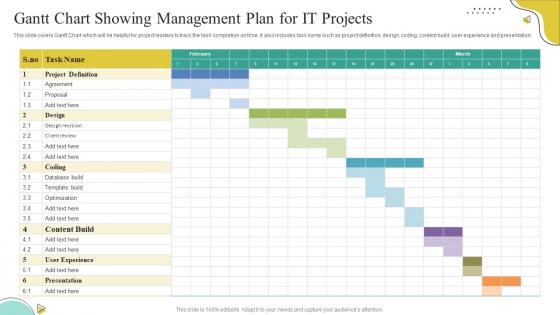
Gantt Chart Showing Management Plan For IT Projects




Try Before you Buy Download Free Sample Product
 Impress Your
 Audience
 100%
100% Editable
 Save Hours
 of Time


The mentioned slide highlights strategies or activities a HR can incorporate at workplace to resolve conflicts between employees . the slide includes building bonds, working on acceptable disagreements, highlighting strengths and tackling roadblocks
People who downloaded this PowerPoint presentation also viewed the following :
Gantt Chart Showing Management Plan For IT Projects with all 6 slides:
Use our Gantt Chart Showing Management Plan For IT Projects to effectively help you save your valuable time. They are readymade to fit into any presentation structure.






FAQs for Gantt Chart Showing Management Plan
Key components of a Gantt chart in IT project management include task lists, timelines, dependencies, milestones, resource assignments, and progress tracking bars. These elements work together by providing visual project oversight, enabling better resource allocation, and facilitating stakeholder communication, with many IT teams finding that comprehensive Gantt charts ultimately streamline project delivery and enhance deadline adherence.
Gantt charts improve team collaboration by providing visual transparency of project timelines, task dependencies, resource allocation, and individual responsibilities across development cycles. Through centralized project visualization, IT teams can identify bottlenecks, coordinate sprints more effectively, and maintain alignment between developers, testers, and stakeholders, ultimately delivering faster deployments and enhanced project outcomes.
Leading Gantt chart tools for IT projects include Microsoft Project, Smartsheet, Asana, Monday.com, and Wrike, each offering specialized features for technical workflows. These platforms streamline project visualization by integrating with development tools, enabling real-time collaboration, and automating task dependencies, with many IT teams finding that cloud-based solutions like Smartsheet deliver enhanced scalability and seamless remote project coordination.
Gantt charts enable project managers to visualize timeline progression, identify critical path dependencies, monitor task completion rates, and spot potential bottlenecks before they impact deliverables. Through color-coded progress indicators and milestone markers, IT teams can proactively adjust resource allocation, communicate status updates to stakeholders, and maintain project momentum, ultimately delivering software implementations and system upgrades on schedule while minimizing costly delays.
Gantt charts can be integrated with Agile methodologies through hybrid approaches that combine visual timeline planning with iterative development cycles, sprint tracking, and adaptive resource allocation. Many software development teams use Agile-Gantt combinations for release planning, dependency management, and stakeholder communication, while maintaining sprint flexibility and continuous delivery, ultimately delivering enhanced project visibility and strategic alignment across development phases.
Gantt chart challenges in complex IT projects include limited flexibility for scope changes, difficulty visualizing interdependencies, resource allocation complexities, and inadequate handling of iterative development cycles. While traditional Gantt charts struggle with agile methodologies and dynamic requirements, many IT teams find that hybrid approaches combining Gantt scheduling with sprint planning ultimately deliver better project visibility and stakeholder communication.
Gantt charts facilitate resource allocation by providing visual timelines that show task dependencies, personnel assignments, and workload distribution across project phases. Through this visualization, IT project managers can identify resource conflicts, balance team capacity, and optimize skill deployment, while tracking utilization rates and preventing bottlenecks, ultimately delivering more efficient project execution and strategic resource optimization.
Effective Gantt chart best practices include defining clear project phases, breaking tasks into manageable durations, establishing realistic timelines, identifying critical dependencies, and assigning specific resources to each activity. These approaches streamline project visibility by enhancing milestone tracking, improving resource allocation, and facilitating team coordination, with many IT organizations finding that well-structured Gantt charts ultimately deliver better project outcomes and stakeholder communication.
Gantt charts enable project managers to visualize task dependencies through linked bars and connecting lines, showing prerequisite relationships, parallel workflows, and critical path sequences. These visual representations help IT teams identify bottlenecks, optimize resource allocation, and coordinate complex integrations, with many organizations finding that clear dependency mapping reduces project delays and enhances team coordination.
Gantt charts enhance risk management in IT projects by providing visual timeline clarity, identifying task dependencies, highlighting critical path vulnerabilities, and enabling proactive resource allocation adjustments. Through real-time progress tracking, IT teams can anticipate potential delays in software deployments or system integrations, ultimately delivering more predictable project outcomes and minimizing costly overruns.
Gantt charts should be updated weekly or bi-weekly during active project phases, with more frequent updates during critical milestones or when scope changes occur. Through regular updates, IT teams can track progress against deadlines, identify bottlenecks early, and maintain stakeholder alignment, ultimately delivering projects on schedule while enhancing transparency and resource allocation efficiency.
Gantt charts offer superior visual timeline representation, dependency mapping, resource allocation tracking, progress monitoring capabilities, and stakeholder communication clarity compared to basic task lists or Kanban boards. Through their comprehensive project visualization, IT teams can identify bottlenecks faster, coordinate complex software deployments more effectively, and deliver client projects on schedule, ultimately enhancing operational efficiency and competitive advantage.
Gantt charts enhance stakeholder reporting by providing visual timelines, milestone tracking, progress indicators, and resource allocation overviews that simplify complex project data. Through automated status updates and dependency mapping, project managers can deliver comprehensive reports to executives, clients, and team members, ultimately reducing meeting time while increasing transparency and stakeholder confidence in project delivery.
Essential Gantt chart software features for IT project management include task dependencies, resource allocation, real-time collaboration tools, milestone tracking, and integration capabilities with development platforms. These features streamline project workflows by enabling agile sprint planning, automated progress updates, and seamless coordination across development teams, ultimately delivering faster deployment cycles and enhanced project visibility for IT managers.
Gantt charts adapt to different IT methodologies by offering flexible visualization approaches, with Waterfall projects utilizing detailed sequential timelines and fixed dependencies, while Agile implementations feature shorter sprint-based iterations and dynamic task adjustments. Through specialized software integrations, IT teams streamline project tracking, resource allocation, and stakeholder communication across both traditional and iterative frameworks, ultimately delivering enhanced visibility and improved delivery predictability.
-
Excellent products for quick understanding.
-
My team has been relying on SlideTeam’s professional PPT designs for a while now. It has greatly sped up quality work at my organization. So thanks!